Developer API (2.0.0)
Download OpenAPI specification:Download
New to RevenueCat?
Welcome! If you're adding subscriptions or other in-app purchases to your app, the RevenueCat SDK will handle most of the heavy-lifting without the need to interact with this API directly. See our Quickstart for more information on getting started with RevenueCat.
RevenueCat provides a REST API for developers to perform customer and transaction related actions from their own server.
Most of this API is geared toward client usage via RevenueCat’s SDK, but there are various endpoints that can be used for refunding purchases, granting promotional entitlements, and other sensitive actions that can only be done via a Secret API key from your server.
If you’re adding subscriptions or other in-app purchases to your app for the first time or if you don’t have a backend that stores your user’s receipts, you’re probably looking to implement the RevenueCat SDK.
If you want to start migrating your existing users to RevenueCat and you have your user’s receipts stored on your own server, or you want to check subscription status of your users from your own server, the REST API is a great solution.
Authentication for the RevenueCat REST API is achieved by setting the Authorization header with a valid API key. You'll find two types of API keys in your RevenueCat dashboard: public and secret.
Certain endpoints require secret keys, which should be kept out of any publicly accessible areas such as GitHub, client-side code, and so forth. See our Authentication guide for more information.
Authorization: Bearer YOUR_REVENUECAT_API_KEY
Authorization type
Bearerrequired in headerhe RevenueCat REST API v2 requires stating the authorization type
Bearerin theAuthorizationheader before the API key in accordance with RFC 7235. This is different to the v1 API which allowed passing just the API key as theAuthorizationheader.
API v1 keys will not work with REST API v2
In order to utilize the RevenueCat API v2, please create new v2 secret keys and define your permissions.
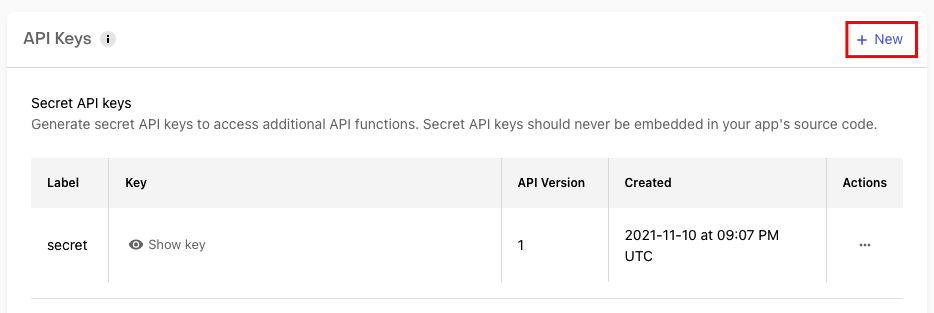
You can create a new secret API key in your project settings page > API keys. Select + New.
Give it a name, select V2 as the version, and set your permissions. Be sure to select Generate at the top right corner.
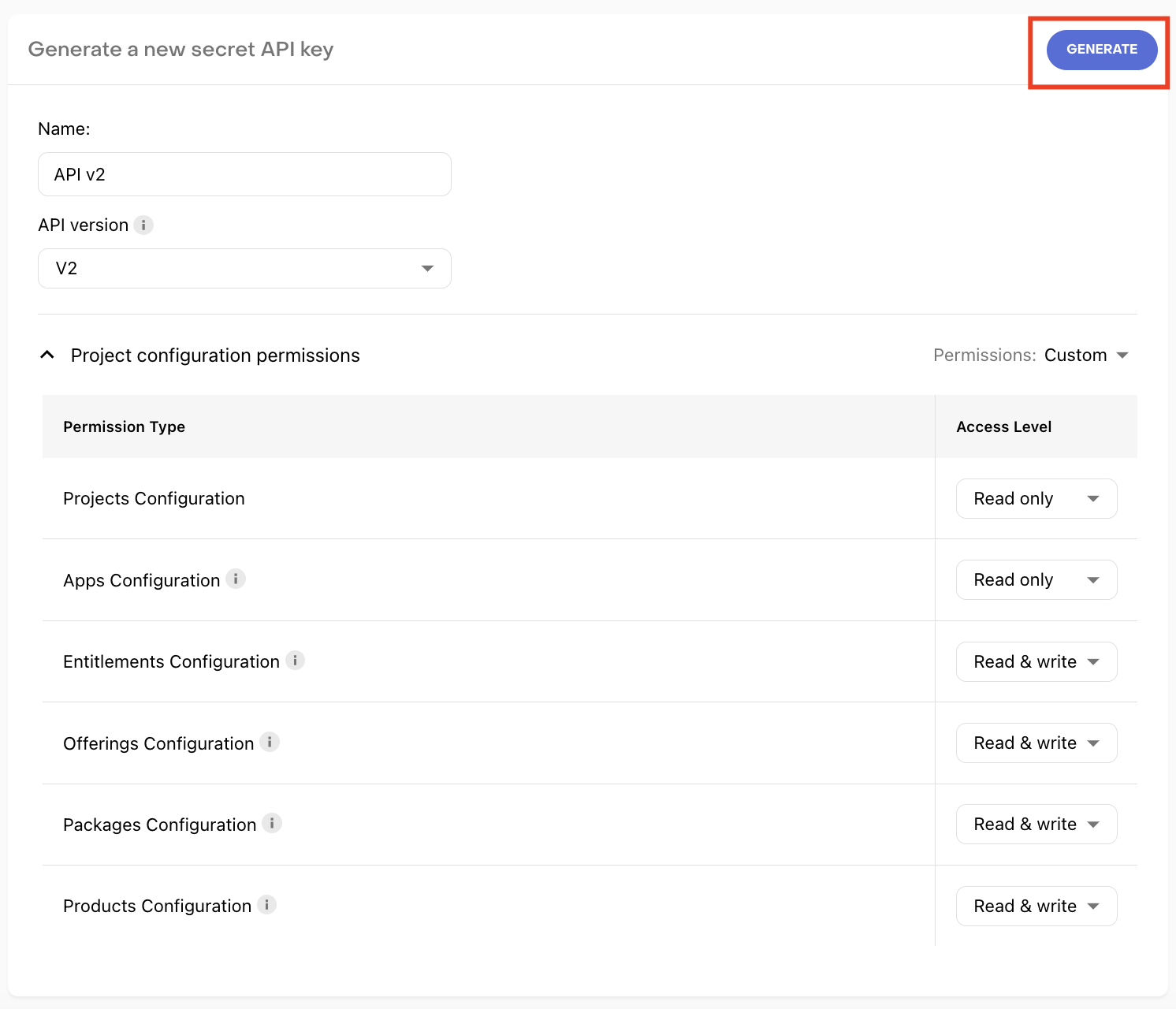
Each endpoint in this documentation will contain a description informing you which permissions are required.
The body of the POST requests should be encoded in JSON and have the 'Content-Type' header set to 'application/json'.
Content-Type: application/json
{
  "app_user_id": "user-1456",
  "fetch_token": "MQABC...EFH1234="
}
Encode your URL params
For URL params, such as the
app_user_id, make sure you URL encode them before using them.
Top-level API resources have support for bulk fetches via "list" API methods. For instance, you can list products, list entitlements, and list offerings. These list API methods share a common structure, taking at least these two parameters: limit and starting_after.
When a response or a field contains multiple entities of the same type, it returns a list object of the following structure:
{
  "object": "list",
  "items": [{}],
  "next_page": "LIST_BASE_URL?starting_after=LAST_ID",
  "url": "LIST_BASE_URL"
}
Where…
urlis the full path base URL of the list endpoint (i.e., if you make a request to this endpoint, you will get the first page), e.g./v2/projects/{project_id}/productsnext_pageis the URL for the next page, if there is one. If there is no next page, thenext_pagefield will not be present. Example:/v2/projects/{project_id}/products?starting_after={last_id}itemsis an array of the entries of the list.
The starting_after query parameter of list endpoints accepts the ID of the first list item that will not be part of the list (in other words, the ID of the last item of the previous page).
At the moment we only support forward pagination.
limit optional, default is 20
A limit on the number of objects to be returned.
starting_after optional
A cursor for use in pagination. starting_after is an object ID that defines your place in the list. For instance, if you make a list request and receive 20 objects, ending with foo, your subsequent call can include starting_after=foo in order to fetch the next page of the list.
API v2 uses rate limiting to prevent abuse. Rate limits are configured per domain, and all endpoints within the same domain share the same rate limit.
| Domain | Rate Limit (requests per minute) |
|---|---|
| Customer Information | 480 |
| Charts & Metrics | 25 |
| Project Configuration | 60 |
| In-App Currencies (Virtual Currencies) | 480 |
Each endpoint belongs to one of these domains. The rate limit applies per API key (for app-level keys) or per developer (for developer-level keys).
We will return the following headers on all successful requests:
RevenueCat-Rate-Limit-Current-Usage: the number of executed requests for the current rate limiting period, including the current request. The rate limiting period is one minute.RevenueCat-Rate-Limit-Current-Limit: the limit in requests per minute for this endpoint
If you reach the rate limit, as indicated by a 429 error code, we will also include the following header:
Retry-After: the number of seconds to wait until you can retry this request.
Below is an example of the response body that will be sent when the rate limit is reached. The value of the backoff_ms field corresponds to the Retry-After header but specified in milliseconds.
{
  "type": "rate_limit_error",
  "message": "Rate limit exceeded",
  "retryable": true,
  "doc_url": "https://errors.rev.cat/rate-limit-error",
  "backoff_ms": 1000
}
Expandables allow you to retrieve related data along with the request without making additional requests. Fields in the REST API will allow you to request additional information as an expanded response by using the expand query parameter.
For example, a product object will have an associated app_id field. This app_id field can be expanded in the same request with the expand query parameter and will include an app object in the response.
Without expand query param
{
  "object": "product",
  "id": "prod1a2b3c4d5e",
  "store_identifier": "rc_1w_199",
  "type": "subscription",
  "subscription": {
    "duration": "P1M",
    "grace_period_duration": "P3D",
    "trial_duration": "P1W"
  },
  "created_at": 1658399423658,
  "app_id": "app1a2b3c4"
}
With expand query param:
{
  "object": "product",
  "id": "prod1a2b3c4d5e",
  "store_identifier": "rc_1w_199",
  "type": "subscription",
  "subscription": {
    "duration": "P1M",
    "grace_period_duration": "P3D",
    "trial_duration": "P1W"
  },
  "created_at": 1658399423658,
  "app_id": "app1a2b3c4",
  "app": {
    "id": "app1a2b3c4",
    "name": "string",
    "created_at": 1658399423658,
    "type": "amazon",
    "project_id": "proj1a2b3c4"
  }
}
As you can see from above, the app_id field remains the same, but the response contains an additional app object.
Fields that can be expanded into objects are indicated in the endpoint documentation under Query Params and will list accepted values. Also, the required permissions to be defined in the API key are listed there.
RevenueCat uses standard HTTP status codes to indicate the success or failure of an API request. Codes in the 2XX range indicate the request was successful. 4XX codes indicate an error caused by the client. 5XX codes indicate an error in RevenueCat servers.
Successful modifications return the modified entity. Errors return the following fields:
{
  "type": "parameter_error",
  "param": "customer_id",
  "message": "id is too long",
  "retryable": false,
  "doc_url": "https://errors.rev.cat/parameter-error"
}
For more information on the type field and how to resolve these errors, please visit our Error Types documentation.
| Code | Name | Description |
|---|---|---|
| 200 | OK | Processed as expected |
| 201 | Created | Entity was created |
| 202 | Accepted | Request acknowledged, but cannot be processed in real time (for instance, async job) |
| 204 | No content | The request was successful and there was no content that could be returned |
| 400 | Bad Request | Client error |
| 401 | Unauthorized | Not authenticated |
| 403 | Forbidden | Authorization failed |
| 404 | Not Found | No resource was found |
| 409 | Conflict | Uniqueness constraint violation |
| 418 | I'm a teapot | RevenueCat refuses to brew coffee |
| 422 | Unprocessable entity | The request was valid and the syntax correct, but we were unable to process the contained instructions. |
| 423 | Locked | The request conflicted with another ongoing request |
| 429 | Too Many Requests | Being rate limited |
| 500 | Internal Server Error | The RevenueCat server ran into an unexpected problem – please check the RevenueCat status page for any known outages and/or report the issue to RevenueCat support |
| 502 | Bad Gateway | Invalid response from an upstream server |
| 503 | Service Unavailable | There wasn’t a server to handle the request |
| 504 | Gateway Timeout | We could not get the response in time from the upstream server |
authentication_error
Authentication is not valid for the given API key. Double check your API key.
authorization_error
The API key does not belong the project you specified. Double check that your API key is associated with the IDs you are passing.
invalid_request
This error can be due to several reasons:
Content-Type: application/jsonis missing in the request header forPOST/PUT/PATCHrequests- Using the incorrect HTTP method on a path (i.e:
GET …/entitlements/<entitlements_id>/actions/attach_products)
parameter_error
The parameter provided is invalid. Please refer to the message field for more information.
- IDs (e.g:
entitlement_id,project_id, etc): 1 to 255 characters display_name(applies to Entitlements): 1 to 1000 characterslookup_key(applies to Entitlements): 1 to 200 characters
rate_limit_error
The request has hit the rate limit for this endpoint. Refer to the backoff_ms field to determine how many milliseconds to wait before making another request to the same endpoint.
resource_missing
The resource with the specific ID does not exist. Double check the IDs (e.g: product ID, entitlement ID, etc) you are passing into the endpoints.
resource_already_exists
The resource with the specific ID already exists. Use a different, unique value for ID and try again.
resource_locked_error
The resource is currently being modified by a concurrent request. Refer to the backoff_ms field to determine when to try again.
server_error
Request is not able to be processed due to an internal server error. Refer to the backoff_ms field to determine when to try again. Please report this to the RevenueCat team if you are encountering this issue.
store_error
There was a problem with the stores (e.g: Apple App Store, Google Play Store, etc). This typically occurs when the stores are unable to process the request. Refer to the backoff_ms field to determine when to try again.
unprocessable_entity_error
Request is not able to be processed. Please refer to the message field for more information.
entity_references_archived_entities
The entity you are trying to make active references other entities that are currently inactive (archived). The referenced_object_ids field contains the IDs of the inactive entities that need to be made active before the operation can succeed. Make those entities active first, then retry the request.
In comparison to our v1 REST API, we have made changes to improve the organization and accessibility of your customers’ subscriptions. The data model used in the RevenueCat REST API v2 has several advantages. Firstly, it better abstracts differences between different app stores, making it easier for you to access your data without needing to understand the specificities and idiosyncrasies of each individual store.
Additionally, the REST API v2 subscription data model provides richer information regarding your subscription data and includes new fields such as:
gives_access: Rather than having to create your own logic to determine if a customer should have access, we will provide you with that information directly.auto_renewal_status: Previously you would have to useunsubscribe_detected_at,billing_issues_detected_at, and other fields to determine the auto renewal status of the customer, now we include this information to take away the estimation work.status: Gives you a quick and easy way to gather the status of the customer’s subscription to determine what state they are currently in.store_subscription_identifier: Whereas the old data model was missing the store’s subscription identifier (aka the transaction ID directly from the stores), we have included this new field to help identify your customer’s subscription.total_revenue_in_usd: You can easily determine how much a customer has spent for this subscription in USD and utilize it for your own bookkeeping purposes. This object also contains information such as gross, commission, tax, and proceeds to help you break down the customer’s revenue.
To view more details of fields we have included for the subscription object, check out the model reference.
Eventually we will also expose this sort of information in webhooks and customer event details to incorporate the new data model throughout RevenueCat.
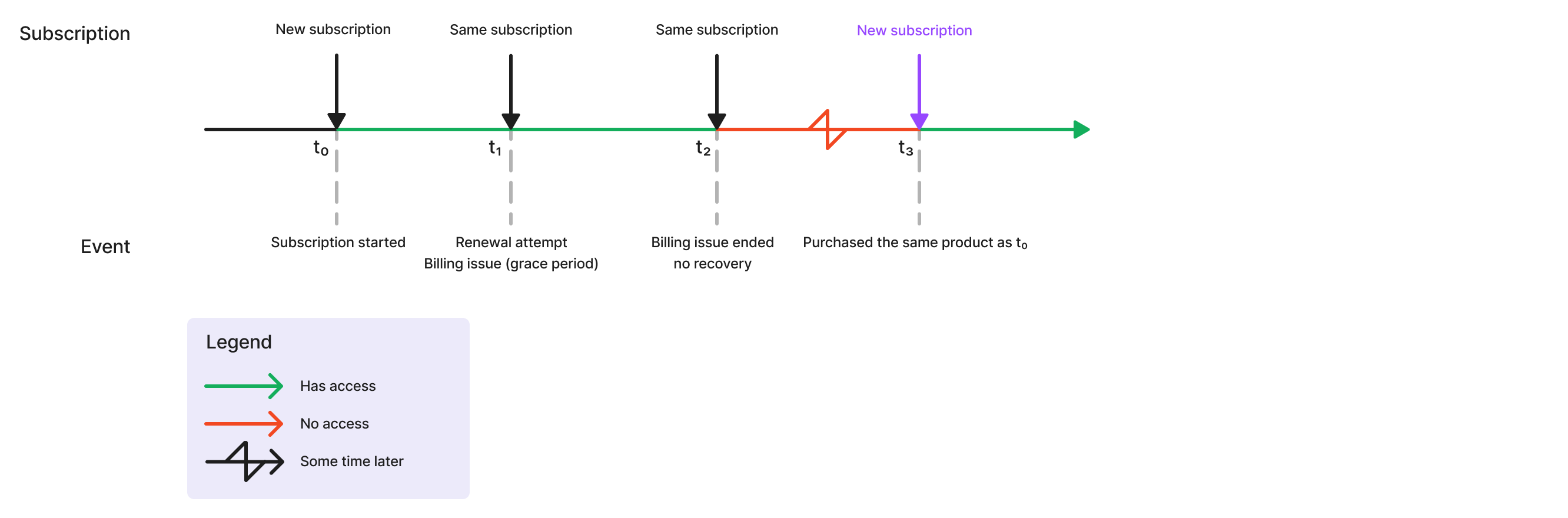
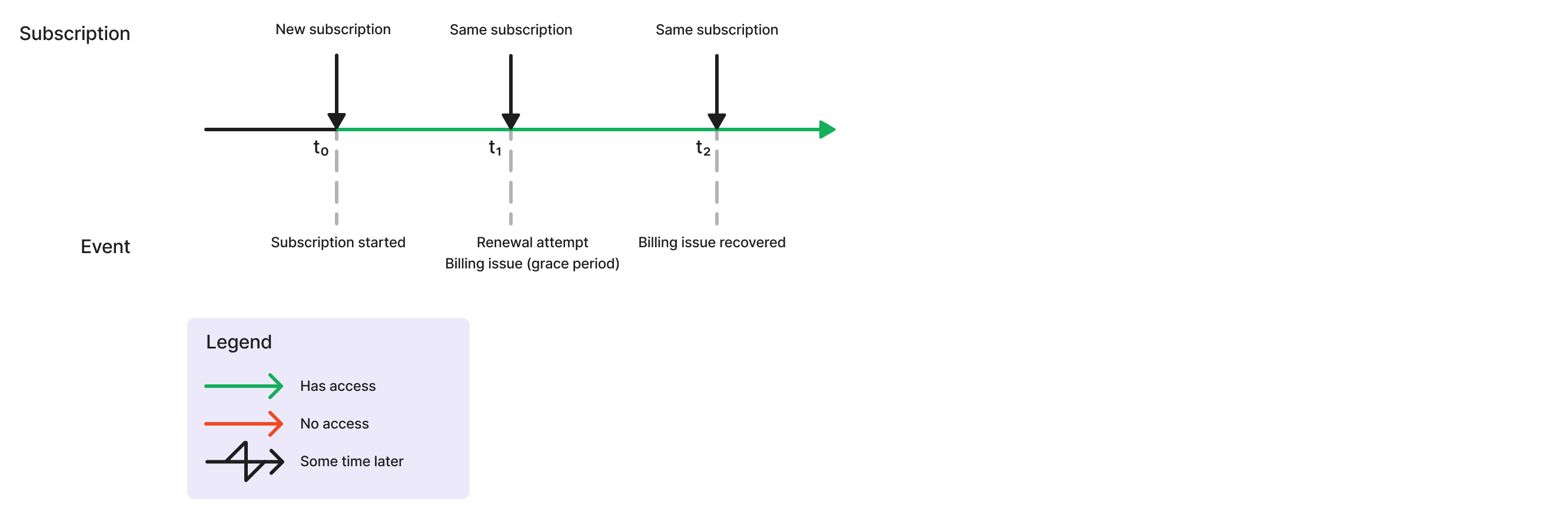
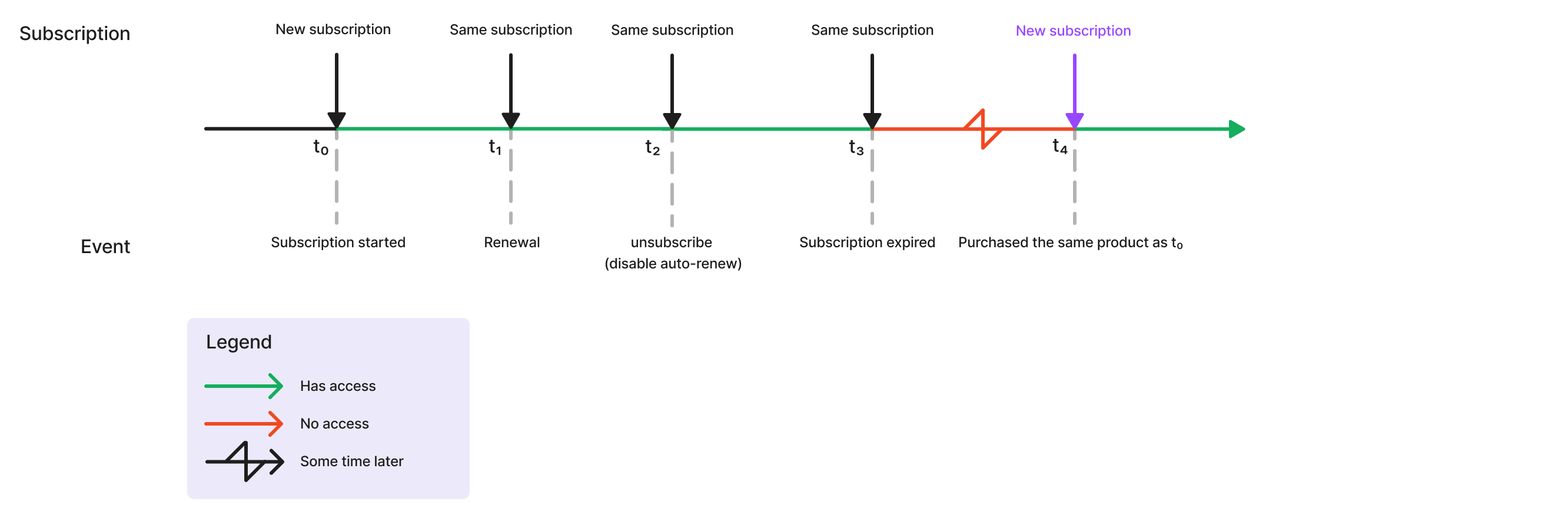
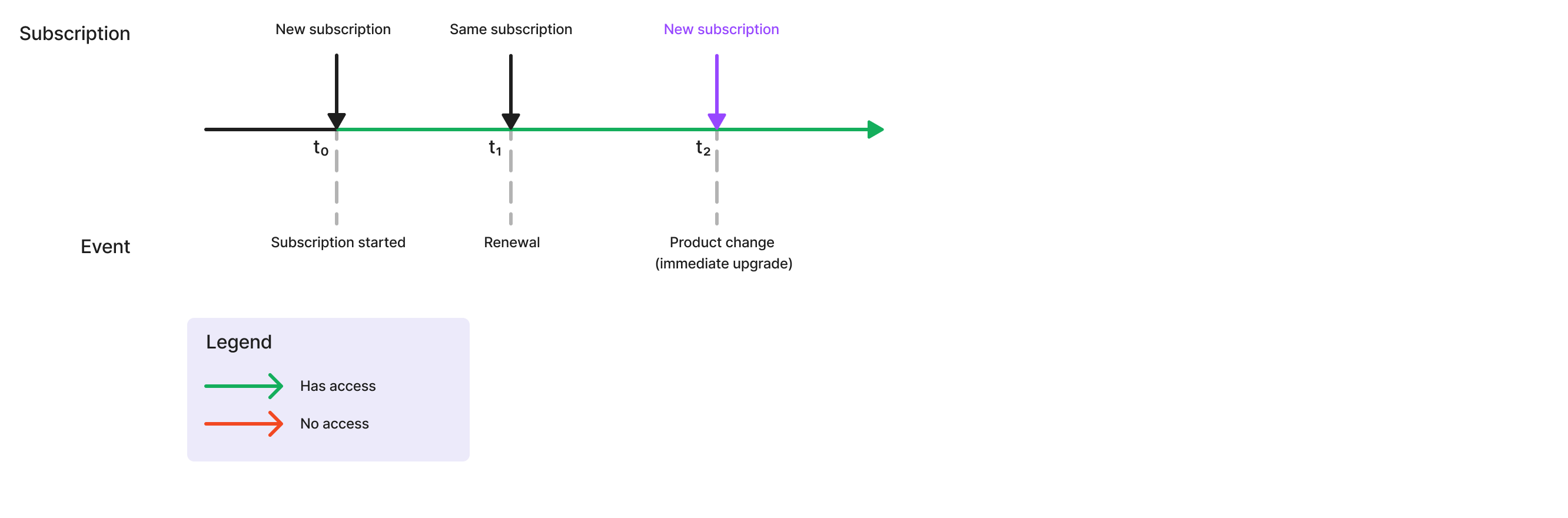
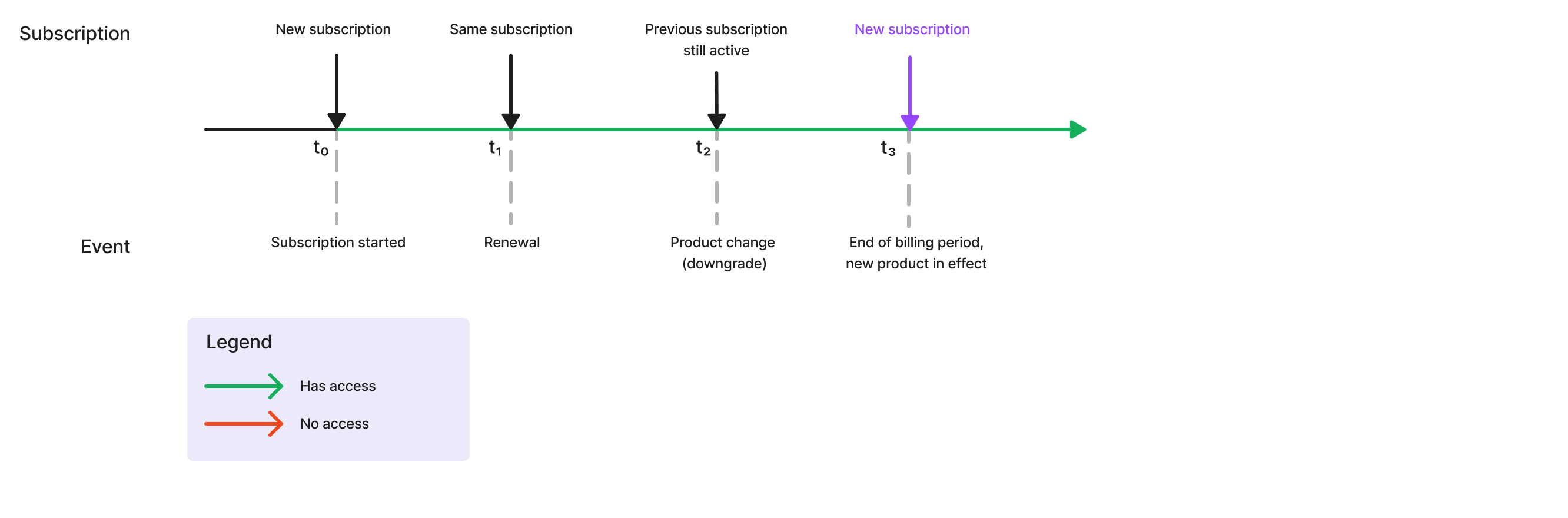
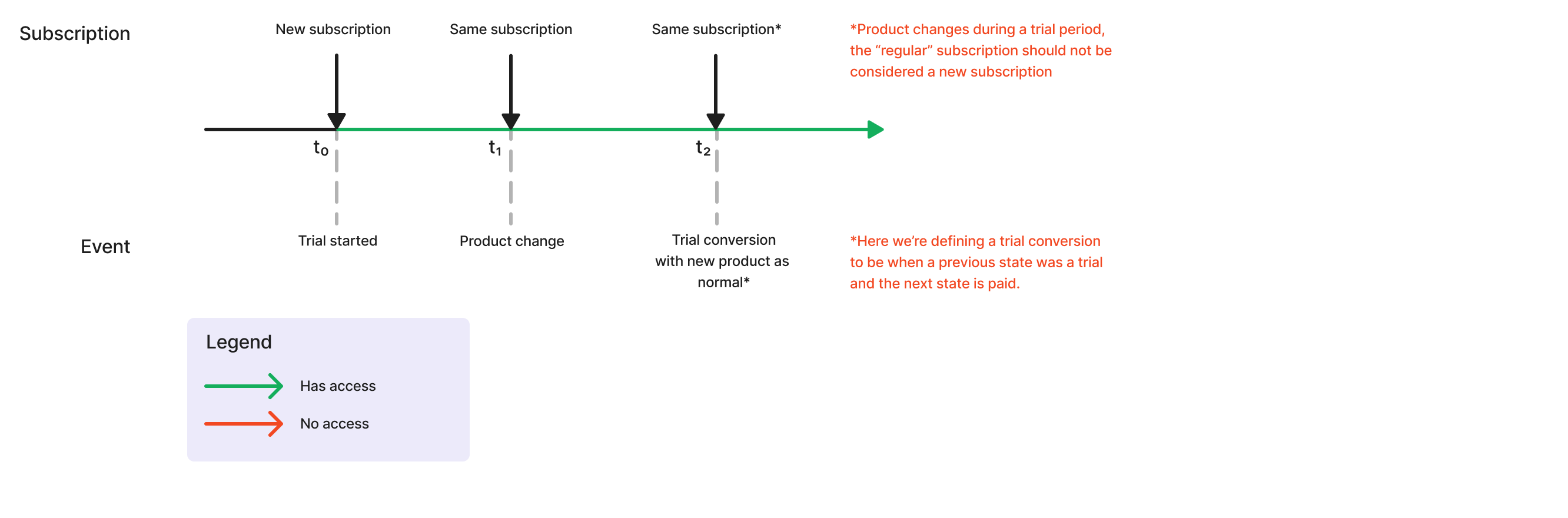
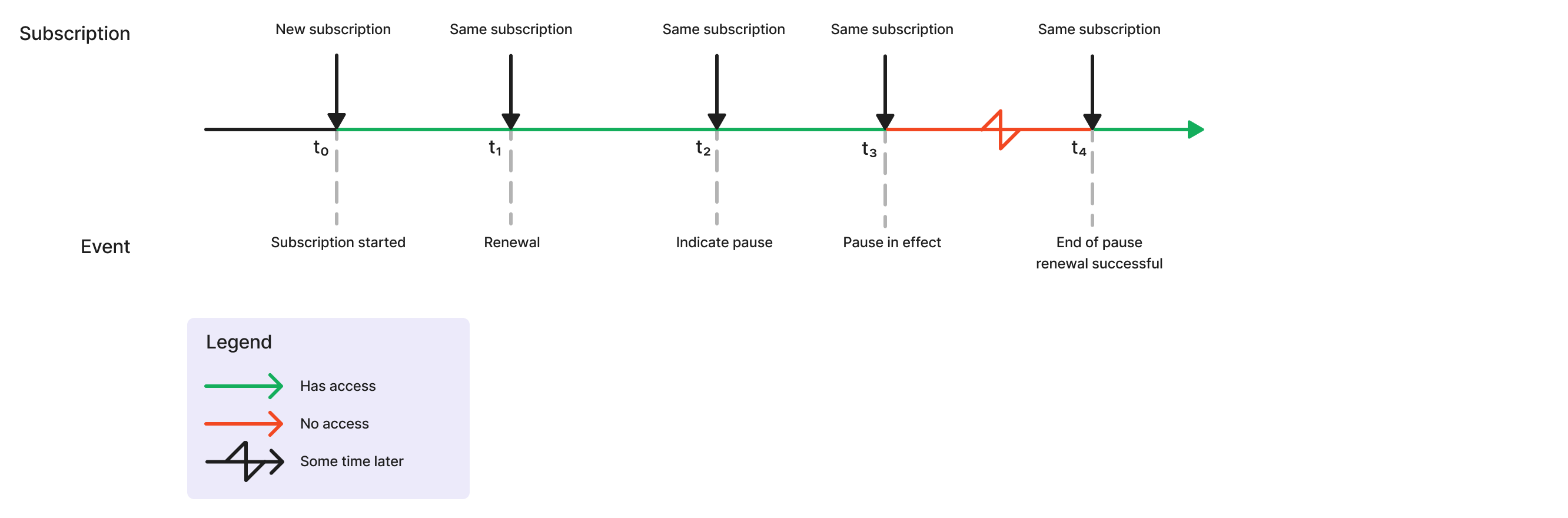
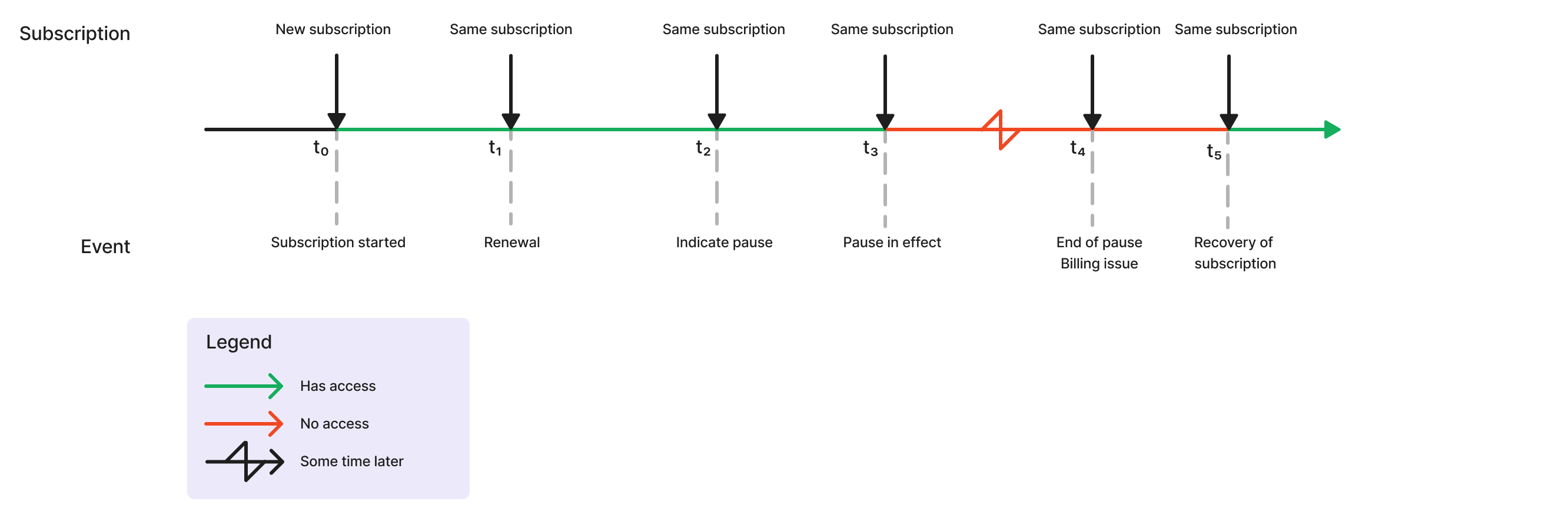
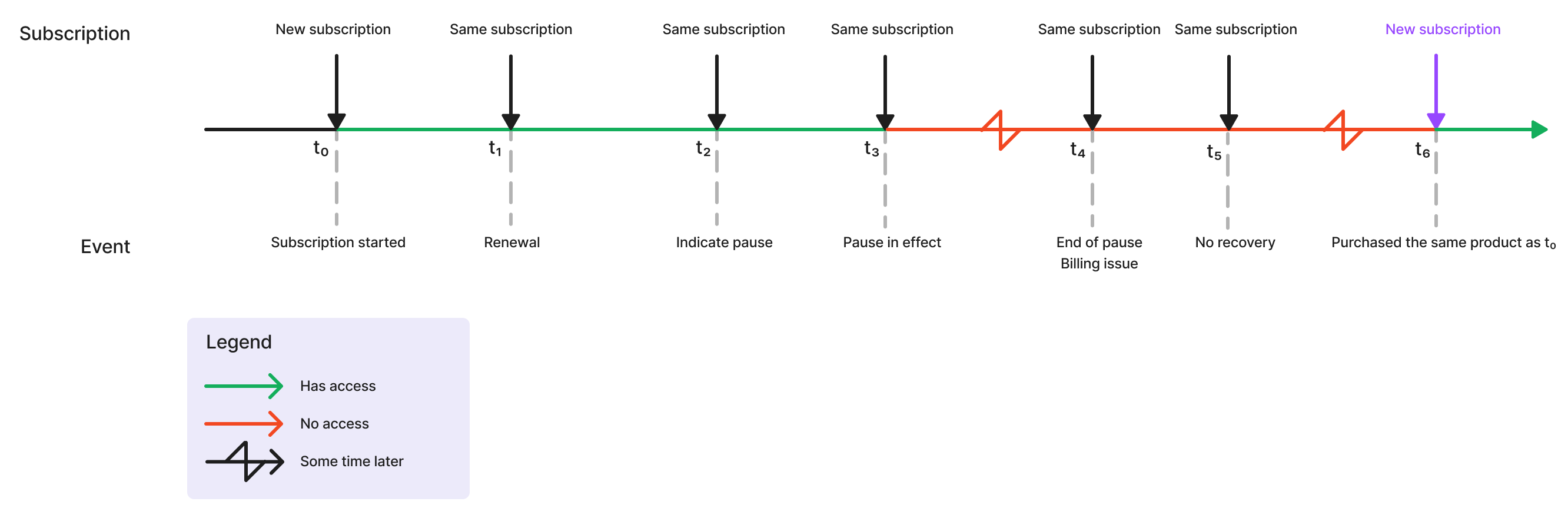
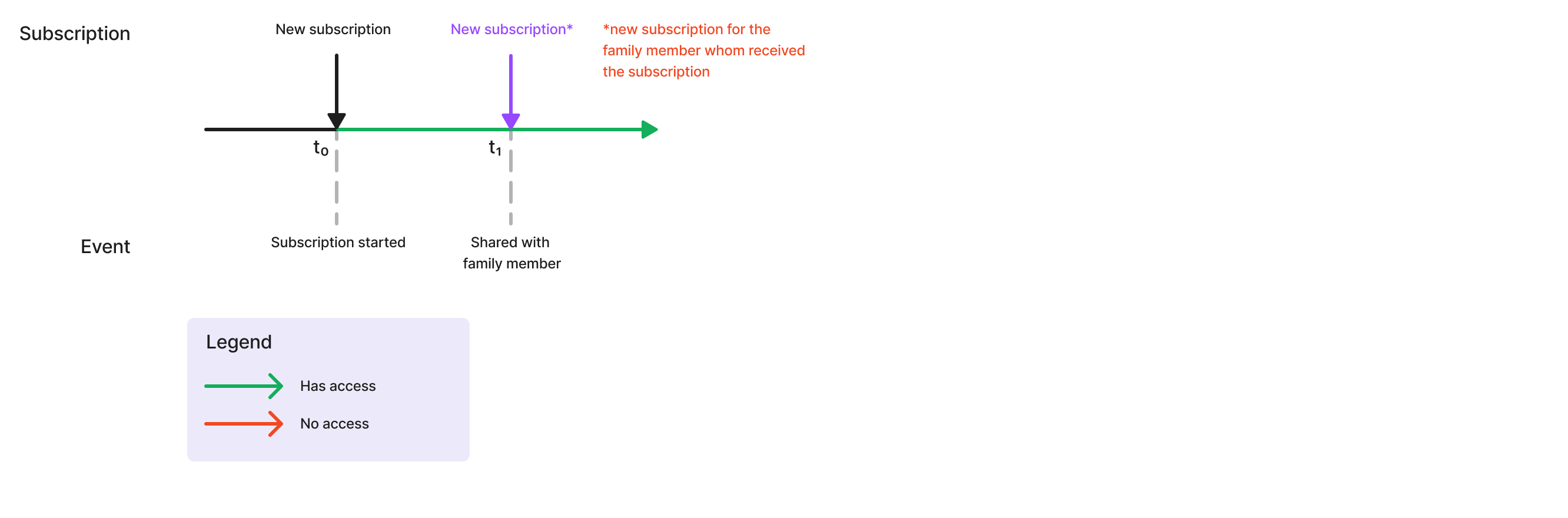
Different stores supported by RevenueCat have different logic to define what is a new subscription vs. a change to an existing subscription. To make it easier to handle subscriptions across different stores, the data model for the RevenueCat REST API v2 is now following a consistent definition of what continues the same subscription vs. a new one:
- After a subscription has lapsed (e.g: after a billing retry or letting subscription expire after an unsubscribe), if a customer subscribes to the same product it will be considered a new subscription (this was previously treated differently on Apple App Store vs. Google Play Store)
- If the product of a paid subscription is changed, the subscription to the new product will be considered a new subscription. An exception is product changes during a trial period, the post-trial subscription period to a different product will not be considered a new subscription, but a regular trial conversion
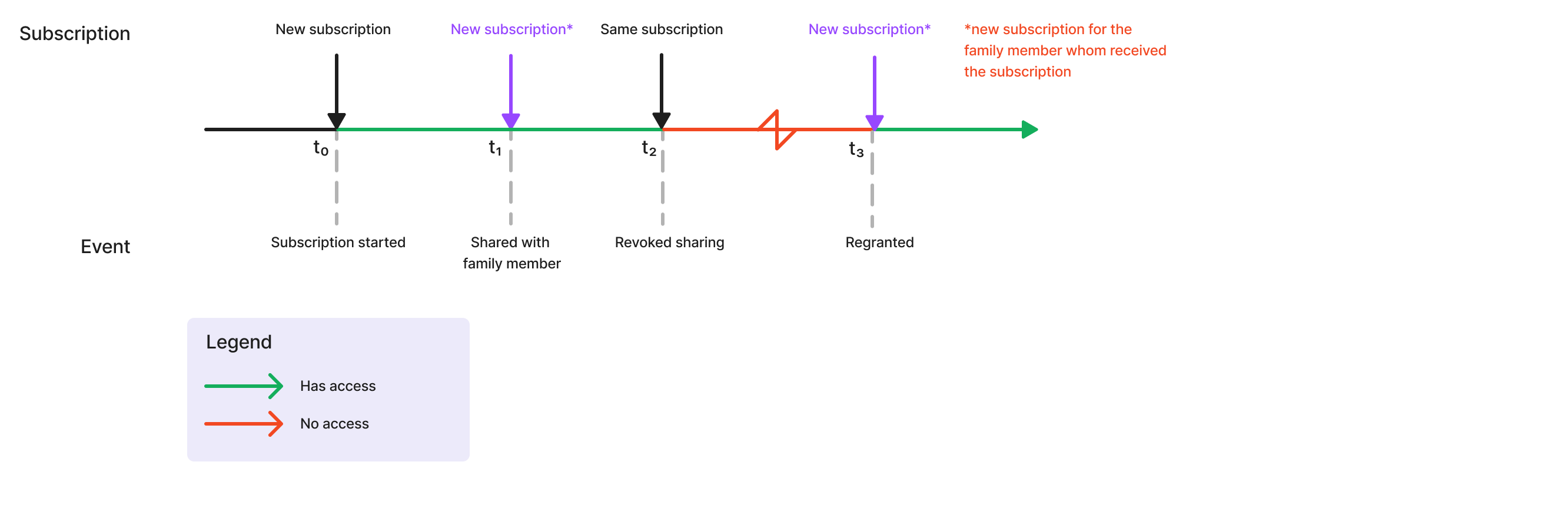
- For family shared subscriptions:
- Family shared subscriptions will be considered as a new subscription (albeit with no revenue)
- If family sharing access is revoked and later re-enabled, this will be considered as a new subscription
Diagrams for different cases
Billing issue: unrecovered
Billing issue: recovered
Lapsed subscription
Product changes: upgrade (no trial)
Product changes: downgrade (no trial)
Product changes (with trial)
Subscription paused: Recovery
Subscription paused: Billing issue, recovered
Subscription paused: Billing issue, unrecovered
Family shared subscriptions
Family shared subscriptions: regranted
Each resource below has its own page.
- App — 7 endpoints
- Audience — 6 endpoints
- Audit Log — 1 endpoint
- Charts & Metrics — 4 endpoints
- Collaborator — 1 endpoint
- Customer — 12 endpoints
- Customer Resources — 5 endpoints
- Discount — 10 endpoints
- Entitlement — 10 endpoints
- IAM — 8 endpoints
- Integration — 5 endpoints
- Invoice — 2 endpoints
- Offering — 7 endpoints
- Package — 8 endpoints
- Paywall — 5 endpoints
- Paywall Fonts & Media — 4 endpoints
- Paywall Publishing — 7 endpoints
- Product — 8 endpoints
- Project — 2 endpoints
- Purchase — 4 endpoints
- Subscription — 7 endpoints
- Subscription Data Model — full schema reference
- Subscription Transactions — 2 endpoints
- Virtual Currency — 10 endpoints