In-App Currency Events



RevenueCat provides event tracking for in-app currency transactions, allowing you to monitor and respond to balance changes in real-time through webhooks.
In-app currency adjustments made through the API will appear in the customer timeline, but cannot be clicked for additional details. These adjustments are displayed for reference only and do not generate webhook events.
Timeline Events
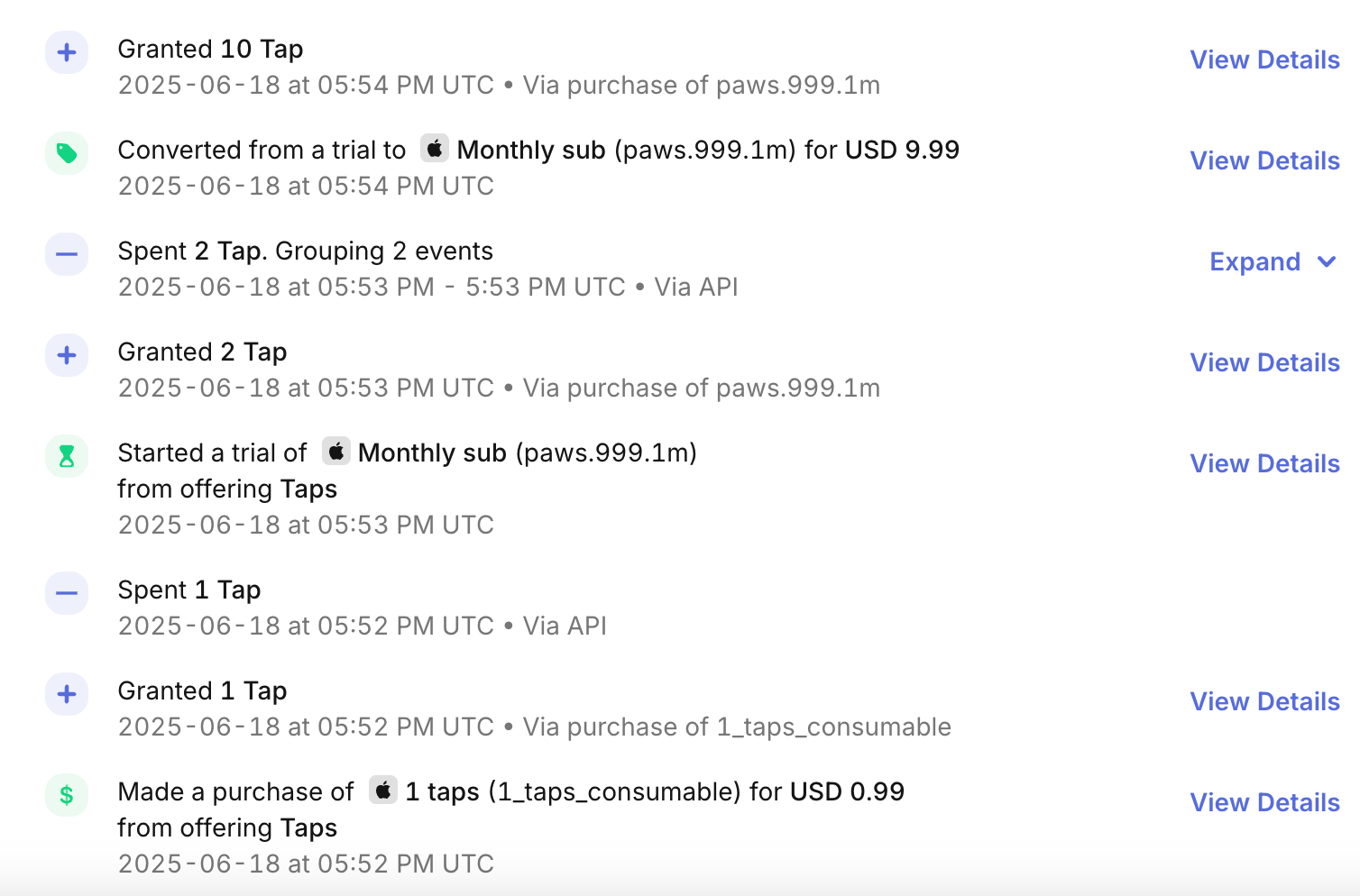
In-app currency transactions appear in the Customer History timeline, providing visibility into when currency was granted or spent from a customer's balance. These events help with debugging, customer support, and understanding customer behavior.
Event Types
The following in-app currency events can appear in the customer timeline:
| Event Name | Description | Webhook Event |
|---|---|---|
| Granted ... [Currency] | Currency was added to the customer's balance | VIRTUAL_CURRENCY_TRANSACTION |
| Spent ... [Currency] | Currency was removed from the customer's balance | VIRTUAL_CURRENCY_TRANSACTION |
Event Details
When you click on an in-app currency event in the Customer History, you can view additional details including:
- The amount of currency granted or spent
- The currency type and metadata
- The product that triggered the transaction
- The source of the transaction (
in_app_purchase,admin_api)
Webhook Events
RevenueCat sends VIRTUAL_CURRENCY_TRANSACTION webhook events whenever an in-app currency transaction occurs. These events provide detailed information about the transaction, including the amount, currency type, and source of the transaction.
When Events Are Sent
In-app currency webhook events are triggered in the following scenarios:
- In-app purchases: When a customer purchases a product associated with in-app currency
- Subscription lifecycle: For subscriptions that grant in-app currency, events are sent for the entire subscription lifecycle (initial purchase, renewals, refunds, etc.) whenever there is an adjustment to be made to the currency balance
- Manual adjustments via dashboard: When in-app currency is manually adjusted through the dashboard
Event Structure
In-app currency webhook events include standard webhook fields plus in-app currency-specific fields. Here's an example of an in-app currency transaction event:
- Code
{
    "event": {
      "adjustments": [
        {
          "amount": 100,
          "currency": {
            "code": "CRD",
            "description": "The main currency unit",
            "name": "Credits"
          }
        }
      ],
      "aliases": [
        "$RCAnonymousID:8069238d6049ce87cc529853916d624c"
      ],
      "app_id": "1234567890",
      "app_user_id": "1234567890",
      "event_timestamp_ms": 1658726378679,
      "product_display_name": "Monthly sub for 100 credits",
      "product_id": "1M_100credits",
      "purchase_environment": "PRODUCTION",
      "source": "in_app_purchase",
      "store": "APP_STORE",
      "subscriber_attributes": {
        "$email": {
            "updated_at_ms": 1662955084635,
            "value": "firstlast@gmail.com"
        }
      },
      "transaction_id": "123456789012345",
      "virtual_currency_transaction_id": "vatx123456789012345",
      "type": "VIRTUAL_CURRENCY_TRANSACTION",
      "id": "12345678-1234-1234-1234-123456789012"
    },
    "api_version": "1.0"
}
In-App Currency Specific Fields
| Field | Type | Description | Possible Values |
|---|---|---|---|
adjustments | Array | Array of in-app currency adjustments made in this transaction. Each adjustment contains the amount and currency details. | |
adjustments[].amount | Integer | The amount of in-app currency added (positive) or removed (negative) from the customer's balance. | |
adjustments[].currency | Object | Details about the in-app currency involved in the transaction. | |
adjustments[].currency.code | String | The unique identifier for the in-app currency. | |
adjustments[].currency.name | String | The display name of the in-app currency. | |
adjustments[].currency.description | String | The description of the in-app currency. | |
product_display_name | String | The display name of the product that triggered the in-app currency transaction. | |
purchase_environment | String | The environment where the product purchase was made. | SANDBOX, PRODUCTION. |
source | String | The source of the in-app currency transaction. | in_app_purchase, admin_api |
virtual_currency_transaction_id | String | Unique identifier for this in-app currency transaction. |
Source Values
The source field indicates what triggered the in-app currency balance adjustment:
in_app_purchase: Currency granted from a one-time or subscription purchase. This also includes the subscription lifecycle (initial purchase, renewals, refunds, etc.) whenever there is an adjustment to be made to the currency balanceadmin_api: Currency was manually adjusted through the dashboard
Multiple Currency Adjustments
A single webhook event can include adjustments for multiple in-app currency types. This is useful for scenarios like currency conversion or when a single purchase grants multiple types of currency.
Example of a multi-currency transaction:
{
  "adjustments": [
    {
      "amount": 1000,
      "currency": {
        "code": "GLD",
        "name": "Gold",
        "description": "Premium currency"
      }
    },
    {
      "amount": 50,
      "currency": {
        "code": "SLV",
        "name": "Silver",
        "description": "Standard currency"
      }
    }
  ]
}
Best Practices
Monitoring
- Balance Reconciliation: Use webhook events to reconcile in-app currency balances with your internal systems
- Fraud Detection: Monitor for unusual patterns in in-app currency transactions
- Customer Support: Use timeline events to help customers understand their transaction history
RevenueCat's Firebase Extension integration
If you have the Firebase Extension integration enabled, RevenueCat will include the customer's in-app currency balance in the dispatched events' payload. Balance changes due to other reasons, such as manual adjustments through our Developer API endpoints will not trigger an event.
When an event is dispatched, the Firebase Extension event payload will include a virtual_currencies object containing the customer's total balance for each currency after the purchase. The below example shows the customer's total balance for "GLD" is 80, while "SLV" is 40.
- Code
{
  "virtual_currencies": {
    "GLD": {
      "balance": 80
    },
    "SLV": {
      "balance": 40
    }
  }
}
Next Steps
- Webhook Event Types and Fields
- Customer History
- In-App Currency Subscriptions
- In-App Currency Refunds