External Purchases API (BETA) (0.1)
Download OpenAPI specification:Download
The External Purchases API enables you to track subscription status and revenue data from Payment Service Providers that RevenueCat doesn't support natively. Such examples of Payment Service Providers, referenced as External Sources, are Paddle, PayPal, Braintree, Adyen, and Recurly.
You can post subscription status and payment events to the External Purchases API to use RevenueCat as a single source of truth for providing access to your application across mobile and web and to consolidate revenue data and key subscription metrics. Customer history, webhooks, and integration events are supported as well, but they have limitations during the Beta period.
The API expects data to be posted in a format defined in the API reference, meaning that you would need to convert or transform data from the External Source before posting it to the External Purchases API endpoint. RevenueCat accepts data posted to this endpoint as is, and relies on your timely requests to provide entitlement access.
If you have a mobile first business with a web presence that follows a similar monetization model and subscription lifecycle implementation typical to the app stores, then this API is the right choice for you to consolidate your stack.
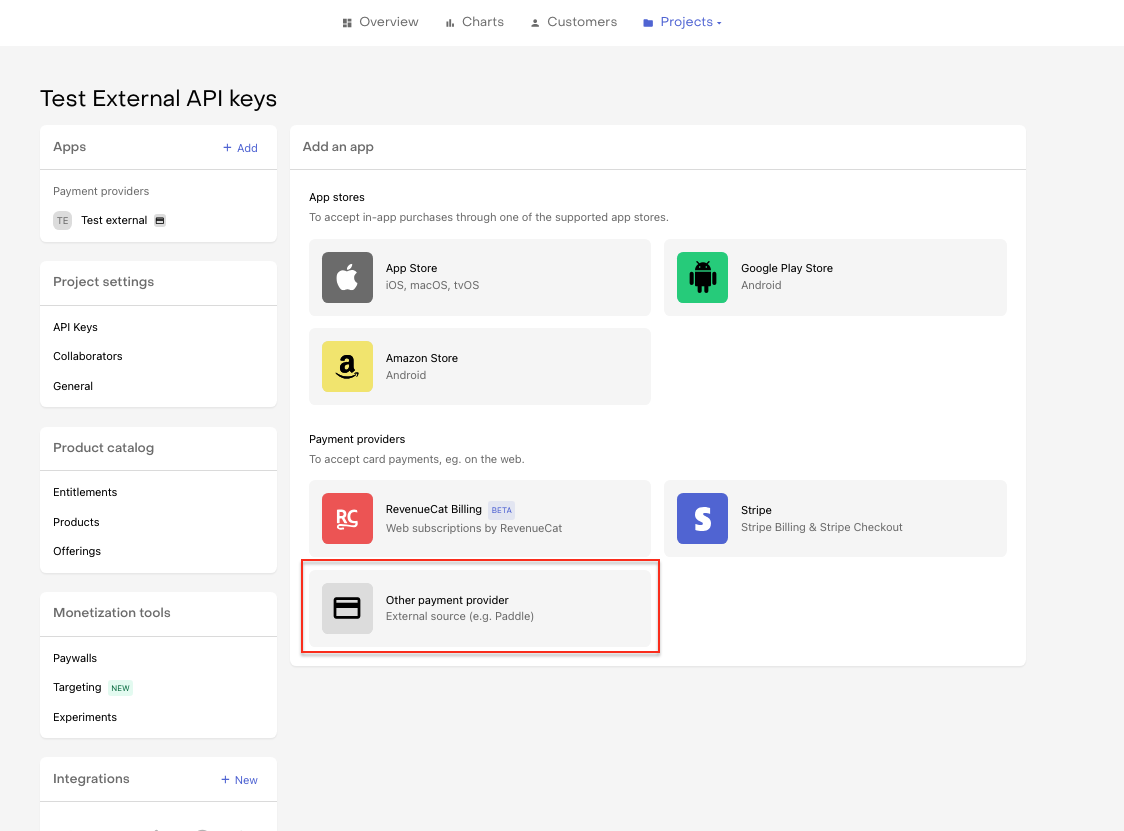
You can add an External Source under Project > Apps > +New. All you need to provide is the App name. The External API Keys and RevenueCat App ID required to call the API are automatically generated after hitting Save Changes.
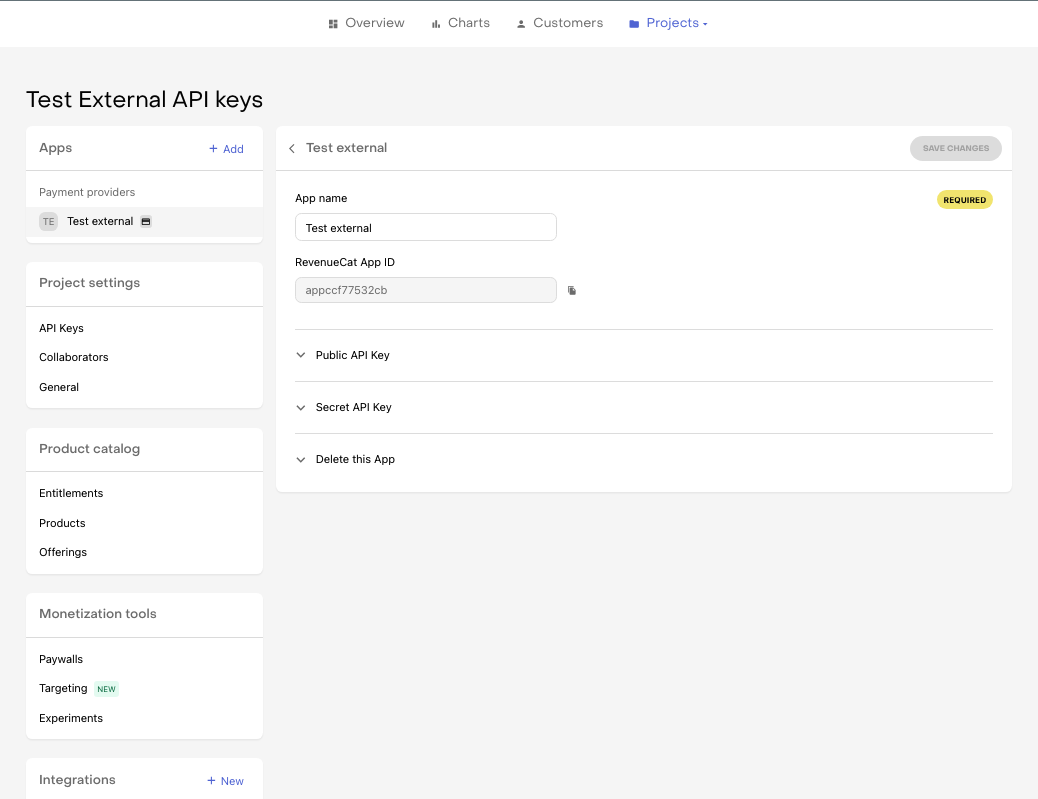
Authentication for the External Purchases API is achieved by setting the Authorization header with a valid API secret external key. You'll find two main types of API keys in your RevenueCat dashboard: public app-specific , secret and secret app-specific.
Authorization: Bearer YOUR_REVENUECAT_APP_SPECIFIC_SECRET_API_KEY
The API keys are automatically generated for each External Source whenever you add a new External Source on the Add New App screen in the Dashboard.
You can retrieve these API keys both on the Apps settings page and Project settings > API Keys page.
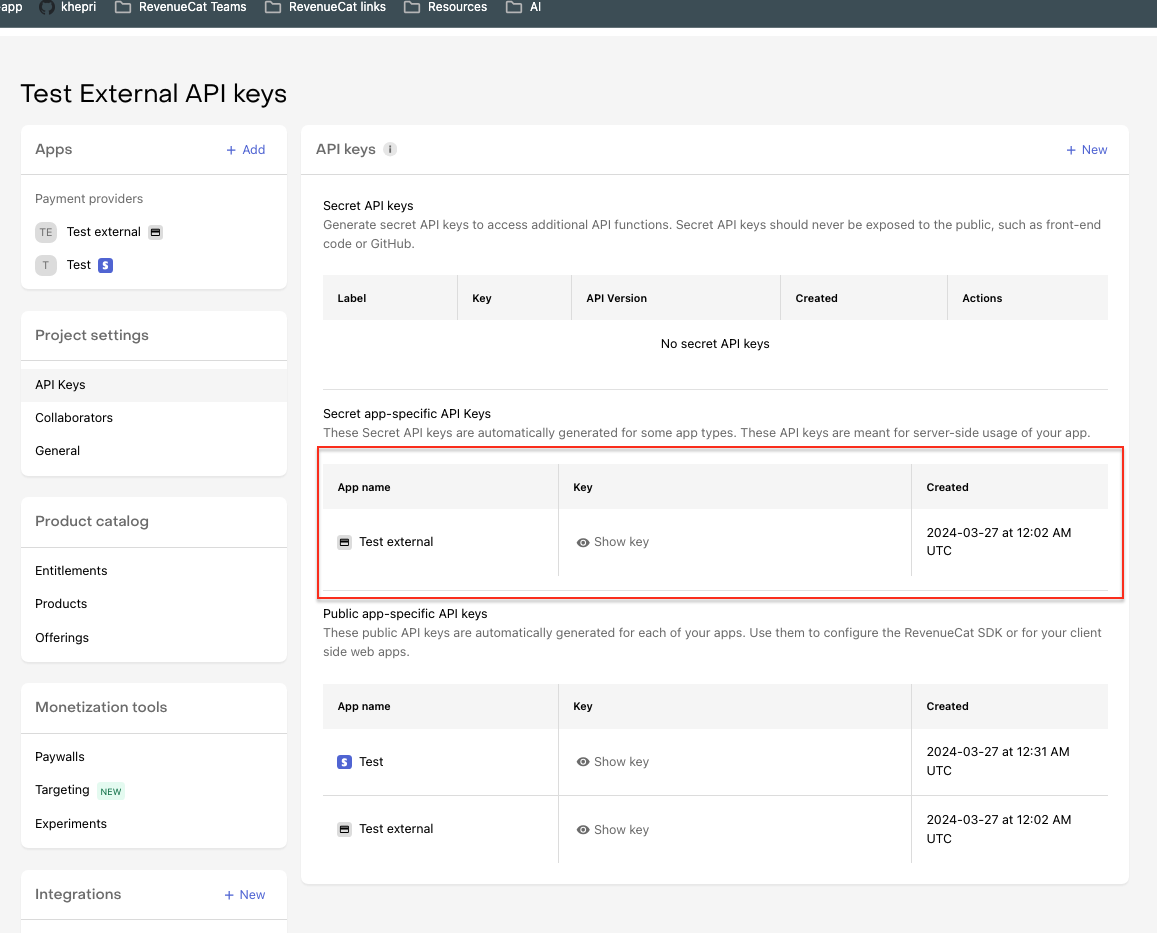
You can call the External Purchases API only with the corresponding app-specific Secret API key. The app-specific Secret API Key should be kept out of any publicly accessible areas such as GitHub or client side code. Additionally, an app-specific Public API Key is generated so public endpoints like Offerings can be accessed.
The API has one endpoint, POST/receipts/external.
POST/receipts/external is used for requests with a single purchase and/or payment, and processes them right away. Calling Get Customer right after will return the updated entitlements.
For more details check the API reference.
The body of the POST requests should be encoded in JSON and have the 'Content-Type' header set to 'application/json'.
Content-Type: application/json
{
  "purchase": {
    "object": "external_subscription",
    "customer_id": "app_user_id12341234",
    "source_subscription_identifier": "paddle_sub_id1234",
    "source_product_identifier": "paddle_product_id1234",
    "updated_at": "2023-04-01T00:00:00",
    "current_period_starts_at": "2023-04-01T00:00:00",
    "current_period_ends_at": "2023-05-01T00:00:00",
    "gives_access": true,
    "status": "active",
    "environment": "production",
    "auto_renewal_status": "will_renew"
  },
  "payment": {
    "object": "external_subscription_payment",
    "source_subscription_identifier": "paddle_sub_id1234",
    "payment_identifier": "payment_id1234",
    "processed_at": "2023-04-01T00:00:00",
    "amount_in_local_currency": {
      "gross": 9.99,
      "currency": "USD"
    }
  }
}
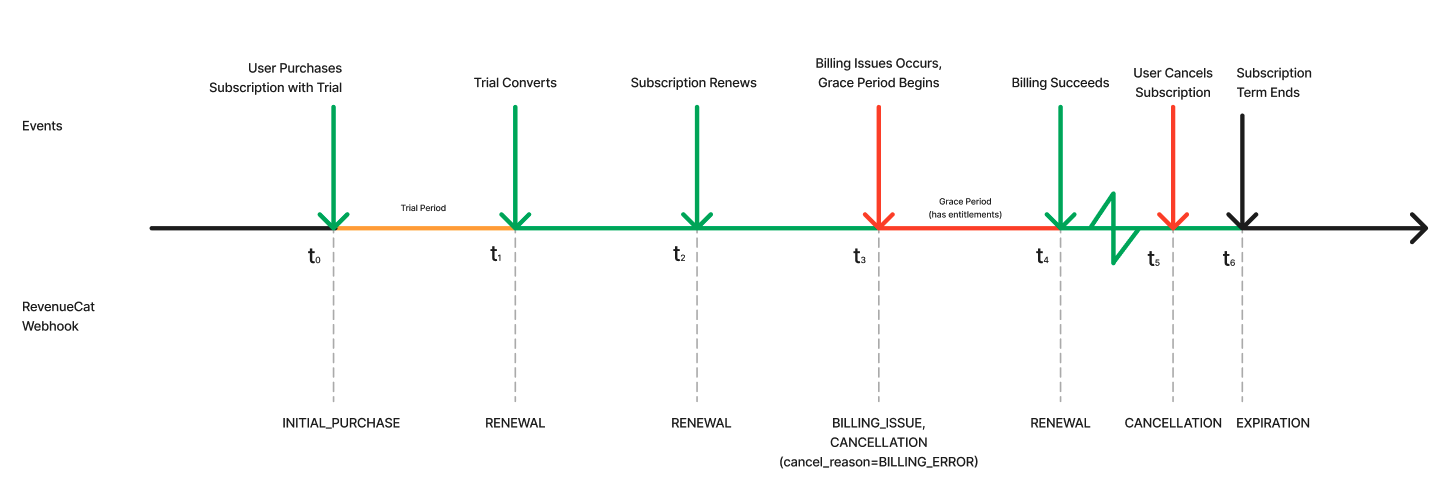
This example of a subscription lifecycle demonstrates the series of API request to make to the External Purchases API and the resulting events generated (for Customer History, webhooks, and integration events).
This flow covers a Trial Flow with Successful Conversion, an ordinary Subscription Renewal, a Billing Issue Flow that gets resolved in Grace Period, and eventually a Cancellation Flow.
Trial purchase
{
  "purchase": {
    "object": "external_subscription",
    "customer_id": "app_user_id12341234",
    "source_subscription_identifier": "paddle_sub_id1234",
    "source_product_identifier": "paddle_product_id1234",
    "updated_at": "2023-03-01T00:00:00",
    "current_period_starts_at": "2023-03-01T00:00:00",
    "current_period_ends_at": "2023-04-01T00:00:00",
    "gives_access": true,
    "status": "trialing",
    "environment": "production"
  },
  "payment": null
}
Trial conversion
{
  "purchase": {
    "object": "external_subscription",
    "customer_id": "app_user_id12341234",
    "source_subscription_identifier": "paddle_sub_id1234",
    "source_product_identifier": "paddle_product_id1234",
    "updated_at": "2023-04-01T00:00:00",
    "current_period_starts_at": "2023-04-01T00:00:00",
    "current_period_ends_at": "2023-05-01T00:00:00",
    "gives_access": true,
    "status": "active",
    "environment": "production",
    "auto_renewal_status": "will_renew"
  },
  "payment": {
    "object": "external_subscription_payment",
    "source_subscription_identifier": "paddle_sub_id1234",
    "payment_identifier": "payment_id1234",
    "processed_at": "2023-04-01T00:00:00",
    "amount_in_local_currency": {
      "gross": 9.99,
      "currency": "USD"
    }
  }
}
Renewal
{
  "purchase": {
    "object": "external_subscription",
    "customer_id": "app_user_id12341234",
    "source_subscription_identifier": "paddle_sub_id1234",
    "source_product_identifier": "paddle_product_id1234",
    "updated_at": "2023-05-01T00:00:00",
    "current_period_starts_at": "2023-05-01T00:00:00",
    "current_period_ends_at": "2023-06-01T00:00:00",
    "gives_access": true,
    "status": "active",
    "environment": "production",
    "auto_renewal_status": "will_renew"
  },
  "payment": {
    "object": "external_subscription_payment",
    "source_subscription_identifier": "paddle_sub_id1234",
    "payment_identifier": "payment_id2345",
    "processed_at": "2023-05-01T00:00:00",
    "amount_in_local_currency": {
      "gross": 9.99,
      "currency": "USD"
    }
  }
}
Billing issue
{
  "purchase": {
    "object": "external_subscription",
    "customer_id": "app_user_id12341234",
    "source_subscription_identifier": "paddle_sub_id1234",
    "source_product_identifier": "paddle_product_id1234",
    "updated_at": "2023-06-01T00:00:00",
    "current_period_starts_at": "2023-06-01T00:00:00",
    "current_period_ends_at": "2023-06-14T00:00:00",
    "gives_access": true,
    "status": "in_grace_period",
    "environment": "production",
    "auto_renewal_status": "will_not_renew"
  },
  "payment": null
}
Billing succeeds
{
  "purchase": {
    "object": "external_subscription",
    "customer_id": "app_user_id12341234",
    "source_subscription_identifier": "paddle_sub_id1234",
    "source_product_identifier": "paddle_product_id1234",
    "updated_at": "2023-06-12T00:00:00",
    "current_period_starts_at": "2023-06-01T00:00:00",
    "current_period_ends_at": "2023-07-01T00:00:00",
    "gives_access": true,
    "status": "active",
    "environment": "production",
    "auto_renewal_status": "will_renew"
  },
  "payment": {
    "object": "external_subscription_payment",
    "source_subscription_identifier": "paddle_sub_id3456",
    "payment_identifier": "payment_id1234",
    "processed_at": "2023-06-12T00:00:00",
    "amount_in_local_currency": {
      "gross": 9.99,
      "currency": "USD"
    }
  }
}
Cancellation
{
  "purchase": {
    "object": "external_subscription",
    "customer_id": "app_user_id12341234",
    "source_subscription_identifier": "paddle_sub_id1234",
    "source_product_identifier": "paddle_product_id1234",
    "updated_at": "2023-06-18T00:00:00",
    "current_period_starts_at": "2023-06-01T00:00:00",
    "current_period_ends_at": "2023-07-01T00:00:00",
    "gives_access": true,
    "status": "active",
    "environment": "production",
    "auto_renewal_status": "will_not_renew"
  },
  "payment": null
}
Expiration
{
  "purchase": {
    "object": "external_subscription",
    "customer_id": "app_user_id12341234",
    "source_subscription_identifier": "paddle_sub_id1234",
    "source_product_identifier": "paddle_product_id1234",
    "updated_at": "2023-07-01T00:00:00",
    "current_period_starts_at": "2023-06-01T00:00:00",
    "current_period_ends_at": "2023-07-01T00:00:00",
    "gives_access": false,
    "status": "expired",
    "environment": "production",
    "auto_renewal_status": "will_not_renew"
  },
  "payment": null
}
Note: Make sure to include the
current_period_starts_atfor the transaction you are trying to expire. Otherwise your target transaction might not be found by the system.
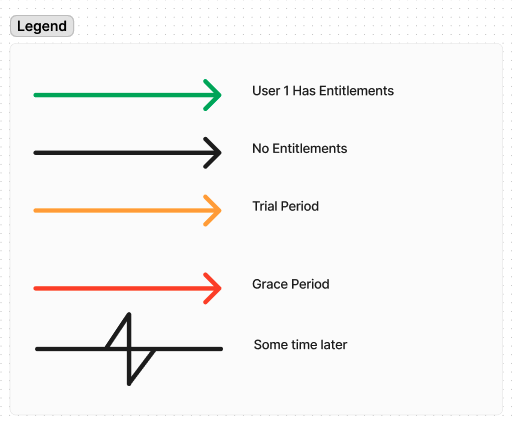
This is a self-contained, end-to-end guide that takes you from zero to a correct backend integration. It expands on the Example Subscription Lifecycle by explaining how the system works underneath, which clusters of real-world events you must model, and exactly what each one looks like on the wire.
By the end you should understand the mental model behind the External Purchases API and have a concrete checklist of what your backend has to send, in what order, and what RevenueCat will do with it.
This guide reuses the payloads from the Example Subscription Lifecycle and adds new ones for the flows that example doesn't cover (extensions, transfers, refunds, product changes, and split-billing edge cases).
1. How the system works (the mental model)
The API surface is intentionally small: you POST /v1/receipts/external with a body containing a purchase object, a payment object, or both. Everything else — Customer History, webhooks, and integration events — is derived from the stream of requests you send. RevenueCat accepts your data as-is and relies on your timely requests to grant and revoke entitlement access.
The four objects
There are two object types for subscriptions and two for one-time purchases:
| Concept | Subscriptions | One-time purchases |
|---|---|---|
| The thing that grants access for a period of time | external_subscription |
external_purchase |
| The money movement (charge or refund) | external_subscription_payment |
external_purchase_payment |
Throughout this guide we use the subscription objects, but the same rules apply to one-time purchases except where called out.
Transactions vs. payments
Two ideas are often conflated but are distinct:
- A transaction represents a period of access: it has a start, an end, a status, and whether it currently
gives_access. In the payload this is thepurchaseobject (external_subscription). - A payment represents a money movement in time: a charge or a refund that happened at a specific instant. In the payload this is the
paymentobject (external_subscription_payment).
A subscription is therefore a chain of transactions (one per period: trial, first paid period, each renewal) with payments attached to whichever period contains them.
external_subscription (source_subscription_identifier = "paddle_sub_id1234")
│
├─ period 1  [2023-03-01 → 2023-04-01]  status: trialing      ← transaction
├─ period 2  [2023-04-01 → 2023-05-01]  status: active        ← transaction
│     └─ payment_id1234  processed_at 2023-04-01  $9.99        ← payment
└─ period 3  [2023-05-01 → 2023-06-01]  status: active        ← transaction
      └─ payment_id2345  processed_at 2023-05-01  $9.99        ← payment
Transactions are mutable, events are immutable (the generic RevenueCat model)
This model is not specific to External Purchases — it is how RevenueCat models every store (App Store, Google Play, Stripe, Amazon, and others). The External Purchases API is another way to feed transactions into this same machinery, so what you wire up here behaves exactly like a native store integration downstream.
- Transactions are mutable. A transaction is the current, living state of a period of access. As reality changes — a trial converts, a renewal succeeds, a billing issue starts, a user cancels — you keep updating the same transaction (same period boundaries, newer
updated_at). At any moment a transaction reflects the latest truth you've told us. - Events are immutable. Every meaningful change to a transaction produces an Event, an append-only, point-in-time record of what happened (for example
INITIAL_PURCHASE,RENEWAL,CANCELLATION,BILLING_ISSUE,EXPIRATION). Events are never edited or deleted; correcting a mistake means a new event, not a rewrite of an old one. Together they form the immutable history of the subscription that you see in Customer History. - Dispatchable events fan out to webhooks and integrations. Once an event is generated, if it is dispatchable RevenueCat delivers it to your configured destinations: it fires a webhook and triggers each enabled integration (analytics, attribution, data warehouses, and more).
your POST  ──►  transaction (mutable state)  ──►  event (immutable record)
                                                      │
                                                      └─ if dispatchable ──►  webhooks
                                                                              integrations
                                                                              Customer History
In summary: you are responsible for keeping the transaction accurate and timely. RevenueCat turns your sequence of transaction states into the events that everything else — entitlements, webhooks, integrations, and metrics — is built on. Not every change is dispatchable (see the Beta Limitations for cases where no event is generated today), but the model is always transaction-first, event-derived.
How transactions are identified
You never set a transaction id yourself. You provide:
source_subscription_identifier: the id of the subscription in your external source. All renewals of the same subscription must reuse the same value. This is what ties periods together into one chain.current_period_starts_at/current_period_ends_at: the boundaries of the period.updated_at: the moment this status was true (used to resolve out-of-order delivery).
RevenueCat derives an internal transaction identifier from these. Conceptually, the first period acts as the original transaction, and each subsequent period is keyed off that original plus the period's update timestamp (roughly original_transaction_id..updated_at_timestamp). You will see this derived identifier in data exports and integration payloads, but you do not send it. Your job is only to keep source_subscription_identifier stable and the period boundaries correct.
How payments get matched to a transaction
Payments are matched to transactions by a single rule:
A payment is matched to a transaction purely by time, using the payment's
source_subscription_identifierandprocessed_at. RevenueCat scans that subscription's periods latest-ending first and attaches the payment to the latest-ending period whosecurrent_period_ends_atis at or afterprocessed_at. For a charge, only the period end is checked (the period start is not), so a payment can attach to a period even whenprocessed_atfalls before that period'scurrent_period_starts_at.
Consequences of this rule:
- Posting a
purchaseand apaymentin the same body creates no special link between them. They are not "bundled". Thepaymentis still placed by itsprocessed_at, exactly as if it had been posted separately. - A single transaction can have many payments attached (see the split-billing edge case below).
- Only the period end bounds a charge. Because the start is not checked and periods are scanned latest-ending first, a charge lands on the newest period that ends at or after
processed_at. When two periods overlap, you cannot target the older one with a charge. - Once a payment is processed and attached, it cannot be relocated or edited. Sending a corrected period later will not move a payment that was already matched. Refunds are therefore modeled as new payment objects, never as edits (see Refunds).
- Refunds can be matched more strictly. When strict refund matching is enabled for your project, a refund (a negative payment) is matched only to the period whose full window contains it (
current_period_starts_at <= processed_at <= current_period_ends_at, both bounds checked) rather than by the end alone. This changes which period a refund or credit lands on, so confirm with the RevenueCat team whether it is enabled for your account. - Payments are deduplicated by
payment_identifier, so it is safe to retry. Give refunds apayment_identifierdistinct from the original charge.
payment object once that information is available, populating the tax and commission fields of amount_in_local_currency (or amount_in_usd) so the recorded revenue is complete. We're actively working on a better solution for late-arriving commission and tax data.How to modify an existing transaction
To update a period that you already posted (for example, to change its status or extend its end date), post the purchase again with:
- The same
source_subscription_identifier. - Boundaries that let RevenueCat locate the existing period. RevenueCat matches your update to an existing period when either boundary is identical to the stored period: the same
current_period_starts_ator the samecurrent_period_ends_at(the end also matches a stored grace-period deadline). Because the match needs at least one unchanged boundary, keep the boundary you are not changing identical, down to the millisecond — when you change the end (for example, an extension) keepcurrent_period_starts_atidentical so the match falls back to the start, and when the end stays put the samecurrent_period_ends_attargets the period even ifcurrent_period_starts_atdiffers. If neither boundary matches an existing period, RevenueCat creates a separate, overlapping transaction instead of an edit. - An
updated_atthat is strictly later than the lastupdated_atyou posted for that period. Older-or-equal updates are ignored so that out-of-order delivery never overwrites fresher state.
For one-time purchases (external_purchase) the rule on updated_at is different: because a one-time purchase has no period to extend, its updated_at doubles as its start_at. To target the same purchase for an edit, updated_at must be exactly equal to the original, not later.
Other things worth knowing up front
- You can attach a
metadataobject (key-value pairs of string/number/boolean/null) to carry your own context. Metadata lives at the subscription / purchase level, not at the individual transaction (period) level, so it describes the whole subscription rather than a single renewal period. This capability is not enabled by default, contact the RevenueCat team to have it turned on for your account. - Payment objects can appear in data exports, so the
payment_identifier,processed_at, and amounts you send are what your finance/analytics will see. Including payment objects in exports is not enabled by default, contact the RevenueCat team to have it enabled for your account. EXPIRATIONevents are not fired automatically. When a subscription lapses you must explicitly post anexpiredstatus (see Cancellation & expiration).
Live updates vs. historical imports (the 30-day window)
RevenueCat distinguishes between live activity and historical data, and this distinction is also generic across stores:
Transactions whose relevant timestamp is older than 30 days are treated as a backfill / historical import rather than a live update.
Historical imports are recorded to build accurate state, history, and metrics, but they do not generate dispatchable events, so they will not fire webhooks or trigger integrations. This is intentional: when you first onboard, or replay months of past subscriptions, you don't want to flood your downstream systems with thousands of retroactive notifications.
What this means in practice:
- For an ongoing, real-time integration, post updates promptly (well within 30 days of when they happen) so they are treated as live and fan out to webhooks/integrations.
- For an initial migration of existing subscribers, expect those older records to land silently as backfill. They will still grant entitlements and appear in Customer History and exports.
- See Backfill Logic for how out-of-order and overlapping historical periods are reconciled.
2. Modeling the subscription lifecycle
Real subscription systems are just combinations of a handful of patterns. Model these and you've covered the lifecycle. Each cluster below tells you when it happens, whether it creates a new transaction or edits an existing one, the payload, and the resulting events.
Two families of clusters:
- Generators create a brand-new period (a new row): new purchases, trials, and renewals.
- Mutators edit an existing period (same period boundaries, later
updated_at): extensions, status changes, cancellations, expirations, refunds, transfers, and product changes.
2.1 New purchases, trials, and renewals (generators)
These each represent a completely new period of time, so each one is a new transaction with a new current_period_starts_at / current_period_ends_at.
A free trial starts the chain. There is no payment yet, so payment is null. This fires an INITIAL_PURCHASE event.
{
  "purchase": {
    "object": "external_subscription",
    "customer_id": "app_user_id12341234",
    "source_subscription_identifier": "paddle_sub_id1234",
    "source_product_identifier": "paddle_product_id1234",
    "updated_at": "2023-03-01T00:00:00",
    "current_period_starts_at": "2023-03-01T00:00:00",
    "current_period_ends_at": "2023-04-01T00:00:00",
    "gives_access": true,
    "status": "trialing",
    "environment": "production"
  },
  "payment": null
}
When the trial converts, you open a new paid period and attach the first charge. Note the payment.processed_at (2023-04-01) falls inside the new period, which is how it gets matched. This fires an INITIAL_PURCHASE/RENEWAL style event with revenue.
{
  "purchase": {
    "object": "external_subscription",
    "customer_id": "app_user_id12341234",
    "source_subscription_identifier": "paddle_sub_id1234",
    "source_product_identifier": "paddle_product_id1234",
    "updated_at": "2023-04-01T00:00:00",
    "current_period_starts_at": "2023-04-01T00:00:00",
    "current_period_ends_at": "2023-05-01T00:00:00",
    "gives_access": true,
    "status": "active",
    "environment": "production",
    "auto_renewal_status": "will_renew"
  },
  "payment": {
    "object": "external_subscription_payment",
    "source_subscription_identifier": "paddle_sub_id1234",
    "payment_identifier": "payment_id1234",
    "processed_at": "2023-04-01T00:00:00",
    "amount_in_local_currency": {
      "gross": 9.99,
      "currency": "USD"
    }
  }
}
Each renewal is the same shape: a new period that starts where the previous one ended, plus the renewal charge. Keep source_subscription_identifier stable and give the payment a fresh payment_identifier. This fires a RENEWAL event.
{
  "purchase": {
    "object": "external_subscription",
    "customer_id": "app_user_id12341234",
    "source_subscription_identifier": "paddle_sub_id1234",
    "source_product_identifier": "paddle_product_id1234",
    "updated_at": "2023-05-01T00:00:00",
    "current_period_starts_at": "2023-05-01T00:00:00",
    "current_period_ends_at": "2023-06-01T00:00:00",
    "gives_access": true,
    "status": "active",
    "environment": "production",
    "auto_renewal_status": "will_renew"
  },
  "payment": {
    "object": "external_subscription_payment",
    "source_subscription_identifier": "paddle_sub_id1234",
    "payment_identifier": "payment_id2345",
    "processed_at": "2023-05-01T00:00:00",
    "amount_in_local_currency": {
      "gross": 9.99,
      "currency": "USD"
    }
  }
}
2.2 Operations that edit an existing transaction
Everything in this family targets a period you already posted. The rule: same source_subscription_identifier, boundaries that resolve to the existing period (an identical current_period_starts_at or current_period_ends_at, per How to modify an existing transaction above), and a strictly-later updated_at.
Subscription extended
Use this when the access period gets longer without a new charge, for example a goodwill extension or a promo. You re-post the same period with a later current_period_ends_at and a later updated_at. The current_period_starts_at stays identical so RevenueCat edits the existing period instead of creating a new one.
{
  "purchase": {
    "object": "external_subscription",
    "customer_id": "app_user_id12341234",
    "source_subscription_identifier": "paddle_sub_id1234",
    "source_product_identifier": "paddle_product_id1234",
    "updated_at": "2023-05-10T00:00:00",
    "current_period_starts_at": "2023-05-01T00:00:00",
    "current_period_ends_at": "2023-06-15T00:00:00",
    "gives_access": true,
    "status": "active",
    "environment": "production",
    "auto_renewal_status": "will_renew"
  },
  "payment": null
}
current_period_starts_at (the extension branch of the rule described under How to modify an existing transaction). That value must match the target period exactly, down to the millisecond. If it differs even slightly, RevenueCat treats the request as a different period and can create an overlapping or duplicate transaction instead of extending the existing one.current_period_ends_at to a later date emits a SUBSCRIPTION_EXTENDED event and updates the entitlement expiry. This holds even when the previous end date was already in the future and you move it to a different future date.Purchase transfer
A transfer moves a subscription from one app_user_id to another (for example, when a user signs into a different account). Transfers are not performed through the External Purchases API, and you should not try to move a subscription by changing customer_id in the payload. Instead, use the Developer API v2 Transfer a customer's subscriptions and one-time purchases endpoint, which moves all of a source customer's purchases (optionally filtered by app_ids) to a target customer and generates the corresponding TRANSFER event.
customer_id in the payload. If you post a purchase whose customer_id resolves to a different customer than the one that already owns the subscription, the request is rejected with an error (the purchase belongs to a different customer) rather than silently reassigned. Use the v2 transfer endpoint above to move a subscription between customers.Refund and partial refunds
A refund is not an edit to a transaction or to the original payment. It is a new payment object with a negative amount and a distinct payment_identifier. RevenueCat matches it to a period by its processed_at, just like a charge.
A full refund negates the original gross amount:
{
  "purchase": null,
  "payment": {
    "object": "external_subscription_payment",
    "source_subscription_identifier": "paddle_sub_id1234",
    "payment_identifier": "refund_id1234",
    "processed_at": "2023-05-05T00:00:00",
    "amount_in_local_currency": {
      "gross": -9.99,
      "currency": "USD"
    }
  }
}
A partial refund negates only part of it:
{
  "purchase": null,
  "payment": {
    "object": "external_subscription_payment",
    "source_subscription_identifier": "paddle_sub_id1234",
    "payment_identifier": "refund_id2345",
    "processed_at": "2023-05-06T00:00:00",
    "amount_in_local_currency": {
      "gross": -4.00,
      "currency": "USD"
    }
  }
}
If the refund should also revoke access, post a purchase update in the same family that sets gives_access: false and an appropriate status.
Note on refund events: A partial refund does not trigger a refund event for subscriptions — it only adjusts the recorded revenue. For one-time purchases, the refund is reflected by the purchase's
statuschanging torefunded(theexternal_purchasestatusfield), not by the refund payment object on its own.
2.3 Billing issues: grace, retry, on-hold, and recovery
This is the deepest of the mutator clusters. It walks through declaring a billing issue / grace period, then either recovering, dropping into a billing-retry / on-hold state (access suspended but still recoverable), or reaching final expiration, and which events each transition produces.
These updates act on the existing period, the one that is due to expire now. You never create separate "grace" or "on-hold" records. A subscription is a series of periods (transactions), and billing state is expressed as an overlay on the current period: post the same source_subscription_identifier, boundaries that resolve to that period, and a strictly-later updated_at. The one exception is recovery, which starts a new period (a renewal).
You control that overlay with three signals in the purchase object:
| What you send | What it controls | Resulting event(s) |
|---|---|---|
status |
Whether the subscription reads as in_grace_period, in_billing_retry, or expired |
BILLING_ISSUE / EXPIRATION |
gives_access |
The entitlement. Sending false clamps current_period_ends_at to the update time, so access ends immediately |
(no event on its own) |
auto_renewal_status |
Whether the subscription is still set to renew | CANCELLATION / UNCANCELLATION |
Two rules explain every transition below:
- Access follows
gives_access. Sendinggives_access: falsemoves the current period end to the update time, so the entitlement ends immediately;truekeeps (or extends) access. - A new period means a renewal.
RENEWAL(orINITIAL_PURCHASE) fires only when a new period is created (current_period_starts_atadvances). Updating billing state on the current period never produces a renewal.
The examples below continue the subscription paddle_sub_id1234 from the sections above, whose current paid period runs 2023-06-01 -> 2023-07-01.
Billing issue and grace period (access retained)
The renewal charge on 2023-07-01 fails, but you want to keep access while the provider retries. Send status: in_grace_period with gives_access: true, and set current_period_ends_at to the grace deadline (keep current_period_starts_at on the existing period so this extends it rather than starting a new one).
{
  "purchase": {
    "object": "external_subscription",
    "customer_id": "app_user_id12341234",
    "source_subscription_identifier": "paddle_sub_id1234",
    "source_product_identifier": "paddle_product_id1234",
    "updated_at": "2023-07-01T00:05:00",
    "current_period_starts_at": "2023-06-01T00:00:00",
    "current_period_ends_at": "2023-07-08T00:00:00",
    "gives_access": true,
    "status": "in_grace_period",
    "environment": "production",
    "auto_renewal_status": "will_renew"
  },
  "payment": null
}
Event: BILLING_ISSUE (fires once per episode). State: in_grace_period, access retained until the grace deadline.
If the provider also reports the subscription will not renew, send
auto_renewal_status: "will_not_renew". You then getBILLING_ISSUEandCANCELLATION, mirroring a store-style cancellation with a billing-error reason.
Dynamic or unknown retry windows
If your payment provider uses a dynamic billing-retry schedule (for example, Adyen), you often won't know the exact grace or on-hold end date in advance. That's fine — you can keep rolling current_period_ends_at forward on each retry signal while status stays in_grace_period. This only moves the grace deadline and is event-silent: it does not re-fire BILLING_ISSUE, and it never triggers SUBSCRIPTION_EXTENDED (that event tracks the paid period end, not the grace deadline). Shortening the value again later is allowed too.
Keep the horizon short, never push grace past where the next period would begin. A subscription's entitlement expiry is the latest period end across all of its periods (a period's grace deadline counts as that period's end). If the subscription later recovers, the new paid period is created but the previous period's grace deadline is not trimmed automatically. A stale grace deadline that reaches beyond the recovered period can therefore keep the entitlement alive past when it should end. With a conventional short grace window this can't happen (grace ends a few days after the paid period, well before the next full cycle); it only becomes reachable when you roll the horizon far out.
Correct it before recovery, not after. If you did extend the horizon, shorten current_period_ends_at back to at most the start of the recovering period in an update that still targets the current period, and only then post the new active period. Editing an older period's grace deadline once a newer period already exists is not supported (period corrections only adjust a period's start/end, and normal updates act on the latest period). Prevention is much simpler than correction.
Prefer on hold when access should be suspended. If you don't need to grant access during retries, model the retry window as status: in_billing_retry with gives_access: false instead of grace. It carries no end date to manage, so there is nothing to roll or shorten: the subscription stays recoverable (keep auto_renewal_status: will_renew) until you post a renewal or an expired state.
Recovery: the payment succeeds (renewal)
The retry succeeds. Post a new period (current_period_starts_at = the previous paid end) with status: active. Because a new period is created, this is a renewal and the billing-issue flag clears automatically. Optionally attach a payment to record the recovered revenue.
{
  "purchase": {
    "object": "external_subscription",
    "customer_id": "app_user_id12341234",
    "source_subscription_identifier": "paddle_sub_id1234",
    "source_product_identifier": "paddle_product_id1234",
    "updated_at": "2023-07-03T00:00:00",
    "current_period_starts_at": "2023-07-01T00:00:00",
    "current_period_ends_at": "2023-08-01T00:00:00",
    "gives_access": true,
    "status": "active",
    "environment": "production",
    "auto_renewal_status": "will_renew"
  },
  "payment": {
    "object": "external_subscription_payment",
    "source_subscription_identifier": "paddle_sub_id1234",
    "payment_identifier": "payment_id3456",
    "processed_at": "2023-07-03T00:00:00",
    "amount_in_local_currency": {
      "gross": 9.99,
      "currency": "USD"
    }
  }
}
Event: RENEWAL. State: active, access continues.
On hold: grace ends, still retrying (access suspended)
Grace has run out but you keep trying to collect and want the subscription to stay recoverable (not terminated). Send status: in_billing_retry with gives_access: false, and keep auto_renewal_status: will_renew.
{
  "purchase": {
    "object": "external_subscription",
    "customer_id": "app_user_id12341234",
    "source_subscription_identifier": "paddle_sub_id1234",
    "source_product_identifier": "paddle_product_id1234",
    "updated_at": "2023-07-08T00:00:00",
    "current_period_starts_at": "2023-06-01T00:00:00",
    "current_period_ends_at": "2023-07-08T00:00:00",
    "gives_access": false,
    "status": "in_billing_retry",
    "environment": "production",
    "auto_renewal_status": "will_renew"
  },
  "payment": null
}
Event: none if BILLING_ISSUE already fired during grace (it is de-duplicated); a single BILLING_ISSUE if you jump here straight from active. State: access suspended, but will_renew keeps it eligible for recovery.
Mechanics to know:
gives_access: falsemovescurrent_period_ends_atto the update time, so the entitlement drops immediately. Thewill_renewflag (not a distinct "on-hold" record) is what marks the subscription as still-retrying rather than closed. Recovering from on hold is identical to the recovery step above: post a newactiveperiod to fireRENEWAL.
Termination: retries exhausted (expiration)
When retries are exhausted (or the grace / on-hold window closes with no payment), close the subscription with status: expired and gives_access: false. This is the same terminal step described in Cancellation and expiration below.
{
  "purchase": {
    "object": "external_subscription",
    "customer_id": "app_user_id12341234",
    "source_subscription_identifier": "paddle_sub_id1234",
    "source_product_identifier": "paddle_product_id1234",
    "updated_at": "2023-07-15T00:00:00",
    "current_period_starts_at": "2023-06-01T00:00:00",
    "current_period_ends_at": "2023-07-15T00:00:00",
    "gives_access": false,
    "status": "expired",
    "environment": "production",
    "auto_renewal_status": "will_not_renew"
  },
  "payment": null
}
Event: EXPIRATION. State: expired, access removed, subscription closed.
Note: The
current_period_ends_atyou send on this call matters. If it is later than the period's previously recorded end (for example, because you rolled the grace horizon forward), RevenueCat sees the paid period end move forward and can emit aSUBSCRIPTION_EXTENDEDevent alongside the expiration; if you keep the original end date, no extension event is produced. Which behavior is correct is up to you to model.
Billing lifecycle at a glance
| Step | status |
gives_access |
auto_renewal_status |
Event(s) | Access |
|---|---|---|---|---|---|
| Billing issue + grace | in_grace_period |
true |
will_renew (or will_not_renew) |
BILLING_ISSUE (+ CANCELLATION) |
granted |
| Recovery | active (new period) |
true |
will_renew |
RENEWAL |
granted |
| On hold / billing retry | in_billing_retry |
false |
will_renew |
BILLING_ISSUE (once, deduped) |
suspended |
| Termination | expired |
false |
will_not_renew |
EXPIRATION |
removed |
Key semantics:
BILLING_ISSUEis emitted once when the problem is first reported; moving betweenin_grace_periodandin_billing_retryafterwards produces no additional billing event.- There is no dedicated "grace period" or
SUBSCRIPTION_EXTENDEDevent for grace — grace is signaled byBILLING_ISSUEplus thein_grace_periodstatus.SUBSCRIPTION_EXTENDEDis reserved for genuine paid-period extensions. - The difference between grace and on hold is purely
gives_access(truevsfalse). The difference between on hold and terminated isstatus/auto_renewal_status(in_billing_retry+will_renew= recoverable;expired+will_not_renew= closed).
2.4 Upgrades, downgrades, and product changes
The product is fixed when a period is created — you never "change the product" on an existing period. Instead, model a product change as close the current period (product A) and open a new period (product B) on the same source_subscription_identifier, with source_product_identifier set to product B. Proration and refunds are expressed entirely through the payment amounts you post; the period structure is always "close A, open B."
PRODUCT_CHANGE) are not generated during the Beta (see Beta Limitations #1.3). A mid-subscription product change surfaces as a RENEWAL webhook, not PRODUCT_CHANGE. The change is still fully visible: you'll see consecutive periods on the same subscription carrying different source_product_identifier values.Keep it one subscription
- Same
source_subscription_identifier-> the new period is aRENEWALand the subscription stays continuous. - Different
source_subscription_identifier-> you get anINITIAL_PURCHASEand a separate subscription. Only do this if it is genuinely a new subscription.
Ending the outgoing period
You have two ways to end period A:
- Let it auto-trim (simplest). When you post period B as
activewith acurrent_period_starts_atearlier than A's end, RevenueCat automatically pulls A's end back to B's start to prevent overlap (the same reconciliation described in Backfill Logic). You don't have to shorten A yourself. - Shorten it explicitly. If you need a precise, event-silent trim without opening a new period, use a period correction that adjusts only the period's
current_period_starts_at/current_period_ends_at(it emits no purchase events). This matters because a posted period that is a strict subset of an existing one is discarded, so shrinking a period must be done as a correction rather than a new post.
Payments and refunds
- Post the
paymentobject after (or in the same request as) the period it belongs to; within one request the period is created first and the payment attaches to it. - Matching: a charge attaches to the latest-ending period whose
current_period_ends_at >= processed_at(only the end is checked). Because B ends after A, any charge at or before B's end lands on B — you cannot target the older period A with a charge while B exists. To adjust A specifically, use a refund (negative payment) withprocessed_atinside A's window; that only lands on A when strict refund matching is enabled for your project, otherwise it follows the same latest-ending rule and lands on B. - A refund is a negative
gross. A full refund that zeroes the period's balance emits aCANCELLATION(customer-support reason); a partial refund just reduces the recorded amount and fires no event. - RevenueCat does not compute proration for you. Express it through the amounts you post: a prorated charge, and/or a negative payment to credit unused time.
Examples
Baseline: subscription paddle_sub_id5678 on paddle_product_basic ($9.99/mo), current period 2023-05-01 -> 2023-06-01. The change happens on 2023-05-15.
1. Upgrade, immediate and prorated. Open B (paddle_product_pro, $19.99) on a fresh term starting at the switch time; posting B auto-trims A to end 2023-05-15. Charge the prorated difference inside B's window.
{
  "purchase": {
    "object": "external_subscription",
    "customer_id": "app_user_id12341234",
    "source_subscription_identifier": "paddle_sub_id5678",
    "source_product_identifier": "paddle_product_pro",
    "updated_at": "2023-05-15T00:00:00",
    "current_period_starts_at": "2023-05-15T00:00:00",
    "current_period_ends_at": "2023-06-15T00:00:00",
    "gives_access": true,
    "status": "active",
    "environment": "production",
    "auto_renewal_status": "will_renew"
  },
  "payment": {
    "object": "external_subscription_payment",
    "source_subscription_identifier": "paddle_sub_id5678",
    "payment_identifier": "payment_upgrade_prorated",
    "processed_at": "2023-05-15T00:00:05",
    "amount_in_local_currency": {
      "gross": 14.99,
      "currency": "USD"
    }
  }
}
Event: RENEWAL (now on paddle_product_pro).
2. Upgrade, full price and new term. Identical to #1, but charge the full price ("gross": 19.99) for a full new term. Event: RENEWAL.
3. Downgrade, deferred to the end of the period (most common). Leave A untouched to run to 2023-06-01, then post B (paddle_product_lite, $4.99) starting at A's end. Access is uninterrupted — it's just a renewal into the cheaper product.
{
  "purchase": {
    "object": "external_subscription",
    "customer_id": "app_user_id12341234",
    "source_subscription_identifier": "paddle_sub_id5678",
    "source_product_identifier": "paddle_product_lite",
    "updated_at": "2023-06-01T00:00:00",
    "current_period_starts_at": "2023-06-01T00:00:00",
    "current_period_ends_at": "2023-07-01T00:00:00",
    "gives_access": true,
    "status": "active",
    "environment": "production",
    "auto_renewal_status": "will_renew"
  },
  "payment": {
    "object": "external_subscription_payment",
    "source_subscription_identifier": "paddle_sub_id5678",
    "payment_identifier": "payment_downgrade",
    "processed_at": "2023-06-01T00:00:05",
    "amount_in_local_currency": {
      "gross": 4.99,
      "currency": "USD"
    }
  }
}
Event: RENEWAL (on paddle_product_lite) at 2023-06-01.
4. Downgrade, immediate with a proration credit. Open the cheaper B now (as in #1, auto-trimming A to end at the switch time), then credit the unused time on A with a negative payment whose processed_at falls inside A's window (before the switch time). Because the credit is partial, no cancellation fires. This credit lands on A rather than B only when strict refund matching is enabled for your project (see How payments get matched to a transaction above); without it, the negative payment follows the latest-ending rule and attaches to B.
{
  "purchase": null,
  "payment": {
    "object": "external_subscription_payment",
    "source_subscription_identifier": "paddle_sub_id5678",
    "payment_identifier": "payment_credit_basic",
    "processed_at": "2023-05-14T00:00:00",
    "amount_in_local_currency": {
      "gross": -4.99,
      "currency": "USD"
    }
  }
}
Event: RENEWAL on the new product (from the period-opening request); the negative payment adjusts the old product's revenue without firing a cancellation.
5. Crossgrade, same price. Close A and open B at the same price; post no payment (or an offsetting 0). Event: RENEWAL.
6. Full refund / revert of a change. To fully reverse product B, post a negative payment that zeroes B's balance, inside B's window.
{
  "purchase": null,
  "payment": {
    "object": "external_subscription_payment",
    "source_subscription_identifier": "paddle_sub_id5678",
    "payment_identifier": "payment_refund_pro",
    "processed_at": "2023-05-16T00:00:00",
    "amount_in_local_currency": {
      "gross": -19.99,
      "currency": "USD"
    }
  }
}
Event: CANCELLATION (customer-support reason), because the full refund zeroes the period's balance.
Product-change quick reference
| Behavior | Period A | Period B | Payment(s) | Event |
|---|---|---|---|---|
| Upgrade, prorated | trim to switch time | new term, higher price | prorated gross, processed_at in B |
RENEWAL |
| Upgrade, full price | trim to switch time | new term, higher price | full gross in B |
RENEWAL |
| Downgrade, deferred | run to natural end | starts at A's end | full gross in B |
RENEWAL |
| Downgrade, immediate + credit | trim to switch time | new term, lower price | negative credit in A + charge in B | RENEWAL |
| Crossgrade, same price | trim to switch time | same price | none / 0 |
RENEWAL |
| Refund / revert | — | zero out via negative payment | full negative gross in B |
CANCELLATION |
Rules of thumb:
- Same
source_subscription_identifier+ a new period =RENEWAL; a different identifier =INITIAL_PURCHASE. - To end A: just post B (auto-trim) for immediate changes; use an explicit period correction when you need a precise, event-silent shorten.
- Post payments with
processed_atinside the target period; refunds are a negativegross, and a full refund emitsCANCELLATION. - Proration and refunds live entirely in the amounts you post — the period model is always "close A, open B."
2.5 Edge case: a yearly subscription billed monthly
Some products grant a long access period (for example, one year) while charging in smaller installments (monthly). Model this as one transaction spanning the full access period, with multiple payment objects attached. Each payment lands on the single yearly period because every processed_at falls within the same [starts_at, ends_at) window, which is exactly the time-based matching rule in action.
Open the year-long period (first installment attached):
{
  "purchase": {
    "object": "external_subscription",
    "customer_id": "app_user_id12341234",
    "source_subscription_identifier": "paddle_sub_id9999",
    "source_product_identifier": "paddle_product_yearly",
    "updated_at": "2023-01-01T00:00:00",
    "current_period_starts_at": "2023-01-01T00:00:00",
    "current_period_ends_at": "2024-01-01T00:00:00",
    "gives_access": true,
    "status": "active",
    "environment": "production",
    "auto_renewal_status": "will_renew"
  },
  "payment": {
    "object": "external_subscription_payment",
    "source_subscription_identifier": "paddle_sub_id9999",
    "payment_identifier": "yearly_payment_2023_01",
    "processed_at": "2023-01-01T00:00:00",
    "amount_in_local_currency": {
      "gross": 5.00,
      "currency": "USD"
    }
  }
}
Each subsequent monthly installment is a payment-only request (no purchase), because the access period hasn't changed:
{
  "purchase": null,
  "payment": {
    "object": "external_subscription_payment",
    "source_subscription_identifier": "paddle_sub_id9999",
    "payment_identifier": "yearly_payment_2023_02",
    "processed_at": "2023-02-01T00:00:00",
    "amount_in_local_currency": {
      "gross": 5.00,
      "currency": "USD"
    }
  }
}
2.6 Cancellation and expiration
These are the terminal mutators — both edit the current period rather than creating a new one. Cancellation means the customer turned off auto-renew but still has access until the period ends. Edit the current period to set auto_renewal_status: will_not_renew while keeping gives_access: true. This fires a CANCELLATION event.
{
  "purchase": {
    "object": "external_subscription",
    "customer_id": "app_user_id12341234",
    "source_subscription_identifier": "paddle_sub_id1234",
    "source_product_identifier": "paddle_product_id1234",
    "updated_at": "2023-06-18T00:00:00",
    "current_period_starts_at": "2023-06-01T00:00:00",
    "current_period_ends_at": "2023-07-01T00:00:00",
    "gives_access": true,
    "status": "active",
    "environment": "production",
    "auto_renewal_status": "will_not_renew"
  },
  "payment": null
}
Expiration is when access actually ends. You must post this explicitly: set gives_access: false and status: expired. This fires an EXPIRATION event.
{
  "purchase": {
    "object": "external_subscription",
    "customer_id": "app_user_id12341234",
    "source_subscription_identifier": "paddle_sub_id1234",
    "source_product_identifier": "paddle_product_id1234",
    "updated_at": "2023-07-01T00:00:00",
    "current_period_starts_at": "2023-06-01T00:00:00",
    "current_period_ends_at": "2023-07-01T00:00:00",
    "gives_access": false,
    "status": "expired",
    "environment": "production",
    "auto_renewal_status": "will_not_renew"
  },
  "payment": null
}
Note: Always include
current_period_starts_atfor the transaction you are expiring. Otherwise the system may not find your target transaction. And remember:EXPIRATIONevents are not automatic — this request is what triggers them.
Note: The
current_period_ends_aton the expiration call also determines whether aSUBSCRIPTION_EXTENDEDevent fires. Sending an end date later than the period's previously recorded end moves the paid period end forward and can produce aSUBSCRIPTION_EXTENDEDevent alongside the expiration; keeping the original end date produces none. It is up to you to decide which to model.
3. Backend implementation checklist
Before you ship, make sure your backend does all of the following:
- Keep
source_subscription_identifierstable across the entire life of a subscription. Every renewal, status change, and payment must reuse it. - Generate new periods for generators, edit periods for mutators. New boundaries create a transaction; re-posting boundaries that resolve to an existing period (matched by
current_period_ends_at) edits it. - Keep the unchanged boundary identical (to the millisecond) when editing, or you'll create a separate overlapping transaction instead of updating one.
- Order updates with
updated_at. Always send a strictly-laterupdated_atfor subscription edits (exactly-equal for one-time purchases). Stale updates are ignored. - Use stable, unique
payment_identifiers and treat requests as idempotent so retries are safe. Give refunds their own identifiers with negative amounts. - Let
processed_atdo the matching. Don't assume bundling a payment with a purchase links them, only the timestamp matters. - Trigger expirations yourself by posting
status: expired/gives_access: false. - Review the constraints. Read Backfill Logic for out-of-order handling and Beta Limitations for what is not yet supported.
The API surface is intentionally small: you POST /v1/receipts/external with a body containing a purchase object, a payment object, or both. Everything else — Customer History, webhooks, and integration events — is derived from the stream of requests you send. RevenueCat accepts your data as-is and relies on your timely requests to grant and revoke entitlement access.
The four objects
There are two object types for subscriptions and two for one-time purchases:
| Concept | Subscriptions | One-time purchases |
|---|---|---|
| The thing that grants access for a period of time | external_subscription |
external_purchase |
| The money movement (charge or refund) | external_subscription_payment |
external_purchase_payment |
Throughout this guide we use the subscription objects, but the same rules apply to one-time purchases except where called out.
Transactions vs. payments
Two ideas are often conflated but are distinct:
- A transaction represents a period of access: it has a start, an end, a status, and whether it currently
gives_access. In the payload this is thepurchaseobject (external_subscription). - A payment represents a money movement in time: a charge or a refund that happened at a specific instant. In the payload this is the
paymentobject (external_subscription_payment).
A subscription is therefore a chain of transactions (one per period: trial, first paid period, each renewal) with payments attached to whichever period contains them.
external_subscription (source_subscription_identifier = "paddle_sub_id1234")
│
├─ period 1  [2023-03-01 → 2023-04-01]  status: trialing      ← transaction
├─ period 2  [2023-04-01 → 2023-05-01]  status: active        ← transaction
│     └─ payment_id1234  processed_at 2023-04-01  $9.99        ← payment
└─ period 3  [2023-05-01 → 2023-06-01]  status: active        ← transaction
      └─ payment_id2345  processed_at 2023-05-01  $9.99        ← payment
Transactions are mutable, events are immutable (the generic RevenueCat model)
This model is not specific to External Purchases — it is how RevenueCat models every store (App Store, Google Play, Stripe, Amazon, and others). The External Purchases API is another way to feed transactions into this same machinery, so what you wire up here behaves exactly like a native store integration downstream.
- Transactions are mutable. A transaction is the current, living state of a period of access. As reality changes — a trial converts, a renewal succeeds, a billing issue starts, a user cancels — you keep updating the same transaction (same period boundaries, newer
updated_at). At any moment a transaction reflects the latest truth you've told us. - Events are immutable. Every meaningful change to a transaction produces an Event, an append-only, point-in-time record of what happened (for example
INITIAL_PURCHASE,RENEWAL,CANCELLATION,BILLING_ISSUE,EXPIRATION). Events are never edited or deleted; correcting a mistake means a new event, not a rewrite of an old one. Together they form the immutable history of the subscription that you see in Customer History. - Dispatchable events fan out to webhooks and integrations. Once an event is generated, if it is dispatchable RevenueCat delivers it to your configured destinations: it fires a webhook and triggers each enabled integration (analytics, attribution, data warehouses, and more).
your POST  ──►  transaction (mutable state)  ──►  event (immutable record)
                                                      │
                                                      └─ if dispatchable ──►  webhooks
                                                                              integrations
                                                                              Customer History
In summary: you are responsible for keeping the transaction accurate and timely. RevenueCat turns your sequence of transaction states into the events that everything else — entitlements, webhooks, integrations, and metrics — is built on. Not every change is dispatchable (see the Beta Limitations for cases where no event is generated today), but the model is always transaction-first, event-derived.
How transactions are identified
You never set a transaction id yourself. You provide:
source_subscription_identifier: the id of the subscription in your external source. All renewals of the same subscription must reuse the same value. This is what ties periods together into one chain.current_period_starts_at/current_period_ends_at: the boundaries of the period.updated_at: the moment this status was true (used to resolve out-of-order delivery).
RevenueCat derives an internal transaction identifier from these. Conceptually, the first period acts as the original transaction, and each subsequent period is keyed off that original plus the period's update timestamp (roughly original_transaction_id..updated_at_timestamp). You will see this derived identifier in data exports and integration payloads, but you do not send it. Your job is only to keep source_subscription_identifier stable and the period boundaries correct.
How payments get matched to a transaction
Payments are matched to transactions by a single rule:
A payment is matched to a transaction purely by time, using the payment's
source_subscription_identifierandprocessed_at. RevenueCat scans that subscription's periods latest-ending first and attaches the payment to the latest-ending period whosecurrent_period_ends_atis at or afterprocessed_at. For a charge, only the period end is checked (the period start is not), so a payment can attach to a period even whenprocessed_atfalls before that period'scurrent_period_starts_at.
Consequences of this rule:
- Posting a
purchaseand apaymentin the same body creates no special link between them. They are not "bundled". Thepaymentis still placed by itsprocessed_at, exactly as if it had been posted separately. - A single transaction can have many payments attached (see the split-billing edge case below).
- Only the period end bounds a charge. Because the start is not checked and periods are scanned latest-ending first, a charge lands on the newest period that ends at or after
processed_at. When two periods overlap, you cannot target the older one with a charge. - Once a payment is processed and attached, it cannot be relocated or edited. Sending a corrected period later will not move a payment that was already matched. Refunds are therefore modeled as new payment objects, never as edits (see Refunds).
- Refunds can be matched more strictly. When strict refund matching is enabled for your project, a refund (a negative payment) is matched only to the period whose full window contains it (
current_period_starts_at <= processed_at <= current_period_ends_at, both bounds checked) rather than by the end alone. This changes which period a refund or credit lands on, so confirm with the RevenueCat team whether it is enabled for your account. - Payments are deduplicated by
payment_identifier, so it is safe to retry. Give refunds apayment_identifierdistinct from the original charge.
payment object once that information is available, populating the tax and commission fields of amount_in_local_currency (or amount_in_usd) so the recorded revenue is complete. We're actively working on a better solution for late-arriving commission and tax data.How to modify an existing transaction
To update a period that you already posted (for example, to change its status or extend its end date), post the purchase again with:
- The same
source_subscription_identifier. - Boundaries that let RevenueCat locate the existing period. RevenueCat matches your update to an existing period when either boundary is identical to the stored period: the same
current_period_starts_ator the samecurrent_period_ends_at(the end also matches a stored grace-period deadline). Because the match needs at least one unchanged boundary, keep the boundary you are not changing identical, down to the millisecond — when you change the end (for example, an extension) keepcurrent_period_starts_atidentical so the match falls back to the start, and when the end stays put the samecurrent_period_ends_attargets the period even ifcurrent_period_starts_atdiffers. If neither boundary matches an existing period, RevenueCat creates a separate, overlapping transaction instead of an edit. - An
updated_atthat is strictly later than the lastupdated_atyou posted for that period. Older-or-equal updates are ignored so that out-of-order delivery never overwrites fresher state.
For one-time purchases (external_purchase) the rule on updated_at is different: because a one-time purchase has no period to extend, its updated_at doubles as its start_at. To target the same purchase for an edit, updated_at must be exactly equal to the original, not later.
Other things worth knowing up front
- You can attach a
metadataobject (key-value pairs of string/number/boolean/null) to carry your own context. Metadata lives at the subscription / purchase level, not at the individual transaction (period) level, so it describes the whole subscription rather than a single renewal period. This capability is not enabled by default, contact the RevenueCat team to have it turned on for your account. - Payment objects can appear in data exports, so the
payment_identifier,processed_at, and amounts you send are what your finance/analytics will see. Including payment objects in exports is not enabled by default, contact the RevenueCat team to have it enabled for your account. EXPIRATIONevents are not fired automatically. When a subscription lapses you must explicitly post anexpiredstatus (see Cancellation & expiration).
Live updates vs. historical imports (the 30-day window)
RevenueCat distinguishes between live activity and historical data, and this distinction is also generic across stores:
Transactions whose relevant timestamp is older than 30 days are treated as a backfill / historical import rather than a live update.
Historical imports are recorded to build accurate state, history, and metrics, but they do not generate dispatchable events, so they will not fire webhooks or trigger integrations. This is intentional: when you first onboard, or replay months of past subscriptions, you don't want to flood your downstream systems with thousands of retroactive notifications.
What this means in practice:
- For an ongoing, real-time integration, post updates promptly (well within 30 days of when they happen) so they are treated as live and fan out to webhooks/integrations.
- For an initial migration of existing subscribers, expect those older records to land silently as backfill. They will still grant entitlements and appear in Customer History and exports.
- See Backfill Logic for how out-of-order and overlapping historical periods are reconciled.
Real subscription systems are just combinations of a handful of patterns. Model these and you've covered the lifecycle. Each cluster below tells you when it happens, whether it creates a new transaction or edits an existing one, the payload, and the resulting events.
Two families of clusters:
- Generators create a brand-new period (a new row): new purchases, trials, and renewals.
- Mutators edit an existing period (same period boundaries, later
updated_at): extensions, status changes, cancellations, expirations, refunds, transfers, and product changes.
2.1 New purchases, trials, and renewals (generators)
These each represent a completely new period of time, so each one is a new transaction with a new current_period_starts_at / current_period_ends_at.
A free trial starts the chain. There is no payment yet, so payment is null. This fires an INITIAL_PURCHASE event.
{
  "purchase": {
    "object": "external_subscription",
    "customer_id": "app_user_id12341234",
    "source_subscription_identifier": "paddle_sub_id1234",
    "source_product_identifier": "paddle_product_id1234",
    "updated_at": "2023-03-01T00:00:00",
    "current_period_starts_at": "2023-03-01T00:00:00",
    "current_period_ends_at": "2023-04-01T00:00:00",
    "gives_access": true,
    "status": "trialing",
    "environment": "production"
  },
  "payment": null
}
When the trial converts, you open a new paid period and attach the first charge. Note the payment.processed_at (2023-04-01) falls inside the new period, which is how it gets matched. This fires an INITIAL_PURCHASE/RENEWAL style event with revenue.
{
  "purchase": {
    "object": "external_subscription",
    "customer_id": "app_user_id12341234",
    "source_subscription_identifier": "paddle_sub_id1234",
    "source_product_identifier": "paddle_product_id1234",
    "updated_at": "2023-04-01T00:00:00",
    "current_period_starts_at": "2023-04-01T00:00:00",
    "current_period_ends_at": "2023-05-01T00:00:00",
    "gives_access": true,
    "status": "active",
    "environment": "production",
    "auto_renewal_status": "will_renew"
  },
  "payment": {
    "object": "external_subscription_payment",
    "source_subscription_identifier": "paddle_sub_id1234",
    "payment_identifier": "payment_id1234",
    "processed_at": "2023-04-01T00:00:00",
    "amount_in_local_currency": {
      "gross": 9.99,
      "currency": "USD"
    }
  }
}
Each renewal is the same shape: a new period that starts where the previous one ended, plus the renewal charge. Keep source_subscription_identifier stable and give the payment a fresh payment_identifier. This fires a RENEWAL event.
{
  "purchase": {
    "object": "external_subscription",
    "customer_id": "app_user_id12341234",
    "source_subscription_identifier": "paddle_sub_id1234",
    "source_product_identifier": "paddle_product_id1234",
    "updated_at": "2023-05-01T00:00:00",
    "current_period_starts_at": "2023-05-01T00:00:00",
    "current_period_ends_at": "2023-06-01T00:00:00",
    "gives_access": true,
    "status": "active",
    "environment": "production",
    "auto_renewal_status": "will_renew"
  },
  "payment": {
    "object": "external_subscription_payment",
    "source_subscription_identifier": "paddle_sub_id1234",
    "payment_identifier": "payment_id2345",
    "processed_at": "2023-05-01T00:00:00",
    "amount_in_local_currency": {
      "gross": 9.99,
      "currency": "USD"
    }
  }
}
2.2 Operations that edit an existing transaction
Everything in this family targets a period you already posted. The rule: same source_subscription_identifier, boundaries that resolve to the existing period (an identical current_period_starts_at or current_period_ends_at, per How to modify an existing transaction above), and a strictly-later updated_at.
Subscription extended
Use this when the access period gets longer without a new charge, for example a goodwill extension or a promo. You re-post the same period with a later current_period_ends_at and a later updated_at. The current_period_starts_at stays identical so RevenueCat edits the existing period instead of creating a new one.
{
  "purchase": {
    "object": "external_subscription",
    "customer_id": "app_user_id12341234",
    "source_subscription_identifier": "paddle_sub_id1234",
    "source_product_identifier": "paddle_product_id1234",
    "updated_at": "2023-05-10T00:00:00",
    "current_period_starts_at": "2023-05-01T00:00:00",
    "current_period_ends_at": "2023-06-15T00:00:00",
    "gives_access": true,
    "status": "active",
    "environment": "production",
    "auto_renewal_status": "will_renew"
  },
  "payment": null
}
current_period_starts_at (the extension branch of the rule described under How to modify an existing transaction). That value must match the target period exactly, down to the millisecond. If it differs even slightly, RevenueCat treats the request as a different period and can create an overlapping or duplicate transaction instead of extending the existing one.current_period_ends_at to a later date emits a SUBSCRIPTION_EXTENDED event and updates the entitlement expiry. This holds even when the previous end date was already in the future and you move it to a different future date.Purchase transfer
A transfer moves a subscription from one app_user_id to another (for example, when a user signs into a different account). Transfers are not performed through the External Purchases API, and you should not try to move a subscription by changing customer_id in the payload. Instead, use the Developer API v2 Transfer a customer's subscriptions and one-time purchases endpoint, which moves all of a source customer's purchases (optionally filtered by app_ids) to a target customer and generates the corresponding TRANSFER event.
customer_id in the payload. If you post a purchase whose customer_id resolves to a different customer than the one that already owns the subscription, the request is rejected with an error (the purchase belongs to a different customer) rather than silently reassigned. Use the v2 transfer endpoint above to move a subscription between customers.Refund and partial refunds
A refund is not an edit to a transaction or to the original payment. It is a new payment object with a negative amount and a distinct payment_identifier. RevenueCat matches it to a period by its processed_at, just like a charge.
A full refund negates the original gross amount:
{
  "purchase": null,
  "payment": {
    "object": "external_subscription_payment",
    "source_subscription_identifier": "paddle_sub_id1234",
    "payment_identifier": "refund_id1234",
    "processed_at": "2023-05-05T00:00:00",
    "amount_in_local_currency": {
      "gross": -9.99,
      "currency": "USD"
    }
  }
}
A partial refund negates only part of it:
{
  "purchase": null,
  "payment": {
    "object": "external_subscription_payment",
    "source_subscription_identifier": "paddle_sub_id1234",
    "payment_identifier": "refund_id2345",
    "processed_at": "2023-05-06T00:00:00",
    "amount_in_local_currency": {
      "gross": -4.00,
      "currency": "USD"
    }
  }
}
If the refund should also revoke access, post a purchase update in the same family that sets gives_access: false and an appropriate status.
Note on refund events: A partial refund does not trigger a refund event for subscriptions — it only adjusts the recorded revenue. For one-time purchases, the refund is reflected by the purchase's
statuschanging torefunded(theexternal_purchasestatusfield), not by the refund payment object on its own.
2.3 Billing issues: grace, retry, on-hold, and recovery
This is the deepest of the mutator clusters. It walks through declaring a billing issue / grace period, then either recovering, dropping into a billing-retry / on-hold state (access suspended but still recoverable), or reaching final expiration, and which events each transition produces.
These updates act on the existing period, the one that is due to expire now. You never create separate "grace" or "on-hold" records. A subscription is a series of periods (transactions), and billing state is expressed as an overlay on the current period: post the same source_subscription_identifier, boundaries that resolve to that period, and a strictly-later updated_at. The one exception is recovery, which starts a new period (a renewal).
You control that overlay with three signals in the purchase object:
| What you send | What it controls | Resulting event(s) |
|---|---|---|
status |
Whether the subscription reads as in_grace_period, in_billing_retry, or expired |
BILLING_ISSUE / EXPIRATION |
gives_access |
The entitlement. Sending false clamps current_period_ends_at to the update time, so access ends immediately |
(no event on its own) |
auto_renewal_status |
Whether the subscription is still set to renew | CANCELLATION / UNCANCELLATION |
Two rules explain every transition below:
- Access follows
gives_access. Sendinggives_access: falsemoves the current period end to the update time, so the entitlement ends immediately;truekeeps (or extends) access. - A new period means a renewal.
RENEWAL(orINITIAL_PURCHASE) fires only when a new period is created (current_period_starts_atadvances). Updating billing state on the current period never produces a renewal.
The examples below continue the subscription paddle_sub_id1234 from the sections above, whose current paid period runs 2023-06-01 -> 2023-07-01.
Billing issue and grace period (access retained)
The renewal charge on 2023-07-01 fails, but you want to keep access while the provider retries. Send status: in_grace_period with gives_access: true, and set current_period_ends_at to the grace deadline (keep current_period_starts_at on the existing period so this extends it rather than starting a new one).
{
  "purchase": {
    "object": "external_subscription",
    "customer_id": "app_user_id12341234",
    "source_subscription_identifier": "paddle_sub_id1234",
    "source_product_identifier": "paddle_product_id1234",
    "updated_at": "2023-07-01T00:05:00",
    "current_period_starts_at": "2023-06-01T00:00:00",
    "current_period_ends_at": "2023-07-08T00:00:00",
    "gives_access": true,
    "status": "in_grace_period",
    "environment": "production",
    "auto_renewal_status": "will_renew"
  },
  "payment": null
}
Event: BILLING_ISSUE (fires once per episode). State: in_grace_period, access retained until the grace deadline.
If the provider also reports the subscription will not renew, send
auto_renewal_status: "will_not_renew". You then getBILLING_ISSUEandCANCELLATION, mirroring a store-style cancellation with a billing-error reason.
Dynamic or unknown retry windows
If your payment provider uses a dynamic billing-retry schedule (for example, Adyen), you often won't know the exact grace or on-hold end date in advance. That's fine — you can keep rolling current_period_ends_at forward on each retry signal while status stays in_grace_period. This only moves the grace deadline and is event-silent: it does not re-fire BILLING_ISSUE, and it never triggers SUBSCRIPTION_EXTENDED (that event tracks the paid period end, not the grace deadline). Shortening the value again later is allowed too.
Keep the horizon short, never push grace past where the next period would begin. A subscription's entitlement expiry is the latest period end across all of its periods (a period's grace deadline counts as that period's end). If the subscription later recovers, the new paid period is created but the previous period's grace deadline is not trimmed automatically. A stale grace deadline that reaches beyond the recovered period can therefore keep the entitlement alive past when it should end. With a conventional short grace window this can't happen (grace ends a few days after the paid period, well before the next full cycle); it only becomes reachable when you roll the horizon far out.
Correct it before recovery, not after. If you did extend the horizon, shorten current_period_ends_at back to at most the start of the recovering period in an update that still targets the current period, and only then post the new active period. Editing an older period's grace deadline once a newer period already exists is not supported (period corrections only adjust a period's start/end, and normal updates act on the latest period). Prevention is much simpler than correction.
Prefer on hold when access should be suspended. If you don't need to grant access during retries, model the retry window as status: in_billing_retry with gives_access: false instead of grace. It carries no end date to manage, so there is nothing to roll or shorten: the subscription stays recoverable (keep auto_renewal_status: will_renew) until you post a renewal or an expired state.
Recovery: the payment succeeds (renewal)
The retry succeeds. Post a new period (current_period_starts_at = the previous paid end) with status: active. Because a new period is created, this is a renewal and the billing-issue flag clears automatically. Optionally attach a payment to record the recovered revenue.
{
  "purchase": {
    "object": "external_subscription",
    "customer_id": "app_user_id12341234",
    "source_subscription_identifier": "paddle_sub_id1234",
    "source_product_identifier": "paddle_product_id1234",
    "updated_at": "2023-07-03T00:00:00",
    "current_period_starts_at": "2023-07-01T00:00:00",
    "current_period_ends_at": "2023-08-01T00:00:00",
    "gives_access": true,
    "status": "active",
    "environment": "production",
    "auto_renewal_status": "will_renew"
  },
  "payment": {
    "object": "external_subscription_payment",
    "source_subscription_identifier": "paddle_sub_id1234",
    "payment_identifier": "payment_id3456",
    "processed_at": "2023-07-03T00:00:00",
    "amount_in_local_currency": {
      "gross": 9.99,
      "currency": "USD"
    }
  }
}
Event: RENEWAL. State: active, access continues.
On hold: grace ends, still retrying (access suspended)
Grace has run out but you keep trying to collect and want the subscription to stay recoverable (not terminated). Send status: in_billing_retry with gives_access: false, and keep auto_renewal_status: will_renew.
{
  "purchase": {
    "object": "external_subscription",
    "customer_id": "app_user_id12341234",
    "source_subscription_identifier": "paddle_sub_id1234",
    "source_product_identifier": "paddle_product_id1234",
    "updated_at": "2023-07-08T00:00:00",
    "current_period_starts_at": "2023-06-01T00:00:00",
    "current_period_ends_at": "2023-07-08T00:00:00",
    "gives_access": false,
    "status": "in_billing_retry",
    "environment": "production",
    "auto_renewal_status": "will_renew"
  },
  "payment": null
}
Event: none if BILLING_ISSUE already fired during grace (it is de-duplicated); a single BILLING_ISSUE if you jump here straight from active. State: access suspended, but will_renew keeps it eligible for recovery.
Mechanics to know:
gives_access: falsemovescurrent_period_ends_atto the update time, so the entitlement drops immediately. Thewill_renewflag (not a distinct "on-hold" record) is what marks the subscription as still-retrying rather than closed. Recovering from on hold is identical to the recovery step above: post a newactiveperiod to fireRENEWAL.
Termination: retries exhausted (expiration)
When retries are exhausted (or the grace / on-hold window closes with no payment), close the subscription with status: expired and gives_access: false. This is the same terminal step described in Cancellation and expiration below.
{
  "purchase": {
    "object": "external_subscription",
    "customer_id": "app_user_id12341234",
    "source_subscription_identifier": "paddle_sub_id1234",
    "source_product_identifier": "paddle_product_id1234",
    "updated_at": "2023-07-15T00:00:00",
    "current_period_starts_at": "2023-06-01T00:00:00",
    "current_period_ends_at": "2023-07-15T00:00:00",
    "gives_access": false,
    "status": "expired",
    "environment": "production",
    "auto_renewal_status": "will_not_renew"
  },
  "payment": null
}
Event: EXPIRATION. State: expired, access removed, subscription closed.
Note: The
current_period_ends_atyou send on this call matters. If it is later than the period's previously recorded end (for example, because you rolled the grace horizon forward), RevenueCat sees the paid period end move forward and can emit aSUBSCRIPTION_EXTENDEDevent alongside the expiration; if you keep the original end date, no extension event is produced. Which behavior is correct is up to you to model.
Billing lifecycle at a glance
| Step | status |
gives_access |
auto_renewal_status |
Event(s) | Access |
|---|---|---|---|---|---|
| Billing issue + grace | in_grace_period |
true |
will_renew (or will_not_renew) |
BILLING_ISSUE (+ CANCELLATION) |
granted |
| Recovery | active (new period) |
true |
will_renew |
RENEWAL |
granted |
| On hold / billing retry | in_billing_retry |
false |
will_renew |
BILLING_ISSUE (once, deduped) |
suspended |
| Termination | expired |
false |
will_not_renew |
EXPIRATION |
removed |
Key semantics:
BILLING_ISSUEis emitted once when the problem is first reported; moving betweenin_grace_periodandin_billing_retryafterwards produces no additional billing event.- There is no dedicated "grace period" or
SUBSCRIPTION_EXTENDEDevent for grace — grace is signaled byBILLING_ISSUEplus thein_grace_periodstatus.SUBSCRIPTION_EXTENDEDis reserved for genuine paid-period extensions. - The difference between grace and on hold is purely
gives_access(truevsfalse). The difference between on hold and terminated isstatus/auto_renewal_status(in_billing_retry+will_renew= recoverable;expired+will_not_renew= closed).
2.4 Upgrades, downgrades, and product changes
The product is fixed when a period is created — you never "change the product" on an existing period. Instead, model a product change as close the current period (product A) and open a new period (product B) on the same source_subscription_identifier, with source_product_identifier set to product B. Proration and refunds are expressed entirely through the payment amounts you post; the period structure is always "close A, open B."
PRODUCT_CHANGE) are not generated during the Beta (see Beta Limitations #1.3). A mid-subscription product change surfaces as a RENEWAL webhook, not PRODUCT_CHANGE. The change is still fully visible: you'll see consecutive periods on the same subscription carrying different source_product_identifier values.Keep it one subscription
- Same
source_subscription_identifier-> the new period is aRENEWALand the subscription stays continuous. - Different
source_subscription_identifier-> you get anINITIAL_PURCHASEand a separate subscription. Only do this if it is genuinely a new subscription.
Ending the outgoing period
You have two ways to end period A:
- Let it auto-trim (simplest). When you post period B as
activewith acurrent_period_starts_atearlier than A's end, RevenueCat automatically pulls A's end back to B's start to prevent overlap (the same reconciliation described in Backfill Logic). You don't have to shorten A yourself. - Shorten it explicitly. If you need a precise, event-silent trim without opening a new period, use a period correction that adjusts only the period's
current_period_starts_at/current_period_ends_at(it emits no purchase events). This matters because a posted period that is a strict subset of an existing one is discarded, so shrinking a period must be done as a correction rather than a new post.
Payments and refunds
- Post the
paymentobject after (or in the same request as) the period it belongs to; within one request the period is created first and the payment attaches to it. - Matching: a charge attaches to the latest-ending period whose
current_period_ends_at >= processed_at(only the end is checked). Because B ends after A, any charge at or before B's end lands on B — you cannot target the older period A with a charge while B exists. To adjust A specifically, use a refund (negative payment) withprocessed_atinside A's window; that only lands on A when strict refund matching is enabled for your project, otherwise it follows the same latest-ending rule and lands on B. - A refund is a negative
gross. A full refund that zeroes the period's balance emits aCANCELLATION(customer-support reason); a partial refund just reduces the recorded amount and fires no event. - RevenueCat does not compute proration for you. Express it through the amounts you post: a prorated charge, and/or a negative payment to credit unused time.
Examples
Baseline: subscription paddle_sub_id5678 on paddle_product_basic ($9.99/mo), current period 2023-05-01 -> 2023-06-01. The change happens on 2023-05-15.
1. Upgrade, immediate and prorated. Open B (paddle_product_pro, $19.99) on a fresh term starting at the switch time; posting B auto-trims A to end 2023-05-15. Charge the prorated difference inside B's window.
{
  "purchase": {
    "object": "external_subscription",
    "customer_id": "app_user_id12341234",
    "source_subscription_identifier": "paddle_sub_id5678",
    "source_product_identifier": "paddle_product_pro",
    "updated_at": "2023-05-15T00:00:00",
    "current_period_starts_at": "2023-05-15T00:00:00",
    "current_period_ends_at": "2023-06-15T00:00:00",
    "gives_access": true,
    "status": "active",
    "environment": "production",
    "auto_renewal_status": "will_renew"
  },
  "payment": {
    "object": "external_subscription_payment",
    "source_subscription_identifier": "paddle_sub_id5678",
    "payment_identifier": "payment_upgrade_prorated",
    "processed_at": "2023-05-15T00:00:05",
    "amount_in_local_currency": {
      "gross": 14.99,
      "currency": "USD"
    }
  }
}
Event: RENEWAL (now on paddle_product_pro).
2. Upgrade, full price and new term. Identical to #1, but charge the full price ("gross": 19.99) for a full new term. Event: RENEWAL.
3. Downgrade, deferred to the end of the period (most common). Leave A untouched to run to 2023-06-01, then post B (paddle_product_lite, $4.99) starting at A's end. Access is uninterrupted — it's just a renewal into the cheaper product.
{
  "purchase": {
    "object": "external_subscription",
    "customer_id": "app_user_id12341234",
    "source_subscription_identifier": "paddle_sub_id5678",
    "source_product_identifier": "paddle_product_lite",
    "updated_at": "2023-06-01T00:00:00",
    "current_period_starts_at": "2023-06-01T00:00:00",
    "current_period_ends_at": "2023-07-01T00:00:00",
    "gives_access": true,
    "status": "active",
    "environment": "production",
    "auto_renewal_status": "will_renew"
  },
  "payment": {
    "object": "external_subscription_payment",
    "source_subscription_identifier": "paddle_sub_id5678",
    "payment_identifier": "payment_downgrade",
    "processed_at": "2023-06-01T00:00:05",
    "amount_in_local_currency": {
      "gross": 4.99,
      "currency": "USD"
    }
  }
}
Event: RENEWAL (on paddle_product_lite) at 2023-06-01.
4. Downgrade, immediate with a proration credit. Open the cheaper B now (as in #1, auto-trimming A to end at the switch time), then credit the unused time on A with a negative payment whose processed_at falls inside A's window (before the switch time). Because the credit is partial, no cancellation fires. This credit lands on A rather than B only when strict refund matching is enabled for your project (see How payments get matched to a transaction above); without it, the negative payment follows the latest-ending rule and attaches to B.
{
  "purchase": null,
  "payment": {
    "object": "external_subscription_payment",
    "source_subscription_identifier": "paddle_sub_id5678",
    "payment_identifier": "payment_credit_basic",
    "processed_at": "2023-05-14T00:00:00",
    "amount_in_local_currency": {
      "gross": -4.99,
      "currency": "USD"
    }
  }
}
Event: RENEWAL on the new product (from the period-opening request); the negative payment adjusts the old product's revenue without firing a cancellation.
5. Crossgrade, same price. Close A and open B at the same price; post no payment (or an offsetting 0). Event: RENEWAL.
6. Full refund / revert of a change. To fully reverse product B, post a negative payment that zeroes B's balance, inside B's window.
{
  "purchase": null,
  "payment": {
    "object": "external_subscription_payment",
    "source_subscription_identifier": "paddle_sub_id5678",
    "payment_identifier": "payment_refund_pro",
    "processed_at": "2023-05-16T00:00:00",
    "amount_in_local_currency": {
      "gross": -19.99,
      "currency": "USD"
    }
  }
}
Event: CANCELLATION (customer-support reason), because the full refund zeroes the period's balance.
Product-change quick reference
| Behavior | Period A | Period B | Payment(s) | Event |
|---|---|---|---|---|
| Upgrade, prorated | trim to switch time | new term, higher price | prorated gross, processed_at in B |
RENEWAL |
| Upgrade, full price | trim to switch time | new term, higher price | full gross in B |
RENEWAL |
| Downgrade, deferred | run to natural end | starts at A's end | full gross in B |
RENEWAL |
| Downgrade, immediate + credit | trim to switch time | new term, lower price | negative credit in A + charge in B | RENEWAL |
| Crossgrade, same price | trim to switch time | same price | none / 0 |
RENEWAL |
| Refund / revert | — | zero out via negative payment | full negative gross in B |
CANCELLATION |
Rules of thumb:
- Same
source_subscription_identifier+ a new period =RENEWAL; a different identifier =INITIAL_PURCHASE. - To end A: just post B (auto-trim) for immediate changes; use an explicit period correction when you need a precise, event-silent shorten.
- Post payments with
processed_atinside the target period; refunds are a negativegross, and a full refund emitsCANCELLATION. - Proration and refunds live entirely in the amounts you post — the period model is always "close A, open B."
2.5 Edge case: a yearly subscription billed monthly
Some products grant a long access period (for example, one year) while charging in smaller installments (monthly). Model this as one transaction spanning the full access period, with multiple payment objects attached. Each payment lands on the single yearly period because every processed_at falls within the same [starts_at, ends_at) window, which is exactly the time-based matching rule in action.
Open the year-long period (first installment attached):
{
  "purchase": {
    "object": "external_subscription",
    "customer_id": "app_user_id12341234",
    "source_subscription_identifier": "paddle_sub_id9999",
    "source_product_identifier": "paddle_product_yearly",
    "updated_at": "2023-01-01T00:00:00",
    "current_period_starts_at": "2023-01-01T00:00:00",
    "current_period_ends_at": "2024-01-01T00:00:00",
    "gives_access": true,
    "status": "active",
    "environment": "production",
    "auto_renewal_status": "will_renew"
  },
  "payment": {
    "object": "external_subscription_payment",
    "source_subscription_identifier": "paddle_sub_id9999",
    "payment_identifier": "yearly_payment_2023_01",
    "processed_at": "2023-01-01T00:00:00",
    "amount_in_local_currency": {
      "gross": 5.00,
      "currency": "USD"
    }
  }
}
Each subsequent monthly installment is a payment-only request (no purchase), because the access period hasn't changed:
{
  "purchase": null,
  "payment": {
    "object": "external_subscription_payment",
    "source_subscription_identifier": "paddle_sub_id9999",
    "payment_identifier": "yearly_payment_2023_02",
    "processed_at": "2023-02-01T00:00:00",
    "amount_in_local_currency": {
      "gross": 5.00,
      "currency": "USD"
    }
  }
}
2.6 Cancellation and expiration
These are the terminal mutators — both edit the current period rather than creating a new one. Cancellation means the customer turned off auto-renew but still has access until the period ends. Edit the current period to set auto_renewal_status: will_not_renew while keeping gives_access: true. This fires a CANCELLATION event.
{
  "purchase": {
    "object": "external_subscription",
    "customer_id": "app_user_id12341234",
    "source_subscription_identifier": "paddle_sub_id1234",
    "source_product_identifier": "paddle_product_id1234",
    "updated_at": "2023-06-18T00:00:00",
    "current_period_starts_at": "2023-06-01T00:00:00",
    "current_period_ends_at": "2023-07-01T00:00:00",
    "gives_access": true,
    "status": "active",
    "environment": "production",
    "auto_renewal_status": "will_not_renew"
  },
  "payment": null
}
Expiration is when access actually ends. You must post this explicitly: set gives_access: false and status: expired. This fires an EXPIRATION event.
{
  "purchase": {
    "object": "external_subscription",
    "customer_id": "app_user_id12341234",
    "source_subscription_identifier": "paddle_sub_id1234",
    "source_product_identifier": "paddle_product_id1234",
    "updated_at": "2023-07-01T00:00:00",
    "current_period_starts_at": "2023-06-01T00:00:00",
    "current_period_ends_at": "2023-07-01T00:00:00",
    "gives_access": false,
    "status": "expired",
    "environment": "production",
    "auto_renewal_status": "will_not_renew"
  },
  "payment": null
}
Note: Always include
current_period_starts_atfor the transaction you are expiring. Otherwise the system may not find your target transaction. And remember:EXPIRATIONevents are not automatic — this request is what triggers them.
Note: The
current_period_ends_aton the expiration call also determines whether aSUBSCRIPTION_EXTENDEDevent fires. Sending an end date later than the period's previously recorded end moves the paid period end forward and can produce aSUBSCRIPTION_EXTENDEDevent alongside the expiration; keeping the original end date produces none. It is up to you to decide which to model.
Before you ship, make sure your backend does all of the following:
- Keep
source_subscription_identifierstable across the entire life of a subscription. Every renewal, status change, and payment must reuse it. - Generate new periods for generators, edit periods for mutators. New boundaries create a transaction; re-posting boundaries that resolve to an existing period (matched by
current_period_ends_at) edits it. - Keep the unchanged boundary identical (to the millisecond) when editing, or you'll create a separate overlapping transaction instead of updating one.
- Order updates with
updated_at. Always send a strictly-laterupdated_atfor subscription edits (exactly-equal for one-time purchases). Stale updates are ignored. - Use stable, unique
payment_identifiers and treat requests as idempotent so retries are safe. Give refunds their own identifiers with negative amounts. - Let
processed_atdo the matching. Don't assume bundling a payment with a purchase links them, only the timestamp matters. - Trigger expirations yourself by posting
status: expired/gives_access: false. - Review the constraints. Read Backfill Logic for out-of-order handling and Beta Limitations for what is not yet supported.
If subscription statuses arrive out of order (eg. RevenueCat receives a previous subscription period before a subsequent subscription period), RevenueCat needs to make a decision about how the history of the subscription looked like. This section describes various scenarios that can occur.
Context
We know that the new transaction ends before the latest old one.
Overall Scenario
The transaction can fit everywhere between or overlap the existing transactions. The new transaction can be in any of the following positions.
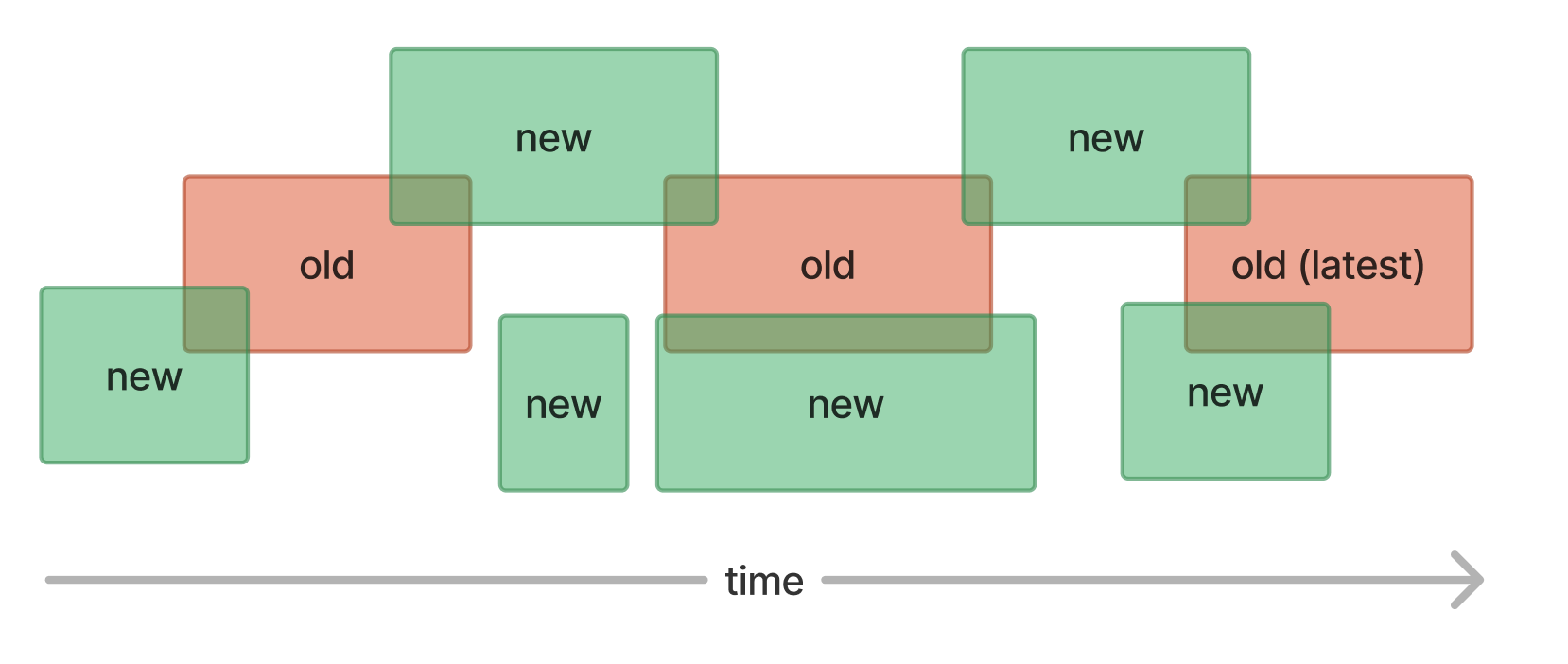
We need to find the previous and next overlapping transactions if any.
Scenario 1
Both previous and next overlapping old transactions exist. As a result, we shrink the previous old transaction to end right before the new one. Similarly, we shrink the new transaction to end right before the next old one.
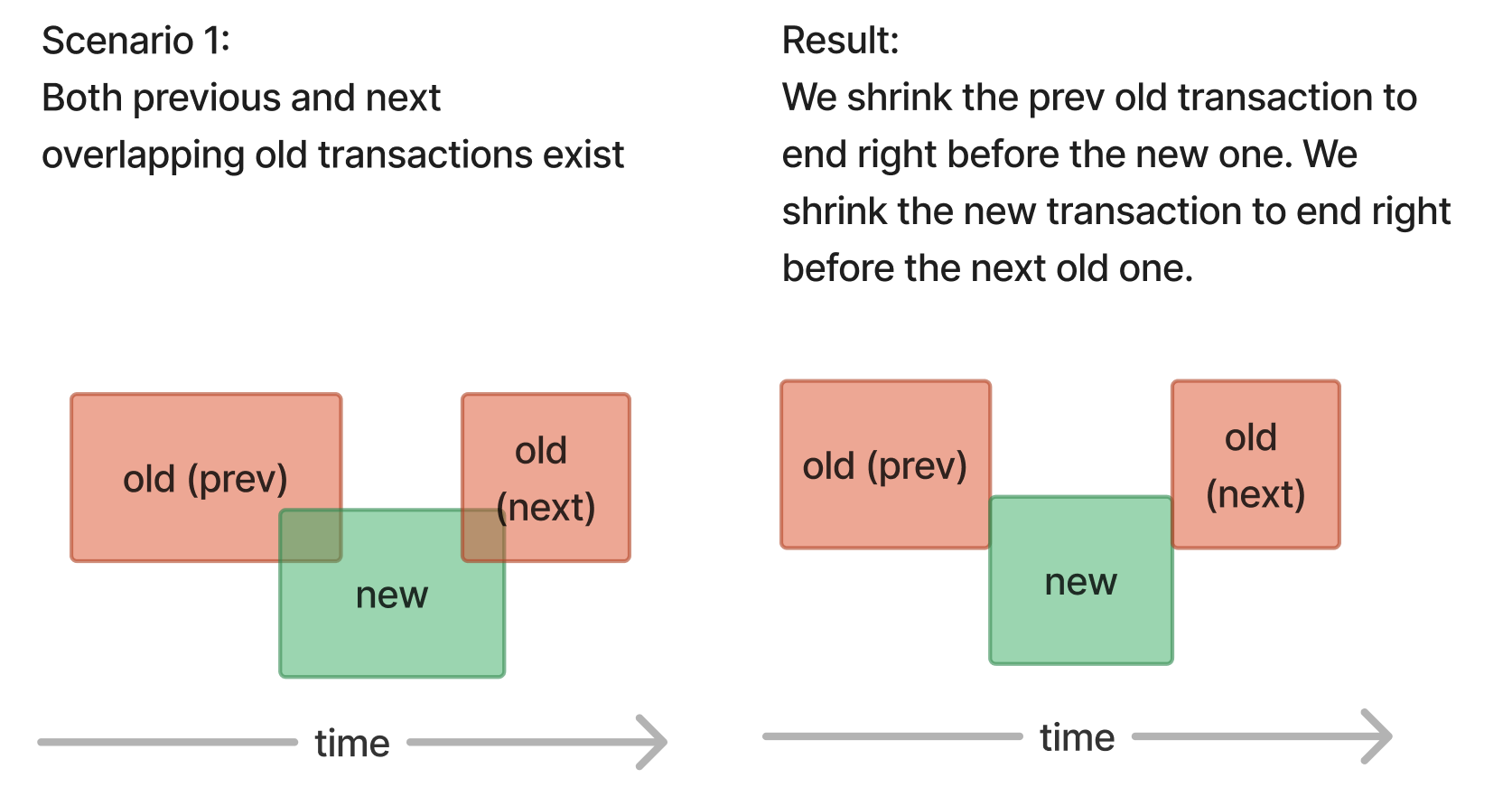
Scenario 2
Only the previous overlapping old transaction exist. As a result, we shrink the prev transaction to end right before the new one. The new transaction is not changed.
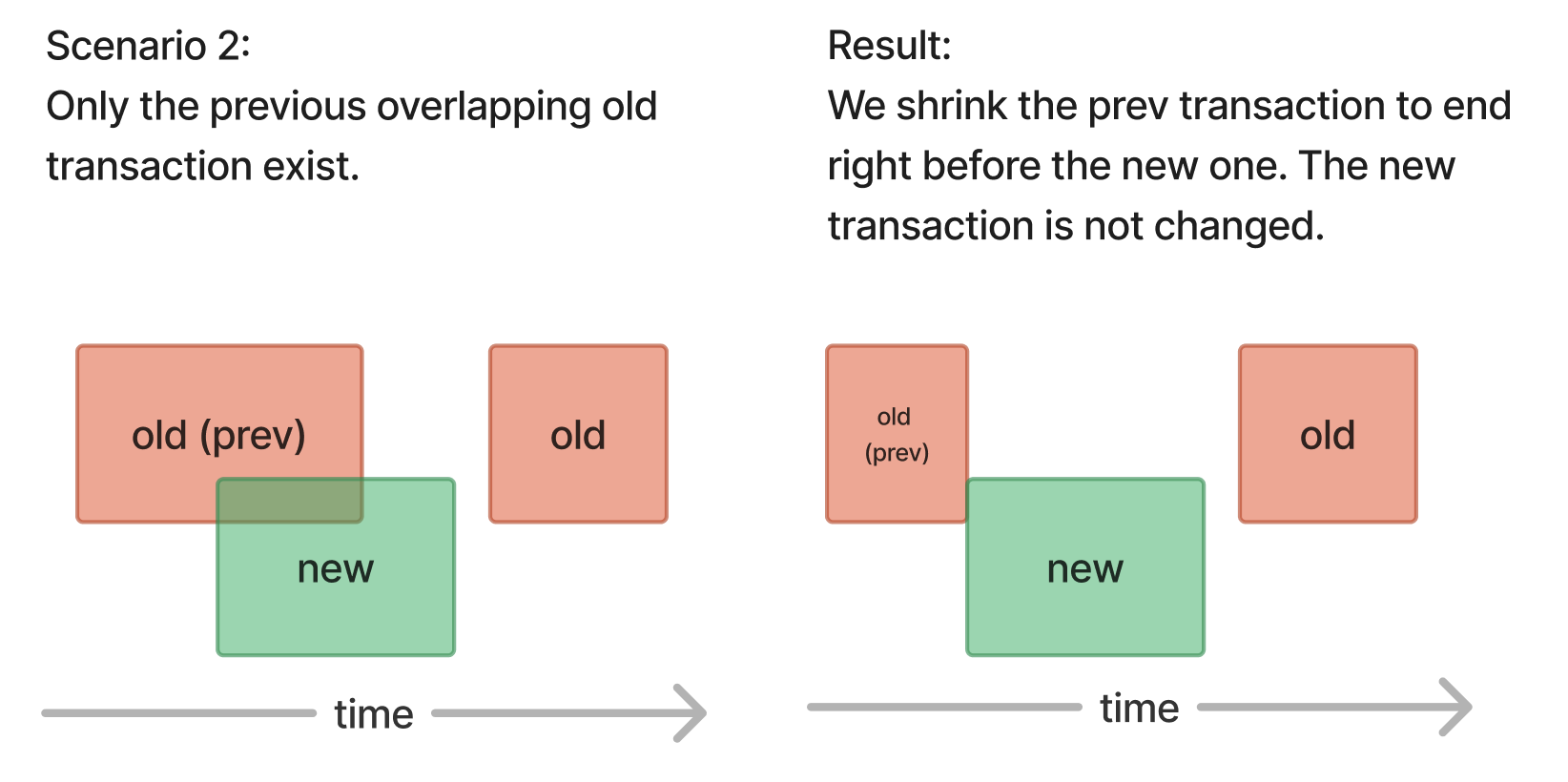
Scenario 3
Only the next overlapping old transaction exist. As a result, we shrink the new transaction to end right before the next old one.
Scenario 4
There’s no old transaction overlapping with the new one. As a result, we just store the new transaction as is.
Scenario 5
The new transaction overlaps completely a old one (prev). As a result, we send ERROR, the new transaction is skipped.
Move back the latest_expiring_transaction start date if needed
Context
We know that the new transaction ends after the latest old one.
Scenario 1
Old transaction starts before and ends during new one. As a result, we shrink the old transaction to end right before the new one
Scenario 2
Old transaction starts and ends during new one. As a result, we send ERROR, the new transaction is skipped.
Scenario 3
Old transaction starts and ends before the new one. As a result, the new transaction is saved, the old one is not modified.
The following limitations apply during Beta period:
- For
purchaseJSON withexternal_subscriptionobject:- You cannot change the
customer_idfield directly in the External Purchases payload. To move purchases between App User IDs, use the Developer API v2 Transfer endpoint instead. - We don't generate a new event in a scenario, when
current_period_ends_atwas in the future, and it's changed to a different future date. - We support the following options for the
auto_renew_statusfield:will_renew,will_not_renew,unknownvalue. We omit thewill_change_productfor now, meaning that we don't support Upgrades, Downgrade, Crossgrades and resulting event (PRODUCT_CHANGEevent). - Family shared subscriptions are not supported (but you can still create shared subscriptions as regular subscriptions).
- You cannot change the
- In a scenario when payments are posted after a subscription or purchase was created we don't generate Events (since the revenue information was already sent with the
INITIAL_PURCHASE/RENEWALevent) - Receipt validation:
- Currently, we do not validate receipts or data posted to RevenueCat via the External purchases API. Customers must ensure that data posted to the endpoint is already validated, and they need to ensure that the External API Key is not getting exposed to the public.
- Refunds:
- In the scenario when the third party payment service provider retains commissions in case of a refund, Revenuecat does not track negative revenues. Meaning, that in such cases, you will see data discrepancies with the equivalent of the commission retained by the payment service provider.
- Entitlement identifier:
- We support only new entitlement identifiers (not the legacy version).
- Backfills that modify
current_period_ends_atdate, do not alter existing Events, which means that the Customer history won't reflect accurately the most up to dateexpiration_at_ms. - If a different
source_subscription_identifiergets provided, doesn’t matter if it’s the same product, we can end up with concurrent transactions EXPIRATIONEvents are not fired automatically. The developer needs to explicitly send a request to the External Purchases API endpoint whenstatuschanged toexpired.
Tracks the status of external purchases
Authorizations:
Request Body schema: application/jsonrequired
ExternalPurchase (object) or ExternalSubscription (object) (Purchase) The current status of one external purchase to track | |||||||||||||||||||
Any of
| |||||||||||||||||||
ExternalSubscriptionPayment (object) or ExternalPurchasePayment (object) (Payment) The current status of one external payment to track | |||||||||||||||||||
Any of
| |||||||||||||||||||
Responses
Request samples
- Payload
{- "purchase": {
- "object": "external_purchase",
- "customer_id": "string",
- "source_purchase_identifier": "string",
- "source_product_identifier": "string",
- "updated_at": "2019-08-24T14:15:22Z",
- "status": "owned",
- "environment": "production",
- "metadata": { }
}, - "payment": {
- "object": "external_subscription_payment",
- "source_subscription_identifier": "string",
- "payment_identifier": "string",
- "processed_at": "2019-08-24T14:15:22Z",
- "country": "string",
- "amount_in_local_currency": {
- "currency": "string",
- "gross": 0,
- "tax": 0,
- "commission": 0
}, - "amount_in_usd": {
- "gross": 0,
- "tax": 0,
- "commission": 0
}, - "active_offer_type": "free_trial",
- "active_offer": "string"
}
}Response samples
- 200
- 400
- 409
- 429
{- "purchase": "string",
- "payment": "string"
}