Supporting offers



If you're providing offers to your customers such as introductory offers, offer codes, or promotional offers; you can configure your paywall to support them.
Introductory offers
When a product on the App Store or Play Store has an introductory offer attached to it, it'll be automatically offered to customers who are eligible for it when they attempt a purchase. To ensure the content of your paywall also correctly reflects that offer and highlights its benefits, all text fields can be configured to have unique strings based on their eligibility for the introductory offer on the selected package using Rules.
To configure a custom string for a text component based on intro offer eligibility:
- Click on the text component in the Layers panel you'd like to configure
- Click the
+icon next toText field for an introductory offerto expand that property and enter a custom string
You can also show or hide entire components based on intro offer eligibility using visibility rules.
On the Play Store, customers may be presented multiple offers to begin their subscription. If that's the case for your app, use the Play Store only: Text field for multiple introductory offers property to configure a custom string for those customers, and consider using the secondary offer variables to reference the correct price and duration of the second offer if needed.
Offer codes (App Store only)
If you're providing offer codes to your customers, you can configure your paywall to support them by adding a button component to your paywall that is set to navigate to the offer code redemption sheet.
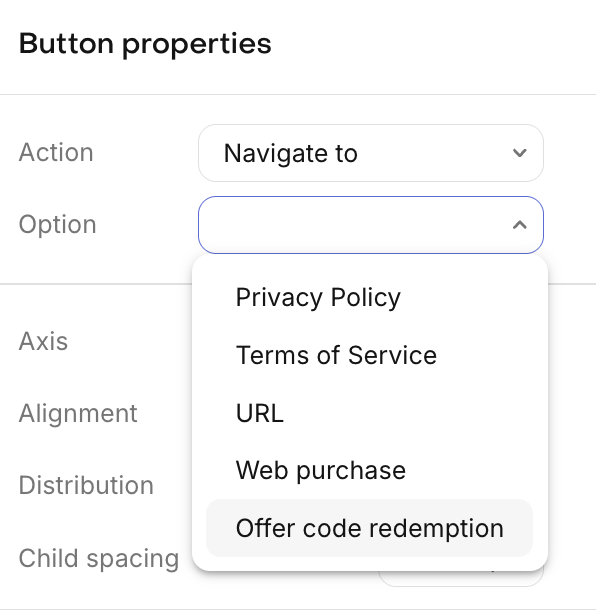
When a customer taps on an offer code redemption button, iOS's native offer code redemption sheet will be presented for them to enter and accept the offer. To learn more about how to configure offer codes, click here.
Supported SDK Versions
Offer code redemption is supported on the following SDK versions:
| RevenueCat SDK | Supported version |
|---|---|
| purchases-ios | 5.34.0 and up |
| react-native-purchases | 9.2.0 and up |
| purchases-flutter | 9.2.0 and up |
| purchases-kmp | 2.1.0+16.2.0 and up |
| purchases-capacitor | 11.1.1 and up |
If an offer code redempetion button is served to customers on an unsupported SDK version, the button will not be displayed.
Promotional offers
Adding a promotional offer
If you're providing promotional offers to your customers, you can configure your paywall to support them by adding the promotional offer identifier to each package component.
On each package component, there is a Promotional Offer section with fields for the App Store and the Play Store.
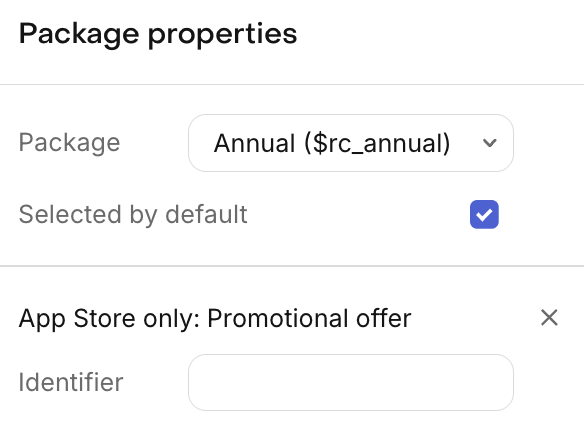
- App Store: Set this to the identifier of the promotional offer you'd like to apply. This maps to the Promotional Offer Identifier field in App Store Connect. To learn more about how to create promotional offers on the App Store, click here.
- Play Store: Set this to the offer ID of the Play Store offer you'd like to apply. This maps to the Offer ID configured in the Google Play Console for the subscription's base plan. To learn more about how to create offers on the Play Store, click here.
Supported SDK Versions
Promotional offers are supported on the following SDK versions:
| RevenueCat SDK | App Store supported version | Play Store supported version |
|---|---|---|
| purchases-ios | 5.34.0 and up | N/A |
| purchases-android | N/A | 9.21.0 and up |
| react-native-purchases | 9.2.0 and up | 9.9.0 and up |
| purchases-flutter | 9.2.0 and up | 9.12.0 and up |
| purchases-unity | 8.1.0 and up | 8.5.0 and up |
| purchases-kmp | 2.1.0+16.2.0 and up | 2.6.0+17.41.0 and up |
| purchases-capacitor | 11.1.1 and up | 12.1.3 and up |
| purchases-cordova | 7.1.0 and up | 7.3.0 and up |
If a promotional offer is added to a paywall that's served to customers on an unsupported SDK version, the product will be presented without the promotional offer applied.
How eligibility is determined
App Store
Any customer you display a paywall with a promotional offer to will be eligible for that offer if they've made a prior purchase before. This eligibility is determined by Apple's promotional offer system.
Play Store
When a Play Store offer ID is configured on a package, the SDK will attempt to apply that specific offer at purchase time. If the customer is eligible for it, that offer will be used instead of any other available offers (such as introductory offers).
If the configured offer is not available for the customer (e.g., they're not eligible or the offer ID is misconfigured), the SDK will fall back to the default behavior of applying the best available offer, such as an introductory offer if the customer is eligible for one.
To control which customers see that offer, consider using Targeting; where you can modify which paywall is shown to different customer audiences by Custom Attributes, different paywall Placements, and more. Learn more.
Customizing content based on promotional offer eligibility
When a promotional offer identifier is set on a package, we'll check if the customer seeing that paywall is eligible for the promotional offer. If they are, we'll show the promotional offer text fields for each text component where they're configured, so that you can use a unique string to describe the price & offer.
You can also show or hide entire components based on promotional offer eligibility using visibility rules.
When a customer is eligible for a promotional offer, the variables prefixed with offer_ will represent the details of that offer, and should be used in the promotional offer text fields to describe the offer. Those same variables should be used in the introductory offer text field as well.
If the customer is eligible for a promotional offer, that offer will take precedence over the introductory offer.