Audiences
Cohort, save, and export customer audiences



RevenueCat Audiences allow you to cohort, save, and export groups of customers based on interactions with your app and purchase behavior.
Audiences are segments of your customers inside RevenueCat. They can include both paying and non-paying users. Some audiences are created automatically for every project (see Default audiences below), and you can also create custom audiences with your own filter logic.
The Customers dashboard tab doesn't support toggling the 'View sandbox data' switch as there is no concept of a sandbox customer in RevenueCat, only sandbox transactions.
To view customers who have made sandbox transactions you can use the default Sandbox audience or apply the Has made sandbox purchase filter to an audience.
Find an Individual Customer
To find an individual customer, use the search bar or the hotkey (⌘K on Mac and iPad, Ctrl+K on other devices) to search by an exact match of their App User ID, Transaction ID, Email Attribute, or Order ID (iOS only).
Looking up customers is real-time. They will be searchable here as soon as a customer exists in RevenueCat.

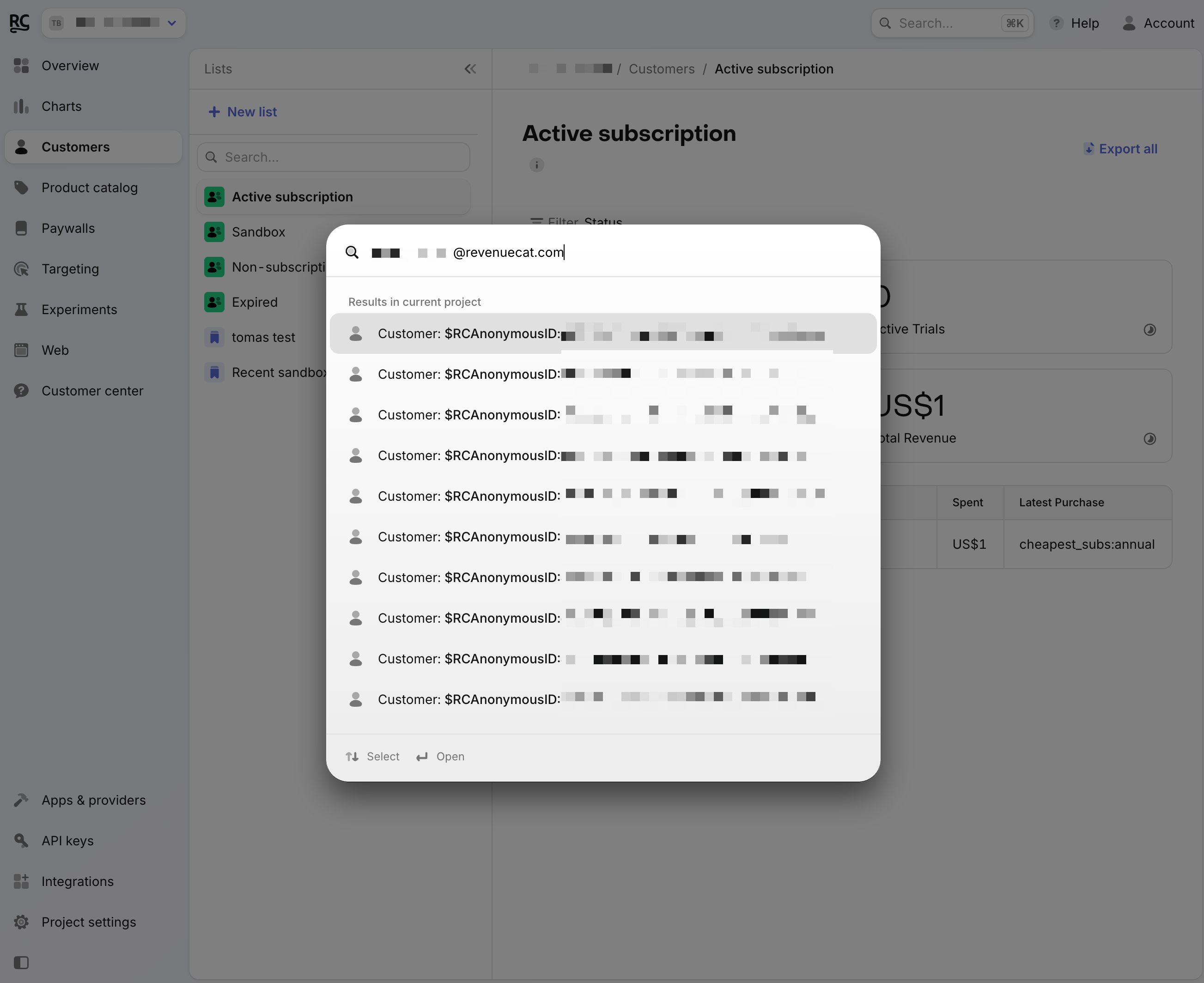
iOS Order ID
To find a customer via Order ID, you can follow our guide on setting up In-App Purchase Keys to unlock this feature. The transaction must show as completed in the Apple Purchase History to be considered a valid Order ID. Note that Transaction ID refers to the identifier in Google Play console and order emails of GPA.1234.1223–, and for Stripe si_abcefg, whereas Order ID refers to the identifier from Apple's order emails.
Customer lookup by Transaction ID and Order ID works for production purchases only.
Viewing an audience
Choose a project
Audiences are scoped to the project you have selected in the dashboard.
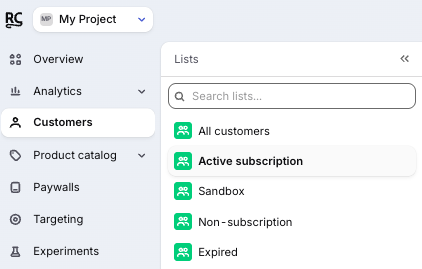
Default audiences
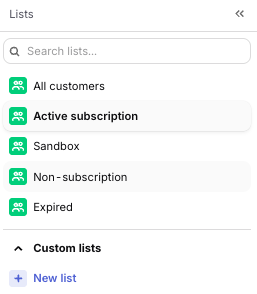
RevenueCat creates default audiences for every project. Default audiences give you insight into customers with subscription, non-subscription, or sandbox purchase activity.
| Default audience | Description |
|---|---|
| All customers | A live preview of every customer in the project. Use this as the starting point to filter customers without saving an audience. |
| Active subscribers | Any customer with a production subscription or trial status that has not expired, including cancelled, intro period, grace period, and billing issue. |
| Sandbox | Any customer with a sandbox subscription or non-subscription purchase. |
| Non-subscription | Any customer with a production non-subscription purchase. |
| Expired | Any customer whose production subscription or trial has expired and who does not also have another active production subscription or trial. |
If a customer only has a Granted Entitlement, they are not counted in the Active subscribers default audience.
Custom audiences
In addition to default audiences, you can create new custom audiences with the audience builder. Custom audiences are saved filter definitions that appear in the Audiences sidebar.
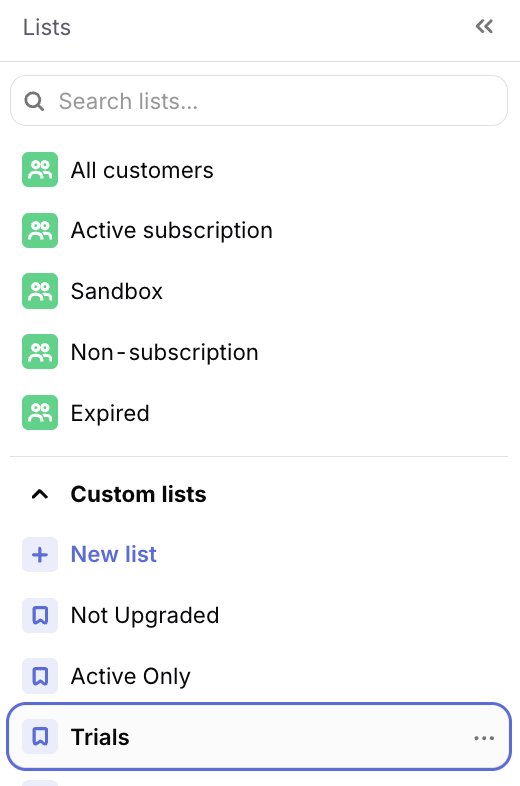
Any custom audiences you create will also be visible to any project collaborators with Read or Admin privileges.
Creating a custom audience
To create a custom audience:
- Open Audiences.
- Open All customers or click New audience.
- Click Filter and add one or more audience conditions.
- Use Add condition to narrow the current group.
- Use Add group to add another set of matching rules.
- Click Save audience, then name the audience.
Saved custom audiences can be reopened, edited, and exported. Updating the filters changes which customers match the audience.
You can also use saved audiences to choose which customers enroll in an experiment. When an experiment starts, it saves a snapshot of the audience's filters, so later edits to the audience don't change who a running experiment enrolls.
Overview stats
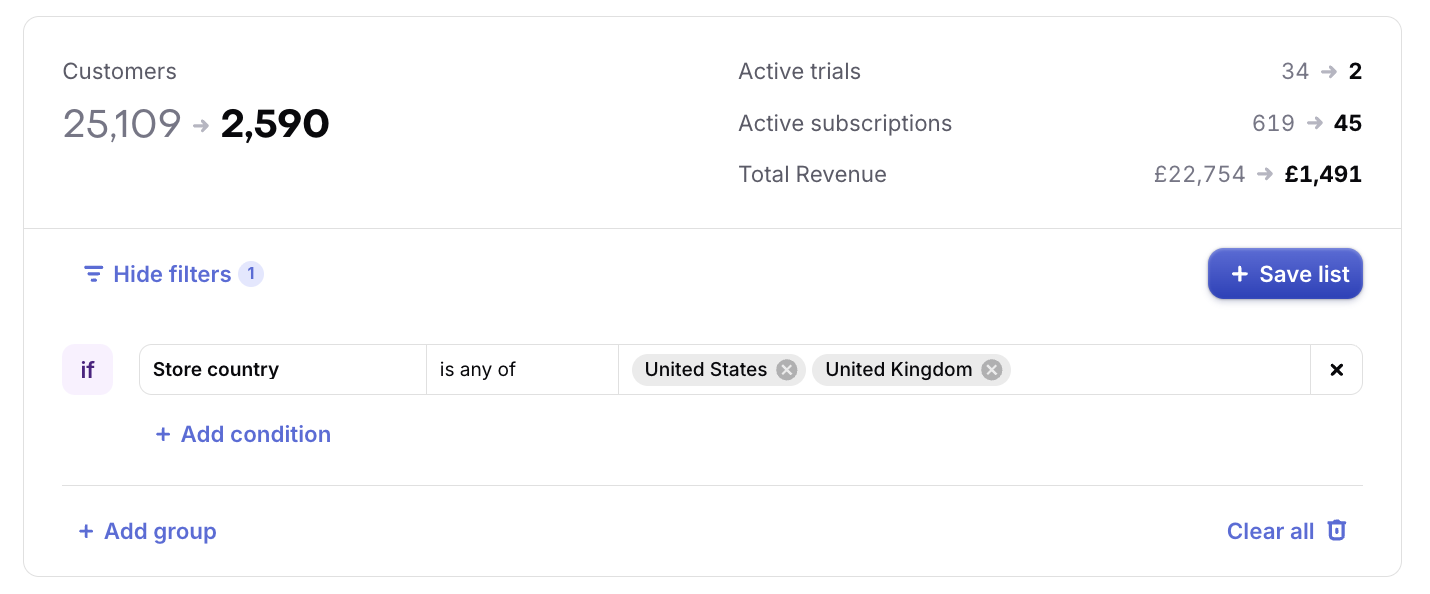
For each audience, RevenueCat computes overview stats for the cohort of customers. Active Trials, Active Subscriptions, and Total Revenue count production activity only.
| Metric | Description |
|---|---|
| Customers | The total number of customers in the audience. Customers are not production or sandbox, so this count is not affected by the production-only rule above. |
| Active Trials | The total number of active production trials. This includes trials which are cancelled, or in their grace period, and have not yet expired. |
| Active Subscriptions | The total number of active production subscriptions. This includes subscriptions which are cancelled, or in their grace period, and have not yet expired. |
| Total Revenue | The total production revenue (USD) that the audience has generated, minus refunds. |
Active subscribers in default audiences or Charts may be lower than Active Subscriptions here if some customers have multiple active subscriptions.
Audience data
For each audience, RevenueCat displays a live preview of matching customers in the dashboard. Audience stats and the customer preview update in real time as you add, remove, or change filters.
The stats cards show Customers, Active Trials, Active Subscriptions, and Total Revenue for the current filter set. You can view these totals on All customers without saving an audience.
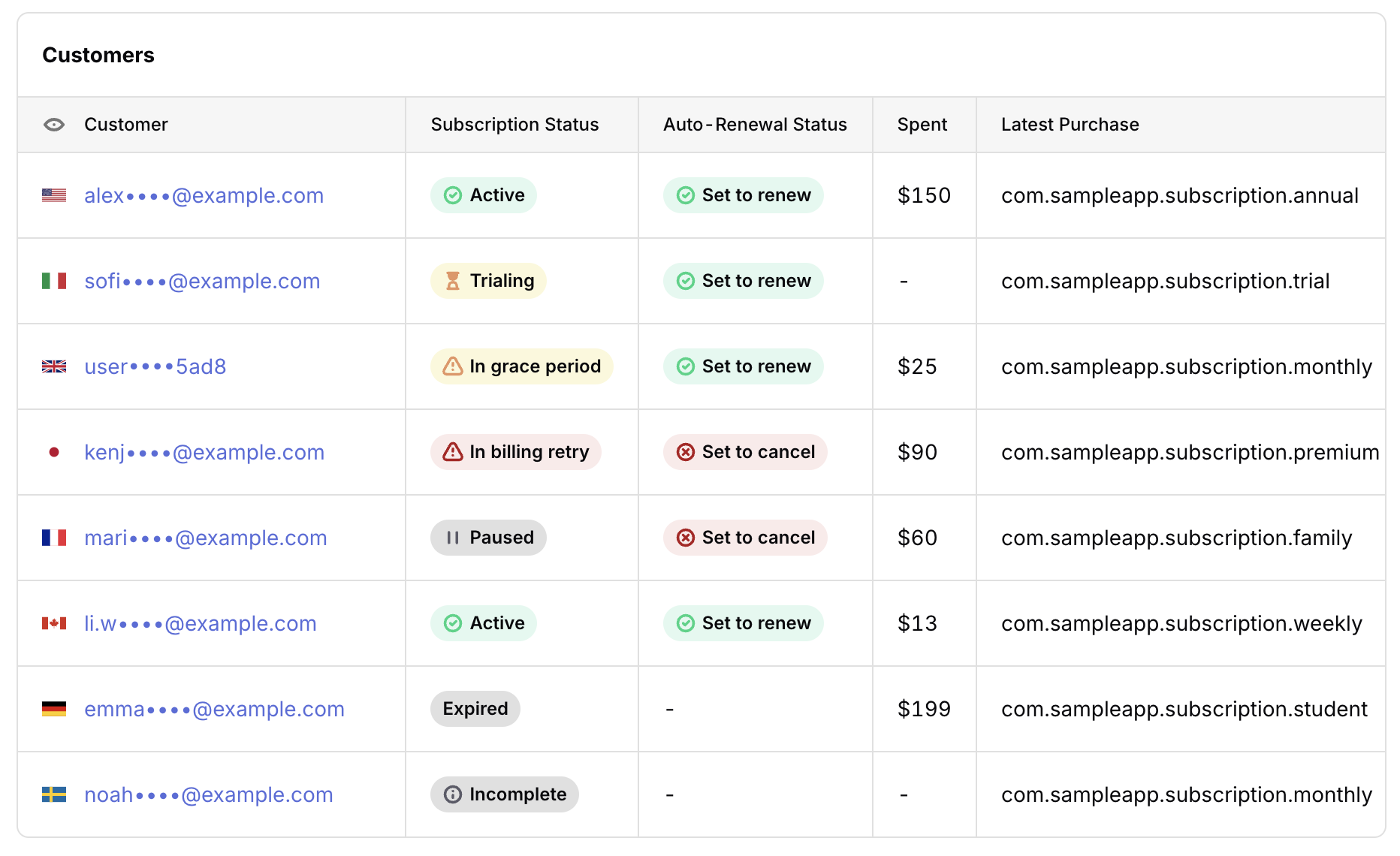
The preview table shows a sample of matching customers. If the audience has more customers than shown in the preview, use Export all to download all matches.
The dashboard table includes:
| Column | Description |
|---|---|
| Customer | App User ID or email, with country |
| Subscription Status | Current subscription status, such as Active, Trialing, In Grace Period, or Expired. See Subscription status filter below. |
| Auto-Renewal Status | Whether the customer's subscription is set to renew or cancel. Blank if not applicable. |
| Spent | Total revenue from the Customer in your Dashboard display currency |
| Latest Purchase | Most recently purchased product identifier |
The country flag in the Customer column uses the Customer's last-seen IP country.
The Spent value converts the Customer's combined USD total using the latest available exchange rate and rounds the displayed value. It may differ from Total Spent in the Customer Profile, which converts each purchase using its purchase-date exchange rate.
Additional columns are available when exporting data.
Filters
Filters allow you to choose which customers appear in your audience. Within a filter group, conditions are applied as AND filters. When you add another group, customers can match the first group OR the next group.
For example, you can create an audience for customers who are active subscribers on iOS, or active subscribers on Android, by creating one group for each platform.
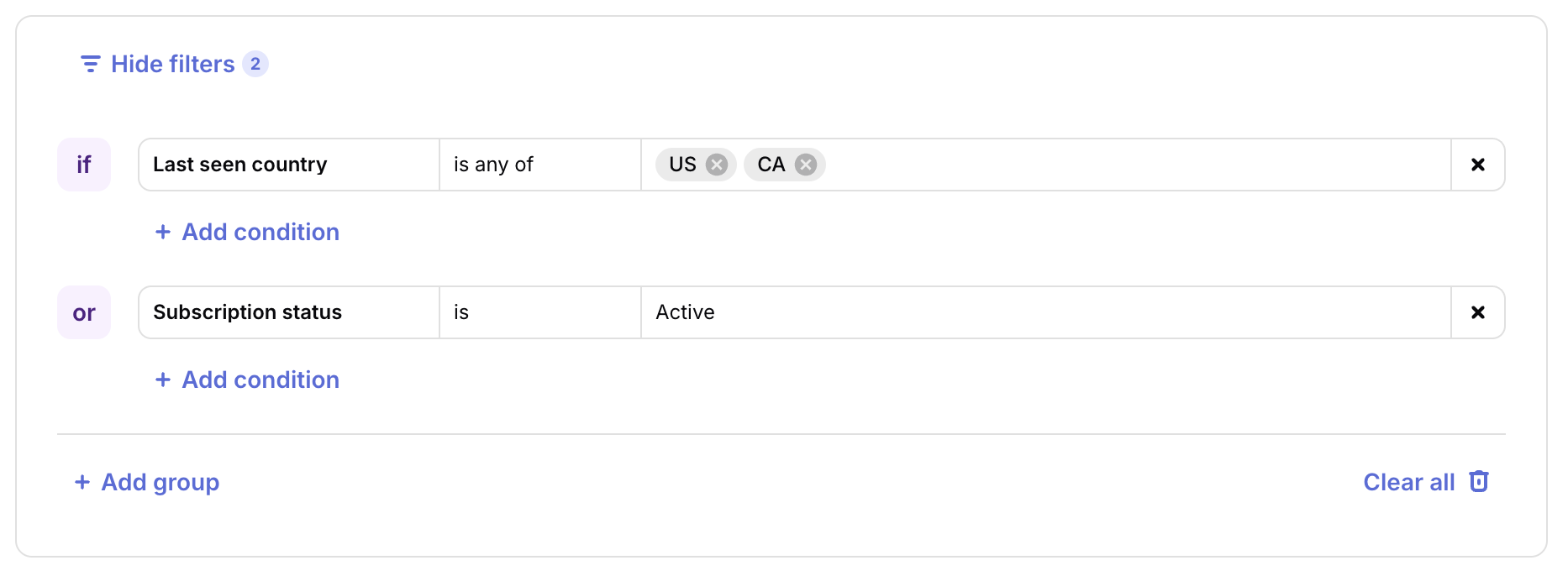
See the table below for all filters you can apply to your audiences. The Operators column lists the operator values accepted by the audience builder API.
| Filter | Type | Operators | Description |
|---|---|---|---|
| Ad | Multi Select | is, isNot, isAnyOf, isNotAnyOf, contains, doesNotContain, isEmpty, isNotEmpty | The $ad Attribute for the customer. |
| Ad group | Multi Select | is, isNot, isAnyOf, isNotAnyOf, contains, doesNotContain, isEmpty, isNotEmpty | The $adGroup Attribute for the customer. |
| All purchased product identifiers | String list | is, isNot, contains, doesNotContain, containsAnyOf, isEmpty, isNotEmpty | A comma-separated list of distinct product identifiers from all of the customer's production purchases. |
| Any active store | Multi Select | is, isNot, isAnyOf, isNotAnyOf, isEmpty, isNotEmpty | A store associated with any production subscription that is active or in a grace period. |
| App ID | String | is, isNot, contains, doesNotContain, isEmpty, isNotEmpty | The ID of the app associated with the customer's latest production purchase, or their last-seen app if they have no purchase app. |
| App name | String | is, isNot, contains, doesNotContain, isEmpty, isNotEmpty | The name of the app associated with the customer's latest production purchase, or their last-seen app if they have no purchase app. |
| App user ID | String | is, isNot, contains, doesNotContain, isEmpty, isNotEmpty | The customer's user identifier in RevenueCat. |
| App version | String | is, isNot, contains, doesNotContain, isEmpty, isNotEmpty | The version of the app that the customer was last seen using. |
| Auto-renewal status | Bool | is, isNot | Whether the customer's subscription is set to renew (true) or cancel (false). |
| Campaign | Multi Select | is, isNot, isAnyOf, isNotAnyOf, contains, doesNotContain, isEmpty, isNotEmpty | The $campaign Attribute for the customer. |
| Creative | Multi Select | is, isNot, isAnyOf, isNotAnyOf, contains, doesNotContain, isEmpty, isNotEmpty | The $creative Attribute for the customer. |
| Currently trialing | Bool | is, isNot | Whether the customer is currently in a free trial (true or false). |
| Custom attribute | Multi Select | is, isNot, isAnyOf, isNotAnyOf, isEmpty, isNotEmpty | The value of a project-specific custom customer attribute. Each available attribute appears as a separate filter. |
| String | is, isNot, contains, doesNotContain, isEmpty, isNotEmpty | The $email Attribute for the customer. | |
| First purchase date | Date | before, beforeOrOn, on, after, afterOrOn, within, between, notBetween, isEmpty, isNotEmpty | The date of the customer's first transaction, including free trials. |
| First seen or purchased | Date | before, beforeOrOn, on, after, afterOrOn, within, between, notBetween, isEmpty, isNotEmpty | The earliest known date for the customer, based on creation, first-seen, original-purchase, and first-purchase dates. |
| GPS ad ID | String | is, isNot, contains, doesNotContain, isEmpty, isNotEmpty | The $gpsAdId Attribute for the customer. |
| Has been granted entitlement via RC | Bool | is, isNot | Whether the customer's latest transaction is a RevenueCat Granted Entitlement. |
| Has made non-subscription purchase | Bool | is, isNot | Whether the customer has made any production non-subscription purchases (true or false). |
| Has made sandbox purchase | Bool | is, isNot | Whether the customer has made any sandbox purchases (true or false). |
| IDFA | String | is, isNot, contains, doesNotContain, isEmpty, isNotEmpty | The $idfa Attribute for the customer. |
| IDFV | String | is, isNot, contains, doesNotContain, isEmpty, isNotEmpty | The $idfv Attribute for the customer. |
| Keyword | Multi Select | is, isNot, isAnyOf, isNotAnyOf, contains, doesNotContain, isEmpty, isNotEmpty | The $keyword Attribute for the customer. |
| Last ad impression | Date | before, beforeOrOn, on, after, afterOrOn, within, between, notBetween, isEmpty, isNotEmpty | The date of the customer's most recent ad impression. |
| Last rewarded ad completion | Date | before, beforeOrOn, on, after, afterOrOn, within, between, notBetween, isEmpty, isNotEmpty | The date the customer last completed a rewarded ad. |
| Last seen | Date | before, beforeOrOn, on, after, afterOrOn, within, between, notBetween, isEmpty, isNotEmpty | The date the customer was last seen by RevenueCat. |
| Last seen app | Multi Select | is, isNot, isAnyOf, isNotAnyOf, isEmpty, isNotEmpty | The app the customer was last seen using. |
| Last seen country | Multi Select | is, isNot, isAnyOf, isNotAnyOf, isEmpty, isNotEmpty | The country where the customer was last seen, determined by IP address. |
| Latest entitlements | String list | is, isNot, contains, doesNotContain, containsAnyOf, isEmpty, isNotEmpty | The identifiers of the Entitlements attached to the customer's latest production purchase. |
| Latest expiration date | Date | before, beforeOrOn, on, after, afterOrOn, within, between, notBetween, isEmpty, isNotEmpty | The latest effective expiration date across the customer's production subscriptions. |
| Latest offer | String | is, isNot, contains, doesNotContain, isEmpty, isNotEmpty | The identifier of the latest offer the customer used to make a purchase, if applicable. |
| Latest offer type | Multi Select | is, isNot, isAnyOf, isNotAnyOf, isEmpty, isNotEmpty | The type of the latest offer the customer used to make a purchase, if applicable. |
| Latest ownership status | Multi Select | is, isNot, isAnyOf, isNotAnyOf, isEmpty, isNotEmpty | The ownership type of the customer's latest purchase, used to distinguish family sharing purchases. |
| Latest product | Multi Select | is, isNot, isAnyOf, isNotAnyOf, contains, doesNotContain, isEmpty, isNotEmpty | The customer's latest production product. Exact operators use the RevenueCat product ID; substring operators use its store identifier. |
| Latest purchase store | Multi Select | is, isNot, isAnyOf, isNotAnyOf, isEmpty, isNotEmpty | The latest store the customer purchased from. |
| Latest purchased offering | String | is, isNot, contains, doesNotContain, isEmpty, isNotEmpty | The offering that the customer's latest purchase was made from. |
| Latest store country | Multi Select | is, isNot, isAnyOf, isNotAnyOf, isEmpty, isNotEmpty | The latest store country that the customer purchased from. |
| Latest trial end date | Date | before, beforeOrOn, on, after, afterOrOn, within, between, notBetween, isEmpty, isNotEmpty | The date the customer's free trial expires. |
| Latest trial start date | Date | before, beforeOrOn, on, after, afterOrOn, within, between, notBetween, isEmpty, isNotEmpty | The date the customer started their free trial. |
| Locale | String | is, isNot, contains, doesNotContain, isEmpty, isNotEmpty | The customer's last seen locale. |
| Media source | Multi Select | is, isNot, isAnyOf, isNotAnyOf, contains, doesNotContain, isEmpty, isNotEmpty | The $mediaSource Attribute for the customer. |
| Most recent cancellation date | Date | before, beforeOrOn, on, after, afterOrOn, within, between, notBetween, isEmpty, isNotEmpty | The date the customer unsubscribed from their subscription. Will be set back to null if the customer later resubscribes. |
| Most recent purchase date | Date | before, beforeOrOn, on, after, afterOrOn, within, between, notBetween, isEmpty, isNotEmpty | The customer's latest transaction date. |
| Most recent renewal date | Date | before, beforeOrOn, on, after, afterOrOn, within, between, notBetween, isEmpty, isNotEmpty | The customer's latest renewal date. This could be the same as the most recent purchase date. |
| Most recent trial cancellation date | Date | before, beforeOrOn, on, after, afterOrOn, within, between, notBetween, isEmpty, isNotEmpty | The date the customer unsubscribed from their free trial. Will be set back to null if the customer later resubscribes. |
| Original app user ID | String | is, isNot, contains, doesNotContain, isEmpty, isNotEmpty | The customer's original user identifier in RevenueCat. |
| Phone number | String | is, isNot, contains, doesNotContain, isEmpty, isNotEmpty | The $phoneNumber Attribute for the customer. |
| Platform | Multi Select | is, isNot, isAnyOf, isNotAnyOf, contains, doesNotContain, isEmpty, isNotEmpty | The platform that the customer was last seen using. |
| Platform version | String | is, isNot, contains, doesNotContain, isEmpty, isNotEmpty | The version of the platform that the customer was last seen using. |
| Experiment | Multi Select | is, isNot, isAnyOf, isNotAnyOf, contains, doesNotContain, isEmpty, isNotEmpty | The unique ID of the experiment that the customer was enrolled in, if applicable. |
| Experiment variant | Multi Select | is, isNot, isAnyOf, isNotAnyOf, isEmpty, isNotEmpty | The variant in the experiment that the customer was enrolled in, if applicable. |
| Project ID | String | is, isNot, contains, doesNotContain, isEmpty, isNotEmpty | The ID of the project in RevenueCat. |
| Project name | String | is, isNot, contains, doesNotContain, isEmpty, isNotEmpty | The name of the project in RevenueCat. |
| SDK version | String | is, isNot, contains, doesNotContain, isEmpty, isNotEmpty | The RevenueCat SDK version being used in the customer's last seen app version. |
| Store country | Multi Select | is, isNot, isAnyOf, isNotAnyOf, isEmpty, isNotEmpty | The customer's latest storefront. |
| Subscription status | Multi Select | is, isNot, isAnyOf, isNotAnyOf, isEmpty, isNotEmpty | The customer's current subscription status. |
| Total ad impressions | Number | equal, notEqual, greaterThanOrEqual, lessThanOrEqual, greaterThan, lessThan, isEmpty, isNotEmpty | The total number of ad impressions the customer has had over their lifetime. Empty if the customer has no ad activity. |
| Total ad revenue | Number | equal, notEqual, greaterThanOrEqual, lessThanOrEqual, greaterThan, lessThan, isEmpty, isNotEmpty | The customer's lifetime ad revenue, converted to the currency selected for this condition. Empty if the customer has no ad activity. |
| Total number of renewals | Number | equal, notEqual, greaterThanOrEqual, lessThanOrEqual, greaterThan, lessThan, isEmpty, isNotEmpty | The total number of renewals the customer has had. A trial conversion is considered a renewal. |
| Total rewarded ad completions | Number | equal, notEqual, greaterThanOrEqual, lessThanOrEqual, greaterThan, lessThan, isEmpty, isNotEmpty | The total number of rewarded ads the customer has completed over their lifetime. Empty if the customer has no ad activity. |
| Total spent | Number | equal, notEqual, greaterThanOrEqual, lessThanOrEqual, greaterThan, lessThan, isEmpty, isNotEmpty | The customer's total gross production revenue converted to the currency selected for this condition. |
| :::info[Operator value formats] |
- Bool filters use
trueorfalse. - Date filters use ISO dates (
YYYY-MM-DD) for absolute operators.withinuses a relative duration ({"direction": "last", "value": 30, "unit": "days"}). The direction can belastornext, and the unit can beminutes,hours, ordays.betweenandnotBetweenuse{"from": "YYYY-MM-DD", "to": "YYYY-MM-DD"}. - Number filters use numeric values.
- Total spent and Total ad revenue amount conditions support
USD,EUR,GBP,AUD,CAD,JPY,BRL,KRW,CNY,MXN,SEK,PLN,NZD, andCHF. The dashboard defaults new conditions to your display currency. API conditions useUSDwhencurrencyis omitted. - Non-USD amounts are converted from the customer's USD total using the latest available exchange rate.
- String
containsanddoesNotContaincomparisons are case-insensitive. - String list filters store comma-separated identifiers.
containsAnyOfmatches when any supplied value is a substring of the stored list. isEmptyandisNotEmptytest whether a value is missing, not whether it is an empty string. :::
Date filters use UTC calendar days. For example, on 2021-01-01 covers the interval from 2021-01-01T00:00:00Z up to, but not including, 2021-01-02T00:00:00Z.
Date filters such as Last seen, First seen or purchased, First purchase date, Most recent purchase date, Most recent renewal date, Latest expiration date, Latest trial start date, Latest trial end date, Most recent cancellation date, Most recent trial cancellation date, Last ad impression, and Last rewarded ad completion support relative ranges, such as customers seen within the last 30 days. Relative date filters are evaluated when the audience is previewed or exported.
Last ad impression, Last rewarded ad completion, Total ad impressions, Total ad revenue, and Total rewarded ad completions are refreshed about once an hour, unlike other filters. Recent ad activity can take up to an hour to affect which customers match.
Subscription status filter
The Subscription status filter provides these options:
- Active: The customer has an active paid subscription.
- Trialing: The customer is in a free trial period.
- In grace period: The customer's subscription is in a grace period after a billing issue.
- In billing retry: The customer's subscription is in a billing retry period.
- Paused: The customer's subscription is paused.
- Expired: The customer's subscription has ended and is no longer active.
- Incomplete: The customer's subscription setup is incomplete.
- Unknown: The customer's subscription status could not be determined.
Platform filter
The Platform filter provides these options:
- iOS
- Android
- Web
- macOS
- Amazon
- Roku
- tvOS
- visionOS
- watchOS
Latest and active store filters
The Latest purchase store and Any active store filters provide these options:
- App Store (
app_store) - Play Store (
play_store) - Promotional (
promotional) - Mac App Store (
mac_app_store) - Stripe (
stripe) - Amazon (
amazon) - Roku (
roku) - RevenueCat Billing (
rc_billing) - Paddle (
paddle) - External (
external)
Latest ownership status filter
The Latest ownership status filter provides these options:
- Purchased (
PURCHASED): The customer purchased the subscription directly. - Family shared (
FAMILY_SHARED): The customer received access through family sharing.
Experiment variant filter
The Experiment variant filter provides these options:
- a
- b
- c
- d
Exporting Data
All customers matching an audience's filters can be exported. Exports are delivered as a .zip file containing a .csv. Exports are processed in the background, and you'll receive an email with a link to download the file. Emails are sent to the logged in account that requested the export. The download links are shareable and available for 30 days.
Below is a description of the .csv format for the exported data. Columns appear in this order in the export file.
| Column Name | Description |
|---|---|
| project_id | The ID of the project in RevenueCat. |
| project_name | The name of the project in RevenueCat. |
| app_id | The ID of the app the customer was last seen using. |
| app_name | The name of the app the customer was last seen using. |
| first_seen_at | Epoch timestamp in milliseconds when the customer was first seen by RevenueCat. |
| last_seen_at | Epoch timestamp in milliseconds when the customer was last seen by RevenueCat. |
| last_seen_app_version | The version of the app that the customer was last seen using. |
| last_seen_ip_country | The two-letter ISO 3166-1 alpha-2 code of the country where the user was last seen, determined by IP address of the customer API request. |
| last_seen_platform | The platform that the customer was last seen using. |
| last_seen_platform_version | The version of the platform that the customer was last seen using. |
| last_seen_sdk_version | The RevenueCat SDK version being used in the customer's last seen app version. |
| last_seen_locale | The device locale that the customer was last seen using. |
| price_experiment_id | The unique ID of the experiment that the customer was enrolled in (if applicable). |
| price_experiment_variant | The variant of the experiment that the customer was enrolled in (if applicable). |
The $email Attribute for the customer, if set. | |
| phone_number | The $phoneNumber Attribute for the customer, if set. |
| media_source | The $mediaSource Attribute for the customer, if set. |
| campaign | The $campaign Attribute for the customer, if set. |
| ad_group | The $adGroup Attribute for the customer, if set. |
| ad | The $ad Attribute for the customer, if set. |
| keyword | The $keyword Attribute for the customer, if set. |
| creative | The $creative Attribute for the customer, if set. |
| idfa | The $idfa Attribute for the customer, if set. |
| idfv | The $idfv Attribute for the customer, if set. |
| gps_ad_id | The $gpsAdId Attribute for the customer, if set. |
| custom_attributes | JSON representation of any custom Attributes set for the customer. |
| has_made_sandbox_purchase | T or F indicating whether the customer has made any sandbox purchases. |
| latest_entitlement | The most recently unlocked RevenueCat Entitlement identifier. |
| latest_entitlements | A comma-separated list of the customer's most recently unlocked Entitlement identifiers. |
| latest_product | The most recently purchased product identifier. |
| is_rc_promo | Whether the most recent transaction was a RevenueCat Granted Entitlement. |
| first_purchase_at | Epoch timestamp in milliseconds of the customer's first transaction. |
| trial_start_at | Epoch timestamp in milliseconds when the customer started a free trial. |
| trial_end_at | Epoch timestamp in milliseconds of the customer's free trial expiration date. |
| most_recent_purchase_at | Epoch timestamp in milliseconds of the customer's most recent transaction. |
| most_recent_renewal_at | Epoch timestamp in milliseconds of the customer's most recent renewal transaction. |
| latest_expiration_at | Epoch timestamp in milliseconds of the customer's latest expiration date. If greater than now, then the customer has an active subscription. |
| subscription_opt_out_at | Epoch timestamp in milliseconds when a subscription or trial cancellation was detected by RevenueCat. |
| trial_opt_out_at | Epoch timestamp in milliseconds when the latest trial cancellation was detected by RevenueCat. |
| total_renewals | The total number of subscription renewals for the customer. |
| total_spent | The total amount spent by the customer, shown in the currency selected in your Account Settings. |
| latest_store | The latest store that the customer purchased from. |
| latest_store_country | The latest store country that the customer purchased from. |
| latest_auto_renew_intent | T or F indicating whether the customer has chosen to have their subscription or trial auto-renew. |
| all_purchased_product_ids | A comma-separated list of all the product identifiers purchased by the customer. |
| most_recent_billing_issues_at | Epoch timestamp in milliseconds when a subscription billing issue was detected by RevenueCat. |
| status | The customer's legacy export status. See Export status values below. |
| has_made_a_non_subscription_purchase | T or F indicating whether the customer has made any non-subscription purchases. |
| latest_offer | The identifier of the latest offer that the customer used to make a purchase (if applicable). |
| latest_offer_type | The type of the latest offer that the customer used to make a purchase (if applicable). |
| latest_purchased_offering | The offering that the customer's latest purchase was made from. |
| latest_ownership_type | The ownership type of the customer's latest purchase, such as PURCHASED or FAMILY_SHARED. |
| app_user_id | The customer's user identifier in RevenueCat. |
| currency | The currency that total_spent and total_ad_revenue are provided in, based on the Display Currency you've configured in Account Settings. |
| total_ad_impressions | The total number of ad impressions for the customer over their lifetime. |
| total_ad_revenue_usd | The total ad revenue from the customer over their lifetime, in USD. Not converted to your Display Currency. |
| total_rewarded_ad_completions | The total number of rewarded ads the customer completed over their lifetime. |
| last_ad_impression_at | Epoch timestamp in milliseconds of the customer's most recent ad impression. |
| last_rewarded_ad_completion_at | Epoch timestamp in milliseconds when the customer last completed a rewarded ad. |
| total_ad_revenue | The customer's lifetime ad revenue in your Display Currency, at the latest exchange rate. Empty without ad activity or an exchange rate. |
Export status values
The status column in exports uses these values:
- active: The customer has an active paid subscription.
- free_trial: The customer is in a free trial period.
- intro_period: The customer's subscription is in a discounted introductory (non-free) period.
- promotional: The customer's latest transaction is a RevenueCat Granted Entitlement.
- billing_issue: The customer's subscription is experiencing a billing retry period.
- billing_issue_trial: The customer is in a trial period experiencing billing issues.
- cancelled: The customer has cancelled their subscription, but it has not expired yet.
- cancelled_trial: The customer has cancelled their trial, but it has not expired yet.
- expired: The customer's subscription has ended and is no longer active.
Note that there is a wait time of 30 minutes between each export.
Exported files
Audience exports are delivered as a .zip file containing a single .csv. The CSV uses a semicolon delimiter, so if the file is not formatted correctly when viewed as a spreadsheet, you may need to change your delimiter settings in the spreadsheet software.
Note that the timestamps in the exports are measured in milliseconds since Unix epoch. To convert these timestamps into a readable date, the formula is (A1÷86400000)+(DATE(1970,1,1)) where A1 is the corresponding cell.
macOS
Can be opened by Archive Utility, included in macOS by default. Extract the .csv from the .zip before opening it in a spreadsheet app.
Windows
Can be opened with a third party utility like WinZip or 7-Zip. Extract the .csv from the .zip before opening it in a spreadsheet app.
Next Steps
-
Enroll a saved audience in an A/B test with Experiments →
-
Learn how to view the purchase history of a specific user and grant them promotional access via the Customer View →