

For 18 years, Apple's standard App Store commission sat at 30%. On October 1, it drops as low as 5% and every EU developer works under one set of Apple terms. Here's everything that's changing, what Apple asks for in return, and how RevenueCat can handle the changes for you.
What changes on October 1
Following its dispute with the European Commission under the Digital Markets Act (DMA), Apple replaced its EU fee structure:
Rates are from Apple's Payment options on the App Store in the EU. The reduced column applies if you're in the App Store Small Business Program, the Mini Apps Partner Program, or the Video Partner Program, and to any auto-renewing subscription after its first year.
Here's an overview of the changes:
- The acquisition fee, store services fee, and per-install Core Technology Fee are gone
- A single commission replaces all three, and where the buyer pays decides the rate
- From October 1, 2026, every EU developer works under one set of Apple terms, and the commission depends on where the buyer pays
- Small businesses and subscriptions after their first year pay just 10% on either alternative path
- Paying through your own checkout inside the app is now part of standard terms for every EU developer (it was already possible under Apple's Alternative Terms Addendum for Apps in the EU)
- You can offer it alongside in-app purchase, as long as Apple's button is at least as prominent as yours, or drop in-app purchase and run only your own checkout. Apple Pay is allowed as a payment method.
The catch: Apple reviews the flow and collects the reports
The lower rates come with two conditions:
- Apple reviews the purchase flow
- Apple collects a report on every transaction
Before a buyer reaches your checkout, your app confirms the device and storefront are eligible for external purchases, shows Apple's disclosure sheet, and requests a token from StoreKit that declares whether the purchase happens inside the app or in a browser. Apple issues a different token for each path, and reviews the order of the steps.
Every token Apple mints is a token you owe a report on. You report the first purchase, every renewal, every product change, every refund, and every cancellation it produces. You also report every token that never turned into a sale at all. Apple gives you seven days to attribute a link-out purchase back to the token that started it, and Apple wants each month's report within 15 days of that month ending. Once you pick your payment options, you keep them available for 12 months.
That's a lot to build before you even see a cent of the lower commission. Luckily, we've built all of that into RevenueCat.
What RevenueCat handles for you
From October 1, you'll get in-app checkout, paywalls that clear App Review, the Apple reporting, and revenue numbers with Apple's commission already taken out, without having to build any of the reporting yourself. Here's how:
Hands-free reporting to Apple
If the purchase runs through RevenueCat, the reporting is taken care of.
Every purchase through Stripe Billing, Paddle Billing, or Web Billing already flows through RevenueCat, so the reporting runs off data you're already sending. The SDK posts the token before the checkout opens and passes an opaque identifier along in the checkout URL. When the purchase lands, RevenueCat matches the two, works out the tax-exclusive and tax-inclusive amounts Apple's report format demands, and submits on Apple's schedule.
The hard part is that the three providers disagree about what a price means:
- A Stripe amount is tax-inclusive or tax-exclusive depending on how you configured the product
- Paddle zeroes out tax on a refund
- RevenueCat normalizes all of it into the shape Apple accepts
Renewals, product changes, refunds, and cancellations report off the same subscription as they happen. RevenueCat reports tokens that never converted as unused and enforces the seven-day window on its side, so a late purchase never gets filed against a token Apple would reject.
Purchase buttons that meet Apple's design rules
Apple's EU terms include design requirements, meaning Apple doesn't only check your reports; App Review checks your paywall too. If you offer an alternative payment next to in-app purchase, the in-app purchase button has to use Apple's standard styling and be at least as prominent. If you only offer in-app purchase, you're free to style it.
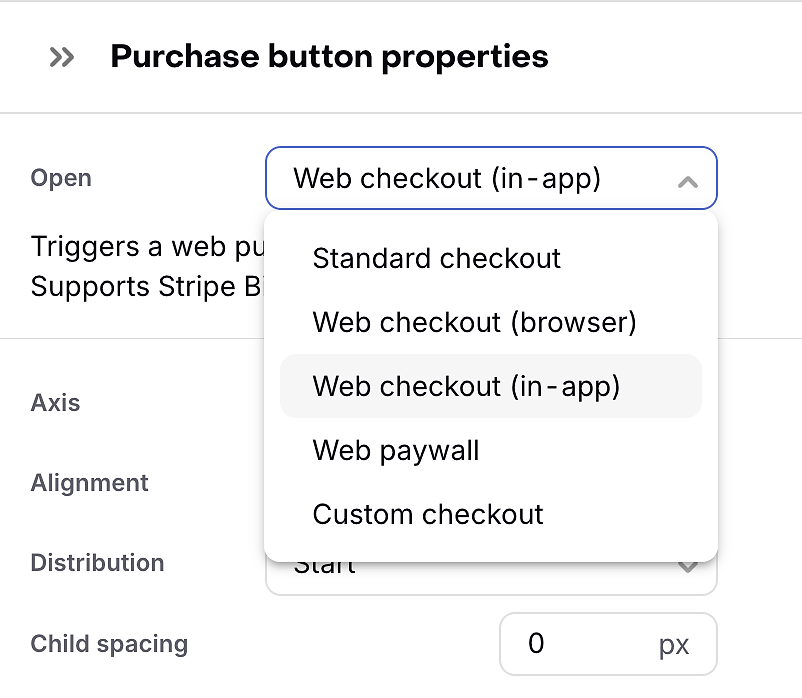
RevenueCat Paywalls get new purchase button variants for both cases. Pick the Apple-styled button when your own checkout sits next to it, or use the custom branding options when in-app purchase is the only path.
Apple's commission is tracked on every web transaction
Once the money's in, you need to know how much of it you actually keep. A web transaction with a token attached now carries two commissions: your processor's and Apple's. Until now, your payment processor reported its own fee and knew nothing about Apple's, so the moment you added a second path, the take-home figure in your revenue reporting went wrong.
RevenueCat breaks Apple's commission out on those transactions, so your charts will be able to show what you keep after both cuts (coming soon).
A web checkout that opens in your app
Tap a purchase button on a RevenueCat paywall and a bottom sheet checkout slides up over it. The buyer pays and the sheet closes without leaving your app.
Behind the tap, the SDK runs Apple's sequence: eligibility check, disclosure sheet, token request declared as in-app, token stored on RevenueCat's backend before the checkout opens.
We are actively working on bringing the bottom sheet in-app checkout to you as soon as possible. If you want to know first when it drops, sign up for early access here. At launch, the in-app checkout works with Stripe Billing and Paddle Billing, with Web Billing to follow.
Prefer the browser? The same button can link out instead at 15%, and Apple's disclosure sheet appears either way.
Show the alternative checkout only where it's allowed
Finally, Apple's terms allow external purchase flows on EU storefronts only, and not to minors. Making sure the alternative checkout appears only for eligible users is your responsibility as the developer.
RevenueCat Targeting lets you serve a paywall with the alternative button to EU storefronts only, and keep a paywall with only in-app purchases everywhere else. Rico can set that up for you: describe the rule and it builds the targeting.
Which path should you use?
Five percentage points separate the in-app sheet from the browser link-out, but the browser path costs you conversion at the disclosure sheet. We've seen this before: in our web vs. in-app purchase test, web subscriptions ended up with 6% less take-home revenue.
We're running the new experiment from October 1 and we'll share the numbers after.
Until then, model it for your own price points: our app store fee calculator takes your monthly revenue, average transaction size, provider, and program status, and shows what each path leaves you with, including the processor's fee on top of Apple's.
Getting started
- Request the StoreKit External Purchase entitlement from Apple and list the countries you want it in. That list is fixed in your provisioning profile, so get it right before you build.
- Update to purchases-ios 5.89.0 or later and turn on external purchase links in your RevenueCat configuration.
- Add a purchase button to your paywall, point it at your Stripe Billing or Paddle Billing checkout, and target the paywall to EU storefronts. The app-to-web purchase docs cover the configuration.
Apple's new terms go live on October 1. With RevenueCat, your checkout, paywalls, and reporting can too.