Install the Firebase function kit
Send customer information from RevenueCat to Cloud Firestore and Firebase Authentication with the Firebase function kit



This article shows you how to install the Firebase function kit, a Cloud Function that keeps your Firebase project in sync with your Customers' purchases. By the end, RevenueCat will send its webhooks to the kit, which stores customer information and events in Cloud Firestore, sets a custom claim with each user's active Entitlements, and can publish Eventarc events.
The kit is the npm package @revenuecat/firestore-revenuecat-purchases, a 2nd gen Cloud Function. You install it with the Firebase CLI, which downloads it from npm, so there's nothing to clone. Its source code, changelog, and issue tracker are on GitHub.
Migrate from the extension to the Firebase function kit instead of installing the kit from scratch: the migration installs the kit with your extension's configuration. The function kit replaces the extension, and Google shuts down Firebase Extensions on March 31, 2027.
Prerequisites
- A RevenueCat plan that includes the Firebase integration.
- A Firebase project on the Blaze (pay-as-you-go) plan, with a Cloud Firestore database.
- Firebase Authentication, if you want custom claims.
- Your app uses the Firebase UID as the App User ID. See Set Firebase user identity in RevenueCat.
- Permission to create service accounts and set the project's IAM policy, for example the Owner role, or Editor plus Project IAM Admin. The kit's function runs under its own service account, which your first deploy creates.
- Firebase CLI 15.32.0 or later, logged in to the account you deploy with:
npm install -g firebase-tools
firebase login
The kit uses Cloud Functions, Cloud Firestore, Secret Manager, Cloud Build, and Artifact Registry, and optionally Firebase Authentication and Eventarc. Each has a free tier, and low-volume apps usually stay within it. See Firebase pricing.
1. Generate a shared secret
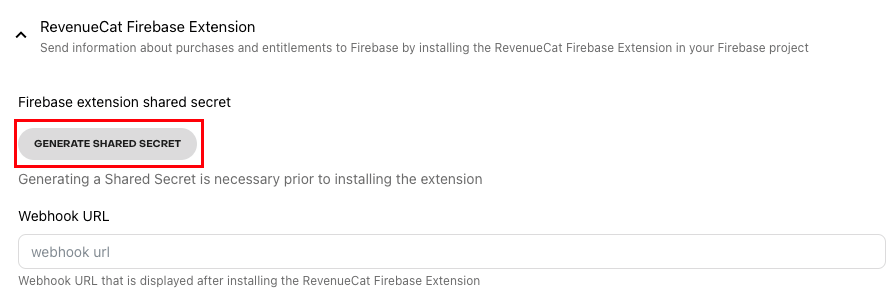
In the RevenueCat dashboard, go to Project > Integrations > Firebase and select Generate shared secret. Copy the secret: the dashboard only shows it when it's generated or rotated, and you enter it when you install the kit.
2. Install the Firebase function kit
From your Firebase project directory, the one with firebase.json, install the kit. If you don't have a firebase.json, run firebase init or create an empty firebase.json first. Your project ID is in your project's settings in the Firebase console.
firebase functions:kits:install --package @revenuecat/firestore-revenuecat-purchases --project <project-id>
Then answer the CLI's prompts:
- The CLI warns that the package isn't published by Firebase. That's expected for any kit that doesn't come from Google, so confirm to continue.
- Keep the default kit name,
firestore-revenuecat-purchases. - Enter an instance ID, for example
revenuecat. It names the deployed function:kit-<instance-id>-handler. - Enter the configuration parameters. For
REVENUECAT_SHARED_SECRET, paste the shared secret from step 1.
When the command finishes, it has added the kit to your firebase.json and created a function-kits/<kit-id>/ folder in your project, where <kit-id> is the kit name:
source/: a small generated codebase that depends on the npm package. It's what gets deployed, and where you update the kit.config-<instance-id>/: the instance's configuration.
Keep this folder with your project: you need it to update or reconfigure the kit.
Configuration parameters
| Parameter | Description |
|---|---|
LOCATION | Region of the webhook function, for example us-east1. Pick one close to your Firestore database. Changing it later gives the function a new URL: after you deploy, update Webhook URL in the RevenueCat dashboard. |
REVENUECAT_EVENTS_COLLECTION | (optional) Firestore collection for RevenueCat events. Leave it empty to not store events. |
REVENUECAT_CUSTOMERS_COLLECTION | (optional) Firestore collection for customer information, for example users. It can be your existing users collection: RevenueCat fields are merged into your documents, and your own fields are left alone. Supports an {app_user_id} placeholder, for example users/{app_user_id}/purchaser-info. Leave it empty to not store customer information. |
SET_CUSTOM_CLAIMS | ENABLED sets the revenueCatEntitlements custom claim, with the user's active Entitlements, on the Firebase Authentication user whose UID is the App User ID. DISABLED doesn't touch Firebase Authentication. |
REVENUECAT_SHARED_SECRET | The shared secret from step 1. It's stored in Secret Manager, not in the configuration file. |
FUNCTION_DEFAULT_REGION | Default region of the generated functions codebase. The webhook function always deploys to LOCATION, so enter the same value. |
The CLI saves your answers, except the shared secret, in function-kits/<kit-id>/config-<instance-id>/.env.<project-id>. To change a setting, edit that file and deploy again. To change the shared secret, see Webhook events fail with "could not be authenticated".
3. Deploy the Firebase function kit
Deploy the kit. It takes a few minutes.
firebase deploy --only functions:<instance-id> --project <project-id>
The first deploy asks you to confirm the service account the kit's function runs under, and its roles. When deploying from CI or with --non-interactive, pass --force. The Firebase CLI creates the service account and grants it these roles:
| Role | Why |
|---|---|
roles/datastore.user | Writes customer and event documents to Cloud Firestore. |
roles/firebaseauth.admin | Sets custom claims on Firebase Authentication users. |
roles/eventarc.publisher | Only when Eventarc events are on: publishes custom events. The CLI also enables eventarcpublishing.googleapis.com. |
The function is public, because RevenueCat calls it directly. Every request must carry a token signed with your shared secret, and the function rejects anything else with a 401 error.
4. Set the webhook URL in RevenueCat
Copy the function's URL from the deploy output, or from firebase functions:list --project <project-id>. It looks like https://<location>-<project-id>.cloudfunctions.net/kit-<instance-id>-handler.
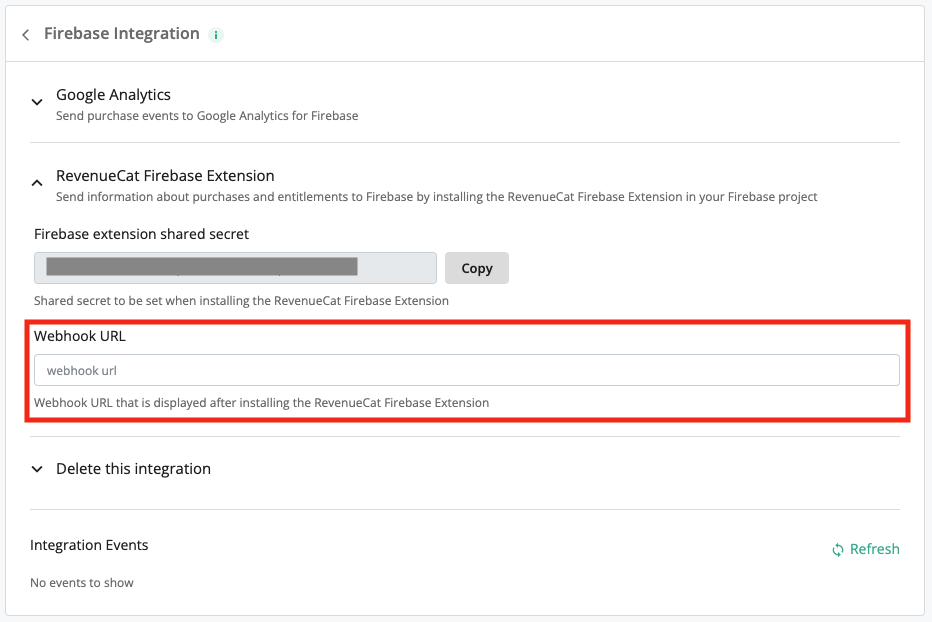
In the RevenueCat dashboard, go to Project > Integrations > Firebase, paste the URL into Webhook URL, and select Save.
5. Set your Cloud Firestore security rules
Set your security rules so that only authenticated users can read customer information, and each user can only read their own. Replace the collection names with your REVENUECAT_CUSTOMERS_COLLECTION and REVENUECAT_EVENTS_COLLECTION values.
- JavaScript
6. Check that it works
The Firebase function kit doesn't have a Send test event button in the RevenueCat dashboard. To check delivery, make a sandbox purchase with a new user, or grant a promotional Entitlement to a Customer in the RevenueCat dashboard. Then check that:
- The event was delivered. In the Customer's Customer History, select the event and check that its Firebase integration event was delivered successfully.
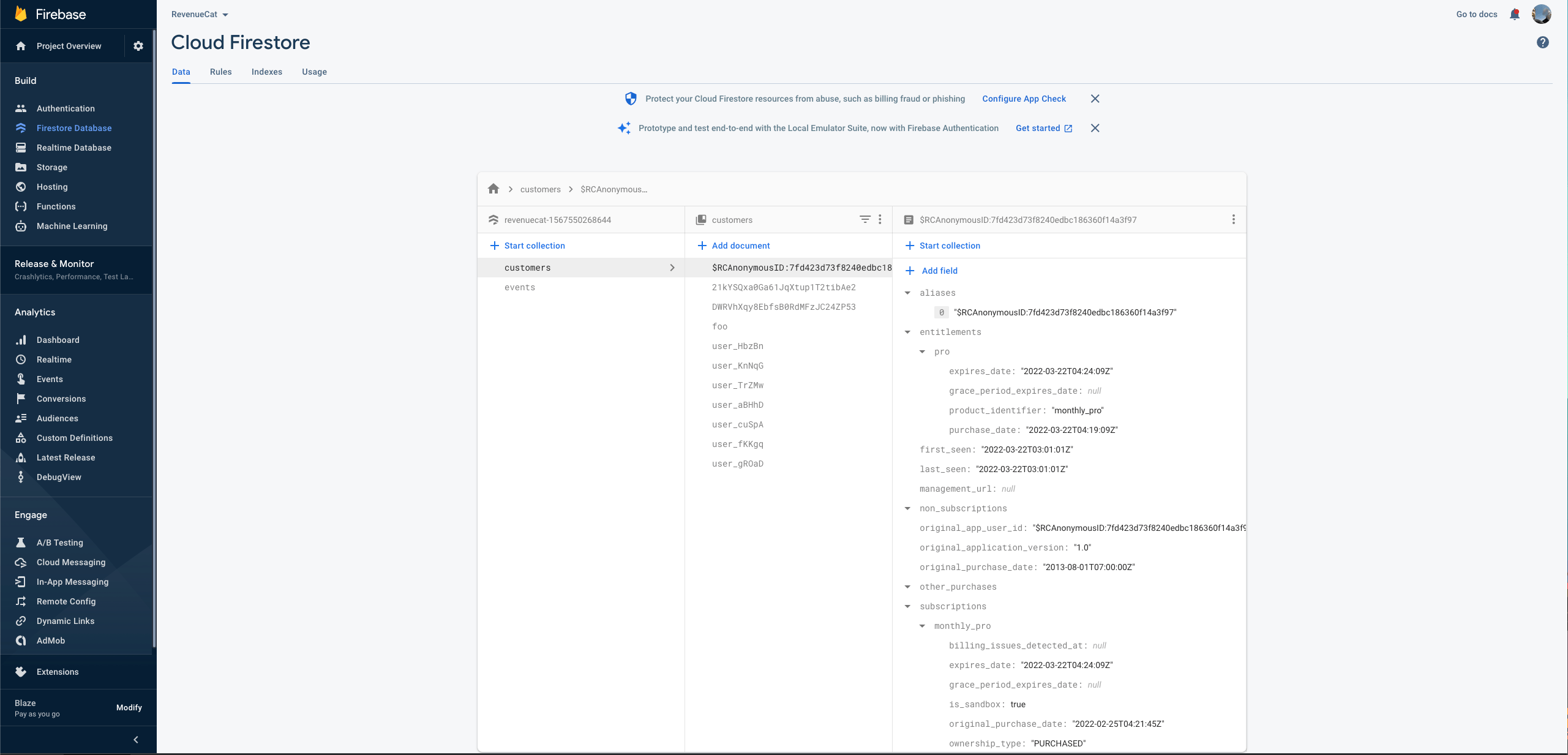
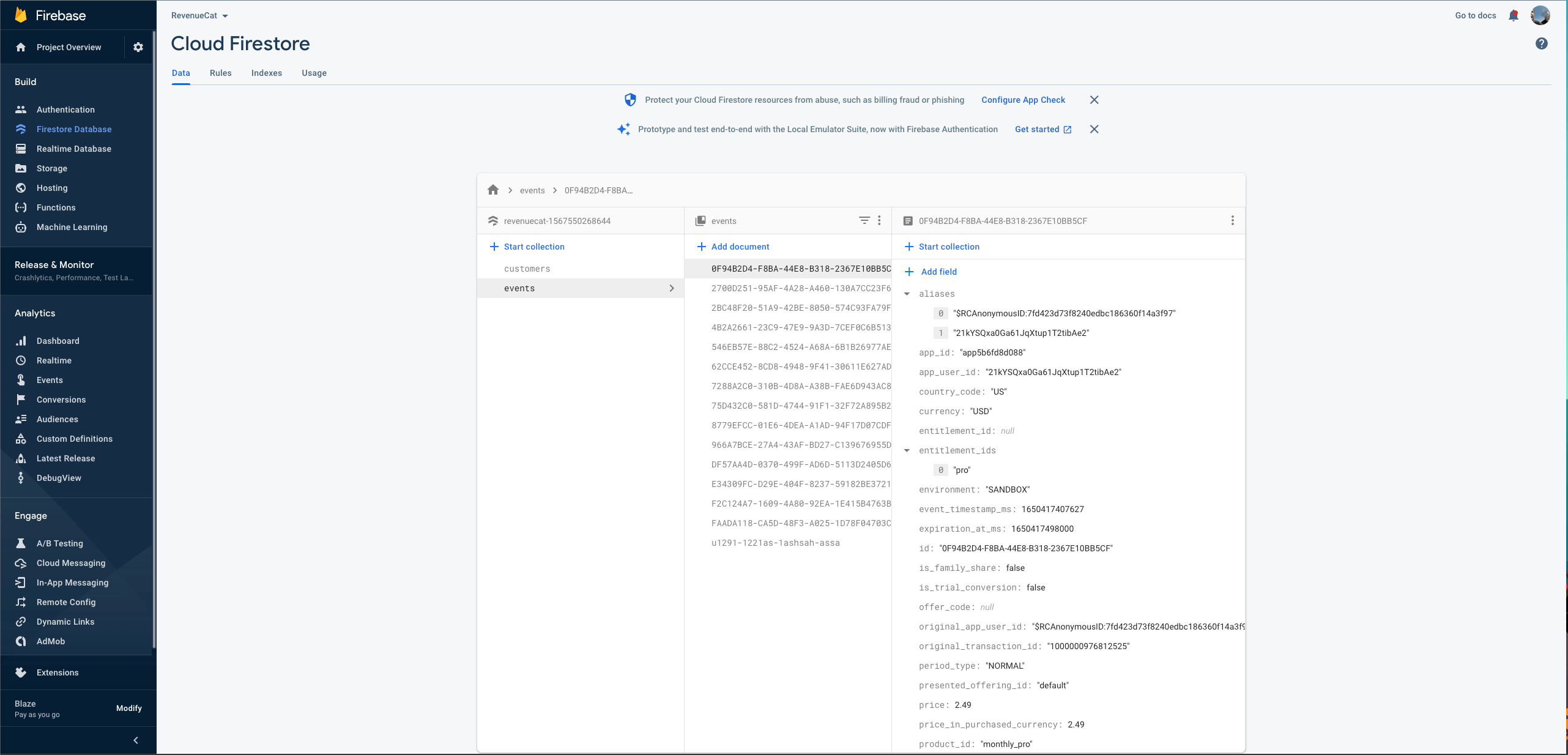
- The event is in your events collection, and the Customer's document is in your customers collection. In the Firebase console, open Firestore Database.
- With custom claims enabled, the Firebase Authentication user has a
revenueCatEntitlementsclaim.
The first event after you install or update the kit fails with a 400 InvalidApiVersionError and is retried a few minutes later. That's how RevenueCat learns the kit's version, not a problem with your setup.
Update the Firebase function kit
Install the new version into the kit's source/ folder, then deploy again. From your Firebase project directory:
npm --prefix function-kits/<kit-id>/source install @revenuecat/firestore-revenuecat-purchases@latest
npm --prefix function-kits/<kit-id>/source prune
firebase deploy --only functions:<instance-id> --project <project-id>
npm prune removes packages the new version no longer uses. The first event after the update fails with a 400 InvalidApiVersionError and is retried a few minutes later, as described in Check that it works.
Use the data
Check Entitlement access with custom claims
To check access to an Entitlement, you can either use the RevenueCat SDK or read the revenueCatEntitlements custom claim. For example, to check whether the current user has access to an Entitlement called premium:
- JavaScript
List a user's active subscriptions
To list a user's active subscriptions, read their document in your customers collection:
- JavaScript
getDoc(doc(db, "your_customers_collection", getAuth().currentUser.uid))
  .then((snapshot) => {
    if (snapshot.exists()) {
      snapshot.subscriptions
        .filter(subscription => new Date(subscription.expires_date) >= new Date())
        .forEach(subscription => console.log(JSON.stringify(subscription)));
    }
  });
Customer document IDs
Each document ID in the customers collection is an App User ID: the Customer's most recently active alias. If your app uses both anonymous App User IDs and custom App User IDs, a Customer's document ID can switch between them. To use only custom App User IDs, see Only configure the SDK with a custom App User ID.
React to subscription lifecycle events
Each event is stored in your events collection (REVENUECAT_EVENTS_COLLECTION), keyed by event ID. To react to events, trigger your own Cloud Functions on new documents there, for example with Cloud Firestore triggers, or turn on Eventarc events.
For example, to send a push notification to Customers with a billing issue, prompting them to update their payment method:
- Store a push notification token for each of your app users, for example with Firebase Cloud Messaging.
- Create a Cloud Function triggered whenever a new document is created in your events collection.
- In the function, check whether the
typefield of the new document is"BILLING_ISSUE". - If it is, read the App User ID from the document's
app_user_idfield. - Look up the push token for that App User ID and send the notification.
Sample events
These are sample event documents that the kit stores in your events collection, one per event type.
- Initial Purchase
- Trial Started
- Trial Cancelled
- Trial Converted
- Renewal
- Cancellation
- Uncancellation
- Non Subscription Purchase
- Subscription Paused
- Expiration
- Billing Issues
- Product Change
- Transfer
React to events with Eventarc
The kit can publish each RevenueCat event to an Eventarc channel as a custom event of type com.revenuecat.v1.<event type>, so your own functions can react to it. The event's data is the RevenueCat webhook event.
First, write a function that handles the events with onCustomEventPublished, and deploy it. Deploying it creates the default firebase channel in us-central1 if it doesn't exist yet. Installing the kit doesn't create a channel.
- TypeScript
import { onCustomEventPublished } from "firebase-functions/eventarc";

export const onBillingIssue = onCustomEventPublished(
  "com.revenuecat.v1.billing_issue",
  async (event) => {
    const { app_user_id } = event.data;
    // e.g. send a push notification asking the customer to update their payment method
  },
);
Until the channel exists, publishing fails: the webhook returns a 500 error, and RevenueCat retries the event.
Then add these lines to function-kits/<kit-id>/config-<instance-id>/.env.<project-id>, listing the events you want, and deploy the kit again:
EVENTARC_CHANNEL=projects/<project-id>/locations/us-central1/channels/firebase
EXT_SELECTED_EVENTS=com.revenuecat.v1.initial_purchase,com.revenuecat.v1.billing_issue
The kit publishes nothing unless both are set. Available events, each prefixed with com.revenuecat.v1.:
| Event | Description |
|---|---|
initial_purchase | Occurs whenever a new subscription has been purchased. |
non_renewing_purchase | Occurs whenever a Customer has made a purchase that won't auto-renew. |
renewal | Occurs whenever an existing subscription has been renewed, or a lapsed user has resubscribed. |
product_change | Occurs whenever a subscriber has changed the product of their subscription. |
cancellation | Occurs whenever a subscription or non-renewing purchase has been canceled. See cancellation reasons for more details. |
uncancellation | Occurs whenever auto-renewal has been re-enabled for a subscription. |
billing_issue | Occurs whenever there has been a problem trying to charge the subscriber. This doesn't mean the subscription has expired. |
subscriber_alias | Deprecated. Occurs whenever a new App User ID has been registered for an existing subscriber. |
subscription_paused | Occurs whenever a subscription has been paused. |
transfer | Occurs whenever a transfer of transactions and Entitlements was initiated from one App User ID to another. |
expiration | Occurs whenever a subscription has expired and access should be removed. |
Troubleshooting
To read the kit's logs, run firebase functions:log --only kit-<instance-id>-handler --project <project-id>.
Events fail once with a 400 InvalidApiVersionError
RevenueCat learns the kit's version from this error, then retries the event a few minutes later, so you see it once after each install or update. Its message starts with The version of this extension is not the same. It doesn't affect your integration. If every event keeps failing with it, check that Webhook URL in the RevenueCat dashboard points to the function you just deployed.
Webhook events fail with "could not be authenticated"
Events fail with a 401 Incoming RevenueCat webhook could not be authenticated when the shared secret in the kit doesn't match the one in RevenueCat.
If you migrated from the Firebase Extension, first delete the FIREBASE_SECRET_REF_REVENUECAT_SHARED_SECRET line from function-kits/<kit-id>/config-<instance-id>/.env.<project-id>: it still points at the extension's shared secret. Then set a new shared secret:
- In the RevenueCat dashboard, go to Project > Integrations > Firebase, generate a new shared secret with Rotate secret, and copy it.
- Set it in the kit and deploy again:
firebase functions:secrets:set kit-<instance-id>-REVENUECAT_SHARED_SECRET --project <project-id>
firebase deploy --only functions:<instance-id> --project <project-id>
There is no user record corresponding to the provided identifier in the logs
The logs show Error saving user <id>: There is no user record corresponding to the provided identifier when custom claims are enabled but the App User ID isn't a Firebase Authentication UID. The kit still writes the Firestore documents. To set custom claims, use the Firebase UID as the App User ID.
An event shows no response, then succeeds on a retry
The function was idle and took longer to start than RevenueCat waits for a response. RevenueCat retries the event, and it's delivered. Low-traffic projects see this more often.
Deploy fails in non-interactive mode
A deploy fails with Cannot enable declarative security and create managed service account … in non-interactive mode because the first deploy needs your confirmation for the kit's service account. Deploy interactively once, or pass --force.
Deploy fails creating a service account or setting the IAM policy
The account you deploy with lacks IAM permissions. It needs permission to create service accounts and set the project's IAM policy, for example the Owner role, or Editor plus Project IAM Admin. See Prerequisites.