Redemption Links
Allow customers to purchase products and subscriptions on the web and seamlessly access them in-app



Redemption Links are one-time-use deep links with a 60-minute expiration, generated after a customer completes a RevenueCat Web purchase. They work across supported billing engines and allow customers to associate a web purchase with their account in your app. By tapping the link, customers are redirected into the app where the purchase is automatically linked to their App User ID, granting them access to the associated entitlements. Redemption Links can increase conversion and be incredibly useful for projects like marketing campaigns.
Using web purchases with Redemption Links means that you do not need to provide an App User ID when initializing the purchase, and customers can therefore check out anonymously.
How Redemption Links work
Here's how a purchase and redemption flow looks, once you've configured and enabled the feature:
- The RevenueCat Web purchase flow is initialized, either through the Web SDK
purchase()method, or through a Web Purchase Link (App User ID not required at this stage) - The customer purchases a subscription or non-subscription product through the web checkout.
- If you're using Web Purchase Links, the customer receives the redemption link on the hosted success page and in the purchase email. If you're redirecting to your own success page, the redemption link is passed as
redeem_url. - If you're using the Web SDK, no hosted redemption page is shown automatically after the purchase. Instead, your app should read
PurchaseResult.redemptionInfofrom the purchase result and present the redemption step in your own UI. - On tapping the redemption link, customers are brought into the mobile app (using a custom URL scheme provided by RevenueCat).
- The app handles associating the purchase with the customer, either by aliasing or transferring the purchase.
- The customer has access to their entitlements associated with the web purchase.
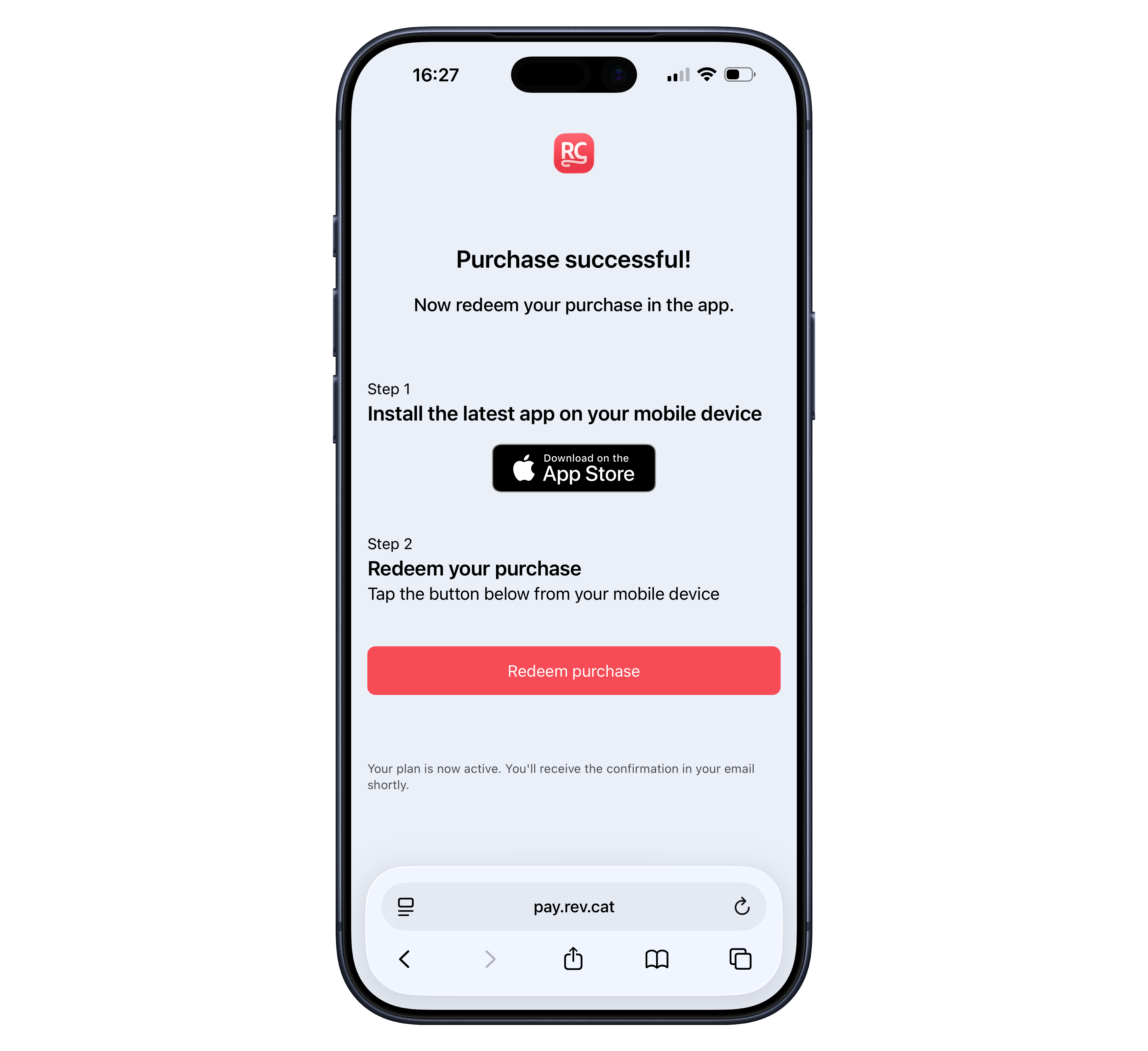 An example web purchase link success page with redemption instructions.
Important considerations
Web Purchase Links and Web SDK handle post-purchase redemption differently
- Web Purchase Links: RevenueCat shows the redemption link on the hosted success page and in the purchase email. If you redirect to a custom success page, the redemption link is included as the
redeem_urlquery parameter. - Web SDK: RevenueCat does not automatically present a redemption page after
purchase()orpresentPaywall(). Instead, your app receives the redemption data in the returnedPurchaseResult.redemptionInfo, so you can decide how to present the next step to the customer.
Redemption links expire after 60 minutes
If a customer tries to use an expired link, they'll automatically get a new link sent to their email. Make sure your app handles the expired case so you can show customers a helpful message.
Redemption URLs with Web Purchase Links custom success redirects
When using a custom success page (redirect URL) in Web Purchase Links, the redemption URL is automatically included as a query parameter named redeem_url. For example, if your success page URL is https://your-app.com/success, the user will be redirected to:
https://your-app.com/success?redeem_url=rc-abc123://redeem_web_purchase?redemption_token=xyz789
Redemption URLs with Web SDK
If you're using the Web SDK, this redemption step is not shown automatically. Read PurchaseResult.redemptionInfo from the returned purchase result and use it to provide the redemption functionality in your own UI.
The redemption link can only be opened from the mobile app where it was configured. It will fail if:
- The app is not installed on the device
- The link is opened on a desktop browser
- The link is older than 60 minutes (a new link will be emailed automatically)
Make sure your success page handles these cases appropriately by:
- Showing a QR code for desktop users to scan with their mobile device
- Clearly instructing users to open the link on their mobile device after installing the app
How to configure Redemption Links to redeem web purchases on mobile
Update your mobile app(s) to register custom URL schemes from RevenueCat
After Redemption Links are enabled, customers purchasing with an anonymous App User ID will be shown app deep links (to redirect the customer into your app and redeem the purchase). Any customers on older app versions that aren't configured to accept custom URL schemes will not be able to use these links. You should therefore make sure that as many customers as possible have updated to your new app version before sending them to a purchase flow without an App User ID.
The SDK versions supporting Redemption Links are:
| RevenueCat SDK | Versions supporting Redemption Links |
|---|---|
| purchases-android | 8.10.6 and above |
| purchases-ios | 5.14.1 and above |
| purchases-flutter | 8.4.0 and above |
| purchases-unity | 7.4.1 and above |
| react-native-purchases | 8.5.0 and above |
| purchases-kmp | 1.6.0+13.19.0 and above |
| purchases-capacitor | 10.1.0 and above |
In order to be able to redeem the redemption links in your mobile apps, follow these steps
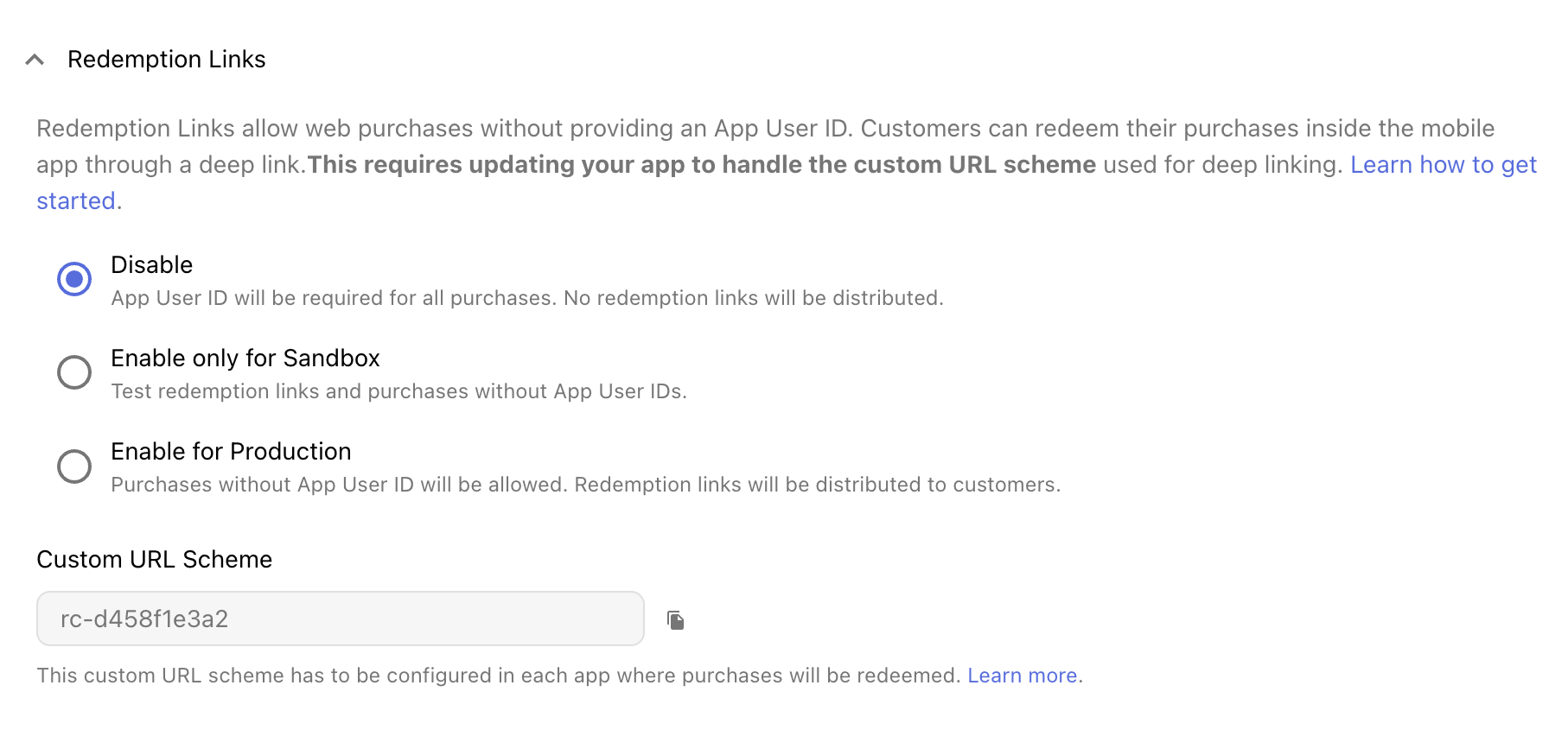
1. Copy the custom URL scheme from the RevenueCat Dashboard
You can find this in the RevenueCat dashboard inside your web config's settings, under "Redemption Links". It is unique to that web config:
2. Allow your app to respond to links with your custom scheme
iOS
In iOS, you need to define a custom URL schema. You can do this in Xcode, from your xcodeproj file, Info tab, URL Types section. Then add your custom scheme from Step 1 in the "URL Schemes" field. You can see a screenshot here, but remember to replace <YOUR_CUSTOM_SCHEME> with the one you obtained in step 1.
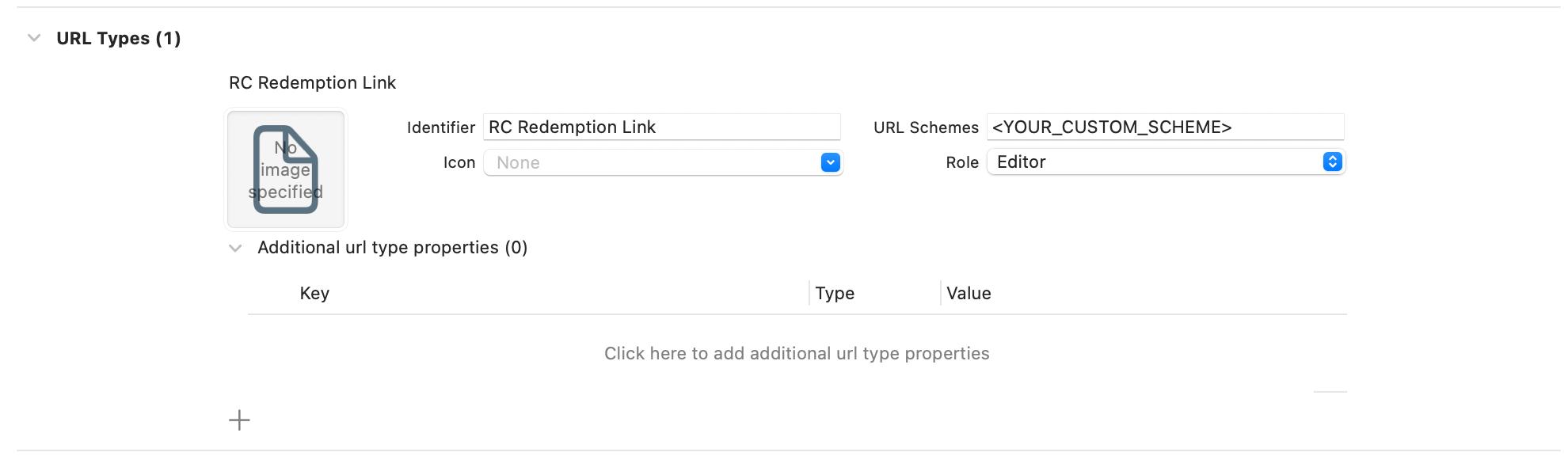
You can see official instructions by Apple here.
Android
In Android, you need to add a deep linking intent filter for the provided scheme. You can do that by adding the following intent filter inside your AndroidManifest.xml activity and replacing <YOUR_CUSTOM_SCHEME> with the scheme you copied in step 1. Note that it's fine to have multiple intent filters for the same activity.
- AndroidManifest.xml
<manifest>
    <application>
        <activity>
            <intent-filter>
                <action android:name="android.intent.action.VIEW" />
                <category android:name="android.intent.category.BROWSABLE" />
                <category android:name="android.intent.category.DEFAULT" />
                <data android:scheme=<YOUR_CUSTOM_SCHEME> />
            </intent-filter>
        </activity>
    </application>
</manifest>
You can check out official docs from Google here.
3. Perform redemption using our SDKs
Our SDKs provide APIs to perform the redemptions and provide you with the result of that redemption.
iOS
If using SwiftUI, you can use the onWebPurchaseRedemptionAttempt modifier to automatically perform redemption of Redemption Links once the app is opened with them.
- SwiftUI Modifier
YourContent()
    .onWebPurchaseRedemptionAttempt { result in
        switch result {
        case .success(customerInfo):
            // Redemption was successful and entitlements were granted to the user.
            updateUI(customerInfo)
        case let .error(error):
            // Redemption failed due to an error.
            displayError(error)
        case .invalidToken:
            // The redemption link is invalid.
            displayInvalidLinkError()
        case .purchaseBelongsToOtherUser:
            // The purchase associated to the link belongs to a different user and it cannot be redeemed.
            displayBelongsToOtherUserError()
        case let .expired(obfuscatedEmail):
            // The redemption link has expired. A new one has been sent to the user to the provided obfuscated email.
            displayExpiredMessage(obfuscatedEmail)
        }
    }
Alternatively, if you don't want to perform the redemption automatically or if you're not using SwiftUI, you can use the provided URL extension asWebPurchaseRedemption and then perform the redemption using Purchases.shared.redeemWebPurchase as follows:
- Alternative Swift
YourContent()
    .onOpenURL { url in
        if let webPurchaseRedemption = url.asWebPurchaseRedemption {
            Task {
                let result = await Purchases.shared.redeemWebPurchase(webPurchaseRedemption)
                // Handle result
            }
        }
    }
Android
In Android, you first need to obtain the link and make sure it's a Redemption Link, then redeem it using the redeemWebPurchase method. You can see an example of this in the following code block:
- Android Redemption
class MainActivity : Activity() {

    override fun onCreate(savedInstanceState: Bundle?) {
        super.onCreate(savedInstanceState)
        handleWebPurchaseRedemption(intent)
    }

    // This allows to respond to the intent if setting certain launch modes in the AndroidManifest.xml.
    override fun onNewIntent(intent: Intent) {
        super.onNewIntent(intent)
        handleWebPurchaseRedemption(intent)
    }

    private fun handleWebPurchaseRedemption(intent: Intent) {
        // This allows to obtain the Redemption Link from the intent if any.
        val webPurchaseRedemption = intent.asWebPurchaseRedemption()

        if (webPurchaseRedemption != null) {
            // This will perform the actual redemption and return a result you can use to update your UI.
            Purchases.sharedInstance.redeemWebPurchase(webPurchaseRedemption) { result ->
                when (result) {
                    is RedeemWebPurchaseListener.Result.Success -> {
                        // Redemption was successful and entitlements were granted to the user.
                        updateUI(result.customerInfo)
                    }
                    is RedeemWebPurchaseListener.Result.Error -> {
                        // Redemption failed due to an error.
                        displayError(result.error)
                    }
                    RedeemWebPurchaseListener.Result.InvalidToken -> {
                        // The redemption link is invalid.
                        displayInvalidLinkError()
                    }
                    RedeemWebPurchaseListener.Result.PurchaseBelongsToOtherUser -> {
                        // The purchase associated to the link belongs to a different user and it cannot be redeemed.
                        displayBelongsToOtherUserError()
                    }
                    is RedeemWebPurchaseListener.Result.Expired -> {
                        // The redemption link has expired. A new one has been sent to the user to the provided obfuscated email.
                        displayExpiredMessage(result.obfuscatedEmail)
                    }
                }
            }
        }
    }
}
Flutter
In our Flutter SDK, you will need to obtain the deep link first. Please read the official docs on how to parse deep links: https://docs.flutter.dev/ui/navigation/deep-linking. You can use app_links or similar libraries to obtain the deep link.
Once you have the deep link, you can use the following snippet to perform the redemption:
- Flutter Redemption
String redemptionUrl = 'YOUR_REDEMPTION_URL';

final webPurchaseRedemption = await Purchases.parseAsWebPurchaseRedemption(redemptionUrl);

if (webPurchaseRedemption != null) {
  final result = await Purchases.redeemWebPurchase(webPurchaseRedemption);
  switch (result) {
    case WebPurchaseRedemptionSuccess(:final customerInfo):
      // Redemption was successful and entitlements were granted to the user.
      break;
    case WebPurchaseRedemptionError(:final error):
      // Redemption failed due to an error.
      break;
    case WebPurchaseRedemptionPurchaseBelongsToOtherUser():
      // The purchase associated to the link belongs to a different user and it cannot be redeemed.
      break;
    case WebPurchaseRedemptionInvalidToken():
      // The redemption link is invalid.
      break;
    case WebPurchaseRedemptionExpired(:final obfuscatedEmail):
      // The redemption link has expired. A new one has been sent to the user to the provided obfuscated email.
      break;
  };
}
React Native
In our React Native SDK, you will need to obtain the deep link first. Please read the official docs on how to parse deep links: https://reactnavigation.org/docs/deep-linking/.
Once you have the deep link, you can use the following snippet to perform the redemption:
- React Native Redemption
String redemptionUrl = 'YOUR_REDEMPTION_URL';

const webPurchaseRedemption = await Purchases.parseAsWebPurchaseRedemption(redemptionUrl);
if (webPurchaseRedemption) {
  const result = await Purchases.redeemWebPurchase(webPurchaseRedemption);
  switch (result.result) {
    case WebPurchaseRedemptionResultType.SUCCESS:
      const customerInfo: CustomerInfo = result.customerInfo;
      // Redemption was successful and entitlements were granted to the user.
      break;
    case WebPurchaseRedemptionResultType.ERROR:
      const error: PurchasesError = result.error;
      // Redemption failed due to an error.
      break;
    case WebPurchaseRedemptionResultType.PURCHASE_BELONGS_TO_OTHER_USER:
      // The purchase associated to the link belongs to a different user and it cannot be redeemed.
      break;
    case WebPurchaseRedemptionResultType.INVALID_TOKEN:
      // The redemption link is invalid.
      break;
    case WebPurchaseRedemptionResultType.EXPIRED:
      const obfuscatedEmail: string = result.obfuscatedEmail;
      // The redemption link has expired. A new one has been sent to the user to the provided obfuscated email.
      break;
  }
}
For a complete walkthrough of implementing Redemption Links in React Native, see How to Configure RevenueCat Redemption Links in React Native.
Unity
In our Unity SDK, you will need to obtain the deep link first. Please read the official docs on how to parse deep links: https://docs.unity3d.com/Manual/deep-linking.html.
Once you have the deep link, you can use the following snippet to perform the redemption:
- Unity Redemption
string redemptionUrl = 'YOUR_REDEMPTION_URL';

purchases.ParseAsWebPurchaseRedemption(redemptionUrl, (webPurchaseRedemption) =>
{
    if (webPurchaseRedemption != null)
    {
        purchases.RedeemWebPurchase(webPurchaseRedemption, (result) =>
        {
            switch (result)
            {
                case Purchases.WebPurchaseRedemptionResult.Success success:
                    Purchases.CustomerInfo customerInfo = success.CustomerInfo;
                    // Redemption was successful and entitlements were granted to the user.
                    break;
                case Purchases.WebPurchaseRedemptionResult.RedemptionError error:
                    Purchases.Error error = error.Error;
                    // Redemption failed due to an error.
                    break;
                case Purchases.WebPurchaseRedemptionResult.InvalidToken:
                    // The redemption link is invalid.
                    break;
                case Purchases.WebPurchaseRedemptionResult.PurchaseBelongsToOtherUser:
                    // The purchase associated to the link belongs to a different user and it cannot be redeemed.
                    break;
                case Purchases.WebPurchaseRedemptionResult.Expired expired:
                    string obfuscatedEmail = expired.ObfuscatedEmail;
                    // The redemption link has expired. A new one has been sent to the user to the provided obfuscated email.
                    break;
            }
        });
    }
});
Kotlin Multiplatform
In our Kotlin Multiplatform SDK, you will need to obtain the deep link first. There are several ways to do this, using a 3rd party library, or by writing the relevant android/iOS code in your app and passing the url back to the shared kotlin code.
Once you have the deep link, you can use the following snippet to perform the redemption:
- KMP Redemption
val webPurchaseRedemption = Purchases.parseAsWebPurchaseRedemption(urlString)

if (webPurchaseRedemption != null && Purchases.isConfigured) {
    Purchases.sharedInstance.redeemWebPurchase(webPurchaseRedemption) { result ->
        when (result) {
            is RedeemWebPurchaseListener.Result.Error -> {
                val error: PurchasesError = result.error
                // Redemption failed due to an error.
            }
            is RedeemWebPurchaseListener.Result.Expired -> {
                val obfuscatedEmail: String = result.obfuscatedEmail
                // The redemption link has expired. A new one has been sent to the user to the provided obfuscated email.
            }
            RedeemWebPurchaseListener.Result.InvalidToken -> {
                // The redemption link is invalid.
            }
            RedeemWebPurchaseListener.Result.PurchaseBelongsToOtherUser -> {
                // The purchase associated to the link belongs to a different user and it cannot be redeemed.
            }
            is RedeemWebPurchaseListener.Result.Success -> {
                val customerInfo: CustomerInfo = result.customerInfo
                // Redemption was successful and entitlements were granted to the user.
            }
        }
    }
}
Capacitor
In our Capacitor SDK, you will need to obtain the deep link first. Please read the official docs on how to parse deep links: https://capacitorjs.com/docs/guides/deep-links.
Once you have the deep link, you can use the following snippet to perform the redemption:
- Capacitor Redemption
String redemptionUrl = 'YOUR_REDEMPTION_URL';

const { webPurchaseRedemption } = await Purchases.parseAsWebPurchaseRedemption({ urlString: url });
if (webPurchaseRedemption) {
  const result = await Purchases.redeemWebPurchase({ webPurchaseRedemption: webPurchaseRedemption });
  switch (result.result) {
    case WebPurchaseRedemptionResultType.SUCCESS:
      const customerInfo: CustomerInfo = result.customerInfo;
      // Redemption was successful and entitlements were granted to the user.
      break;
    case WebPurchaseRedemptionResultType.ERROR:
      const error: PurchasesError = result.error;
      // Redemption failed due to an error.
      break;
    case WebPurchaseRedemptionResultType.PURCHASE_BELONGS_TO_OTHER_USER:
      // The purchase associated to the link belongs to a different user and it cannot be redeemed.
      break;
    case WebPurchaseRedemptionResultType.INVALID_TOKEN:
      // The redemption link is invalid.
      break;
    case WebPurchaseRedemptionResultType.EXPIRED:
      const obfuscatedEmail: string = result.obfuscatedEmail;
      // The redemption link has expired. A new one has been sent to the user to the provided obfuscated email.
      break;
  }
}
4. Verify your setup
Once you've followed the steps above, in order to verify that your integration worked correctly you can open your app using a deep link in the format: <YOUR_CUSTOM_SCHEME>://redeem_web_purchase?redemption_token=<ANY_TOKEN>
For example, rc-d458f1e3a2://redeem_web_purchase?redemption_token=invalid_token.
You can use a deep link test app or write the deep link in a notes app and click on it. Alternatively, if you're using an iOS simulator you can run this command in your mac terminal: xcrun simctl openurl booted "<YOUR_CUSTOM_SCHEME>://redeem_web_purchase?redemption_token=<ANY_TOKEN>", and on android you can follow the instructions here.
Then, you need to make sure that you display the appropriate UI in your app. In this case, an invalid link error.
Configure Redemption Links in the RevenueCat Dashboard
Use the "Enable only for Sandbox" setting to test the full purchase flow, including deep-linking into your app. This will ensure that you don't send redemption links to customers before they're functioning and tested.
How to test Redemption Links in sandbox mode
-
Navigate to your project in the RevenueCat dashboard, and then the RevenueCat Billing app.
-
Under App Information in the Settings tab, make sure you have added: App icon, App name, and at least one store link for either the App Store or Google Play Store:
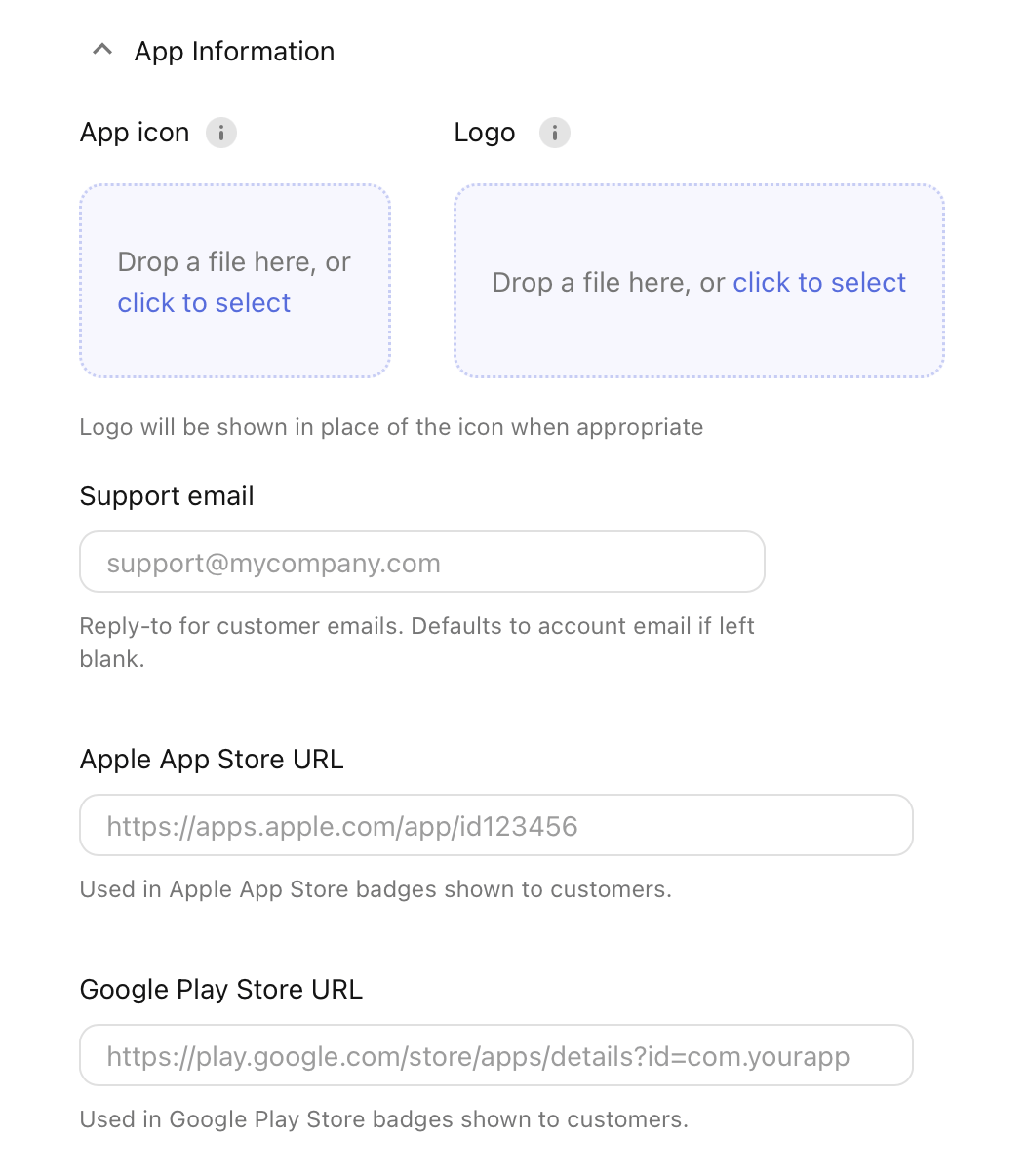
- Under Redemption Links, set the feature to "Enable only for Sandbox":
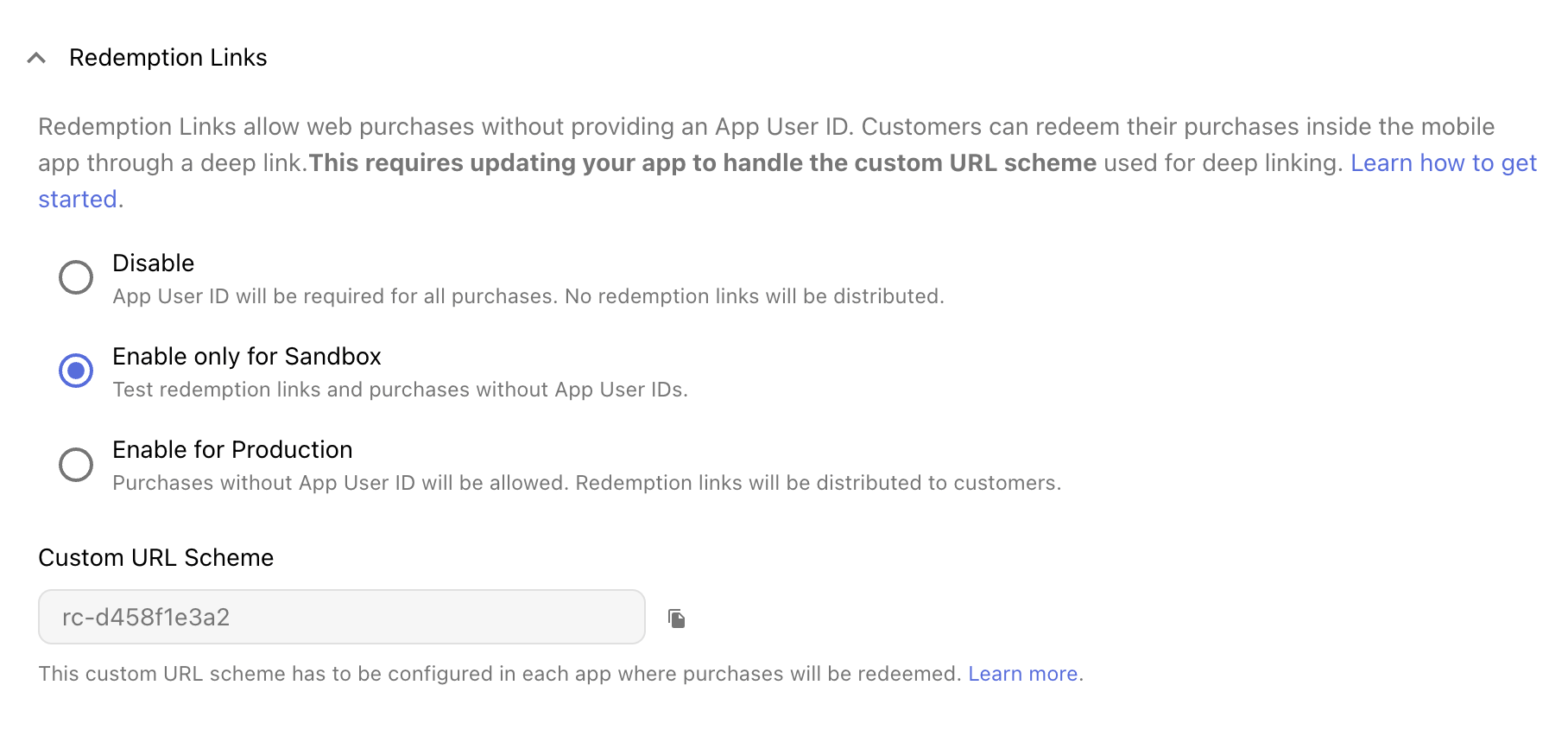
- Use the sandbox purchase flow to make a test purchase on a mobile device where your app is installed (either through Web Purchase Links sandbox URL, or the Web SDK with a sandbox API key).
Purchase Association Behavior
In this context, Identified means a Custom App User ID has been set, while Anonymous refers to an App User ID automatically generated by RevenueCat.
When a customer redeems a web purchase in your app, RevenueCat will automatically handle associating the purchase based on the App User IDs involved:
| Current App User ID | Web Purchase Owner | Result |
|---|---|---|
| Anonymous | Anonymous | App customer and Web Purchase Owner have CustomerInfo merged (aliased) |
| Anonymous | Identified | App customer and Web Purchase Owner have CustomerInfo merged (aliased) |
| Identified | Anonymous | App customer and Web Purchase Owner have CustomerInfo merged (aliased) |
| Identified | Identified | Follows project's restore behavior (The default is to transfer the purchase to the new App User ID) |
In most cases, the App User IDs will be merged (aliased) and treated as the same customer going forward. The exception is when both App User IDs are identified - in this case, it follows your project's configured restore behavior.
After successful redemption, the customer will immediately have access to their entitlements regardless of which association method was used.
FAQs
How can I make sure that customers can't share redemption links with other people and allow anyone to access premium entitlements in my app?
A redemption link is only valid for one single redemption of a purchase — once redeemed, it's no longer valid.
Can my customers redeem their purchases on multiple devices?
Customers can redeem a single purchase multiple times (i.e. on a different devices) — on each occasion they'll be sent a new redemption link to their billing email address, valid for one new redemption.
What happens if a redemption link expires?
Redemption links expire 60 minutes after they're created. If a customer tries to use an expired link, your app will get an expired result, and we'll automatically send them a new link to their billing email. Show customers a message letting them know to check their email for the new link.