

Google Ads is one of the most underused channels in subscription app user acquisition. Not because the inventory is bad, but because the default way to buy it gives advertisers almost nothing to work with.
That default is Google App Campaigns (GAC, formerly UAC), and it has been the status quo for app advertisers for years.
Thomas Petit's practical guide to Google App Campaigns documents the limitations better than anyone:
- Valuable search inventory you can't pick keywords for
- No keyword reporting
- No way to run search-only campaigns
- Brand searches silently inflating your campaign performance
Thomas’s guide is the best resource for surviving within Google’s current restraints. But it’s a tight box. This article is about enhanced app campaigns — a new way to get out of the box.
Why do enhanced app campaigns matter most on Google?
In my previous article, I covered what enhanced app campaigns are and why apps are shifting budgets to them. Quick refresher: enhanced app campaigns (EACs) are web campaigns whose final URL redirects users straight to the app store. No landing page, no web funnel, no SKAN dependency.
This article is the execution manual for EACs — specifically focused on Google, because Google is where EACs unlock the most. On Meta and TikTok, running EACs mainly gets you better measurement and enriched signals. They’re valuable, but the campaigns themselves look similar to what you were running before.
Google is different. On Google, EACs unlock entirely new campaign types that don't exist for app advertisers:
- Search: bid on specific keywords and search terms, and see revenue and ROAS at the keyword level. GAC technically serves on search, but you don't choose the keywords, you don't see them properly, and you can't exclude them. It's by design.
- YouTube Shorts: get full control over placement types within YouTube. This use case is great for apps that mainly run vertical videos and want to access new inventory without creating new assets.
- Demand Gen: full control over how your budget is spent. If you have winning vertical video or static images from Meta or TikTok, this is a new home for it, same format.
- Display: the largest display network on the internet, with placement-level control.
- Performance Max (PMax): Google's all-inventory automation product, once your conversion signals are strong enough to feed it.
One important thing to note is that running enhanced app campaigns on Google Ads does not allow you to reach the Play Store inventory on Android devices. So this is a constraint you should keep in mind.
With GAC, Google's algorithm decides everything: placements, keywords, audiences, budget allocation. You upload assets, set a bid, and pray. With EACs, you're buying Google inventory the way web advertisers have for 20 years. With actual control.
Across the subscription apps I worked with, the numbers back it up:
- 100% reduction in install cannibalization — because you can now control all brand search terms (more on this below)
- 12% lower CPMs on Demand Gen EACs compared to equivalent GAC placements
- 14% higher ROAS on Demand Gen versus GAC targeting similar placements
Let's get into how it actually works.
Are enhanced app campaigns allowed on Google Ads?
I know this is the first thing on your mind. When we first started running enhanced app campaigns at Appstack, this concern came up a lot. The answer is a clear yes.
Enhanced app campaigns are web campaigns. When you run one, you're using Google Ads exactly as designed: a web campaign with a final URL, a click, and conversions reported back through Google's standard web measurement stack. The fact that your final URL redirects the user to the App Store or Play Store is not a loophole. Deep links and store redirects are a normal, documented part of the web. App stores are websites too.
There is no policy against it. You're not spoofing anything, hiding anything, or exploiting a bug. In my experience, thousands of apps run this structure at scale today, with Google account reps fully aware of it. Google gets paid either way. (And you could argue that they prefer it, because you feed their algorithm richer conversion data than SKAN ever could.)
So no, you won't get banned.
How it works under the hood
Before touching the Google Ads interface, understand the click journey — this is how app install attribution works without SKAN. It's five steps:
- User clicks your ad: the ad's final URL is a tracking link (app store page), not your website.
- Instant redirect: the link captures the click (with the Google click ID, campaign, keyword, and ad parameters) and redirects the user to the App Store or Play Store in milliseconds — the user never sees a webpage.
- Install and first open: the user installs the app and opens it for the first time. On first launch, the SDK matches the install to the click using probabilistic matching. It doesn't depend on SKAN or ATT opt-in.
- Events flow in: trial starts, subscriptions, renewals, and every event is tied back to the exact campaign, ad, and keyword that drove the install.
- Signals go back to Google: Conversions are uploaded to Google Ads via API against the original click ID. Google's algorithm now optimizes using previously-matched conversion data rather than modeled SKAN postbacks, which are aggregated and have long delays.
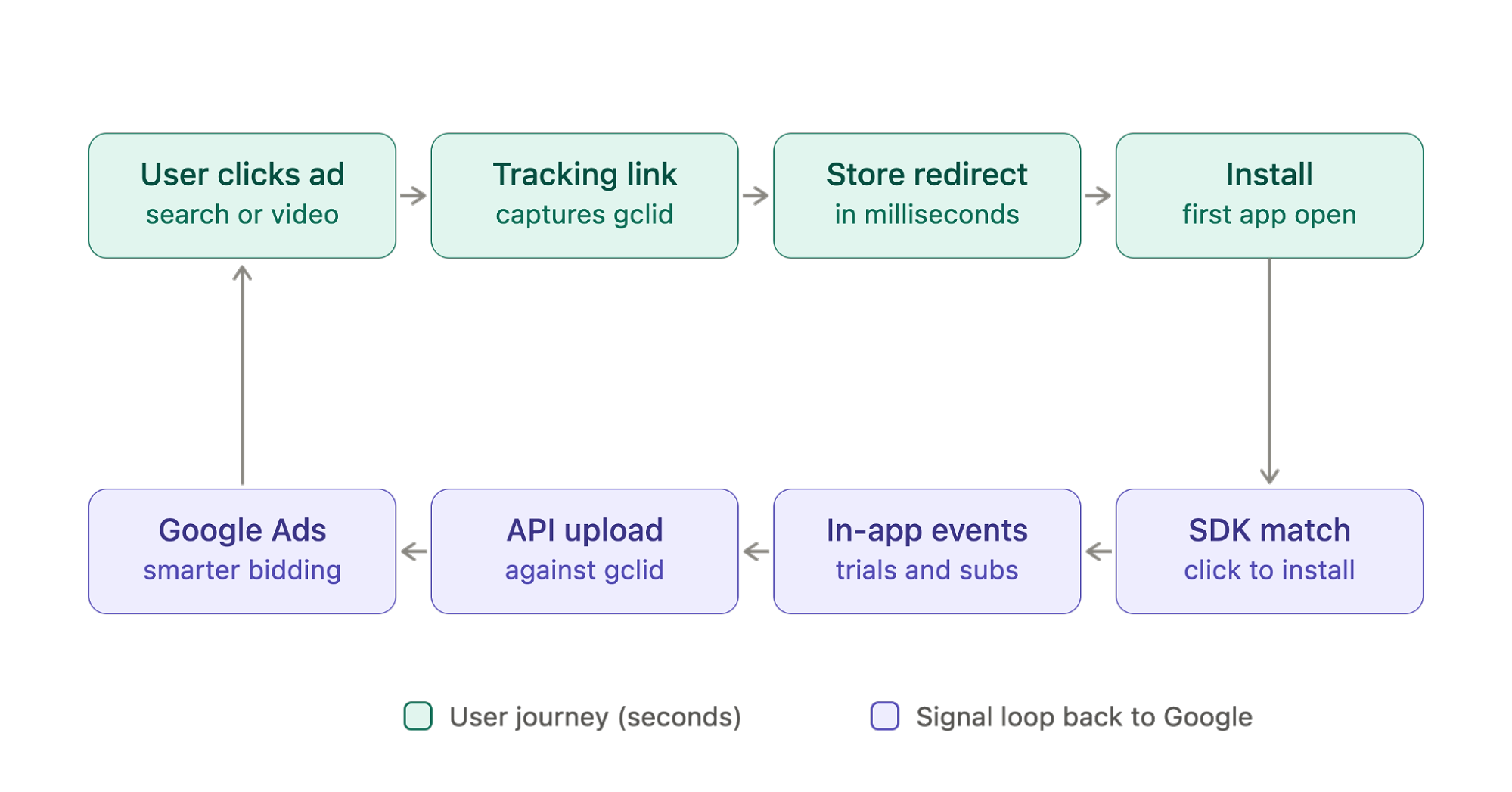
That last step is what makes the whole system compound. Google's bidding is only as good as the signals you feed it, and EAC signals are cleaner, faster, and more granular than anything SKAN can deliver.
For example, you can pass data back to Google Ads hourly and have total control over which signal is mapped to an offline conversion action. A lot of the apps I work with strategically prioritize qualified events, like ‘Trial qualified’, to improve performance.
Setting up your first enhanced app campaign on Google Ads
Step 1: Offline conversion actions
In Google Ads, create web conversion actions for the events you care about. For subscription apps, the standard set is:
- Install (secondary, for diagnostics, not optimization)
- Trial started
- Trial converted (or subscription started, if you don't offer trials)
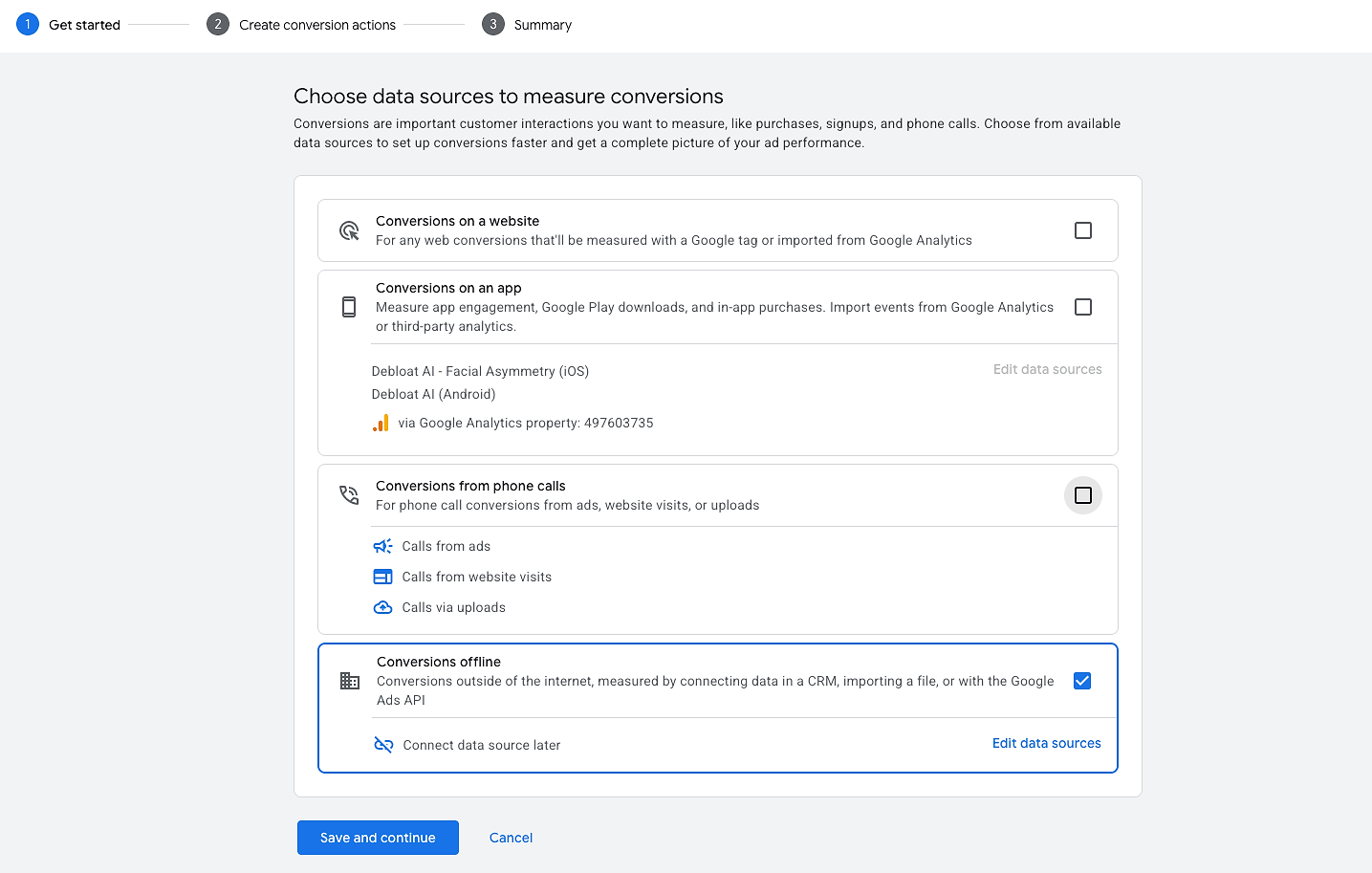
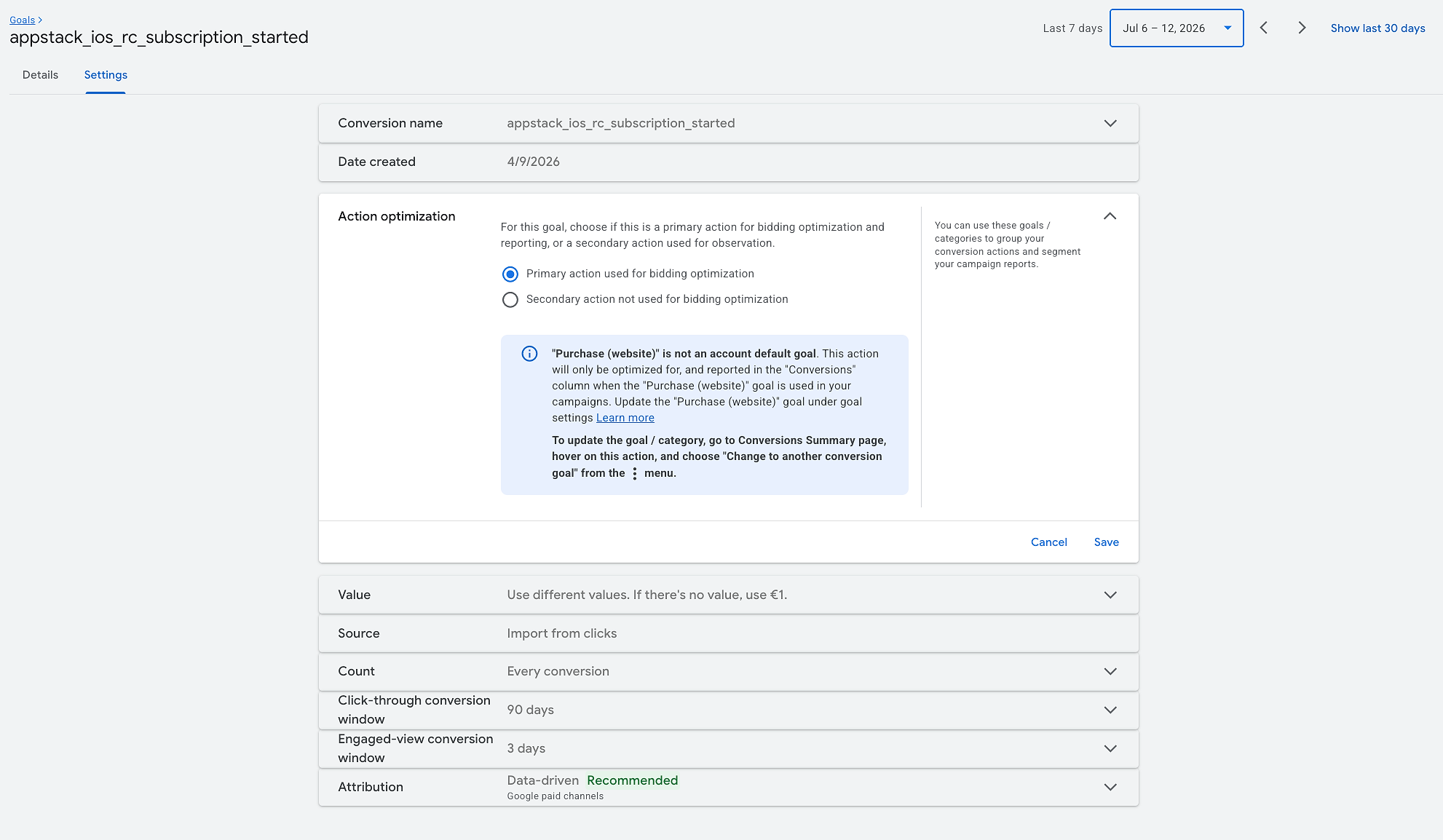
Set ‘trial started’ or ‘subscription started’ as primary, depending on your volume. Same trade-off logic as everywhere else: more signals vs. better signals.
If you want to know which event to optimize or how much to spend, my answer is to do the math and ensure you get at least 10 conversions per campaign per day. So if your subscription costs $100 and you reach breakeven status (which is great at the beginning), you will need to spend $1,000 per day to meet the threshold.
Pro tip
Don’t get frustrated during your first few days optimizing towards an offline conversion action in Google Ads. It’s normal to struggle: Google lacks sufficient context to understand what the offline conversion action actually means. After feeding at least 25 conversions, the performance starts to improve.
A quick note on the numbers in this guide: ~10 primary conversions per campaign per day is the floor for learning to stabilize, around 25 conversions is when performance usually starts to improve, and 50 is the minimum before you judge a campaign or change its structure.
With the RevenueCat and Appstack integration, conversions are automatically uploaded to the Google click ID once the account is connected. You don't build any of this pipeline yourself. For a walkthrough, check out this integration guide.
Step 2: Create your tracking links
Running EACs is fully within Google's policies, but building your own tracking links requires Google certification which means a two/three month review of your infrastructure — that’s a long wait, so most teams use a certified partner instead (like us at Appstack).
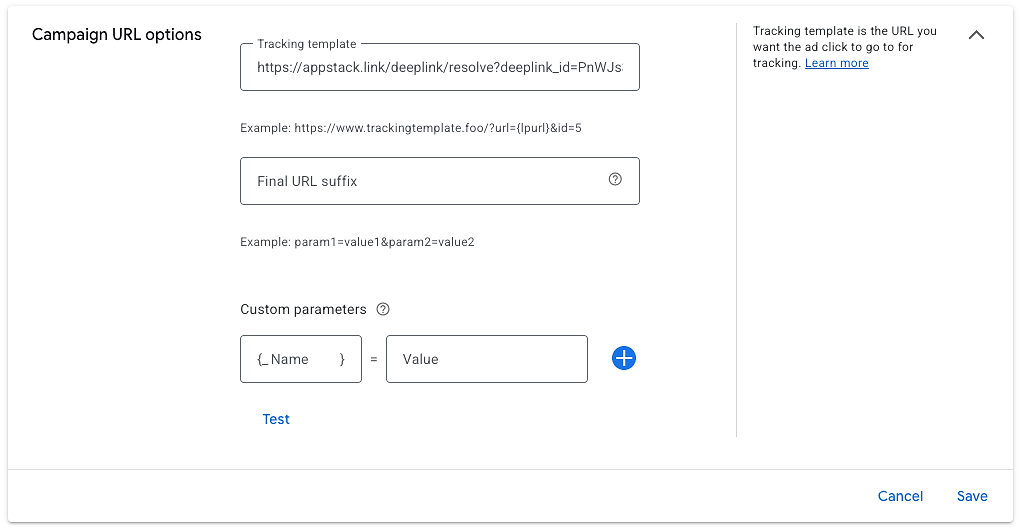
The tracking link must include all query parameters to properly attribute the data and return the correct information to Google. This is an example of a link:
https://appstack.link/deeplink/resolve?deeplink_id=hPSr3MG7&url={lpurl}&placement={placement}&campaignid={campaignid}&adgroupid={adgroupid}&targetid={targetid}&creative={creative}&network={network}&device={device}&gclid={gclid}&gbraid={gbraid}&wbraid={wbraid}&channel={channel}&adtype={adtype}&keyword={keyword}&keywordid={keywordid}&redirection_url=https://apps.apple.com/us/app/
The link must be set at the campaign level only (no need to add it multiple times across ad groups or ads) and should be located under ‘Campaign URL options’. You don’t need to add any suffixes or custom parameters if the link structure is correct (use the example I provided).
Step 3: Pick your first campaign type
Don't launch everything at once. Here's the order I recommend, based on dozens of subscription app accounts:
First, begin with search-to-app.
Search is the highest-intent inventory on the internet, and app advertisers have been locked out of it for years. With an EAC, you create a standard Search campaign, add your keywords, and set the tracking link. That's it. Users search, click, and land directly on your store page.
Two plays, in priority order:
- Brand defense first: here's a dirty secret about GAC that Thomas already called out in his guide: a big chunk of its ‘performance’ is cannibalized brand traffic. Someone searches your app's name (a user you already won), GAC serves them an ad, they install, and Google takes credit and your money for an install that was coming anyway. You can't see it, and you can't stop it, because GAC doesn’t give you the keyword control.
- Then category and competitor keywords: this is where keyword-level ROAS reporting changes how you operate, as you'll know, per keyword, what a subscriber costs and what they're worth. No app advertiser running GAC has ever seen this data. Start with exact and phrase match — broad match plus a fresh conversion history is how you burn a week's budget on garbage queries.
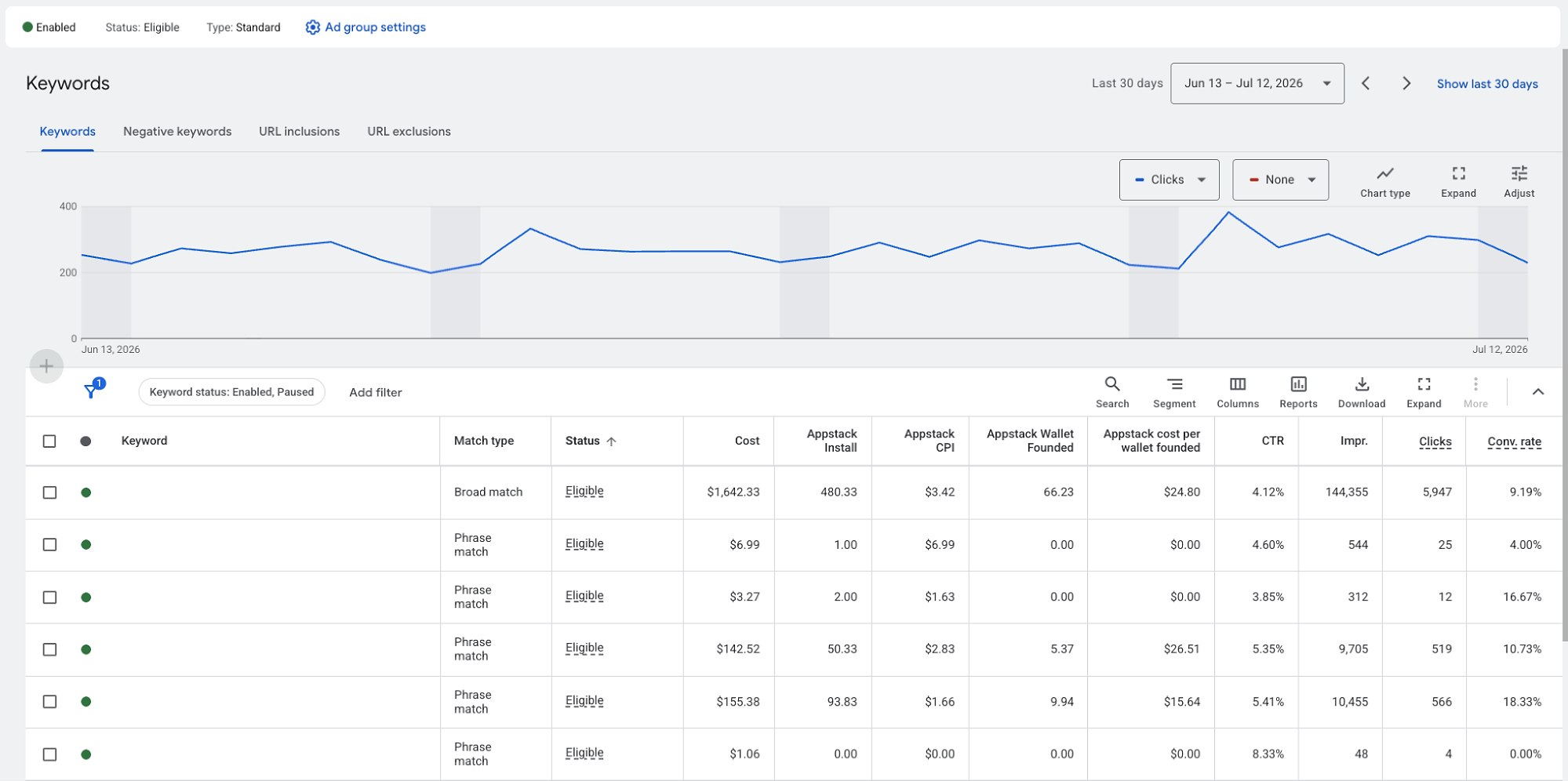
Starting with search-to-app helps you warm up offline conversions at low cost and start getting some ad spend (sometimes the issue is that the campaign doesn’t spend). So my recommendation is to set the campaign to maximize for clicks with a cap if needed. Once you collect some conversions, you can move to maximize conversions or value.
One caution on competitor keywords
Bidding on a competitor's brand name is generally allowed, but using their trademark in your ad copy can get your ads restricted, so keep competitor names out of your headlines and descriptions.
Demand Gen (YouTube and Shorts)
If you have winning vertical videos (or even static images) on Meta or TikTok, Demand Gen is the cheapest expansion you'll ever run: same creative, same format, new audience.
I recommend you structure your Demand Gen into two different campaigns:
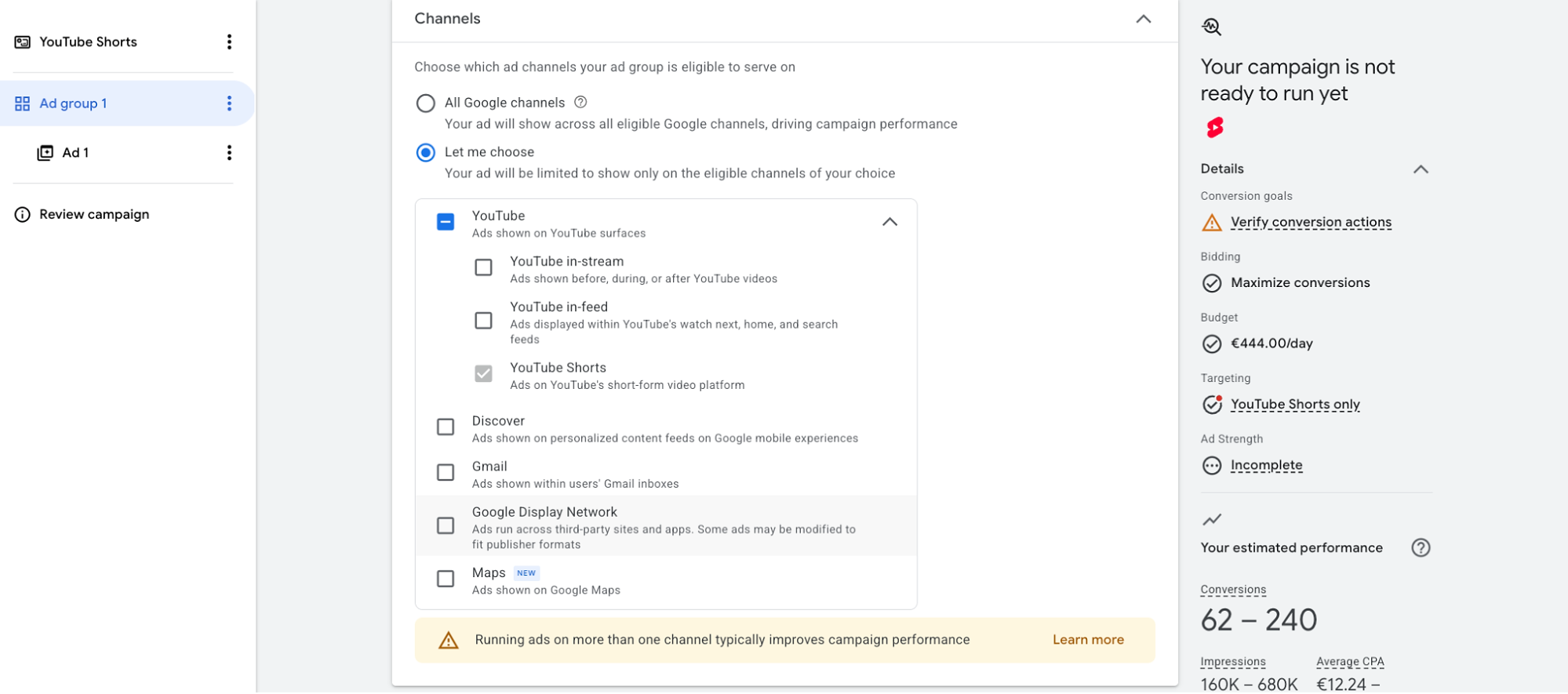
- Create a Demand Gen campaign, select YouTube Shorts as the only placement for a pure Shorts play. You will need to upload the assets to a YouTube account to select them at the ad level.
- Have a second Demand Gen campaign for the remaining placements (excluding YouTube Shorts). This way, you control the vertical content and avoid placing the same ad in two different campaigns.
Based on the data I can access, Demand Gen EACs delivered 12% lower CPMs and 14% higher ROAS than Google App Campaigns running on comparable placements. The reason is simple: you control the placement, and Google receives better conversion signals, so the algorithm wastes less.
Pro tip
Don't remake creatives for Google. Deploy your proven Meta/TikTok winners as-is first, and only iterate once you have baseline data. It’s easier and cheaper to do it.
Step 4: Launch checklist
Once you’ve completed the above, here’s your final checks:
- Tracking link tested end-to-end on a real device (click → store → install → in-app event)
- Offline conversion actions receiving data and marked primary/secondary correctly (you need to run a campaign to test that the offline conversion action is actually receiving the right signals)
- Create custom columns using the offline conversion actions to see them in Google Ads
- One campaign, few ad groups — maximum liquidity, faster learning phase
- Budget floor: enough daily spend to generate ~10 primary conversions per day; below that, learning never stabilizes
Feeding Google better signals
This is where subscription apps have an unfair advantage, and where most of them leave money on the table.
Google optimizes toward whatever conversion you tell it to optimize for. Most apps tell it ‘install’, which is like training a hunting dog to fetch anything that moves. Installs are cheap and mostly worthless; what you want is subscribers.
With EACs, the events you can optimize toward are only limited by what your backend knows:
- Trial started: the volume play. A good starting point for most apps.
- Trial converted: the money event. It fires days after install, when the user isn't in the app. That makes it nearly impossible to send reliably through SKAN without a custom server-side setup, and trivial through an EAC, because the postback is an API call rather than a device-side postback. Although I don’t recommend optimizing for ‘Trial converted’ (due to the delay in the event), you can configure this event as a secondary action to improve performance.
- Trials qualified: trials filtered by early engagement signals that predict conversion. Best of both worlds: more volume than converted trials, more quality than started trials.
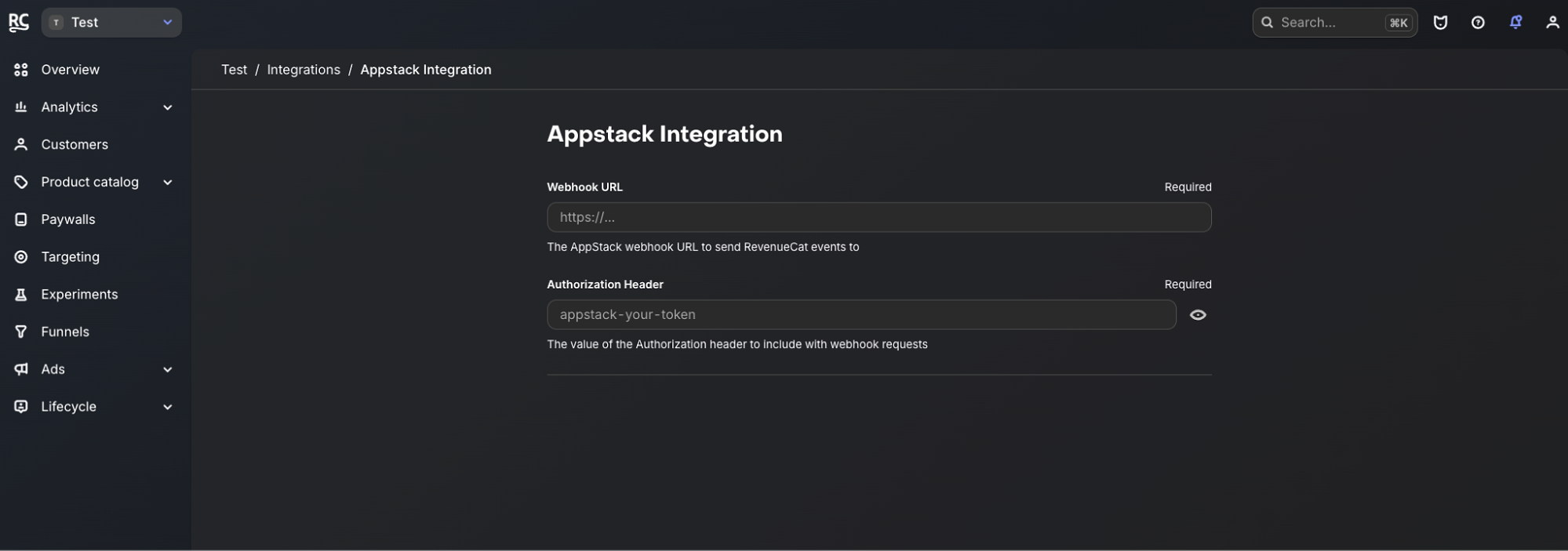
If you're on RevenueCat, this entire layer is free work. The RevenueCat + Appstack integration forwards server-to-server events (trial conversions, renewals, cancellations) directly into the attribution pipeline. No SDK event mapping, no developer time, no risk of a codebase change silently breaking your events. RevenueCat is already the source of truth for your revenue; this just wires it into your ads.
Boost the signal
Whatever you optimize for, send all your events to Google, including renewals. Even events you don't bid on improve the algorithm's picture of who your best users are.
The compounding effect is real: better signals → better bidding → cheaper subscribers → more conversion volume → even better signals. Apps running GAC are stuck feeding Google delayed, aggregated, threshold-gated SKAN data. You're feeding it revenue events straight from your backend, tied to the original click, in near real-time. Same auction, different weapons.
When to judge, when to scale, when to kill
Most EAC setups don't die because the strategy is wrong. They die because someone judged a campaign at the wrong time, with the wrong metric. So instead of a generic ‘be patient’ speech, here are the rules I give every app I work with:
Judge brand search in days, not weeks.
- Brand campaigns have no learning curve worth respecting: intent is maximal, and volume is predictable.
- If it isn't printing cheap installs within the first week, the setup is broken (link, match types, store redirect), not the strategy.
- Debug, don't wait.
Judge category search and Demand Gen at the ROAS level, never at the install level.
- Give them two to three weeks and at least 50 primary conversions before touching anything structural.
- During that window, your only job is to cut obvious garbage: irrelevant search terms and placements that make no sense. Everything else stays untouched.
- Use cohorts to actually see if more money is hitting the bank account than what is going out.
Kill keywords with data, not vibes.
- This is the muscle GAC never let you build.
- 200 clicks, decent CTR, zero trials: Dead. Kill it without mercy.
- Expensive installs but strong trial-to-paid conversion: Keeper, even if your CPA dashboard says otherwise.
- You now have keyword-level ROAS. Use it as the judge, jury, and executioner.
Scale winners vertically before expanding horizontally.
- Raise budgets and bids on proven keywords and placements before adding new campaign types.
- Only once Search and Demand Gen are profitable do you open Display (isolated, audited weekly) and eventually PMax.
- Expanding while your core campaigns are still learning splits your conversion volume and slows everything down.
Pro tip
Create a custom column for cost per trial converted and make it your default view. CPA-per-install is a vanity metric in this setup; retire it.
TL;DR: key takeaways
We covered a lot in this article, so let’s recap on the top points to remember:
- GAC is the legacy way; no keyword control, no keyword reporting, brand traffic silently inflating performance. EACs are the way out of the box, not a hack inside it.
- This is 100% allowed. EACs are standard web campaigns with a store redirect. No policy issue, no gray area, no ban risk.
- Start with search-to-app brand defense. Less install cannibalization is the fastest, most measurable win in this entire playbook.
- Recycle your Meta/TikTok winners into Demand Gen. Same assets, new audiences and segments at a lower CPM.
- Your signals are your moat. Optimize toward trial started or qualified trial, not installs, and send trial converted as a secondary signal.
- Google Ads has always had the inventory. What app advertisers were missing was the control and the data to buy it intelligently. Now you have both.