

You know personalized paywalls convert better, but what if you could use everything your app already knows about the user to get really (but not inappropriately so) personal?
Timing makes this worth the effort: according to our State of Subscription Apps 2026 report, 55% of 3-day trial cancellations happen on Day 0. The battle for a subscriber is won or lost in the first session, so if your paywall only gets one shot, it should speak to the person looking at it.
Make sure you're using the correct versions
Before getting started, make sure your app runs a compatible version of the RevenueCat SDK. Custom variables on the iOS SDK require version 5.57.0. You'll also need to target iOS 26 or above.
The example app
Chorus, the bird song identifier and walk tracker I'm building for Shipaton 2026, spends its onboarding learning why someone is using the app and what would get them to walk more. It asks about their dream bird, who they go on walks with, when they go on walks, and what would actually get them out the door more.
This post is about what happens next: using Apple's on-device Foundation Models framework to hand their own ’why’ back to them at the moment of the ask, on a RevenueCat remote paywall. The best part? It's free.
Here's the basic paywall with no personalization:
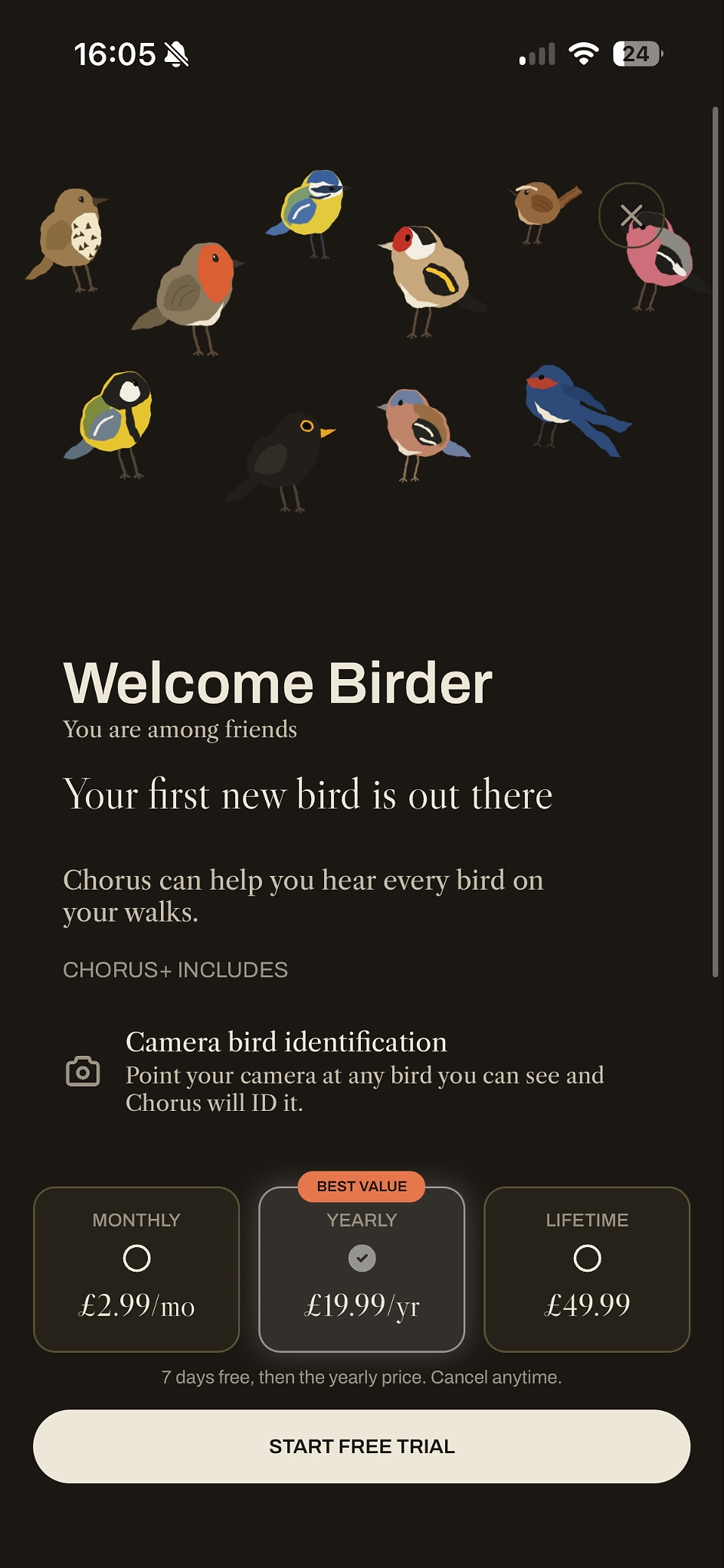
It does the job. It's okay, but it's not really speaking to the user. Let's change that.
Custom variables on the paywall
Using RevenueCat remote paywalls, you can start personalizing them using custom variables, but what if you could push that further? What if you could use everything your app already knows about your customer to really get personal?
Open your RevenueCat paywall editor. Click ‘Paywall Logic’ in the left-hand menu and select Variables. Then click ‘Create Variable’ and you'll see the following entry form:
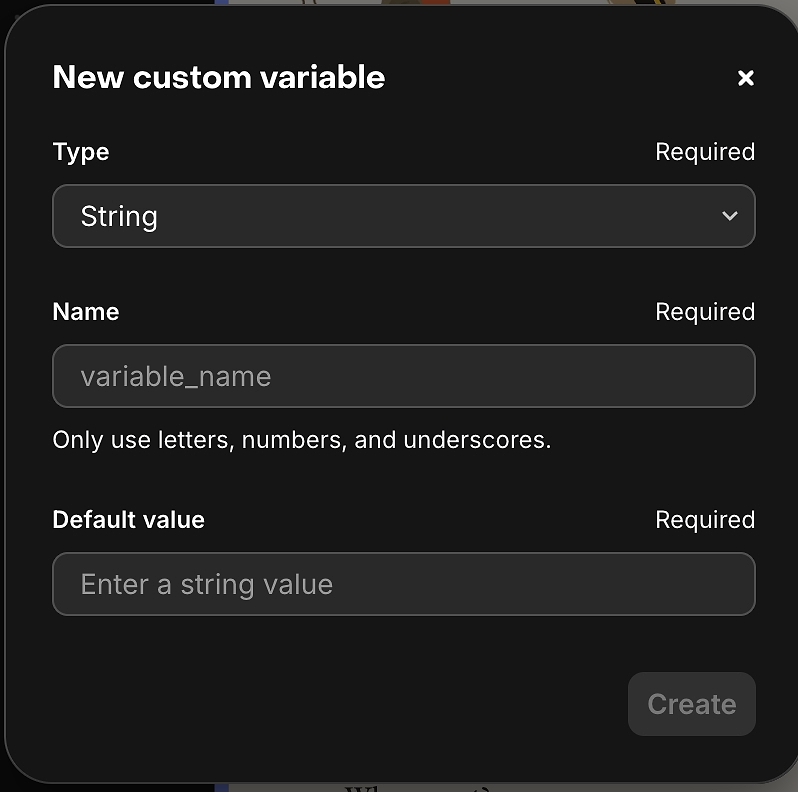
I'll start by creating the userName variable (possibly the easiest bit of personalization), with the default value ‘Birder’. Chorus asks for the birder's name in onboarding, saves it, and passes it into the remote paywall in Swift like so:
That'll produce a paywall like this:

Better. But we can make it even better with Foundation Models.
Apple's Foundation Models
Foundation Models is Apple's on-device large language model (LLM) framework, introduced in iOS 26. It generates text locally, with no server round trip and no per-token cost. Apple says "On-device models excel at a diverse range of text generation tasks, like summarization, entity extraction, text and image understanding, refinement, dialog for games, generating creative content, and more". Perfect for our use case. On-device models are much smaller than cloud-based models, so there are limitations, which I'll go through later.
As I mentioned, Chorus gets to know the customer during onboarding — this is where the magic happens.
Create a class that handles all interaction with Foundation Models. I've called mine ‘PaywallCopyGenerator’. In Chorus, each onboarding screen is aware of this class, and its functions get called at different points in the flow.
Right at the start, the welcome screen calls prewarm(), which checks SystemLanguageModel.default.availability and warms a session. Devices without Apple Intelligence bail out here: they ship the hand-written fallback line and never touch the model.
Prewarming the session reduces the time it takes for the user to see generated output. Do it as early as possible.
One gotcha: the first time a user's device meets the requirements, SystemLanguageModel can register as unavailable while the OS downloads the model in the background. Don't panic, it resolves itself. In Chorus I don't need to guard with an iOS 26 availability check because the app targets iOS 26; if you support older versions, you will.
Instructions and prompts
You'll notice you pass system instructions into the session. Apple has great guidance on getting the best out of the model by giving the model a role, persona, and tone. Here are Chorus's system instructions:
The instructions lean on five concepts from Apple's documentation:
- The persona: Chorus follows Apple's role-playing blueprint. Casting the model as a "warm British field naturalist" with the words "you are" merges character and voice in a single line. The instructions are also written in the exact register they expect back, right down to banning em dashes and obeying that ban themselves.
- Step-by-step logic: dense task descriptions are broken into a two-step plan. For smaller models, this reduces the cognitive load and keeps sequencing on track.
- Size constraints: the prompt stays lean. Two paragraphs of imperatives and one clear objective fit Apple's recommended length budget.
- Few-shot safety: three curated examples establish the style. An "examples are style only" guard prevents exemplar bleed. Without it, the model happily hallucinates dawn walks for night owls.
- Strategic repetition: high-stakes rules like "never invent" and "exactly once" are reinforced, and the runtime prompt repeats the most important rule last.
The runtime prompt works differently. Onboarding captures information about the user, then a few screens before the paywall we ask the model to generate the personalized line. That head start matters: on-device models are still fairly slow, so generating early means the line is ready by the time the paywall appears. (You can add a loading state at the end of onboarding if you prefer, but it's best not to block the paywall.)
Apple suggests sending the model hard facts, so a fairly long Swift function builds the runtime prompt with no conditional language (no ‘if’s for the model to reason about). Deterministic code decides which facts apply; the model only translates them into prose:
OnboardingSignals is a struct that gets populated as the customer moves through onboarding.
The final piece of the puzzle is asking the model to generate output:
The runtime prompt is simple compared to the system instructions. We ask the model to fill a @Generable type:
You can do interesting things here too, like checking the output for banned words and regenerating when one appears. You may also want to trim whitespace. The model occasionally leaks JSON artifacts into the string, so I trim it like this:
Pass the generated line into the paywall like before and you should see the foundation models generate something like the text surrounded by the red rectangle:
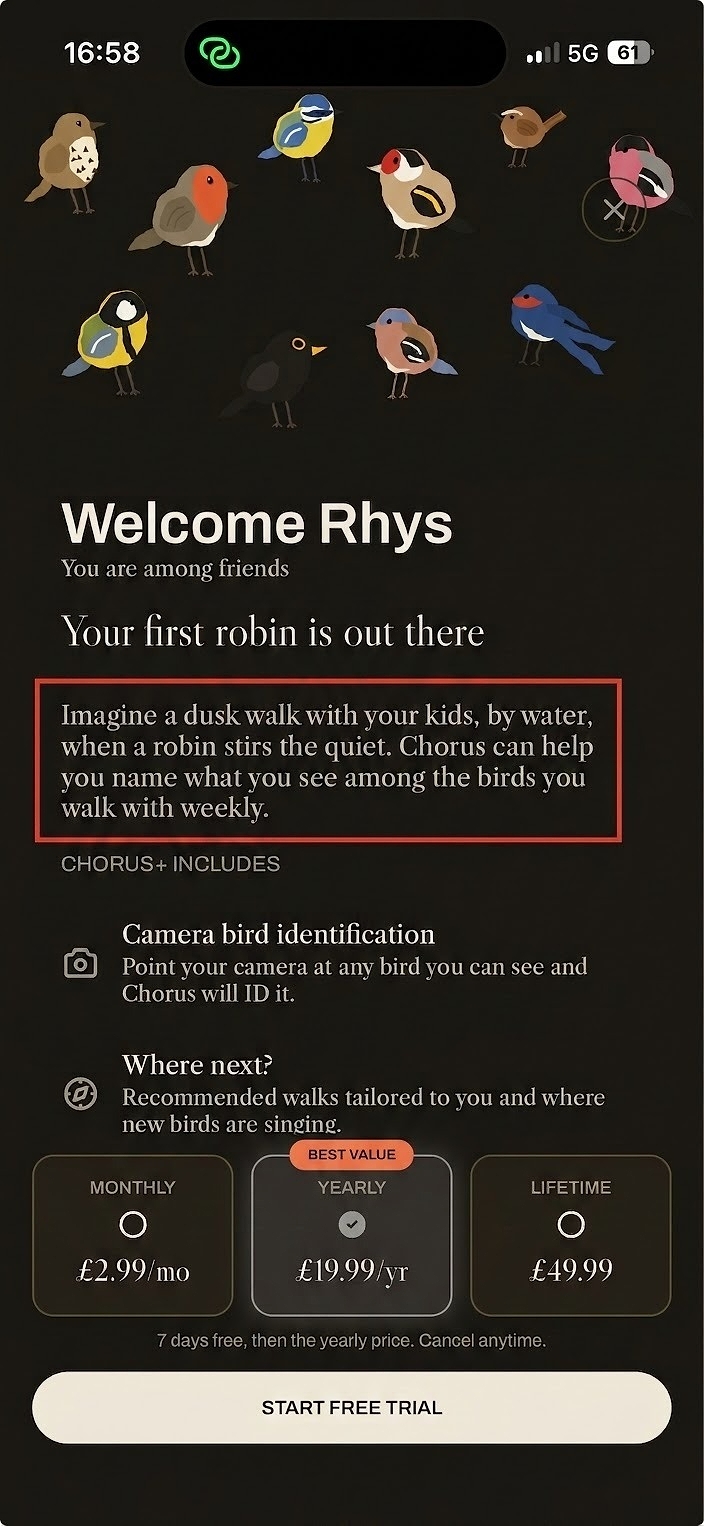
Pretty cool, right?
Limitations of Apple’s Foundation Model for personalized paywall copy
Foundation models are small. I like to compare them to the early days of GPT-3: about three billion parameters against the trillions in server-side models. Output isn't always great, and they can hallucinate. That's why the safety checks matter. Out of the box, Apple protects against harmful output (racism, violence, profanity), but Apple also states that you're responsible for the content the model generates.
A note on prompt safety: Chorus never sends freeform user text to the model. The brief is built entirely from fixed onboarding answers, so there's nothing a user can type that ends up in the prompt. If you do include free text, treat it as untrusted: interpolate it into a rigid prompt structure, and never let it stand alone as instructions.
I also found the model isn't yet smart enough for more ambitious moves, like picking the most relevant feature for a customer and spotlighting it. But it's early days: the models improved massively from iOS 26 to iOS 27, and I expect that trend to continue.
One more reason to ground the model in the user's own answers: our SOSA 2026 data shows AI-powered apps earn 41% more per payer but churn 30% faster. AI features only pay off when they create real, lasting value. Personalization built from what users actually told you is exactly that.
Going even further with AI-personalized paywalls
From iOS 27 you can swap the on-device model for a cloud-based one through the Foundation Models framework. Anthropic's Claude already conforms, and the other big providers may follow suit.
There's also Apple's Private Cloud Compute, which runs much larger server-side models. You can use it for free if you have fewer than two million lifetime first-time downloads and are enrolled in the App Store Small Business Program.
With those larger models, the more ambitious personalization opens up, like picking the most relevant feature for each customer and spotlighting it. Teams like Tinder invest heavily in exactly this kind of paywall relevance work; with these APIs, you don't need a dedicated team to try it.
Whether you want ultra-personalized paywall copy that calls out a birder’s favorite feathered friend, or are looking to demo the exact feature that solves your user’s job-to-be-done, on-device AI is unlocking a new way to tailor paywalls to every individual — just in time to ask them to subscribe.
To keep going on paywalls, start with our paywalls study guide or check out the paywalls documentation.