

Most teams that adopt Kotlin Multiplatform share their networking, models, and business logic first, and leave in-app purchases for last. Billing is the one layer where Android and iOS share almost nothing: a BillingClient connection and a PurchasesUpdatedListener on one side, a StoreKit transaction listener and manual receipt verification on the other, with two server-side validation paths behind them that have to agree on what “subscribed” means.
Migrating that to a shared layer is less about rewriting Kotlin and more about replacing two purchase state machines with one. This article walks through collapsing both native billing stacks into a single commonMain integration backed by RevenueCat’s Kotlin Multiplatform SDK, without losing the customers who already paid through your existing code.
In this article, you’ll add the RevenueCat SDK to an existing project, replace two platform initializers with one commonMain configuration, migrate product loading, the purchase flow, and entitlement checks, bring existing purchasers across with syncPurchases, keep user identity stable through logIn, and verify parity before you delete the old BillingClient and StoreKit code.
The fundamental problem: two billing stacks that share no types
The reason billing resists code sharing is that the two platforms model a purchase differently at every step, and the types never line up.
On Android, you own a connection. You build a BillingClient, register a PurchasesUpdatedListener, start the connection, and handle reconnection when the service drops. The result of a purchase arrives asynchronously on the listener, not as a return value:
After the buyer confirms, you are not done. You verify the purchase token on your server against the Google Play Developer API, grant the entitlement, and then acknowledge the purchase. If you fail to acknowledge within three days, Google Play automatically refunds the user and revokes the purchase:
On iOS, the shape is different. There is no long-lived connection, but there is a verification step you cannot skip, and you finish each transaction by hand:
Reading the current entitlement state is two unrelated APIs. Android queries owned purchases and you map purchase tokens back to entitlements yourself. iOS iterates Transaction.currentEntitlements and you verify each one. The objects are different, the verification model is different, and the field that tells you “this user has premium” does not exist in either SDK. You compute it.
Underneath both clients, you typically run two receipt validation paths, because a Google purchase token and an App Store signed transaction are validated against different servers and stored in different shapes. Every concept in your subscription logic exists twice, and the two copies drift.
The shared model that replaces both
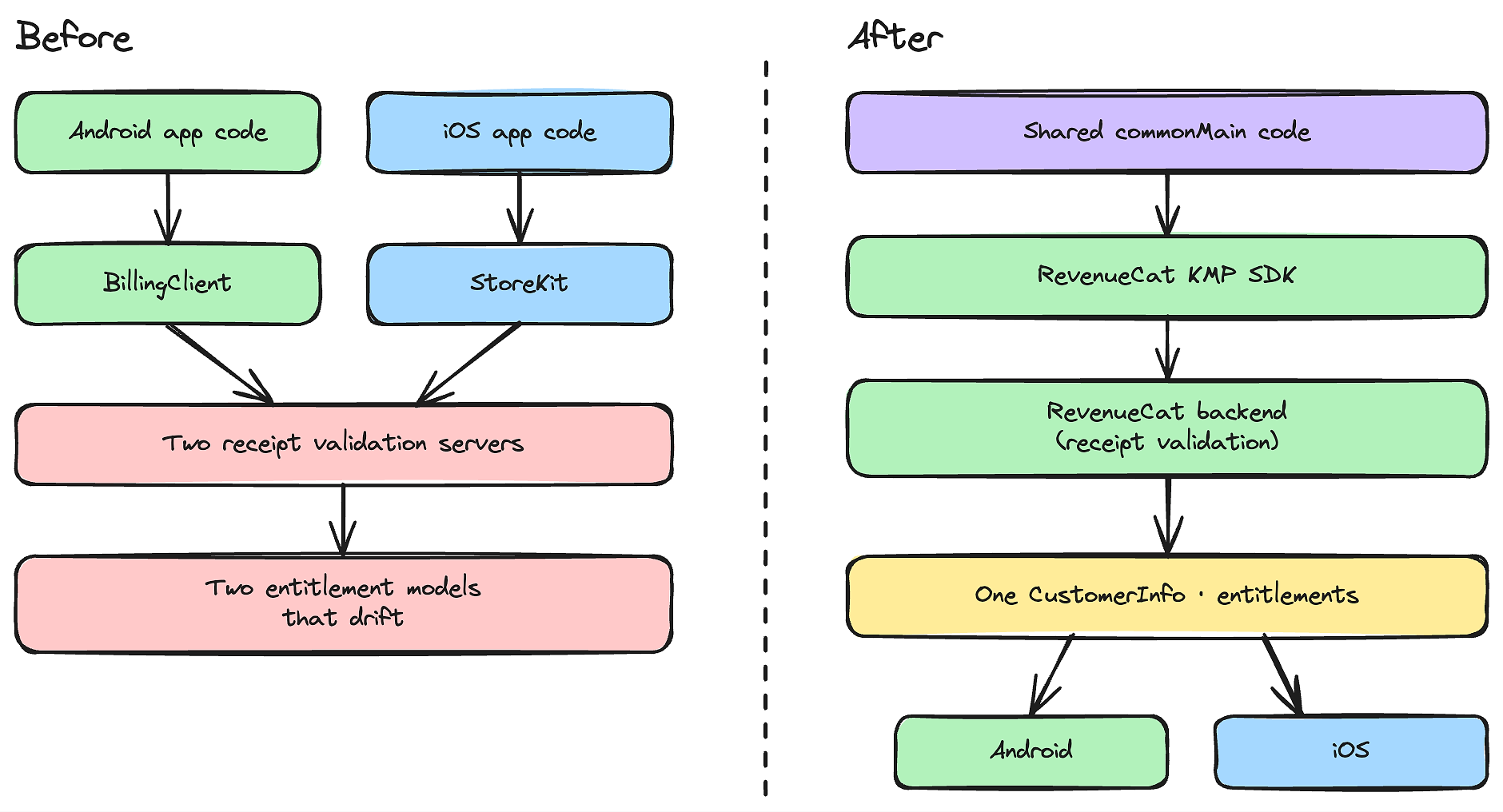
RevenueCat’s KMP SDK does not expose BillingClient or StoreKit through a thin shim. It replaces both with four store-agnostic concepts that live in commonMain:
- Offerings are the set of products you currently sell, configured in the dashboard rather than hardcoded in the app.
- Packages are the buyable units inside an offering, such as monthly, annual, or lifetime.
- Entitlements are the access levels your app checks, such as
premium, independent of which store the user paid through. - CustomerInfo is one object that aggregates every active entitlement for the current user across platforms.
Once your code asks customerInfo.entitlements["premium"]?.isActive instead of “did this user buy token X on Google or sign transaction Y on Apple,” the platform split disappears from your app. The migration is mostly a matter of deleting the per platform machinery and routing each old call to its shared equivalent:
The rest of this article walks through each row from top to bottom.
What the SDK does at the platform boundary
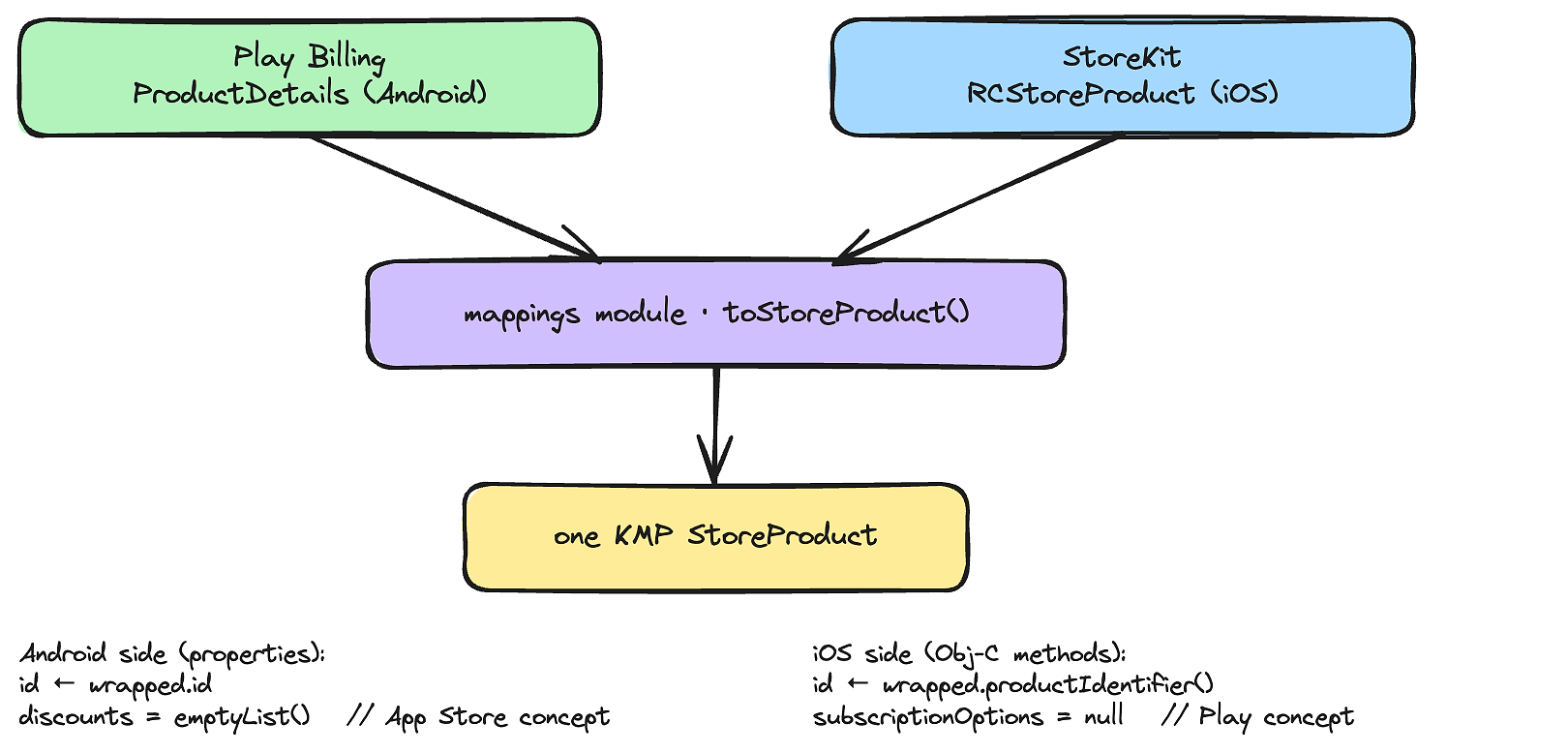
Before changing your code, it helps to see that the shared API is not magic. The translation from native types to KMP types is an explicit boundary that you can read in the SDK’s mappings module, and seeing it removes the worry that something is hidden.
StoreProduct is a good example, because Google’s ProductDetails and StoreKit’s product type have nothing in common. On Android, the mapping wraps the native object and reads its Kotlin properties directly (simplified here to the fields that matter for the contrast):
The iOS mapping, also simplified, implements the same StoreProduct interface, but the native value is reached through Objective C bridged method calls rather than properties, and the platform specific fields flip:
Notice the two design decisions that make one interface work on both stores. First, access is wrapped.id on Android but wrapped.productIdentifier() on iOS, because the Android side wraps the native RevenueCat Android model while the iOS side wraps a StoreKit backed value reached through Kotlin/Native interop. Second, fields that only exist on one platform are filled with safe defaults on the other: subscriptionOptions is a Play Store concept, so it is null on iOS, and discounts is an App Store concept, so it is emptyList() on Android. Your common code reads a single StoreProduct and never branches on the platform.
This is the boundary you are migrating onto. Everything below replaces a native call with a call into this shared model.
Step 1: Add the SDK and drop the native billing dependencies
Add the SDK to your shared module’s commonMain source set. The core artifact carries the platform bindings inside it, so there is no separate androidMain dependency on Play Billing and no iOS pod:
If you are coming from the 2.x line, the iOS side changed in a way that matters here. In 2.x you pinned a PurchasesHybridCommon pod and kept its version in sync with the SDK. As of 3.0.0 the iOS native dependency is pulled through Gradle as a Swift Package Manager build of purchases-ios, so a consumer app has no Podfile, no PurchasesHybridCommon, and nothing to pin. The Kotlin framework your shared module produces already contains the RevenueCat symbols. The same release raises the Android floor to API 23 (Android 6.0) because it ships on Play Billing Library 8.3.0, so set minSdk = 23 if you are lower.
You do not delete your BillingClient and StoreKit code yet. You will route around it step by step, verify parity, and remove it at the end.
Step 2: Replace two initializers with one
Native initialization is two separate jobs. On Android, you build and connect a BillingClient and hold its connection state. On iOS, you register a StoreKit transaction observer early in the app lifecycle so you do not miss updates. Neither has a shared form, so they live in androidMain and Swift respectively.
With the SDK, configuration is one call in commonMain that runs once at startup:
The configure(apiKey) { } form is a small builder. Inside the trailing lambda you can set appUserId, purchasesAreCompletedBy, and the other options on PurchasesConfiguration.Builder. The API key is the one value that differs per platform, so inject it with expect/actual or a tool like BuildKonfig, using your Android key on the Android target and your iOS key on the iOS targets.
Two things you used to manage are now gone. There is no connection to open and reconnect: the SDK owns the BillingClient lifecycle on Android and the StoreKit transaction listener on iOS. And there is no Context to thread through on Android, because the SDK captures the Application through an androidx.startup initializer. On iOS, nothing in your Swift code imports RevenueCat at all. The same configure call covers both platforms.
Step 3: Replace product loading
Loading products natively means describing each product to the store SDK and parsing back a platform-specific response. On Android, you build a QueryProductDetailsParams, set a product type, and parse the QueryProductDetailsResult that the Play Billing 8 callback returns, reading subscriptionOfferDetails and pricing phases off each ProductDetails. On iOS, you call Product.products(for:) with a set of identifiers. The two responses share no type.
The shared replacement reads the offering you configured in the dashboard:
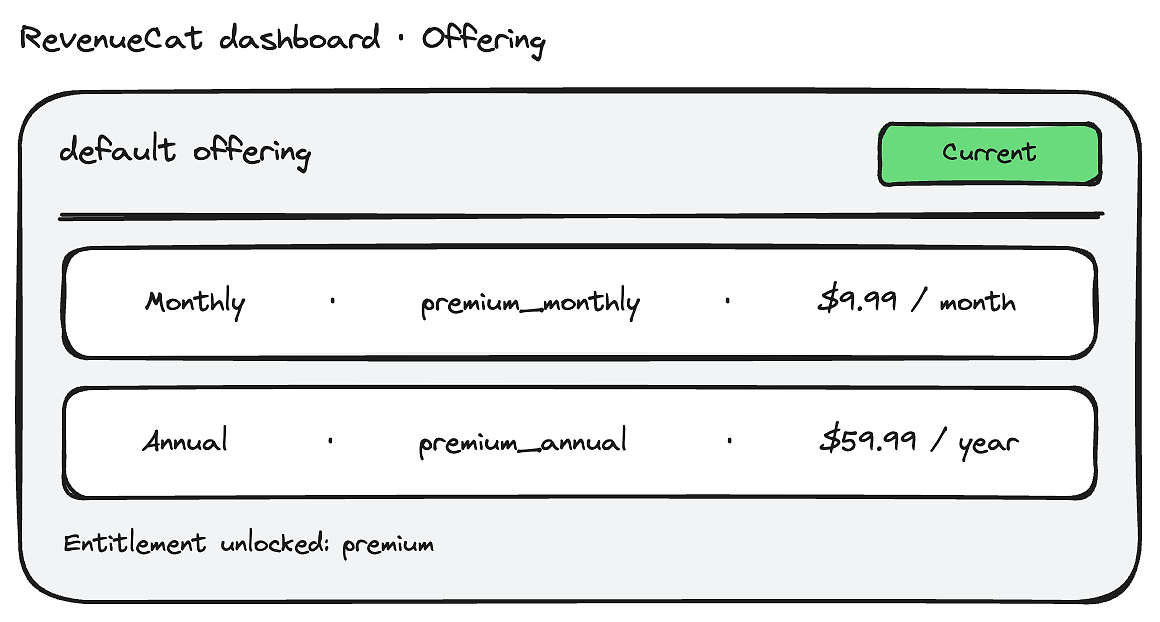
Offerings.current is the offering marked as current in the dashboard. Offering exposes named accessors for common cadences such as monthly, annual, and lifetime, plus availablePackages if you build a custom plan picker. Because the product list comes from the dashboard, you can change which products an app version sells without shipping a build, and the prices arrive already localized for the user’s storefront.
If you are not using offerings yet and want a direct lookup that mirrors your old queryProductDetailsAsync call, awaitGetProducts(productIds) takes a list of identifiers and returns List<StoreProduct>. Both methods are suspend functions, so they replace the listener and async callback with a straight line call.
Step 4: Replace the purchase flow
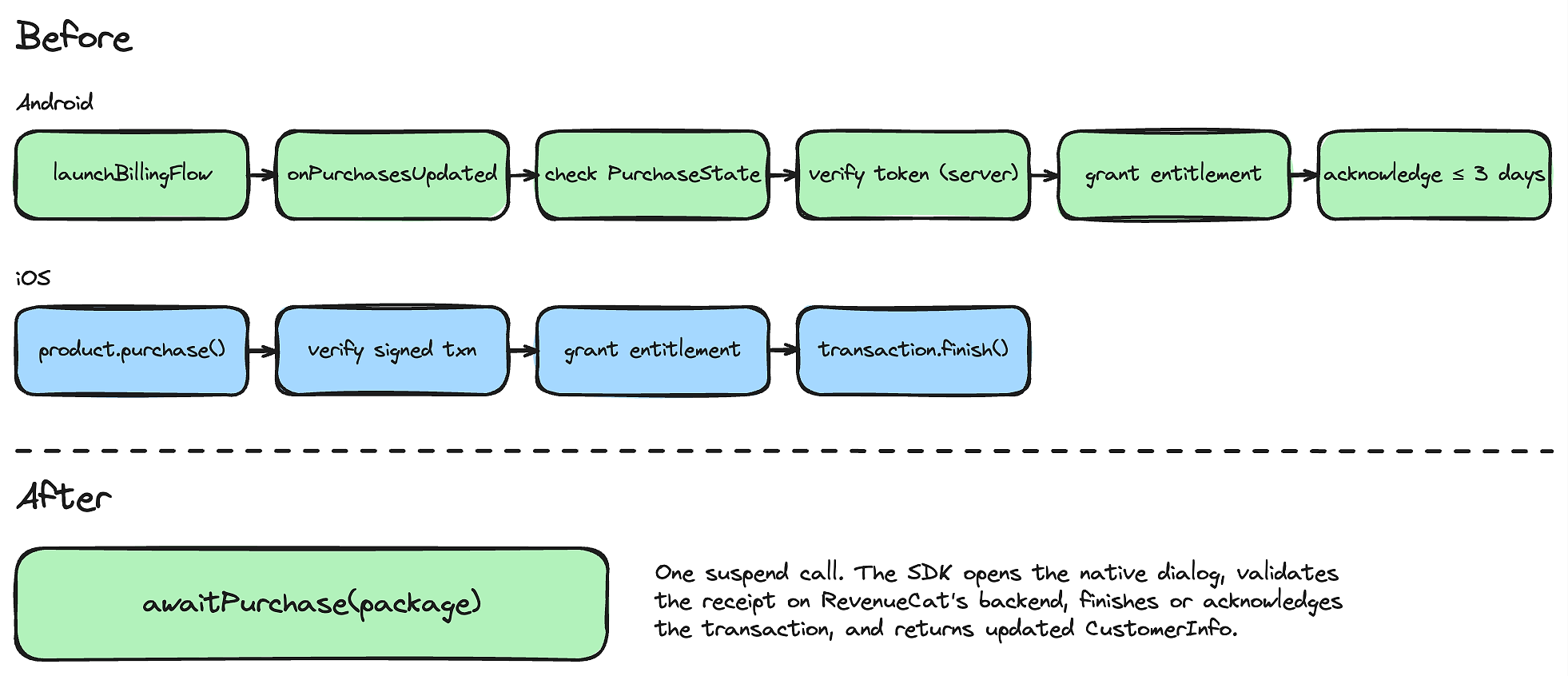
This is the step that removes the most code. Natively, a purchase is a multi stage process you orchestrate by hand. On Android, you build BillingFlowParams, call launchBillingFlow, wait for the result on onPurchasesUpdated, check PurchaseState, verify the token on your server, grant the entitlement, and acknowledge within three days. On iOS you call product.purchase(), switch on the result, verify the signed transaction, grant the entitlement, and call transaction.finish().
The shared replacement is one suspend call:
awaitPurchase opens the native purchase dialog, validates the receipt on RevenueCat’s backend, finishes the transaction on the store, and returns a SuccessfulPurchase. Read the result through its properties, purchase.storeTransaction and purchase.customerInfo, since it is a plain class rather than a destructurable data class. By the time the call resumes, the receipt is validated and the user’s CustomerInfo already reflects the new entitlement, so anything bound to your customer info state updates on its own.
Two behaviors from the native flow are now handled for you. Acknowledgement and finishing happen inside the SDK, which means the three day Google Play refund trap is closed by default. Cancellation is surfaced as a PurchasesTransactionException whose userCancelled flag is true, so you can distinguish a buyer backing out from a genuine error in one catch.
There is one nuance worth keeping if you sell consumables. Play Billing Library 8 removed the ability to query already consumed one time products, the APIs the SDK previously relied on to restore them, so a consumable that was consumed cannot be reconstructed on the client. Grant those entitlements server side, through your backend or RevenueCat’s grant API, rather than relying on a client restore. Subscriptions and non consumable products are not affected.
Step 5: Replace entitlement checks
Natively, “is this user subscribed” is a computation. On Android you call queryPurchasesAsync, walk the returned purchases, and map each token to one of your entitlements. On iOS you iterate Transaction.currentEntitlements, verify each transaction, and map product identifiers to entitlements. Both produce your own boolean.
The shared form is a property read:
CustomerInfo.entitlements is an EntitlementInfos wrapper, and its indexing operator returns a nullable EntitlementInfo, which is why the null safe ?.isActive == true is the correct check. The "premium" key is the entitlement identifier you set up in the dashboard, not a product id. When you need more than a boolean, EntitlementInfo carries the fields you previously reconstructed yourself:
isActiveis the only field most access decisions need.willRenewtells you whether the subscription is set to renew, which you cannot reliably derive from a purchase token.storereports where the entitlement was unlocked, such asPLAY_STOREorAPP_STORE.periodTypedistinguishes aTRIALorINTROperiod from aNORMALone.expirationDateis the entitlement’s expiry, ornullfor lifetime access.
The value is active whether the user subscribed through Google Play, the App Store, or a promotional grant from your support team, which is the property that lets you delete the per store mapping code on both platforms.
Step 6: Bring your existing purchasers with you
A migration is not a fresh install. Your existing customers already paid through your old native code, and RevenueCat does not know about those purchases yet. Skipping this step is how a migration silently locks out paying users, so treat it as part of the cutover rather than a follow-up.
For users whose purchases live on the store account, call syncPurchases once after configuring. Its KDoc states the intent directly:
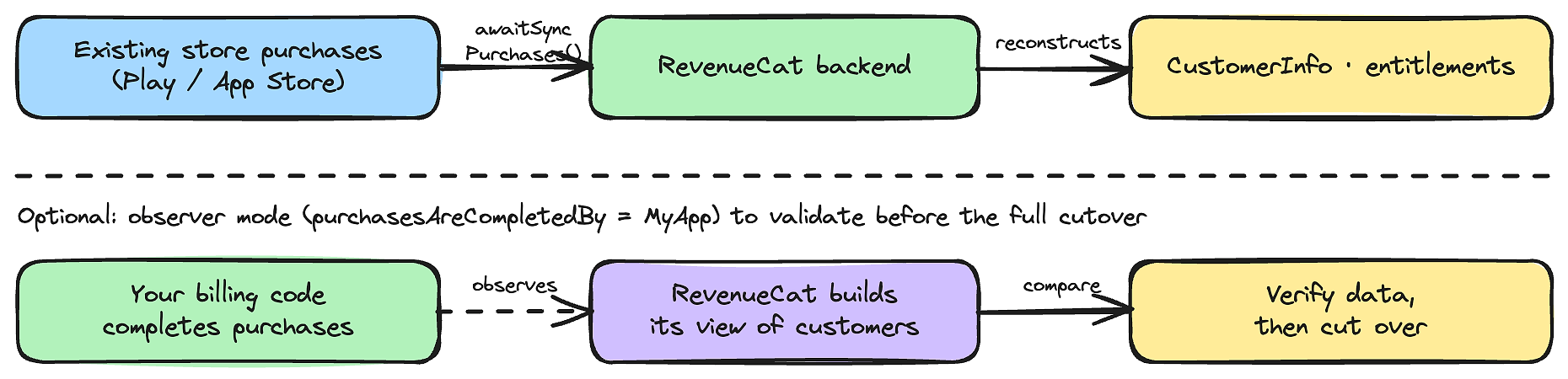
This posts the store receipts already on the device to RevenueCat, which reconstructs the customer’s entitlement state from them. It is a migration and observer mode tool, not something you call on every launch.
If you want to de risk the cutover, run the SDK in observer mode first by setting purchasesAreCompletedBy to MyApp. In this mode your existing billing code keeps completing purchases while RevenueCat observes and builds its view of your customers, so you can compare its entitlement data against your current source of truth before you flip the switch:
Note the trade-off the SDK calls out in the same configuration: when purchasesAreCompletedBy is MyApp on Android, you are still responsible for acknowledging purchases yourself, and failing to acknowledge within three days lets Google Play refund the user and revoke the purchase. Observer mode is a staging step on the way to letting RevenueCat complete purchases, not a permanent home.
Step 7: Keep user identity stable
The last piece is identity, because losing it is the other way a migration drops entitlements. If you left appUserId null, the SDK uses an anonymous identity it generates and persists. The moment you can tie purchases to your own account system, identify the user so their entitlements follow them across devices and reinstalls:
awaitLogIn returns a SuccessfulLogin with the merged customerInfo and a created flag.
RevenueCat maintains the alias graph between the anonymous identity and the identified one on its backend, so purchases made before login transfer to the account. On logout, awaitLogOut clears the saved id and returns to a fresh anonymous user.
This also clarifies when to use restore versus login. awaitRestore posts the purchases on the current store account to the current user, which is what Apple’s required restore button should call. Apple mandates a visible restore control regardless of whether you have your own account system, so that button stays even when logIn already covers continuity for you.
The SDK’s own guidance is that if you have your own account system, you do not need restore for continuity, because “restoration” is simply your app passing the same appUserID the customer used when they first purchased. In practice, rely on logIn for account based continuity and keep the restore entry point for store account based recovery.
Verify parity before you delete anything
The native code stays until you have proven the shared path matches it. Run this checklist on a sandbox account on both platforms before removing BillingClient and StoreKit code:
- Products load correctly from
awaitOfferingson both platforms with correct localized prices. - A purchase completes end to end through
awaitPurchase, and the entitlement flips to active without your old acknowledgement orfinishcode running. - An upgrade or downgrade between plans works on Android with the right
oldProductIdand replacement mode, since that path is the most likely to regress when you remove the nativeBillingFlowParamscode. - A pending purchase, such as a deferred cash payment, resolves to an active entitlement, matching the
enablePendingPurchasesbehavior your native code used to handle. - Cancellation surfaces as
PurchasesTransactionExceptionwithuserCancelledtrue, not as an error. - Trial and introductory state renders correctly through
periodType, remembering that eligibility itself is iOS only. - Existing purchasers see their entitlements after
syncPurchasesorrestore, including a reinstall test. - Identity merges correctly: a purchase made anonymously appears under the account after
logIn.
Once those hold, delete the BillingClient setup, the PurchasesUpdatedListener, the acknowledgement code, the StoreKit purchase and verification code, and the com.android.billingclient:billing dependency. If you ran observer mode, you can also retire the parts of your receipt validation server that the RevenueCat backend now covers, or keep them running in parallel until you are confident.
What still needs platform awareness
The shared model covers the common path, but a few capabilities remain tied to one store, and it is better to know which than to assume the abstraction hides everything:
- Introductory and trial eligibility are iOS-specific.
awaitTrialOrIntroPriceEligibilityreturns a real status on iOS andUNKNOWNon Android, where Google computes eligibility itself. - Win back offers require iOS 18 and StoreKit 2, and the related calls throw on other configurations.
- Personalized price and replacement mode for upgrades are Play Store only parameters on
awaitPurchase, ignored on iOS. - Amazon Appstore support is opt-in through a separate
purchases-store-amazondependency on the Android source set.
These stay as small, well-marked branches in otherwise shared code, rather than the two full billing implementations you started with.
Conclusion
Migrating to a shared in-app purchases layer is mostly subtraction. You replace two initializers with one configure, two product queries with awaitOfferings, two purchase pipelines with awaitPurchase, and two entitlement computations with one entitlements["premium"].isActive check, then bring your existing customers across with syncPurchases and logIn before deleting the native code. What remains is one purchase flow to reason about instead of two.