


When a user dismisses your paywall without purchasing, the conversion opportunity is lost. Exit offers change this by presenting a second offer at the moment of dismissal, typically a lower price, a longer trial, or a different plan. This is the same strategy e-commerce sites use for cart abandonment: catch the user on the way out with an alternative they might accept. RevenueCat’s paywall system supports exit offers as a dashboard configured feature that requires no code changes, but only if you present your paywall the correct way.
In this article, you’ll explore how exit offers work on Android, why the presentation method matters, how to configure them in the RevenueCat dashboard, the correct code for both PaywallDialog and PaywallActivityLauncher, and the common mistake that silently prevents exit offers from appearing.
What exit offers are and when they trigger
An exit offer is a secondary paywall that appears automatically when a user dismisses your primary paywall without making a purchase. The flow looks like this:
- User sees the main paywall (e.g., an annual plan at $49.99/year)
- User taps the close button or swipes to dismiss
- Instead of closing, a second paywall appears with the exit offer (e.g., a monthly plan at $4.99/month)
- User either subscribes to the exit offer or dismisses again, which closes everything
The exit offer is a separate offering configured in the RevenueCat dashboard. It has its own paywall design, its own packages, and its own pricing. The SDK handles the transition between the main paywall and the exit offer automatically.
Exit offers do not trigger when the user has already completed a purchase. If the user subscribes on the main paywall, the paywall closes normally without showing the exit offer.
The presentation mode requirement
This is the most important point in this article: exit offers only work with PaywallDialog and PaywallActivity on Android. They do not work with the Paywall composable embedded directly in your layout.
The reason is structural. PaywallDialog and PaywallActivity control their own dismiss flow. When the user taps close, the SDK intercepts the dismiss action, checks if an exit offer is configured, and presents the exit offering before actually closing. The Paywall composable, on the other hand, is embedded directly into your Compose layout. It has no concept of “dismiss” because it is just a composable in your navigation graph. There is nothing to intercept.
If you are currently using the Paywall composable and want exit offers, you need to switch to PaywallDialog or PaywallActivityLauncher. The migration is straightforward and covered in the sections below.
Setting up exit offers in the dashboard
Exit offers are configured entirely in the RevenueCat dashboard. No code changes are required once your paywall is presented with a supported method.
- Create the exit offer offering. In your RevenueCat project, create a new offering (e.g., “exit_offer_monthly”) with the packages you want to show as the exit offer. This could be a discounted monthly plan, a longer free trial, or a different product entirely.
- Create a paywall for the exit offer offering. Attach a paywall to the exit offer offering using the Paywalls editor. Design it as you would any other paywall. This is the screen the user will see after dismissing the main paywall.
- Link the exit offer to your main paywall. In the Paywalls editor for your main paywall, open the exit offer settings and select the exit offer offering you created. This tells the SDK which offering to present when the user dismisses.
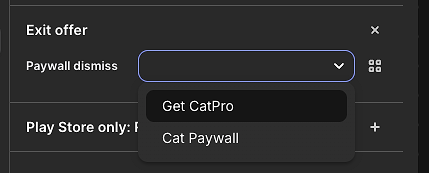
Once linked, the exit offer is live. The SDK handles preloading the exit offering data, intercepting the dismiss action, and presenting the exit offer paywall.
Presenting with PaywallDialog
PaywallDialog is the recommended way to present paywalls in Compose. It displays the paywall as a full screen dialog on compact devices and a standard dialog on tablets. Exit offers work automatically.
The simplest setup uses setRequiredEntitlementIdentifier to show the paywall only if the user does not have a specific entitlement:
If you need custom display logic, use setShouldDisplayBlock:
No additional code is needed for exit offers. The PaywallDialog handles the flow internally: it preloads the exit offering on display, intercepts the dismiss action, and transitions to the exit offer paywall if configured. The setDismissRequest callback fires only when the user has fully dismissed both the main paywall and the exit offer (or if no exit offer is configured).
When using setShouldDisplayBlock together with an exit offer, the SDK also evaluates the block before showing the exit offer. If the condition returns false (for example, the user purchased on the main paywall and now has an active entitlement), the exit offer is skipped and the dialog closes directly.
Presenting with PaywallActivityLauncher
For apps that do not use Compose or prefer an Activity based approach, PaywallActivityLauncher launches the paywall as a separate Activity. Exit offers work automatically here as well, the SDK launches the exit offer as a second Activity on top of the first.
When the user dismisses the main paywall Activity, the SDK automatically launches the exit offer Activity on top. If the user purchases from the exit offer, the result is PaywallResult.Purchased. If they dismiss the exit offer too, the result is PaywallResult.Cancelled. The onActivityResult callback handles both scenarios uniformly.
To launch without an entitlement check, use launch() instead of launchIfNeeded():
The embedded Paywall composable: Why exit offers do not work
If you are embedding the Paywall composable directly in a navigation graph, exit offers will not trigger:
The Paywall composable renders the paywall content directly in your layout. When the user taps the dismiss button, onDismiss navigates back via navController.popBackStack(). The paywall has no opportunity to intercept this dismissal and show an exit offer because the navigation action happens immediately.
If you want exit offers while keeping a navigation based flow, replace the embedded Paywall with a PaywallDialog placed inside the screen composable:
The behavior is identical from the user’s perspective, a full screen paywall appears and can be dismissed, but the PaywallDialog manages the dismiss flow internally, enabling exit offers.
How exit offers work under the hood
When a paywall loads, the SDK calls preloadExitOffering() in the background. This method checks whether the current paywall’s configuration includes an exit offer reference (an offering ID stored in PaywallComponentsData.exitOffers.dismiss.offeringId). If it does, the SDK fetches that offering from RevenueCat’s backend and holds it in memory.
When the user taps close, the SDK checks two conditions:
- Has the user completed a purchase? If yes, close normally. No exit offer.
- Is there a preloaded exit offering? If yes, present it instead of closing.
For PaywallDialog, the transition works through a state swap. The current dialog offering is set to null (closing the current paywall), and the exit offering is set as a pending offering. A LaunchedEffect detects this transition and opens the exit offer as a new dialog.
For PaywallActivity, the transition launches a new Activity. The exit offer Activity uses the same PaywallActivity class but with the exit offering’s ID passed as an argument. The result from the exit offer Activity is forwarded back to the original caller.
The SDK also tracks exit offer events for analytics. When an exit offer is shown, a paywall_exit_offer event is recorded with the exit offer type (dismiss) and the exit offering identifier. This data appears in RevenueCat Charts, letting you measure how exit offers affect your conversion funnel.
Platform differences
iOS
Exit offers on iOS work with presentPaywall() and presentPaywallIfNeeded(). They do not work with PaywallView embedded in SwiftUI. This is the same structural limitation as Android: the presentation method must control the dismiss flow.
One important consideration: Apple’s App Store Review Guideline 5.6 (Developer Code of Conduct) has been cited in some rejections for apps that show additional offers when the user tries to dismiss a paywall. Apple’s definition of “manipulative practices” is subjective, and enforcement is inconsistent across reviewers. Some apps use exit offers on iOS without issues, while others have been rejected. If you want to start with a safer approach, use RevenueCat’s Targeting feature to enable exit offers only for Android users.
React Native
Exit offers work with the presentPaywall and presentPaywallIfNeeded functions. They do not work with the <RevenueCatUI.Paywall> component embedded in your layout. The pattern is consistent across all platforms: only presentation methods that control the dismiss flow support exit offers.
Kotlin Multiplatform
Exit offers are not yet supported in the RevenueCat KMP SDK.
Conclusion
In this article, you’ve explored how exit offers work in RevenueCat’s paywall system on Android, from dashboard configuration to the correct presentation methods. The key takeaway is that exit offers require PaywallDialog or PaywallActivityLauncher. The Paywall composable does not support them because it has no dismiss flow to intercept.
Understanding this distinction helps you choose the right presentation method from the start. If you plan to use exit offers, build your paywall integration around PaywallDialog (for Compose) or PaywallActivityLauncher (for Activity based flows). If you are already using the embedded Paywall composable, switching to PaywallDialog is a small change that unlocks exit offers without altering the user experience.
Whether you are implementing exit offers for the first time, migrating from an embedded paywall to a dialog based one, or evaluating how exit offers could affect your conversion funnel, the patterns in this article give you a clear path to get them working correctly on Android.
As always, happy coding!