Benchmarks
Compare your app's performance to similar apps



Benchmarks allow you to compare your app's key metrics against other apps in the same store and category. This helps you understand how your app is performing relative to your peers and identify opportunities for improvement.
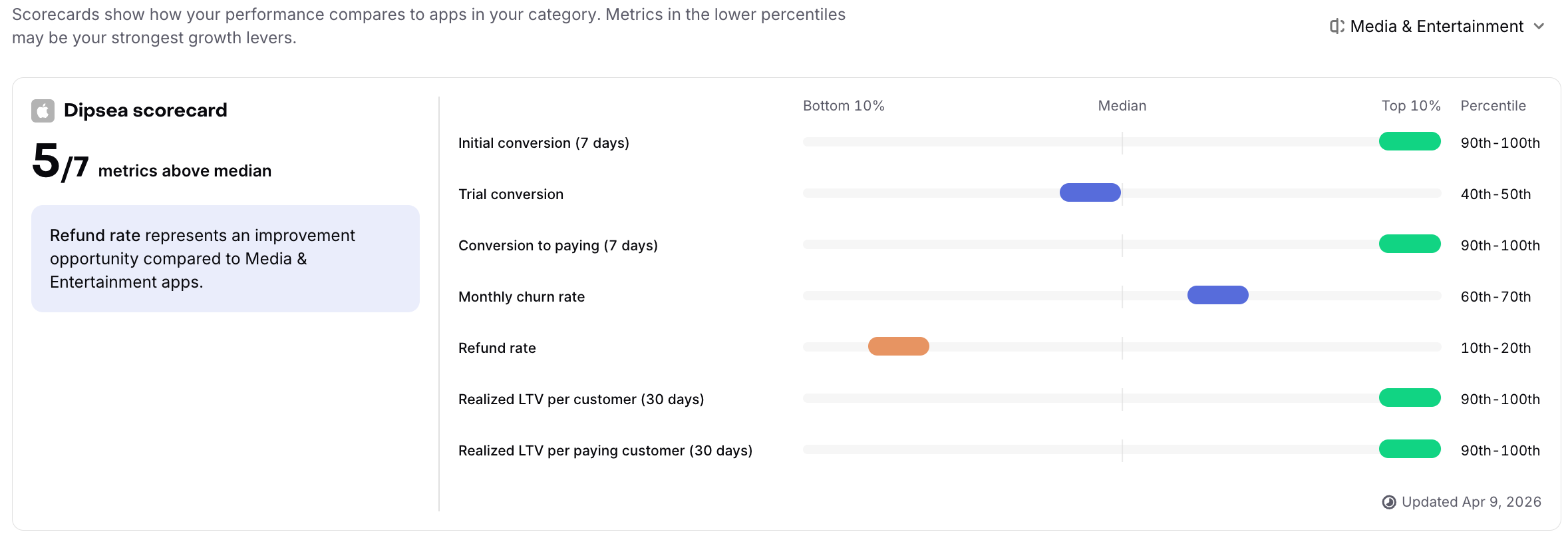
How Benchmarks Work
RevenueCat automatically calculates benchmark percentiles for your app by comparing it to other apps in the same store (App Store or Play Store) and category. We analyze the last 12 months of data to provide stable, meaningful comparisons.
Benchmarks compare apps within the same store and category combination. You can explore benchmarks for different categories to gain additional insights.
Supported Categories:
- Business
- Education
- Gaming
- Health & Fitness
- Media & Entertainment
- Photo & Video
- Productivity
- Shopping
- Social & Lifestyle
- Travel
- Utilities
Eligibility
Benchmarks are available to all RevenueCat users with eligible apps. To ensure meaningful comparisons:
- Currently supported on iOS (App Store) and Android (Play Store)
- Apps are grouped by their primary store category
We only show benchmarks when there are enough apps in a benchmark group (store + category combination) to ensure complete anonymization of individual app data. This protects the privacy of all apps in the ecosystem.
Benchmark Metrics
Benchmarks are available for seven key subscription metrics. For all metrics, being at a higher percentile is better — for churn and refund rates, this means having lower rates than your peers.
Some metrics may show as "stabilizing" if your app doesn't yet have enough data for that specific metric. As you acquire more customers, additional metrics will become available.
| Metric | Description | Learn More |
|---|---|---|
| Initial Conversion (7 days) | The percentage of new customers who subscribe to or purchase any product (including free trials) within 7 days of first being seen. | View chart → |
| Trial Conversion | The percentage of customers who started a free trial and subsequently converted to a paid subscription. Uses an unbounded timeframe to capture all conversions. | View chart → |
| Conversion to Paying (7 days) | The percentage of new customers who become paying subscribers within 7 days of first being seen. Excludes customers who are only on free trials. | View chart → |
| Monthly Churn Rate | The percentage of active subscriptions that expired or were cancelled during a month. Lower rates indicate better retention. | View chart → |
| Refund Rate | The percentage of transactions that were refunded. Lower rates indicate higher customer satisfaction. | View chart → |
| Realized LTV per Customer (30 days) | The average revenue generated per customer (including non-purchasers) in their first 30 days. | View chart → |
| Realized LTV per Paying Customer (30 days) | The average revenue generated per paying customer in their first 30 days. Excludes customers who haven't made any purchases. | View chart → |
Understanding Your Percentiles
Each metric shows your app's performance as a percentile (e.g., 90th percentile means your app performs better than 90% of similar apps). The visualization helps you quickly identify:
- Green bars (80th-100th percentile): Your app is among the top performers
- Blue bars (20th-80th percentile): Your app is performing in the middle range
- Orange bars (0th-20th percentile): Your app has significant room for improvement
Data Freshness
Benchmarks are regularly updated to reflect the latest performance data. The "Updated" timestamp shows when the benchmarks were last calculated.
How to use Benchmarks in your business
Benchmarks provide strategic insights to guide your growth initiatives. The scorecard displays a summary showing how many of your metrics are above the median, giving you a quick overview of overall performance:
- Identify growth opportunities: Focus on metrics in the lower percentiles (0-20th) as these often represent your strongest growth levers
- Set realistic goals: Use category benchmarks to establish achievable targets for each metric based on what similar apps accomplish
- Prioritize improvements: The scorecard provides personalized recommendations, automatically highlighting which metrics to focus on first for maximum impact
- Competitive intelligence: Understanding where you stand relative to peers helps inform product and pricing decisions
- Track progress over time: Regular benchmark reviews show whether your improvements are closing the gap with competitors
- Category analysis: Explore different categories to understand performance variations and identify best practices from other app segments