Grant Cadence



An in-app currency is granted to customers through its associated products. For each product, the "Grant currency on" option controls when the configured amount is deposited: once per billing cycle on Purchase or renewal, or on a recurring Daily, Weekly, or Monthly cadence that drips the amount independent of the billing cycle (see Subscription Schedules). A recurring cadence is ideal for "monthly allowance" style products, where an annual subscriber receives a steady amount every month rather than a single large grant once a year.
You can optionally add a separate Trial start grant that deposits currency when a free trial begins. Each product uses one grant option plus an optional trial grant.
How it works
When you set a recurring cadence (Daily, Weekly, or Monthly), RevenueCat builds a drip schedule relative to the purchase date of the current billing cycle:
- The first grant is deposited immediately on purchase or renewal.
- Each subsequent grant is deposited one cadence period later —
purchase date + 1 period,+ 2 periods, and so on — each depositing the configured amount. - Drips only occur within the current billing cycle. When the subscription renews, the schedule resets from the new renewal date and starts again with a fresh grant.
For example, an annual subscription configured to grant 100 credits with a monthly cadence deposits 100 credits at purchase, then 100 more credits each month for the rest of the year — roughly 1,200 credits over the cycle — instead of a single 1,200-credit grant at renewal.
Calendar alignment
Daily and weekly cadences add a fixed interval (1 day / 7 days) to the purchase date. Monthly cadences are aligned to the purchase day-of-month and clamp to the last valid day for shorter months. A subscription purchased on January 31 drips on February 28, March 31, April 30, and so on — always snapping back to the original day where the month allows.
Configuration
Grant cadence is configured per associated product, alongside the grant amount, when creating or editing an in-app currency.
- Navigate to In-App Currencies: In the RevenueCat dashboard, go to your project's Product catalog → In-app currencies, then create a new currency or edit an existing one.
- Add an associated product: Under Associated products, select "Add associated product" and choose one or more products from the Select products dropdown.
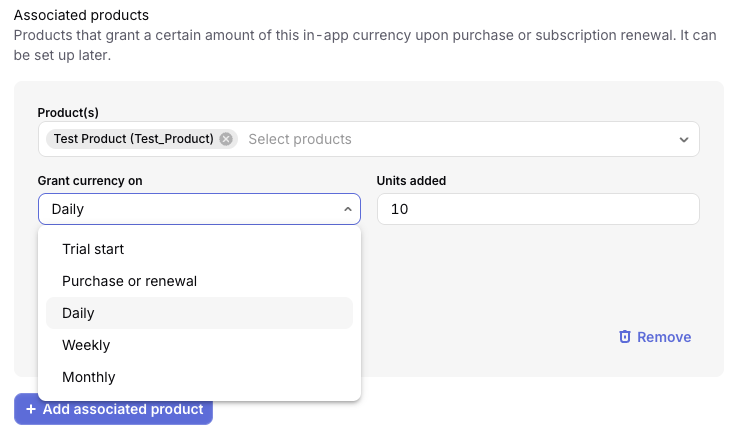
- Choose when to grant: In the grant row, open the "Grant currency on" dropdown and pick how the currency is delivered, then enter the amount to deposit each time in "Units added":
- Purchase or renewal — the full amount is deposited once per billing cycle.
- Daily, Weekly, or Monthly — a recurring cadence that drips the amount on that schedule, independent of the billing cycle.
- Trial start — grants currency when a free trial begins (see Free trials).
- (Optional) Add a trial grant: Select "Add grant" to add a second row, choose Trial start, and set its units. A product can have at most one trial grant plus one purchase/renewal-or-cadence grant. When both are present, the dashboard notes that "Additional grants will start once the trial is completed."
- (Optional) Expire leftover currency: Enable "Auto-expire all currency left" to make each grant use-it-or-lose-it (see Expiring currencies).
- Save: Select "Create" (new currency) or "Save" (existing currency).
Grant cadence applies to subscription products. One-time purchases grant their full amount on purchase and are not affected by a cadence.
Interactions with other features
Free trials
A grant cadence does not drip during a free trial. If you add a Trial start grant, its units are deposited once when the trial begins; the recurring cadence drips only start once the subscription converts to a paid period — as the dashboard notes, "Additional grants will start once the trial is completed."
Expiring currencies
When you enable "Auto-expire all currency left" on a grant that uses a cadence, each drip becomes use-it-or-lose-it: a deposited grant expires when the next drip lands, rather than at the end of the billing cycle. This keeps each period's allowance from rolling over into the next. The final drip of the cycle expires at the cycle end. See Expiring currencies for the general behavior.
Refunds
If a subscription is refunded, RevenueCat revokes the currency the customer still holds from that purchase. For use-it-or-lose-it cadences, grants that have already expired are not clawed back; only currency the customer could still hold is removed. Balances are capped at zero. See the refunds documentation for details.
Cancellations and grace periods
- Cancellation (auto-renew off, not yet expired): drips continue on schedule until the paid period ends.
- Grace period / billing retry: no currency is dripped while a payment issue is unresolved. Drips resume once billing recovers, consistent with Grace Periods and Billing Recovery.
Sandbox testing
Waiting a full day, week, or month to verify a cadence would make testing impractical, so in sandbox RevenueCat accelerates the schedule: drips are scheduled every 5 minutes, regardless of the configured cadence. Actual timing can vary by a short duration, so a drip may arrive slightly earlier or later than 5 minutes. This mirrors how the stores accelerate sandbox subscription renewals, letting you observe several drips — and their expiration and refund behavior — within a few minutes.
The accelerated interval applies only to sandbox purchases; production purchases always follow the configured daily, weekly, or monthly cadence.