In-App Currency
Enable transactions for virtual items in your app



In-app currencies are digital assets used within your app to facilitate transactions, unlock premium features, or enhance customer engagement.
These currencies are typically acquired through in-app purchases, rewards, or gameplay achievements and do not have intrinsic real-world value outside the application. They can be used for purchasing virtual goods, upgrading characters, or accessing exclusive content. Common examples include tokens, coins, credits, or other units that can be replenished through purchases.
RevenueCat can automatically grant in-app currency from verified in-app purchases and rewarded ads. Your app can read customers' currency balances directly from the SDK.
Depositing or spending currency uses the Developer API, which is authenticated with a secret API key that must never be embedded in your app. If your app deposits or spends currency, you need a backend you control to make those calls.
On iOS, Authentication lets your app spend a balance directly. Authentication is in private beta. Tell us about your use case if you want early access.
See best practices and security considerations for details.
In-App Currency terminology: RevenueCat now refers to this feature as In-App Currency. Existing SDK and API identifiers still use Virtual Currency, including object, function, property, field, endpoint, and event names. These technical names have not changed, so continue using them as documented.
For a complete walkthrough, see our In-App Currency tutorial.
Configuration
In RevenueCat, in-app currencies are defined at the project level. You can configure up to 100 in-app currencies per project and use them to enrich your app experience.
- Click the “In-App Currencies” option in the “Product catalog” of your project sidebar in RevenueCat

- Select “+ New in-app currency” button in the top right corner. Enter a code and a name for your currency.
- Code: This is used across various APIs to identify the in-app currency (e.g: GLD)
- Icon (optional): Choose an icon to visually represent this currency in the dashboard
- Name: This should be a readable name for the currency that you're creating (e.g: GOLD)
- Description (optional): A description of what this currency represents or how it is used (e.g: Can be used to purchase in-app items)

- You can optionally associate products with your new currency. Every time customers purchase one of these products, the defined amount of in-app currency will be added to their balance. Click Add associated product, pick a product and fill in the amount.

You can associate as many products as you want with your in-app currency and you can also associate a product with more than one in-app currency, meaning once it's purchased, multiple types of in-app currencies are added to the customer's balance. If you have not yet configured any products, see our documentation for further instructions.
- Remember to select "SAVE" in the upper right-hand corner. Repeat this process if to create more than one currency.
Dashboard balances
Once your customer purchase the associated products they will get the defined amount of your in-app currency. You can inspect the in-app currency balances of your customer in the right side-panel of the customer page.
Usage
Prerequisites
The endpoints available for in-app currency are supported through our Developer API (2.0.0). You will need a secret key to access it. Make sure that your key at least has Read & Write permissions for Customer Purchases Configuration and Customer Configuration. See our documentation for more details on how you can access RevenueCat’s Developer API.

Rate limits
All endpoints for in-app currency under our Developer API are subject to a rate limit of 900 requests per minute. If you exceed this limit, the API will return a 429 Too Many Requests status code, indicating that the rate limit has been reached.
To avoid service interruptions, we recommend implementing retry logic. If you hit the rate limit, the API response will include a Retry-After header, specifying the amount of time (in seconds) you need to wait before making further requests.
For more information on handling rate limits and using the Retry-After header, please refer to our API documentation.
If you anticipate needing higher rate limits, please contact our support team with details about your use case and anticipated request usage.
Limitations
The maximum amount of a single in-app currency that a customer can own must be between zero and two billion (2,000,000,000). Negative balances are not supported.
Reading balances
From your backend
The virtual currency get balance Developer API endpoint allows you to retrieve a customer's current balance from your backend:
- Code
curl --location 'https://api.revenuecat.com/v2/projects/<YOUR_PROJECT_ID>/customers/<YOUR_CUSTOMER_ID>/virtual_currencies' \
--header 'Authorization: Bearer sk_***************************'
The response will include the balances for all the in-app currencies that the customer has.
- Code
{
    "items": [
        {
            "balance": 80,
            "currency_code": "GLD",
            "object": "virtual_currency_balance"
        },
        {
            "balance": 40,
            "currency_code": "SLV",
            "object": "virtual_currency_balance"
        }
    ],
    "next_page": null,
    "object": "list",
    "url": "https://api.revenuecat.com/v2/projects/<YOUR_PROJECT_ID>/customers/<YOUR_CUSTOMER_ID>/virtual_currencies"
}
From the SDK
Fetching in-app currency balances is supported in the following SDK versions:
| SDK | Supported Versions |
|---|---|
| iOS SDK | 5.32.0+ |
| Android SDK | 9.1.0+ |
| React Native SDK | 9.1.0+ |
| Flutter SDK | 9.1.0+ |
| Capacitor SDK | 11.1.0+ |
| Unity SDK | 8.1.0+ |
| KMP SDK | 2.1.0+16.2.0+ |
| Cordova SDK | 7.1.0+ |
| Web (JS/TS) SDK | 1.13.0 |
You can use the virtualCurrencies() function to retrieve a customer's balance. The function returns a VirtualCurrencies object, which includes the customer's balances along with each in-app currency's metadata.
- Swift
- Kotlin
- Java
- React Native
- Flutter
- Capacitor
- Unity
- Kotlin Multiplatform
- Cordova
- Web (JS/TS)
// Fetch virtual currencies
// With Async/Await
let virtualCurrencies = try? await Purchases.shared.virtualCurrencies()

// With Completion Handlers
Purchases.shared.virtualCurrencies { virtualCurrencies, error in
   // TODO: Handle virtual currencies & error
}

// Get the details of a specific virtual currency
let virtualCurrency = virtualCurrencies.all[<your_virtual_currency_code>]
let balance = virtualCurrency?.balance
let name = virtualCurrency?.name
let code = virtualCurrency?.code

// Keep in mind that serverDescription may be null if no description was provided
// in the RevenueCat dashboard
let description = virtualCurrency?.serverDescription

// Iterate through all virtual currencies
for(virtualCurrencyCode, virtualCurrencyInfo) in virtualCurrencies.all {
   print("\(virtualCurrencyCode): \(virtualCurrencyInfo.balance)")
}
// Fetch virtual currencies
// With coroutines
try {
    val getVirtualCurrenciesResult: VirtualCurrencies = Purchases.sharedInstance.awaitGetVirtualCurrencies()
    // TODO: Handle virtual currencies
} catch(error: PurchasesException) {
    // TODO: Handle error
}

// With callbacks
Purchases.sharedInstance.getVirtualCurrenciesWith(
    onError = { error: PurchasesError ->
        // TODO: Handle error
    },
    onSuccess = { virtualCurrencies: VirtualCurrencies ->
        // TODO: Handle virtual currencies
    },
)

// Get the details of a specific virtual currency
val virtualCurrency = virtualCurrencies.all[<your_virtual_currency_code>]
val balance = virtualCurrency?.balance
val name = virtualCurrency?.name
val code = virtualCurrency?.code

// Keep in mind that serverDescription may be null if no description was provided
// in the RevenueCat dashboard
val description = virtualCurrency?.serverDescription

// Iterate through all virtual currencies
for ((virtualCurrencyCode, virtualCurrency) in virtualCurrencies.all) {
    println("$virtualCurrencyCode: ${virtualCurrency.balance}")
}
// Fetch virtual currencies
Purchases.sharedInstance.getVirtualCurrencies(
    new GetVirtualCurrenciesCallback() {
        @Override
        public void onReceived(@NonNull VirtualCurrencies virtualCurrencies) {
            // TODO: Handle virtual currencies
        }

        @Override
        public void onError(@NonNull PurchasesError error) {
            // TODO: Handle error
        }
    }
);

// Get the details of a specific virtual currency
VirtualCurrency virtualCurrency = virtualCurrencies.getAll().get(<virtual_currency_code>);
int balance = virtualCurrency.getBalance();
String name = virtualCurrency.getName();
String code = virtualCurrency.getCode();

// Keep in mind that serverDescription may be null if no description was provided
// in the RevenueCat dashboard
String serverDescription = virtualCurrency.getServerDescription();

// Iterate through all virtual currencies
virtualCurrencies.getAll().forEach((key, virtualCurrency) -> {
    System.out.println(virtualCurrency.getCode() + ": " + virtualCurrency.getBalance());
});
// Fetch virtual currencies
try {
  const virtualCurrencies = await Purchases.getVirtualCurrencies();
  // TODO: Handle virtual currencies
} catch (error) {
  // TODO: Handle error
}

// Get the details of a specific virtual currency
const virtualCurrency = virtualCurrencies.all['<virtual_currency_code>'];
const balance = virtualCurrency.balance;
const name = virtualCurrency.name;
const code = virtualCurrency.code;

// Keep in mind that serverDescription may be null if no description was provided
// in the RevenueCat dashboard
const serverDescription = virtualCurrency.serverDescription;

// Iterate through all virtual currencies
for (const [virtualCurrencyCode, virtualCurrency] of Object.entries(virtualCurrencies.all)) {
    console.log(`${virtualCurrency.code}: ${virtualCurrency.balance}`);
}
// NOTE: Virtual currencies are not yet supported in Flutter web and
// are only available for Flutter on iOS and Android.

// Fetch virtual currencies
try {
  final virtualCurrencies = await Purchases.getVirtualCurrencies();
  // TODO: Handle virtual currencies
} catch (error) {
  // TODO: Handle error
}

// Get the details of a specific virtual currency
final virtualCurrency = virtualCurrencies.all[<virtual_currency_code>];
final balance = virtualCurrency?.balance;
final name = virtualCurrency?.name;
final code = virtualCurrency?.code;

// Keep in mind that serverDescription may be null if no description was provided
// in the RevenueCat dashboard
final serverDescription = virtualCurrency?.serverDescription;

// Iterate through all virtual currencies
virtualCurrencies.all.forEach((virtualCurrencyCode, virtualCurrency) {
  print('$virtualCurrencyCode: ${virtualCurrency.balance}');
});
// Fetch virtual currencies
try {
  const { virtualCurrencies } = await Purchases.getVirtualCurrencies();
  // TODO: Handle virtual currencies
} catch (error) {
  // TODO: Handle error
}

// Get the details of a specific virtual currency
const virtualCurrency = virtualCurrencies.all['<virtual_currency_code>'];
const balance = virtualCurrency.balance;
const name = virtualCurrency.name;
const code = virtualCurrency.code;

// Keep in mind that serverDescription may be null if no description was provided
// in the RevenueCat dashboard
const serverDescription = virtualCurrency.serverDescription;

// Iterate through all virtual currencies
for (const [virtualCurrencyCode, virtualCurrency] of Object.entries(virtualCurrencies.all)) {
    console.log(`${virtualCurrency.code}: ${virtualCurrency.balance}`);
}
// Fetch virtual currencies
purchases.GetVirtualCurrencies((virtualCurrencies, error) =>
{
    // TODO: Handle virtual currencies & error
});

// Get the details of a specific virtual currency
var virtualCurrency = virtualCurrencies.All[<virtual_currency_code>];
var balance = virtualCurrency.Balance;
var name = virtualCurrency.Name;
var code = virtualCurrency.Code;

// Keep in mind that serverDescription may be null if no description was provided
// in the RevenueCat dashboard
var serverDescription = virtualCurrency.ServerDescription;

// Iterate through all virtual currencies
foreach (var keyValuePair in virtualCurrencies.All) {
    var virtualCurrencyCode = keyValuePair.Key;
    var vc = keyValuePair.Value;
    Debug.Log($"{virtualCurrencyCode}: {vc.Balance}");
}
// Fetch virtual currencies
// With coroutines
try {
    val virtualCurrencies: VirtualCurrencies = Purchases.sharedInstance.awaitVirtualCurrencies()
    // TODO: Handle virtual currencies
} catch(error: PurchasesException) {
    // TODO: Handle error
}

// With callbacks
Purchases.sharedInstance.getVirtualCurrencies(
    onError = { error: PurchasesError ->
        // TODO: Handle error
    },
    onSuccess = { virtualCurrencies: VirtualCurrencies ->
        // TODO: Handle virtual currencies
    },
)

// Get the details of a specific virtual currency
val virtualCurrency = virtualCurrencies.all[<your_virtual_currency_code>]
val balance = virtualCurrency?.balance
val name = virtualCurrency?.name
val code = virtualCurrency?.code

// Keep in mind that serverDescription may be null if no description was provided
// in the RevenueCat dashboard
val description = virtualCurrency?.serverDescription

// Iterate through all virtual currencies
for ((virtualCurrencyCode, virtualCurrency) in virtualCurrencies.all) {
    println("$virtualCurrencyCode: ${virtualCurrency.balance}")
}
// Fetch virtual currencies
Purchases.getVirtualCurrencies(
    virtualCurrencies => {
        // TODO: Handle virtual currencies
    },
    error => {
        // TODO: Handle error
    }
);

// Get the details of a specific virtual currency
const virtualCurrency = virtualCurrencies.all['<virtual_currency_code>'];
const balance = virtualCurrency.balance;
const name = virtualCurrency.name;
const code = virtualCurrency.code;

// Keep in mind that serverDescription may be null if no description was provided
// in the RevenueCat dashboard
const serverDescription = virtualCurrency.serverDescription;

// Iterate through all virtual currencies
for (const [virtualCurrencyCode, virtualCurrency] of Object.entries(virtualCurrencies.all)) {
    console.log(`${virtualCurrency.code}: ${virtualCurrency.balance}`);
}
// Fetch virtual currencies
try {
  const virtualCurrencies = await Purchases.getSharedInstance().getVirtualCurrencies();
  // TODO: Handle virtual currencies
} catch (error) {
  // TODO: Handle error
}

// Get the details of a specific virtual currency
const virtualCurrency = virtualCurrencies.all['<virtual_currency_code>'];
const balance = virtualCurrency.balance;
const name = virtualCurrency.name;
const code = virtualCurrency.code;

// Keep in mind that serverDescription may be null if no description was provided
// in the RevenueCat dashboard
const serverDescription = virtualCurrency.serverDescription;

// Iterate through all virtual currencies
for (const [virtualCurrencyCode, virtualCurrency] of Object.entries(virtualCurrencies.all)) {
    console.log(`${virtualCurrencyCode}: ${virtualCurrency.balance}`);
}
When a customer's balance is updated from your backend, the VirtualCurrencies object remains cached and is not automatically updated. To get the updated balance, you need to call Purchases.shared.invalidateVirtualCurrenciesCache() and fetch the VirtualCurrencies object again.
We also recommend calling invalidateVirtualCurrenciesCache() after a purchase has completed successfully to ensure that the balances are up to date the next time you fetch them.
You may directly access the cached in-app currencies using the cachedVirtualCurrencies property. This is helpful for rendering UI immediately, or for displaying in-app currencies when there is no network connection. Keep in mind that this value is cached and isn't guaranteed to be up to date.
- Swift
- Web (JS/TS)
let cachedVirtualCurrencies: VirtualCurrencies? = Purchases.shared.cachedVirtualCurrencies
const cachedVirtualCurrencies: VirtualCurrencies | null = Purchases.getSharedInstance().getCachedVirtualCurrencies();
Depositing or spending
You can deposit or spend currency by calling the in-app currency transactions Developer API endpoint from the backend of your app:
- Code
curl --location 'https://api.revenuecat.com/v2/projects/<YOUR_PROJECT_ID>/customers/<YOUR_CUSTOMER_ID>/virtual_currencies/transactions' \
--header 'Content-Type: application/json' \
--header 'Authorization: Bearer sk_***************************' \
--data '{
    "adjustments": {
        "GLD": -20,
        "SLV": -10
    }
}'
The example request will deduct 20 GLD and 10 SLV from the customer's balance. Upon successful execution, the response will contain the updated balances of the in-app currencies that were spent.
Note that sufficient balances of both currency types are required for the transaction to succeed. If not, the transaction will fail with HTTP 422 error and no in-app currency will be deducted.
- 200
- 422
{
    "items": [
        {
            "balance": 80,
            "currency_code": "GLD",
            "object": "virtual_currency_balance",
        },
        {
            "balance": 40,
            "currency_code": "SLV",
            "object": "virtual_currency_balance",
        },
    ],
    "next_page": null,
    "object": "list",
    "url": "https://api.revenuecat.com/v2/projects/<YOUR_PROJECT_ID>/customers/<YOUR_CUSTOMER_ID>/virtual_currencies"
}
{
    "doc_url": "https://errors.rev.cat/unprocessable-entity-error",
    "message": "Customer's balance is not enough to perform the transaction.",
    "object": "error",
    "param": "adjustments",
    "retryable": false,
    "type": "unprocessable_entity_error"
}
Multiple in-app currency types can be adjusted in a single transaction. Deductions and additions can also be combined. For example, you can execute the conversion of 50 GLD to 200 SLV with the following transaction:
- Code
{
    "adjustments": {
        "GLD": -50,
        "SLV": 200
    }
}
Spending from your app
On iOS, your app can spend a Customer's balance directly once the Customer is authenticated. Your app doesn't need a backend or a secret API key for these calls. See Add authentication to your mobile app. The SDK calls the spend endpoint of API v1 with the Customer's access token.
- Swift
// Spending from the app needs the SDK imported with @_spi(Internal) and
// configured with .with(iamEnabled: true)
@_spi(Internal) import RevenueCat

// Spend an amount of one currency
let _ = try await Purchases.shared.spendVirtualCurrency(code: "GLD", amount: 20)

// Spend several currencies in one transaction
let _ = try await Purchases.shared.spendVirtualCurrencies(amounts: [
    "GLD": 20,
    "SLV": 10
])

// Spend a currency and attach your own reference identifier to the transaction
Purchases.shared.spendVirtualCurrencies(
    amounts: ["GLD": 20],
    reference: "my_custom_transaction_id"
) { updatedCurrencyInformation, error in
    // The transaction has completed, or failed with an error
}
Spending from the app needs iOS SDK version 5.88.0 or later, and Authentication is in private beta. Android and the hybrid SDKs don't support it yet. Tell us about your use case if you're interested in early access.
Customer center
You can display a customer's in-app currency balances in RevenueCat's Customer Center. Please refer to this section of the Customer Center configuration guide for more information on displaying in-app currencies in the Customer Center.
Events
RevenueCat provides event tracking for in-app currency transactions, allowing you to monitor and respond to balance changes in real-time through webhooks.
In-app currency transactions appear in the Customer History timeline and trigger VIRTUAL_CURRENCY_TRANSACTION webhook events for the entire subscription lifecycle whenever there are currency balance adjustments.
In-app currency adjustments made through the API will appear in the customer timeline, but cannot be clicked for additional details. These adjustments are displayed for reference only and do not generate webhook events.
For more information about in-app currency events, including customer timeline events and webhook events, see our In-App Currency Events documentation.
Sandbox Testing
When testing in-app currency functionality in sandbox environments, you have control over how sandbox purchases affect in-app currency balances. This is particularly important when testing with real app user IDs or test accounts that might overlap with production data.
Sandbox Access Control
You can configure sandbox testing behavior in the General tab of your project settings:
- Anybody (default): All sandbox purchases will add in-app currency as configured. This is recommended for early development and internal QA testing.
- Allowed App User IDs only: Only specific app user IDs will receive in-app currency from sandbox purchases. Useful for restricted testing scenarios like Google Play closed testing.
- Nobody: No sandbox purchases will grant in-app currency. Use this to prevent testing from affecting in-app currency balances.
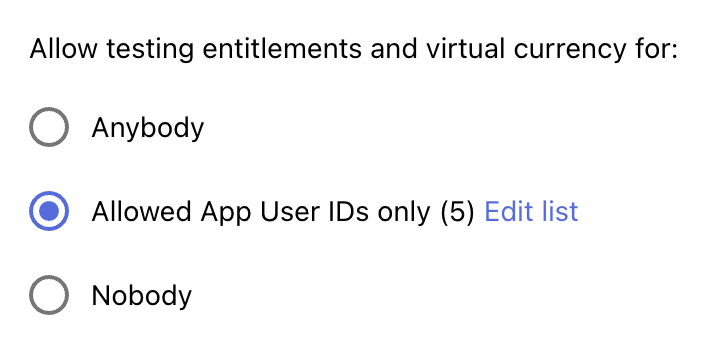
What Happens When You Restrict Access
If you update your sandbox access settings to be more restrictive:
- ✅ Sandbox purchases continue to be recorded in RevenueCat
- ✅ Only qualifying customers receive in-app currency going forward
- 💰 Previously granted in-app currency remains in customer balances (even if they no longer qualify)
For more detailed information about sandbox testing configuration, see our Sandbox Testing Access documentation.
Feedback
In-App Currency is under active development, and we're continuing to expand its capabilities.
We’d love to hear your feedback to help shape the roadmap.
Best practices and security considerations
In-app currency is a very powerful feature that RevenueCat provides, however it needs to be used correctly to ensure high standards of security. Here are some necessary requirements in order to make sure that bad actors cannot exploit your system for their benefit or to harm other users of your app.
In-app currency transactions should be securely initiated by a backend server
Transactions that add or remove in-app currencies to your customer balances, except for In-App Purchases, should be initiated by the backend of your Application. These requests require RevenueCat secret API keys to be authenticated, and these keys need to be securely stored and never be exposed to the public.
It’s fine if your backend provides APIs for your app to initiate in-app currency transactions, however, these APIs should not allow direct modifications of customer balances. Instead they should only support operations that do not require direct input of amounts and they should always perform the necessary validations to ensure that the customer has the rights and meets the requirements to perform the requested transaction.
See some examples of secure and unsecure backend APIs:
| Do ✅ | Do not! ❌ |
|---|---|
|
|
|
|
Following this will ensure that the users of your app cannot tamper / fake requests to your backend for their benefit.
On iOS, Authentication lets your app spend a balance directly without handling a secret key. Authentication is in private beta. Tell us about your use case if you want early access.
Communication between your app and your backend should be encrypted and authenticated
All the requests from your app to your backend that could trigger an in-app currency transaction need to be encrypted and authenticated. Make sure you use TLS or equivalent encryption technologies. Also ensure that all the requests that can trigger an in-app currency transaction are authenticated using well proved methodology.
Here are a few options to consider:
- Password based authentication
- Two/Multifactor authentication
- Token based authentication (e.g. JWT, OAuth 2.0)
- Single sign on using widely used services (Google, Facebook, Apple etc)
- Other equivalent or stronger technologies
With this you will ensure that requests that could trigger in-app currency transactions for an account of your app can only be initiated by the actual account owner.
Tips & Hints
Ensuring exactly one execution of In-App Currency transactions
As a common practice, you may implement retries to handle network or other errors when submitting an In-App Currency transaction. If you want to ensure that your transaction will only be executed once, even if your request reaches our server more than once, you can make use of our Idempotency-Key HTTP header. Make sure that you pass an identifier that uniquely identifies your transaction (e.g. a UUID) and it will be guaranteed that your transaction will be executed at most one time.
- Code
curl --location 'https://api.revenuecat.com/v2/projects/<YOUR_PROJECT_ID>/customers/<YOUR_CUSTOMER_ID>/virtual_currencies/transactions' \
--header 'Idempotency-Key: 2c15a0a5-8cf8-4eb3-95c2-56a343974663' \
--header 'Content-Type: application/json' \
--header 'Authorization: Bearer sk_***************************' \
--data '{
    "adjustments": {
        "GLD": 20,
        "SLV": 1
    }
}'
If a request reuses an Idempotency-Key that was already processed, RevenueCat doesn't apply the adjustment again. The response is still 200 OK, but it includes the Idempotent-Replayed: true header. The header is only present on replays. This applies to both the transactions and update_balance endpoints.
In-App Currencies are not transferable
In contrast to regular In-App purchases that can be transferred to other customers during purchase restores, In-App Currencies are not transferable, and once granted they will remain with the same customer until they are consumed.