Experimenting with retention messaging
A/B test Apple retention messages and compare their impact in RevenueCat Experiments



Retention messaging experiments let you A/B test Apple retention messages and understand which message produces more value. Each variant is one production retention message for the same App Store app.
As long as the selected messages meet the requirements below, retention messaging experiments can compare any approved realtime message type.
Experiments is available to Pro & Enterprise customers. Learn more about pricing here.
How retention messaging experiments work
Retention messaging experiments compare two to four Apple retention messages for the same App Store app. When an eligible Customer enters the cancellation flow during the experiment, RevenueCat assigns the Customer to a variant and serves the retention message for that variant.
If a Customer is eligible for the experiment but does not fall into the audience percentage, they are not enrolled in the experiment. RevenueCat uses the normal retention messaging selection, as if no experiment were running. That message might still be one of the messages used in the experiment, but the Customer's behavior is not counted in the experiment results.
Selected messages must apply to the same Products, have the same set of locales, and have the same eligibility criteria other than sample rate. Sample rate eligibility criteria are ignored for retention messaging experiments, so they do not need to match across variants.
An experiment can start only after all selected messages are approved by Apple.
Selected messages can be inactive when the experiment starts. An inactive message used in an experiment won't be served by normal retention messaging selection, but it can be served to Customers enrolled in the experiment.
- The primary metric is always Save rate
- Secondary metrics are fixed to Realized LTV per customer and Churned subscribers rate
- Offer acceptance rate is also included as a secondary metric when every selected message has a configured associated offer, such as a promotional offer, an alternate plan, or both
For retention message setup, see Apple Retention Messaging API.
Create a retention messaging experiment
To create a retention messaging experiment:
- Go to the app's Lifecycle → Retention page.
- Select New experiment.
- Enter a name and optional notes.
- Choose between two and four retention messages to test.
- Set the audience percentage to enroll.
- Save as draft, schedule the experiment, or start it. To start the experiment, all selected messages must be approved by Apple.
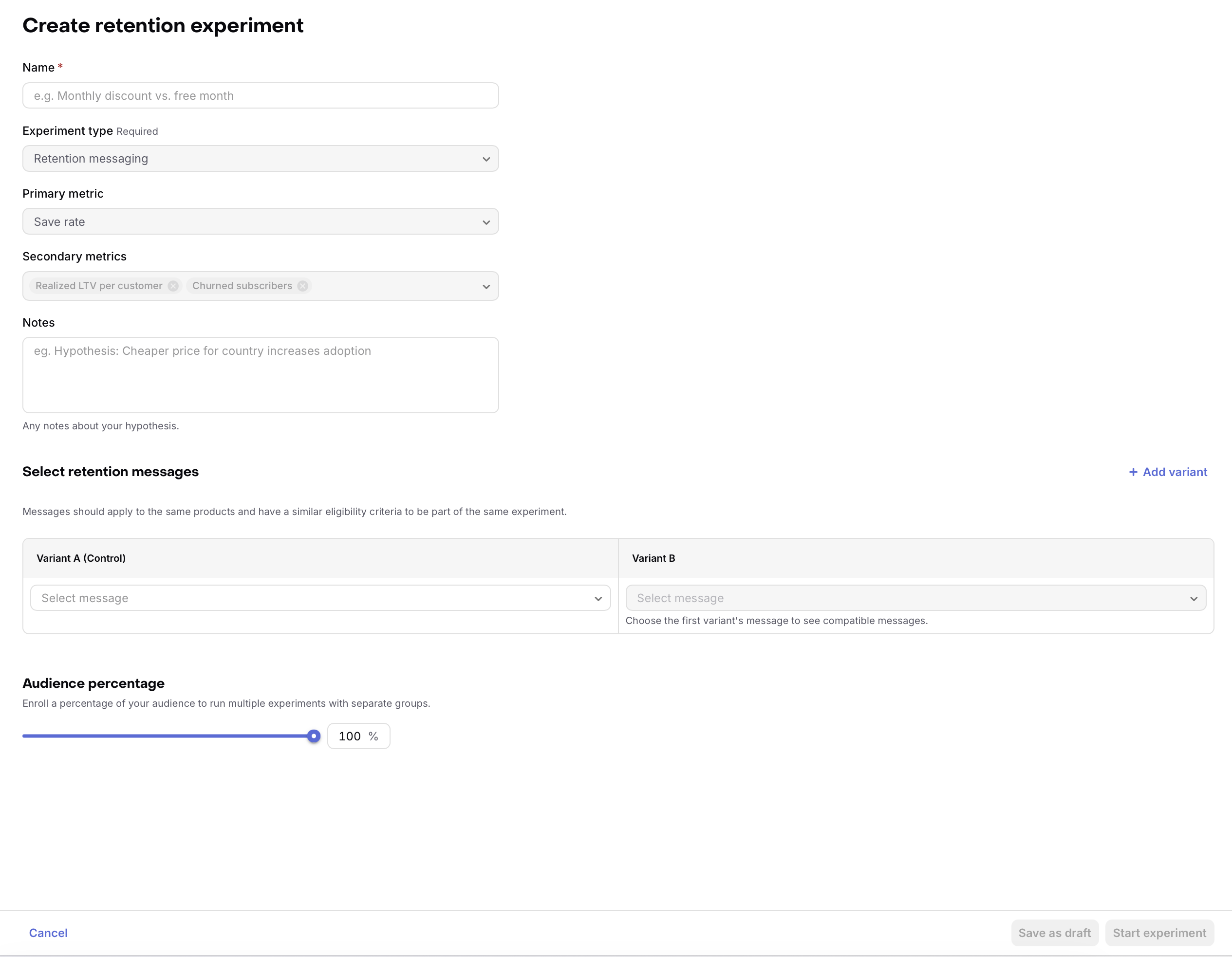
After an experiment starts, its variants are locked, but you can still edit the audience percentage until the experiment is stopped.
Retention messages included in an experiment can't be modified or deleted.
View results
To view retention messaging experiment results:
- Go to Experiments in the project sidebar and find the Retention experiments section.
- Select the experiment.
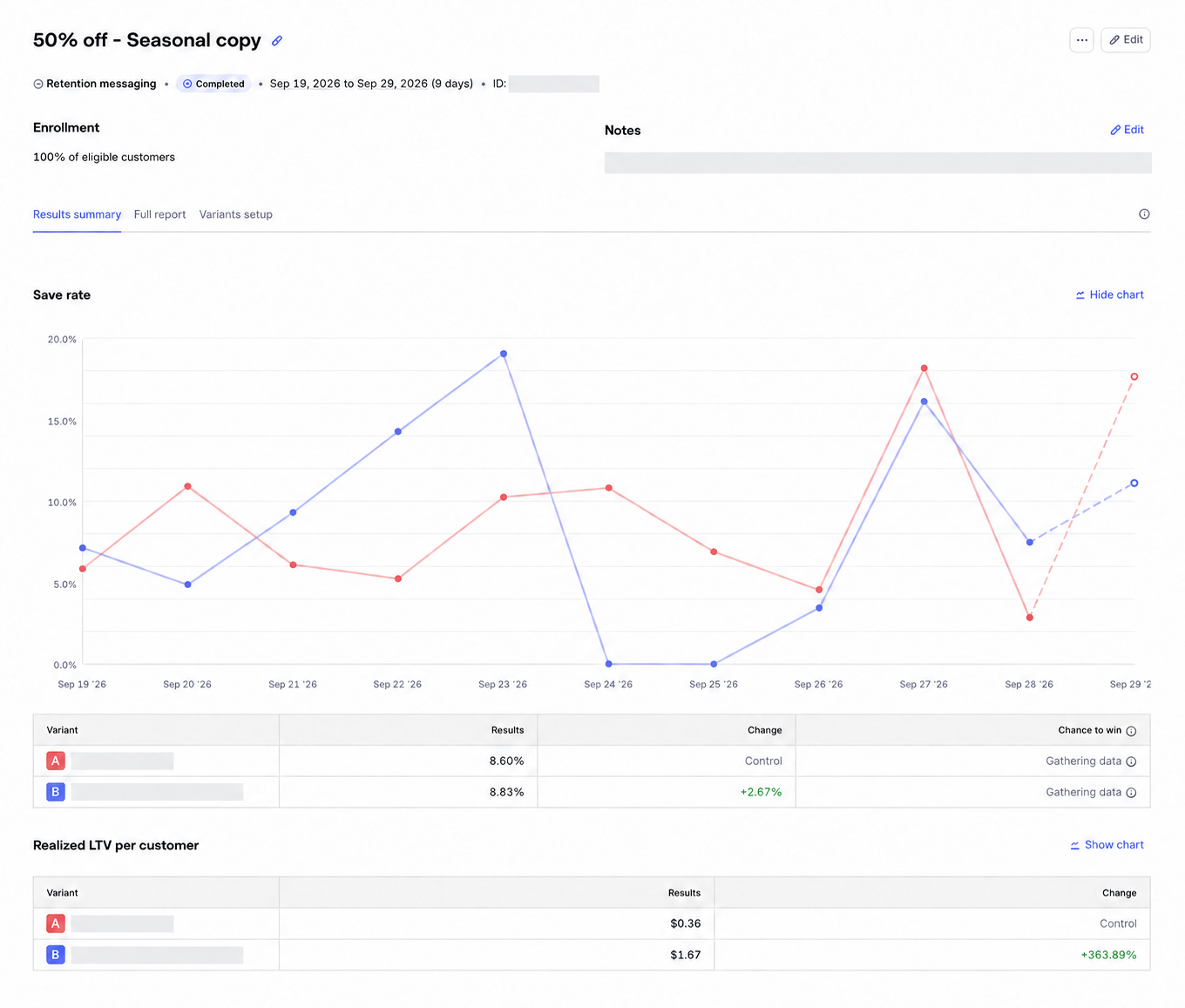
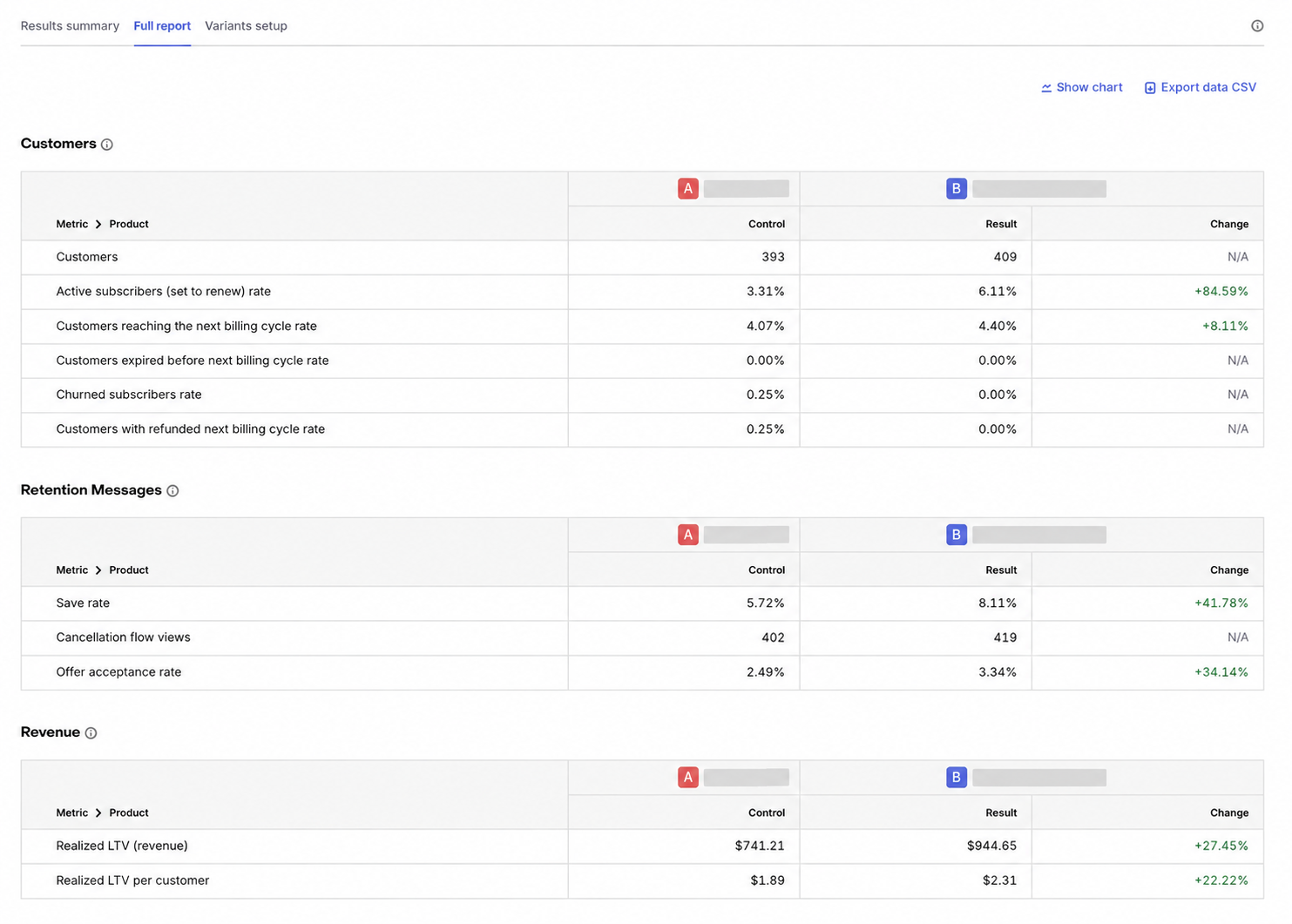
The results page includes a Results summary, Full report, and Variants setup tab.
Results summary metrics
The Results summary tab shows the fixed primary and secondary metrics for the experiment:
| Metric | When shown |
|---|---|
| Save rate | Always shown as the primary metric. |
| Realized LTV per customer | Always shown as a secondary metric. |
| Churned subscribers rate | Always shown as a secondary metric. |
| Offer acceptance rate | Shown when every selected message has a configured associated offer, such as a promotional offer, alternate plan, or both. |
Full report metrics
The Full report tab includes all retention messaging experiment measures, grouped into three sections.
Retention messages
| Metric | Definition |
|---|---|
| Save rate | The percentage of retention messages saved during the 24-hour outcome window. A message counts as saved when the Customer keeps the subscription after viewing the message, including by accepting a configured offer or alternate plan. The 24-hour outcome window starts when the Customer views the message. |
| Cancellation flow views | The number of retention messages viewed during the experiment active window, deduped per Customer within a 24-hour window. |
| Offer acceptance rate | Accepted-offer saved outcomes divided by all retention messages, not only messages containing offers. Accepted promotional offers, alternate plans, or both qualify. |
Cancellation flow views are message-level counts. They are deduped per Customer within a 24-hour window, but they are not a unique-Customer count across the whole experiment. Because of that, cancellation flow views and Customers can differ.
Customers
| Metric | Definition |
|---|---|
| Customers | The number of identified Customers enrolled in the retention messaging experiment. |
| Active subscribers (set to renew) rate | The percentage of enrolled Customers whose latest standard subscription state is active and set to renew. |
| Customers reaching the next billing cycle rate | The percentage of enrolled Customers with a renewal, trial conversion, or effective plan change after the retention message. |
| Customers expired before next billing cycle rate | The percentage of enrolled Customers whose subscription expired before reaching the next billing cycle. |
| Churned subscribers rate | The percentage of enrolled Customers whose subscription later expired. |
| Customers with refunded next billing cycle rate | The percentage of enrolled Customers whose next billing cycle was refunded after they reached it. |
Revenue
| Metric | Definition |
|---|---|
| Realized LTV (revenue) | Total realized revenue net of refunds after the Customer's first retention message in the experiment. |
| Realized LTV per customer | Realized revenue net of refunds after the Customer's first retention message in the experiment, divided by enrolled Customers. |