

Managing subscription lifecycles on Android is one of the most complex aspects of in-app billing implementation. Subscriptions go through numerous states throughout their lifetime, from initial purchase to renewals, grace periods, account holds, pauses, cancellations, and eventual expiration. Each state transition requires specific handling in your app to ensure users receive the correct entitlements, while your backend maintains accurate subscription records. Understanding these lifecycle events is essential for building a robust subscription system that minimizes involuntary churn and provides a seamless user experience.
To make it a little clearer, you will break down the complete Google Play subscription lifecycle in depth. We’ll cover every subscription state and the transitions between them, examine how Real-Time Developer Notifications (RTDN) inform your backend of changes, understand the differences between auto-renewing and prepaid subscriptions, and see how proper lifecycle handling can recover revenue from failed payments. Finally, we’ll look at how RevenueCat simplifies this complexity by abstracting away much of the lifecycle management.
The subscription lifecycle at a glance
Before diving into the details, let’s establish a mental model of how subscriptions flow through different states. A subscription begins with a purchase, enters an active state, and eventually either renews successfully, encounters payment issues, gets canceled, or expires. The complexity arises from the numerous intermediate states and recovery mechanisms that Google Play provides.
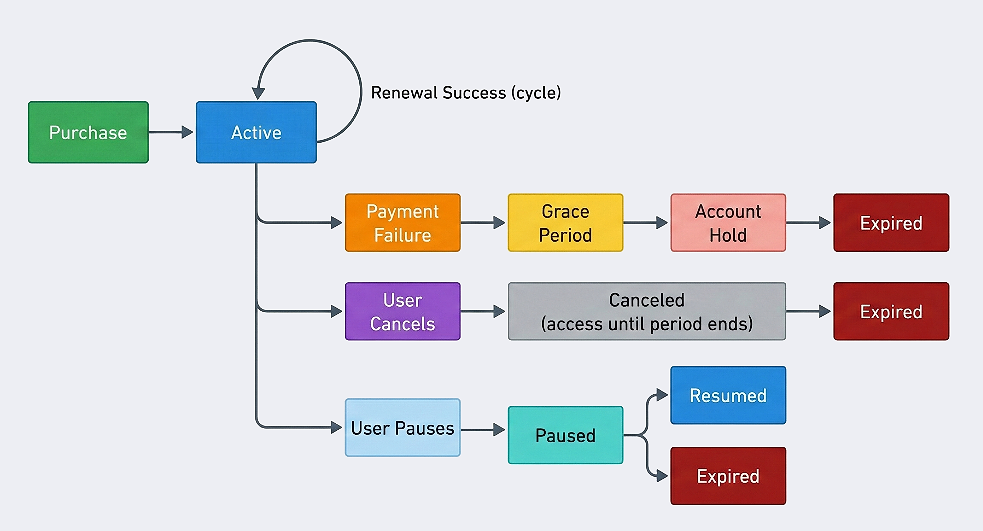
Each state has specific implications for user entitlements and requires different handling in your app and backend.
New subscription purchases
When a user purchases a subscription, your app receives a SUBSCRIPTION_PURCHASED notification, and the subscription enters the SUBSCRIPTION_STATE_ACTIVE state. This is the starting point of the lifecycle.
The critical acknowledgment requirement
One of the most important aspects of handling new purchases is acknowledgment. Google Play requires you to acknowledge a subscription purchase within three days of the transaction. If you fail to acknowledge within this window, the user automatically receives a refund, and the subscription is revoked.
The acknowledgment serves as confirmation that you have granted the user access to their purchased content. It’s a safeguard that protects users from situations where a purchase succeeds on Google’s side but fails to register in your app.
Understanding the purchase response
When you query a new subscription purchase using the purchases.subscriptionsv2.get API endpoint, you receive detailed information about the subscription state:
The expiryTime field indicates when the current billing period ends and renewal will be attempted. For a monthly subscription purchased on January 15, this would be February 15.
Linking purchases to user accounts
Google Play provides ExternalAccountIdentifiers to help you associate purchases with user accounts in your system. When configuring the billing flow, you can pass your internal user ID:
These identifiers are returned in the purchase response and RTDN notifications, allowing your backend to correctly attribute purchases to user accounts even in edge cases like upgrades, downgrades, or resubscriptions.
Subscription renewals
For auto-renewing subscriptions, Google Play automatically attempts to charge the user’s payment method when the billing period ends. Successful renewals trigger a SUBSCRIPTION_RENEWED notification.
What happens on successful renewal
When a subscription renews successfully, the subscription remains in SUBSCRIPTION_STATE_ACTIVE, and the expiryTime is updated to reflect the new billing period. Importantly, renewals do not require acknowledgment, only the initial purchase does.
Your backend should update the stored expiry time when receiving the renewal notification:
Renewal date behavior
Google Play follows specific rules for renewal dates that you should be aware of:
- Subscriptions started on 29, 30, or 31 of a month will renew on day 28 (or 29 in leap years) when the following month has fewer days
- Once a renewal shifts to an earlier date (like 28), it stays on that date for subsequent months
- For example, a subscription starting March 31 renews April 30, then May 30, June 30, and so on
This behavior can affect analytics if you’re tracking renewal patterns, so keep it in mind when building reports.
Grace periods: the first line of defense
When a renewal payment fails, Google Play doesn’t immediately suspend the subscription. Instead, it enters a grace period: a recovery window during which the user retains full access while Google retries the payment.
Grace period configuration
Grace periods are enabled by default in the Play Console and can be configured per subscription:
During the grace period, the subscription state changes to SUBSCRIPTION_STATE_IN_GRACE_PERIOD, but autoRenewEnabled remains true because the user hasn’t canceled; they just have a payment issue.
Handling grace period in your app
When you detect a user is in the grace period, you should encourage them to update their payment method. Google provides the In-App Messaging API to display a standardized payment update dialog:
The key point is that users retain access during the grace period. Your app should continue providing the subscribed features while simultaneously nudging users to fix their payment method.
Silent grace period
Even if you configure a zero–day grace period in the Play Console, Google Play still provides a minimum one–day silent grace period for payment processing retries. During this silent grace period, the subscription appears as SUBSCRIPTION_STATE_ACTIVE (not IN_GRACE_PERIOD).
This is important to understand because you might receive a delayed notification about payment issues. After 24 hours, the subscription will transition to one of several states depending on the outcome:
SUBSCRIPTION_RENEWEDif the retry succeededSUBSCRIPTION_ON_HOLDif account hold is enabledSUBSCRIPTION_CANCELEDif the user canceled during this timeSUBSCRIPTION_EXPIREDif no recovery mechanisms are enabled
Account hold: the second chance
If the grace period expires without successful payment recovery, the subscription enters account hold. This state represents a more serious payment failure where the user loses access to subscribed content.
Account hold duration
Account hold is enabled by default with a duration of 60 days minus the grace period length. For example, if you have a seven–day grace period, account hold lasts 53 days. During this time:
- The subscription state is
SUBSCRIPTION_STATE_ON_HOLD - The
expiryTimeis set to a past timestamp - The subscription is not returned by
queryPurchasesAsync() - The user should lose access to premium features
User experience during account hold
Your app should detect when a user’s subscription is on hold and display appropriate messaging. Since subscriptions on hold are not returned by queryPurchasesAsync(), you need to query your backend or the Google Play Developer API directly to check for this state:
This implementation requires some infrastructure: your backend must receive and process RTDN notifications, store subscription state, and expose an API for your app to query. You also need to handle edge cases like network failures, state synchronization, and ensuring your backend state matches Google Play’s state.
With RevenueCat SDK, this complexity is taken away entirely across platforms. RevenueCat processes RTDN notifications on your behalf and maintains subscription state that you can query with a single call:
RevenueCat’s CustomerInfo automatically reflects the current subscription state, including account hold status via the billingIssueDetectedAt field. The managementURL property provides a direct link to Google Play’s subscription management screen where users can fix their payment method.
During account hold, users can still cancel, restore, or resubscribe. If they fix their payment method, you’ll receive a SUBSCRIPTION_RECOVERED notification, and the subscription returns to SUBSCRIPTION_STATE_ACTIVE with the same purchase token — it’s a recovery, not a new purchase.
The billing date reset
An important detail: when a subscription recovers from account hold, the billing date resets to the recovery date. If a user’s subscription was originally set to renew on day 15 of each month, but they recover from account hold on day 22, their new renewal date becomes day 22.
Subscription pausing
Google Play allows users to pause their subscriptions — a feature that can reduce cancellations by giving users a temporary break without losing their subscription entirely.
Pause configuration and availability
Pause functionality is enabled by default in the Play Console but is only available for certain billing periods:
Annual subscriptions cannot be paused, this is a deliberate limitation because the pause period could potentially exceed the subscription duration.
The pause lifecycle
Pausing involves multiple notifications as the pause progresses through its stages:
- User initiates pause:
SUBSCRIPTION_PAUSE_SCHEDULE_CHANGEDnotification- State remains
SUBSCRIPTION_STATE_ACTIVE - User retains access until current billing period ends
- State remains
- Pause takes effect:
SUBSCRIPTION_PAUSEDnotification- State becomes
SUBSCRIPTION_STATE_PAUSED - User loses access
PausedStateContextcontains the expected resume date
- State becomes
- Subscription resumes:
SUBSCRIPTION_RECOVEREDnotification- Can be automatic (pause period ends) or manual (user resumes early)
- State returns to
SUBSCRIPTION_STATE_ACTIVE
If the user manually resumes their subscription before the pause period ends, their billing date changes to the date they resumed. This is similar to the billing date reset that occurs after account hold recovery.
Handling pause in your app
Handling subscription pauses requires tracking multiple states and coordinating between your app and backend. The challenge is that paused subscriptions behave differently from other non-active states, a scheduled pause still grants access, while an active pause does not.
Your backend needs to process RTDN notifications to track pause state changes:
On the client side, your app needs to query the backend to determine the current pause state and display appropriate UI:
The complexity here involves distinguishing between a scheduled pause (where users still have access) and an active pause (where access is revoked). You also need to handle the case where users cancel their scheduled pause, and provide a way for users to resume early if they choose.
With RevenueCat, pause state management becomes straightforward:
RevenueCat automatically tracks pause state through its server-side RTDN processing. The managementURL property provides a direct link to Google Play’s subscription settings where users can view their pause status, cancel a scheduled pause, or resume early. This eliminates the need to build custom deep links or track pause scheduling on your backend.
Additionally, RevenueCat’s webhooks notify your server of pause events in a normalized format, making it easy to trigger pause-related communications like “We miss you!” emails or special offers to encourage early resumption.
Cancellations and expirations
When a user decides to cancel their subscription, the lifecycle enters its terminal phase, but cancellation doesn’t mean immediate loss of access.
The cancellation grace period
Upon cancellation, users retain access until the end of their current billing period. The subscription enters SUBSCRIPTION_STATE_CANCELED, and the expiryTime indicates when access will be revoked.
Understanding cancellation reasons
The canceledStateContext field provides valuable information about why the subscription was canceled:
- User voluntarily canceled (check
userInitiatedCancellationfor the survey response) - Developer canceled via API
- Subscription was replaced (upgrade/downgrade)
- Payment failed and all recovery mechanisms were exhausted
- Google canceled due to policy violations
This information is valuable for understanding churn patterns and improving retention strategies.
Expiration: end of the line
When the expiryTime passes for a canceled subscription, or when account hold ends without recovery, the subscription expires. You receive a SUBSCRIPTION_EXPIRED notification, and the state becomes SUBSCRIPTION_STATE_EXPIRED.
At this point, you should:
- Revoke all entitlements associated with the subscription
- Mark the purchase token as invalid in your database
- Optionally, offer win-back promotions to the user
Restore and resubscribe: bringing users back
Google Play provides two mechanisms for users to return to a subscription they previously had: restore and resubscribe.
Restore: before expiration
If a user cancels but then changes their mind before the subscription expires, they can restore it. This uses the same purchase token and continues the subscription as if it was never canceled.
Your app receives a SUBSCRIPTION_RESTARTED notification, and the subscription returns to normal active status. Importantly, you don’t need to acknowledge restored subscriptions because you already acknowledged the original purchase.
Resubscribe: after expiration
If the subscription has already expired, users can resubscribe, but this is treated as a new purchase with a new purchase token. You’ll receive a SUBSCRIPTION_PURCHASED notification and must acknowledge within three days.
The resubscribe response includes helpful fields for linking the new subscription to the user’s existing account:
Upgrades, downgrades, and plan changes
When users change their subscription plan, whether upgrading to a more expensive option or downgrading to save money, it creates a new subscription while invalidating the old one.
The linked purchase token
Plan changes generate a new purchase token, but the response includes a linkedPurchaseToken field pointing to the previous subscription:
Proration modes
When implementing plan changes in your app, you can control how billing is handled using different proration modes:
The choice of proration mode affects user experience and revenue recognition, so consider your business requirements carefully.
Revocations and refunds
Sometimes subscriptions end abruptly due to revocation or refund, bypassing the normal cancellation flow.
When revocation occurs
You receive a SUBSCRIPTION_REVOKED notification when:
- You revoke the subscription via the Developer API
- A chargeback occurs
- Google revokes due to policy violations
Revocations are immediate, the subscription jumps straight to SUBSCRIPTION_STATE_EXPIRED, and you should revoke access immediately:
Prepaid subscriptions: a different lifecycle
While this article focuses primarily on auto-renewing subscriptions, it’s worth understanding how prepaid plans differ. Prepaid subscriptions don’t automatically renew; users explicitly purchase additional times.
Key differences for prepaid plans
Prepaid acknowledgment timing
Prepaid plans have stricter acknowledgment requirements:
- Plans ≥ 1 week: acknowledge within three days
- Plans < 1 week: acknowledge within half the plan duration
For a three–day prepaid plan, you must acknowledge within one and a half days, or the user receives a refund.
How RevenueCat simplifies lifecycle management
Managing all these lifecycle states, notifications, and edge cases requires sophisticated backend infrastructure and careful implementation. This is where RevenueCat provides substantial value by handling most of this complexity automatically.
Automatic state management
RevenueCat maintains subscription state in real-time, processing Google Play’s RTDN notifications on your behalf. Instead of building infrastructure to receive, validate, and process notifications, you simply query RevenueCat for the current customer state:
The CustomerInfo object reflects the current state of all subscriptions, including:
- Active entitlements
- Expiration dates
- Whether the user is in a grace period
- Billing issues that need attention
- Management URL for subscription settings
Handling grace periods and billing issues
RevenueCat’s CustomerInfo includes a billingIssueDetectedAt timestamp when a subscription has payment problems. You can use this to show appropriate messaging:
RevenueCat also provides webhooks that notify your server of subscription events in a normalized format, making server-side integration much simpler than processing raw RTDN notifications.
Cross-platform subscription state
One of RevenueCat’s most convenient features is maintaining subscription state across platforms. If a user subscribes on Android and later opens your iOS app, their subscription status is automatically recognized. This is particularly valuable for lifecycle events, a subscription that enters grace period on Android will be reflected in the iOS app’s CustomerInfo without any additional implementation.
Revenue recovery
RevenueCat’s Billing Alerts feature can automatically attempt to recover failed payments by:
- Sending customizable email notifications to users with billing issues
- Prompting users to update payment methods at optimal times
- Tracking recovery rates and providing analytics
This automates much of the grace period and account hold handling that would otherwise require custom implementation.
Analytics and insights
Understanding your subscription lifecycle patterns is crucial for optimization. RevenueCat provides detailed analytics including:
- Churn analysis by cancellation reason
- Grace period and account hold recovery rates
- Subscription duration and renewal patterns
- Revenue metrics across lifecycle stages
These insights help you identify where users are dropping off and opportunities to improve retention.
Best practices for lifecycle management
Based on the lifecycle stages we’ve covered, here are key practices to implement:
Always verify on your backend
Never trust the client-side subscription state alone. Your backend should:
- Process RTDN notifications (or use RevenueCat’s webhooks)
- Verify purchases using the Google Play Developer API
- Maintain authoritative subscription state
Handle grace periods proactively
Users in grace periods are at high risk of churning. Implement multiple touchpoints:
- In-app messaging using Google’s API
- Push notifications reminding users to update payment
- Email campaigns for users not opening the app
Make cancellation reversible
Since users retain access until their billing period ends, make it easy to restore:
- Show clear ‘Resume subscription’ options
- Don’t punish users who explore cancellation
- Consider exit surveys but don’t make them mandatory
Plan for edge cases
Real-world subscription management involves many edge cases:
- Users switching devices mid-subscription
- Multiple purchases from the same user
- Refunds and chargebacks
- Subscription transfers between accounts
Build your system to handle these gracefully, or use a service like RevenueCat that handles them automatically.
Summary
Google Play’s subscription lifecycle is comprehensive but complex. From the initial purchase through renewals, grace periods, account holds, pauses, cancellations, and expirations, each state requires specific handling to ensure users receive correct entitlements while your business captures all possible revenue.
The key states to understand are:
- Active state where users have full access
- Grace period where users retain access while you attempt payment recovery
- Account hold where access is suspended pending payment fix
- Paused state where users voluntarily pause their subscription
- Canceled state where users retain access until their paid period ends
- Expired state where access should be revoked
Whether you implement subscription lifecycle management directly or use RevenueCat, understanding these lifecycle stages is essential for building a robust subscription business on Android. The difference between losing a subscriber to involuntary churn and recovering them often comes down to how well you handle grace periods and account holds. The difference between a confusing user experience and a seamless one depends on how gracefully you handle pauses, cancellations, and restorations.
For complete documentation on subscription lifecycle management, refer to the official Android Developer documentation and RevenueCat’s subscription guidance.