

You spent months working on your shiny new app (or hours vibecoding it), and you’re almost ready to earn millions of dollars with it. Just one last step: add purchases, and you’re ready to go. But… not so fast. While on the surface it may seem obvious: you just check isPremium and unlock the premium content, in reality, there are many more caveats. Can malicious actors bypass this check? How easy is it? And how can you prevent unsanctioned access to premium content and protect your resources? In this article, we will discuss these questions and propose efficient solutions, without compromising security. This matters even more if you’re an indie dev like me and don’t have unlimited resources.
Now let’s build an app!
What are we building?
To explore the concepts, we will start by building a simple sample app called “Catflix”. As you probably guessed from the name, it is a video streaming service (for cats, about cats…). The use case is simple: all users can see the available shows in the catalog, but only premium users can watch unlimited episodes and premium shows. Premium is unlocked via a renewable subscription.
Note: the sample app and code in this article will be a Flutter app, but the logic applies to other mobile clients, since most of the work involves Firebase. The app uses RevenueCat for purchases. More on how to integrate RevenueCat into your Flutter app: https://www.revenuecat.com/docs/getting-started/installation/flutter
Here’s how it looks:
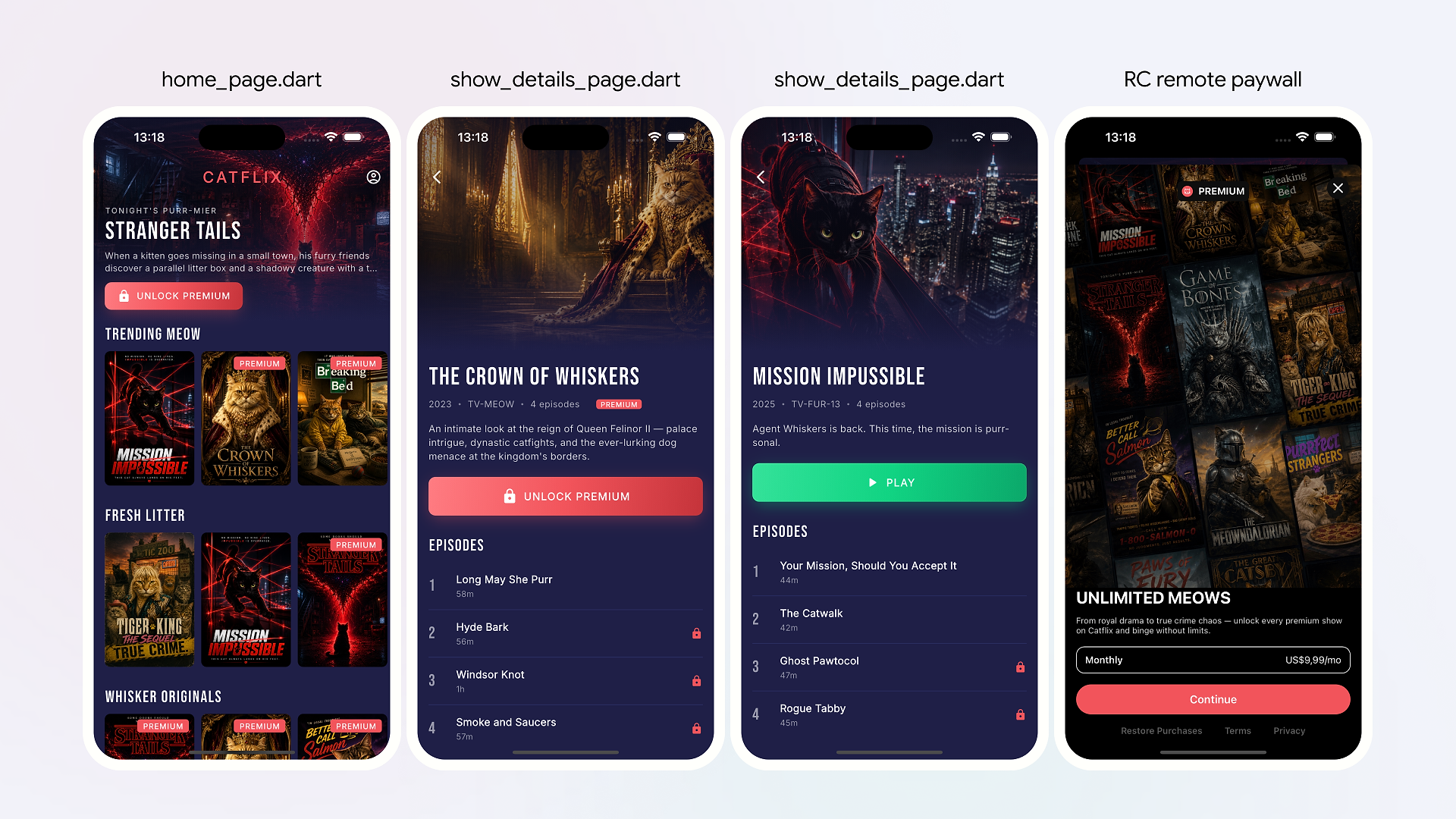
You can follow along with the code in this GitHub repository. To get a complete understanding of why we’re making these technical decisions, we will build our architecture from the ground up.
Level 1: Client-only check
Imagine that your movie streaming data is stored in a remote database. The database itself is unrestricted (already a red flag 🚩), but you need a way to gate premium access. The most straightforward approach is to use the RevenueCat SDK to check if a user has a specific entitlement and grant access accordingly.
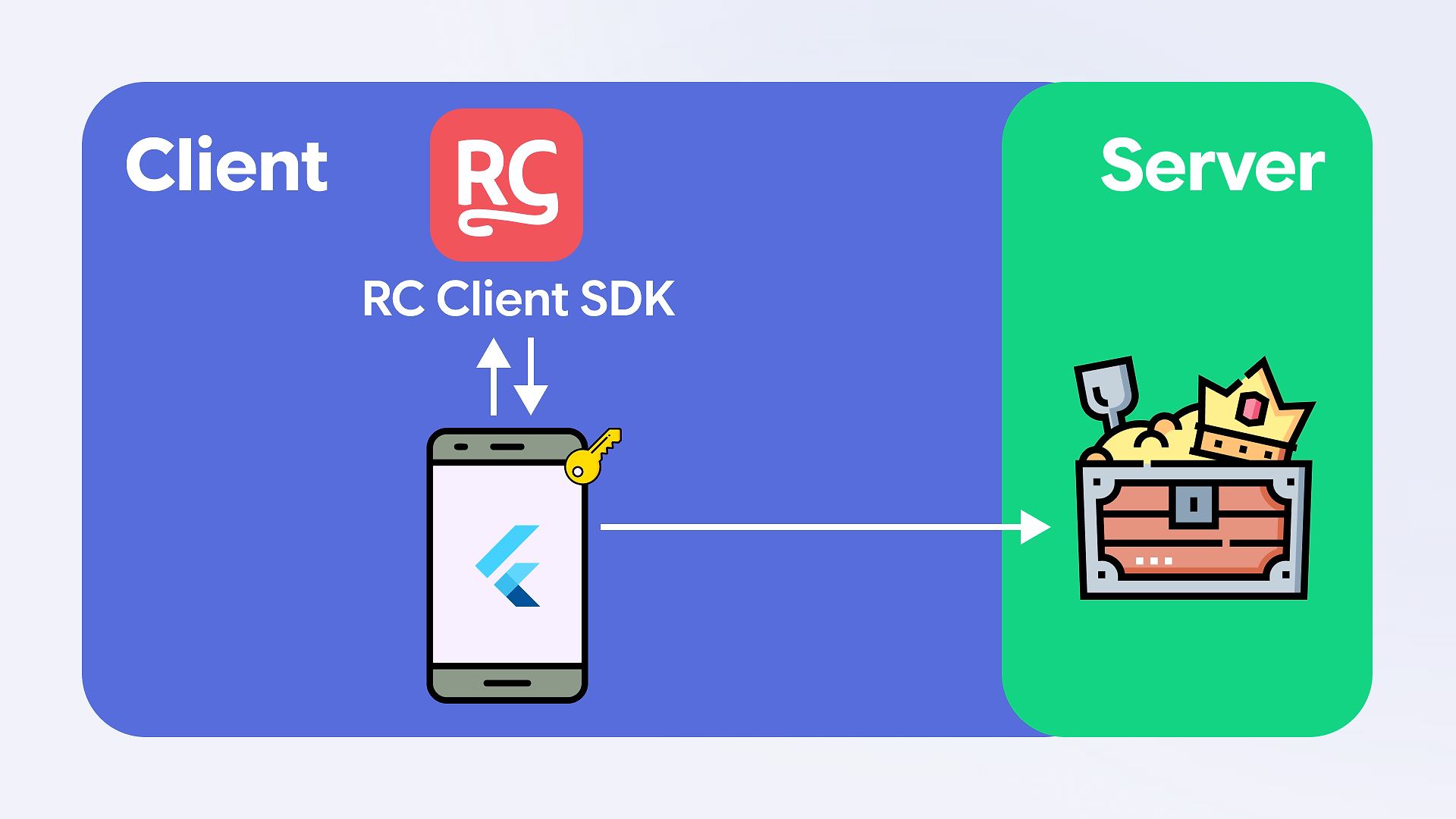
Throughout the article, the 🔑 marks where the entitlement check actually lives.
Watch where it moves as we go.
Note: this step assumes you have integrated the RevenueCat SDK into your app and set up purchases in the App Store and Google Play. For this example, we will omit the actual store setup and rely on RevenueCat test purchases, but here’s the full documentation on how to integrate everything in your real app: https://www.revenuecat.com/docs/projects/overview.
In code, it looks something like this:
The appeal of this approach is obvious: it requires only a couple of lines of code, with no extra boilerplate or complicated verifications. However, that very appeal is also the obvious problem: since the check runs purely on the client side, a malicious user can decompile it, patch isPremium to always return true, and abuse your premium resources.
Conclusion: this approach should never be used in production!
Now, let’s look at the first step we can take to make our app’s premium content more secure.
Level 2: Client-only check + Firebase App Check
The code on the client side is unsafe by definition — it lives on the user device, and honestly, not a lot of things are stopping a potentially malicious user from tampering with the source code and doing all sorts of nasty things. For example, they can easily change your isPremium check to a hard-coded true, granting access to premium content without a subscription. But we’re in luck, because mechanisms exist that allow us to secure our apps from this vector of attack. One of those mechanisms is Firebase App Check.
Note: We won’t discuss the pros and cons of spinning up your own backend versus using a Backend-as-a-Service (BaaS), or the different types of BaaS available. Let’s just assume you have done your research and reached the same conclusion as I did: Firebase is the solution.
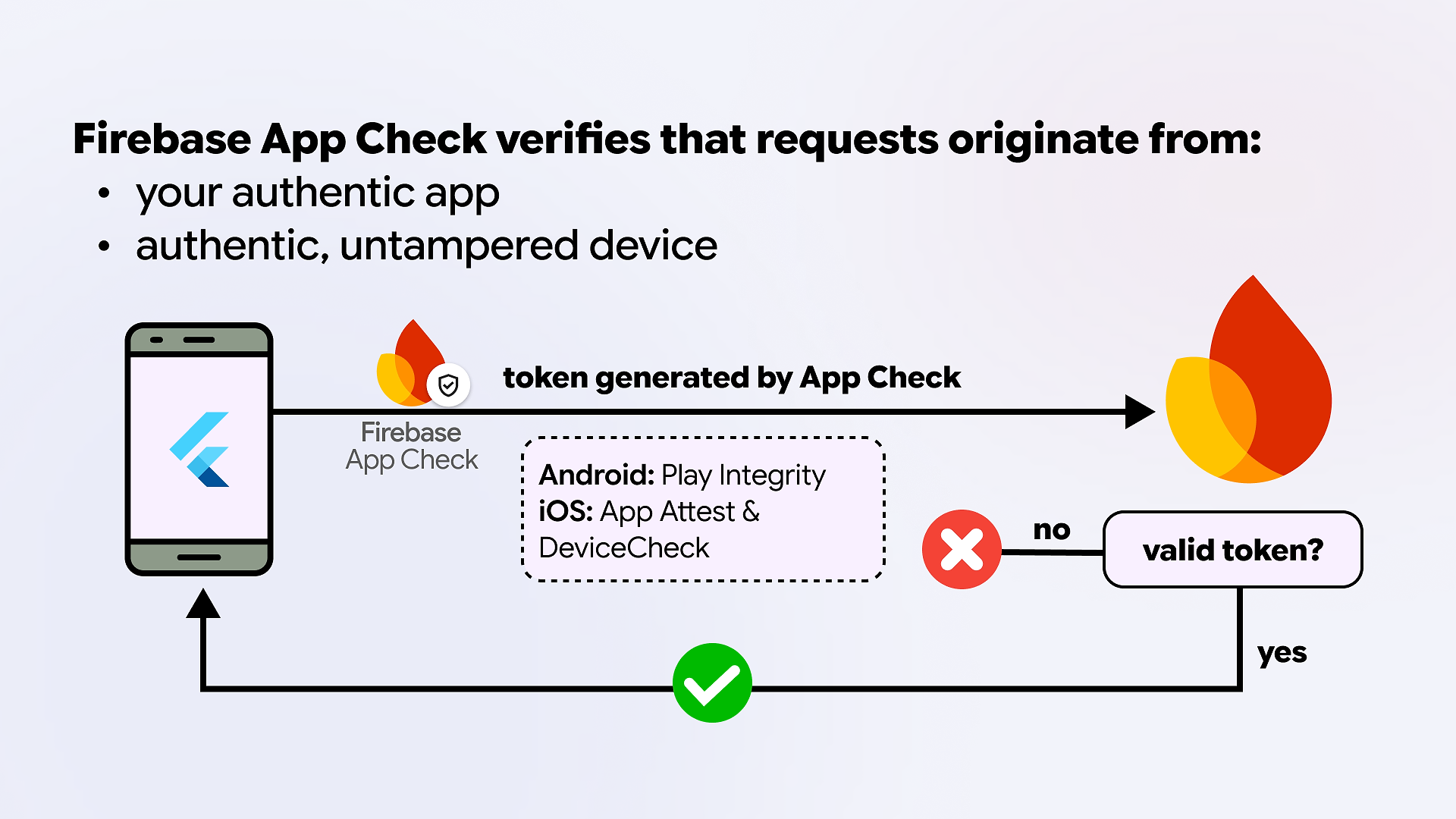
Firebase App Check uses underlying platform attestation mechanisms (Play Integrity by Google and App Attest/Device Check by Apple). It sends a special token with each request to Firebase services; this token is invalid if it was generated from a tampered device or app version (e.g., an Android version that wasn’t signed with your Play Store certificate). If a malicious user repackaged your app and flipped isPremium to true, App Check would refuse the new binary’s tokens, and Firestore would reject every request, keeping your premium content safe. App Check doesn’t catch every form of tampering, but we’ll come back to that in a moment. Therefore, App Check is a must-enable feature if you’re using Firebase services and ESPECIALLY if you’re using the Firebase AI Logic client SDK.
In a nutshell, here is how Firebase App Check works:
Setting up App Check is straightforward. It is highly recommended to enable it from the start, before you even launch your app. But even if you haven’t done so before, it is possible and essentially required to set it up for an existing app; you’ll just need to monitor and wait for some time for your existing users to update their app before enforcing it.
So with this approach, our architecture would look like this:
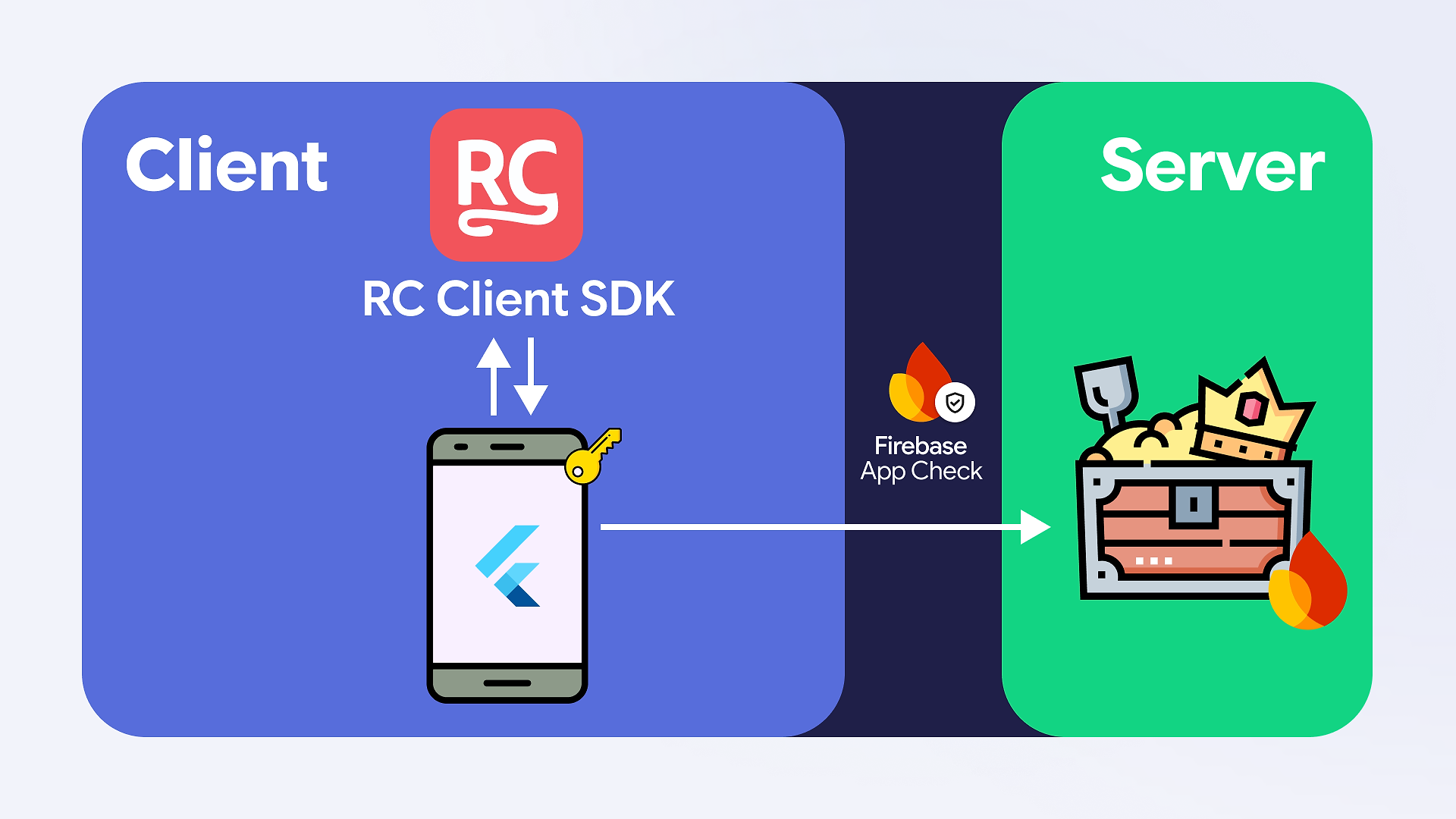
Notice that the 🔑 has not moved. We have added an extra layer of security, but the entitlement decision still lives in the client code. The crucial thing to understand is what App Check actually attests: it confirms a request came from a genuine, untampered instance of your app on a genuine device. It does not confirm that this genuine app instance is telling the truth about the user. That gap is the problem. App Check is great at stopping the basic attacks: someone hitting your Firestore straight from the command line, or repackaging your app into a tampered build. What it can’t do is vouch for the decision your app makes once it’s legitimately running, because that decision happens on a device the user fully controls. And you don’t even need to tamper with anything to see why that matters. Picture our Level 2 setup the moment a paying user’s app fetches the real video URL. That user can read the URL straight out of the network traffic and share it around, and it keeps working for anyone who has it. App Check faithfully protected the lookup, but it can’t protect an asset once a trusted client has been handed it. As long as the client is making the final call, your premium content is vulnerable. To truly secure it, we need to stop trusting the client altogether and move the decision-making process somewhere safe.
Thankfully, with Firebase, we have a couple of options to achieve this without spinning up a whole backend infrastructure. Let’s see what they are.
Level 3: Server-verified entitlements
Firebase offers a solution called Cloud Functions, which allows you to write and deploy custom backend logic without the overhead of managing a full server infrastructure. We will explore these in more detail shortly, but first, we need to address a prerequisite: user authentication.
Identifying Firebase users in RevenueCat
To verify entitlements on the server, we must link our Firebase users to their RevenueCat identities. For this sample app (and many real-world use cases), Firebase Anonymous Authentication is sufficient, though you can later upgrade to email or SSO providers. From Firebase Cloud Functions‘ point of view, an anonymous user is just as authenticated as an email/SSO user: the function receives a real UID it can trust, signed by Firebase. That’s all the server needs to look the user up in RevenueCat.
Good to know
If a user uninstalls and reinstalls the app, they will be assigned a new anonymous UID. If they previously made purchases, they will need to use the RevenueCat restore function to regain access to their entitlements.
Linking users is very simple, but extremely important for the next steps:
This will allow us to identify our user purchases in our database going forward. Now, back to our Cloud Functions.
Understanding Firebase Cloud Functions
If you are already familiar with Firebase Cloud Functions, you can skip this part. Otherwise, here’s a quick intro:
- Firebase Cloud Functions vs. Google Cloud Functions:
While both allow you to execute code in isolation, Google Cloud Functions is the underlying technology, supporting many languages (Go, Java, Python, etc.). Firebase Cloud Functions is built on top of Google Cloud Functions and is specifically tailored for the Firebase ecosystem. It provides libraries that make working with Firebase much easier, offering features like user authentication and App Check out of the box. Due to this specialized support, Firebase Cloud Functions currently supports Node.js (JavaScript and TypeScript), Python, and Dart (experimental). - Types of Firebase Functions:
Firebase Functions generally fall into three categories: HTTP functions, Callable functions, and Background Triggers.- HTTP functions are for when you need functions openly available on the web (e.g., for a web app or a third-party API). This option requires you to manually handle security concerns, including user authentication validation, caller verification (App Check), and managing CORS.
- Callable functions are designed to be triggered directly from your client app using Firebase SDKs. Firebase handles the heavy lifting for you: CORS is automatically managed, and Firebase Auth and App Check tokens are automatically verified and injected directly into the function’s context. Because of this seamless, built-in security, callable functions are the perfect choice for safely verifying a user’s RevenueCat entitlements from your mobile app.
- Background Triggers (or event-driven functions) run automatically in the background in response to events within your Firebase project, such as a new user sign-up or a document update in Firestore. In a RevenueCat architecture, these are incredibly useful. For instance, you might use an HTTP function to receive a RevenueCat webhook, write the user’s new subscription status to Firestore, and then let a Background Trigger automatically provision their premium access the moment that database document changes.
We will use Dart, which has just recently become available in experimental mode, to write our Cloud Functions. That’s a great addition (and something the community has been waiting for years!), because using Dart keeps us in one language end-to-end, lets us share models between client and server, and avoids context-switching mid-feature.
Note: The Dart SDK is currently in experimental support (announced April 2026), so APIs may change. Always consult the latest documentation. For more information on how to set up and deploy Dart Cloud Functions, check the documentation. We will use the Dart SDK for this example, but the approach itself is fully applicable to Firebase Cloud Functions in general, with any supported SDK. Another thing to know is that using Firebase Cloud Functions requires you to be on the pay-as-you-go Firebase plan, Blaze.
Implementing Cloud Function for movie-playing functionality
In our Catflix app, we want to make sure that only premium users can stream premium movies. To do that, we will implement a callable function to verify the RevenueCat entitlement. If the user has a premium subscription, it returns a streaming URL; otherwise, it throws a “subscription required” error. So the code will look something like this:
We’re doing several things here:
- We register a callable function called play
- We check if the user is authenticated with Firebase, and if not, throw an UnauthenticatedError
- We check if the authenticated user has premium entitlement to access this content, and if not, we throw a PermissionDeniedError
And then on the client side, to call this function:
Now, to the fun part: how do we actually check user premium eligibility? For this, we have two options: direct calls to the RevenueCat API and custom webhook functions.
Option 1: Direct calls to RevenueCat API
RevenueCat provides an API we can use to request a user’s entitlement status. The base flow is pretty simple: whenever we need to check a user’s premium status, we make a request to the RevenueCat API and receive back the user entitlements. This flow is simple to wrap your head around and implement. It also doesn’t require you to do any bookkeeping yourself, as RevenueCat provides you with up-to-date info on demand.
With this approach, our architecture would look like this:
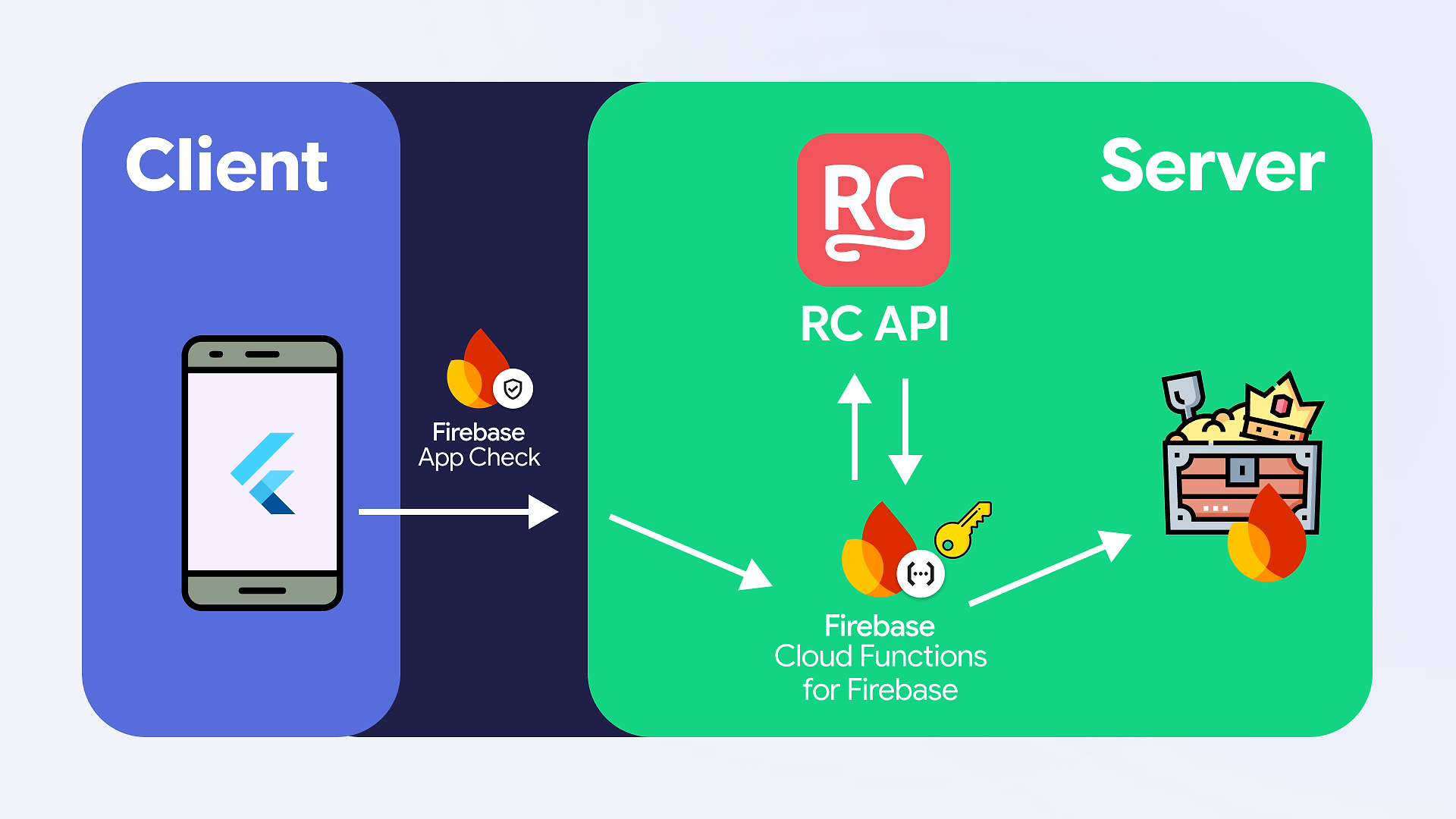
And in pseudocode, the entitlement check would look something like this:
A note on the API key. This is a project-scoped secret key (created in the RevenueCat dashboard under API Keys -> New secret API key), and it’s different from the public SDK key the client uses. It should never be shipped in client code or sit in your repo. In Cloud Functions, inject it as a runtime secret and read it from the function’s environment. Scope the key to the minimum permissions you need (read on customers is enough for this) and rotate it independently of everything else.
How to access sensitive parameters in Firebase Cloud Functions
Firebase Cloud Functions have their own way of defining configuration parameters, and it separates plain config from secrets. Secrets are backed by Google Cloud Secret Manager: stored encrypted, and injected only into the functions you explicitly bind them to. Use a secret for anything sensitive, like your RevenueCat API key, and plain parameters for everything else, like your RevenueCat project ID. The experimental Dart SDK supports both, with defineSecret(‘RC_API_KEY’) for the key and defineString(‘RC_PROJECT_ID’) for the rest. Here are the docs.
Now, even if a malicious user manages to change the value of isPremium to true on the client side, they still won’t be able to access the premium features because our Cloud Function simply won’t return the premium content.
Unfortunately, this approach isn’t the most efficient one, especially if you plan to scale, for a few reasons:
- Overhead on every check. Each premium check now costs an extra HTTP round-trip to RevenueCat, which adds latency to every gated request, and your function is billed for the time it spends waiting on that call.
- Service unavailability and rate limits. If the RevenueCat API is unavailable for any reason, your check will fail. Additionally, RevenueCat enforces rate limits that you could hit under burst traffic. This could temporarily deny a paying user access to a paid feature, and we don’t want that.
You might be thinking: can’t I just cache the result? You can, but then it’s your responsibility to keep the cache fresh, which is exactly the bookkeeping RevenueCat was doing for you, and entitlement state can flip the moment a subscription renews, lapses, or gets refunded.
Direct calls are only viable if you need to perform checks very rarely and are okay with the possibility of the request failing (for example, if you can simply reschedule the task for later). For a general modern app, this isn’t the most efficient solution, and we need to go a different route. The fix is to invert the flow: instead of asking RevenueCat every time for user entitlement status, let RevenueCat tell us once, the moment something changes.
Option 2: Custom Webhook Function
Instead of making the request from your end each time you need to check the status, you can use webhooks to reverse this pattern. You can define a function that RevenueCat will call each time there is a status change. This requires quite a bit of upkeep on your end, such as:
- Validating that the request really came from RevenueCat. RevenueCat sends a static authorization header value you configure in the dashboard. You need to verify it on every request, or anyone who finds your endpoint URL can call it and grant themselves premium access.
- Handling retries and idempotency. RevenueCat retries failed deliveries and, in a rare case, may send duplicate events. Your code needs to process duplicate events idempotently, e.g., by keeping track of the id of the event.
- Storing and updating user status. Each event you receive describes a change to a specific RevenueCat customer’s entitlements. Your code needs to find the matching user in your own database and apply the right update (grant, revoke, change expiry), so the rest of your app has an up-to-date source of truth to read from.
In this case, the architecture would look like this:
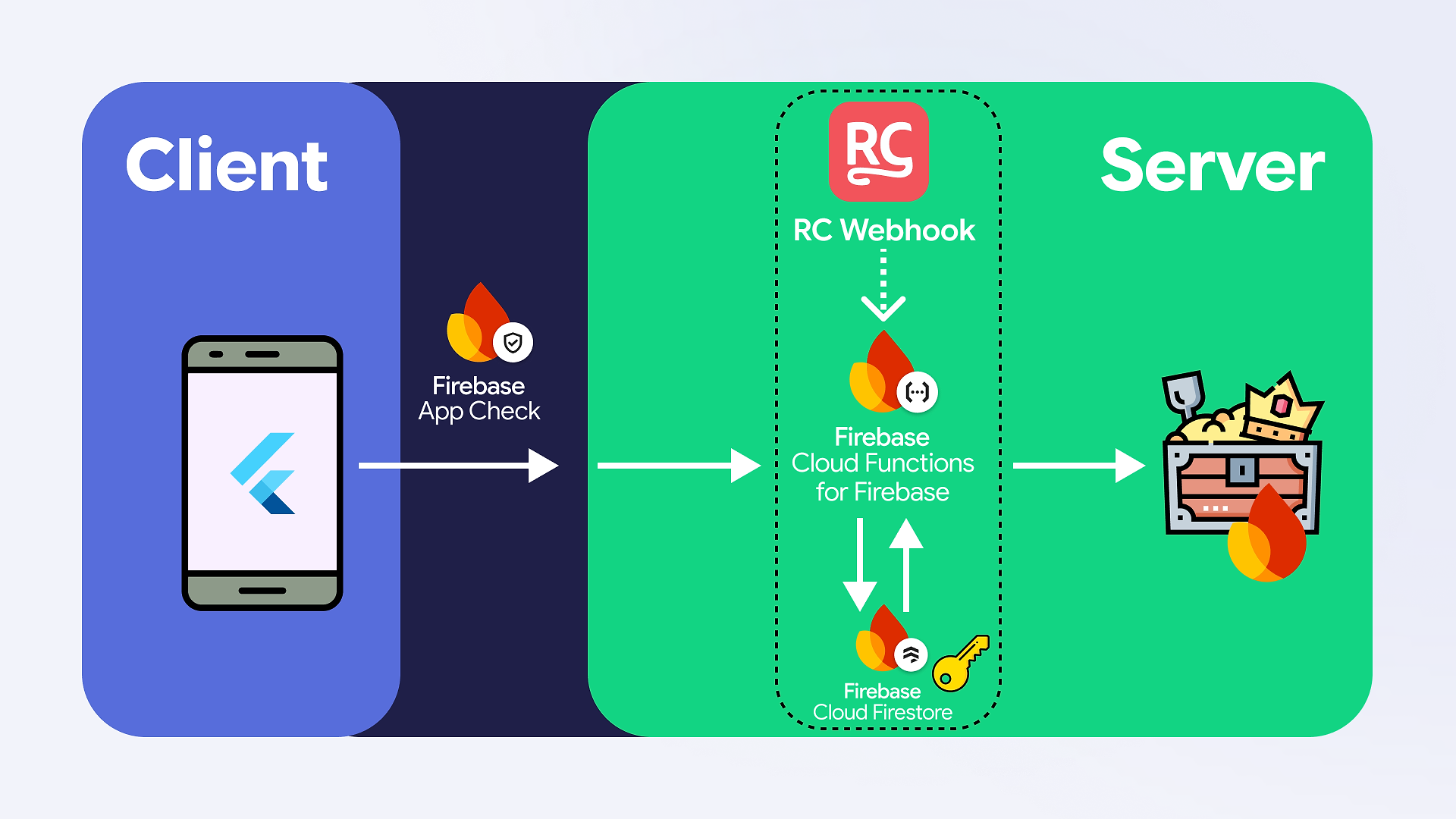
But the benefits are worth it:
- Requests between you and RevenueCat happen only when something actually changes with a user’s entitlement, not on every premium check in your app.
- Your database holds the current premium status for all users, so checking it is a quick local read, instead of sending an expensive request to the RevenueCat API that could also fail or hit a rate limit.
Note: You can read more about working with RevenueCat webhooks in the documentation: https://www.revenuecat.com/docs/integrations/webhooks
While the maintenance of the webhook option is a bit of overhead, if you use Firebase, you are in luck – RevenueCat actually provides a Firebase extension that handles all the boring plumbing and removes all the headache.
Option 3: RevenueCat Firebase Extension
First, what exactly is a Firebase Extension? Simply put, it’s a pre-packaged, configurable backend solution that automates specific tasks so you don’t have to write and maintain the server code yourself. In our case, it provides deployable, pre-written Cloud Functions that handle all the boring boilerplate.
The RevenueCat extension specifically provides an endpoint for RevenueCat webhooks to call whenever a user’s status changes. These functions handle request validation, data parsing, and syncing that state directly into a Firestore document assigned to the specific user. Once you’ve configured the extension, your own Cloud Functions can simply read the latest entitlement status directly from your Firestore database.
You configure the Extension once, and then everything in the purple rectangle is done automatically for you:
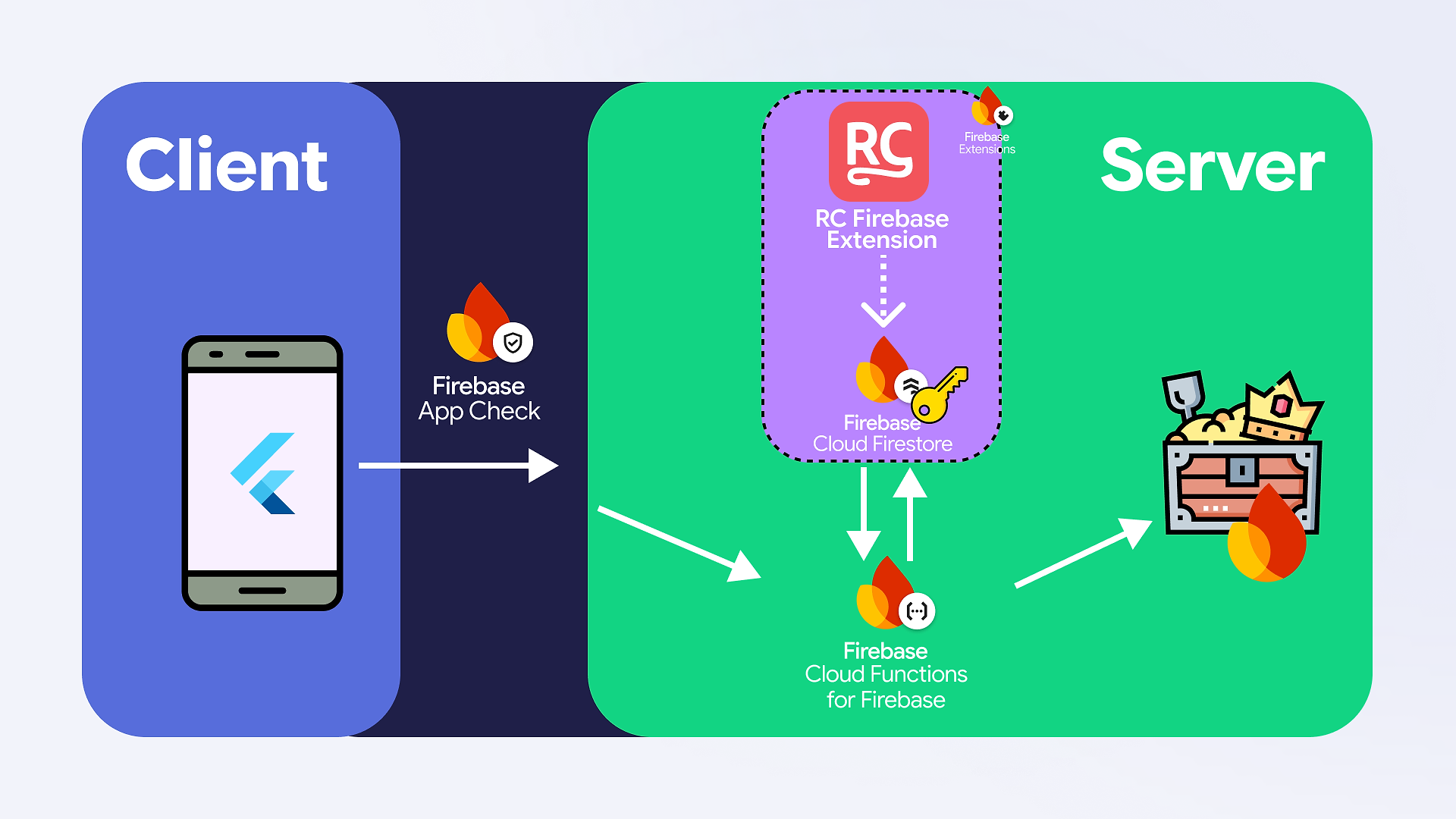
This way, the data is always up to date in your own database, you don’t make unnecessary API calls, and you don’t need to do any manual plumbing or maintenance. All of the benefits of custom webhooks and none of the headache.
Let’s walk through the setup of the RevenueCat Firebase Extension.
Note: this guide contains all the steps to enable the Extension. It also walks you through connecting to Google Analytics, but the analytics portion is outside the scope of this article.
- Start the integration in your RevenueCat console and generate a shared secret. You will need it in the next step.
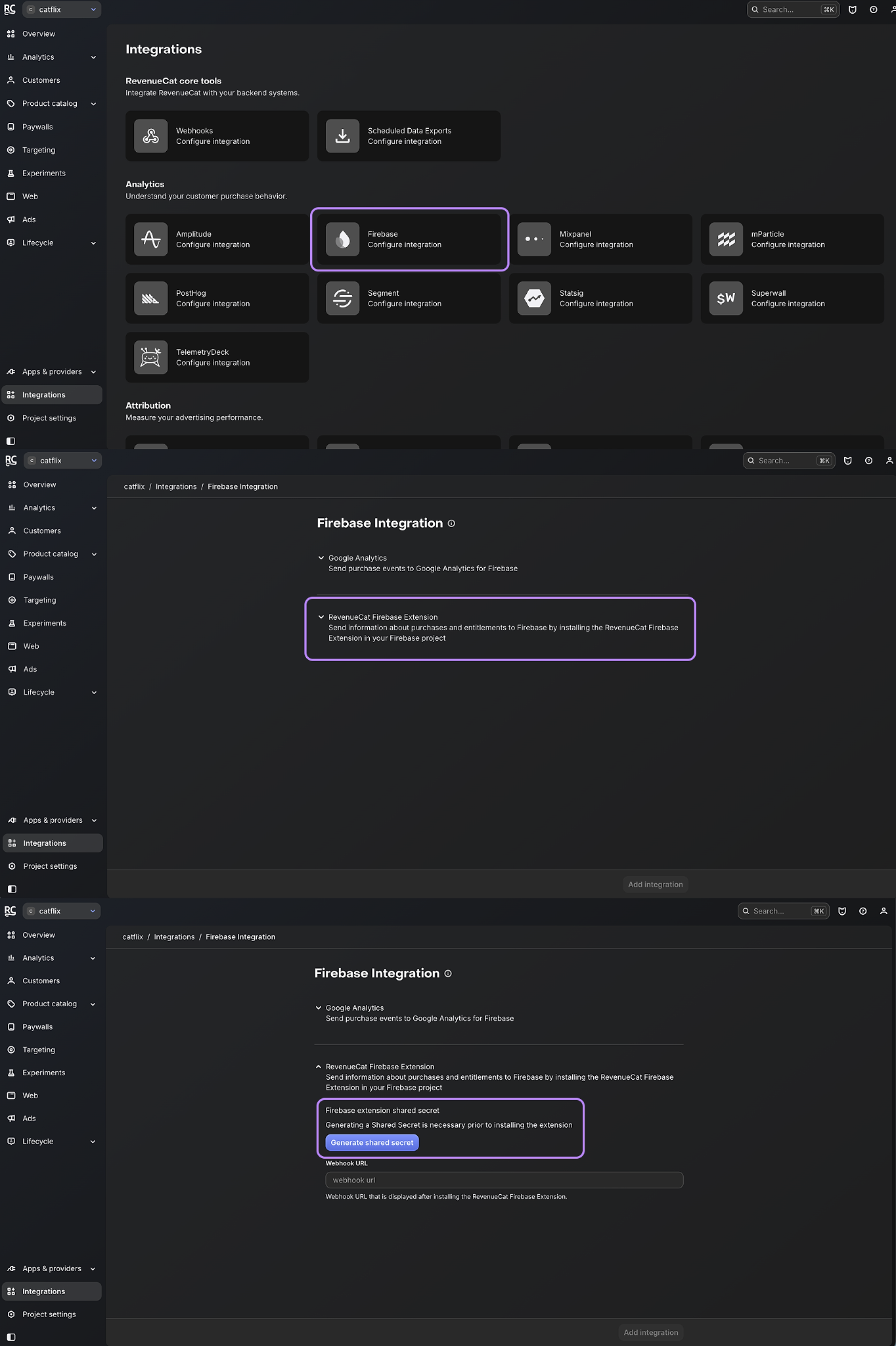
- Install the extension from the Firebase Extension Hub: https://extensions.dev/extensions/revenuecat/firestore-revenuecat-purchases
- Fill in the information. There are two optional fields: the location of the customer collection and the RevenueCat Webhook Events Firestore collection. For our use case, they are both required. These are the paths in Cloud Firestore where the RevenueCat data for your app and for your users will be stored. Also, set ENABLED for custom claims; we will discuss them soon.
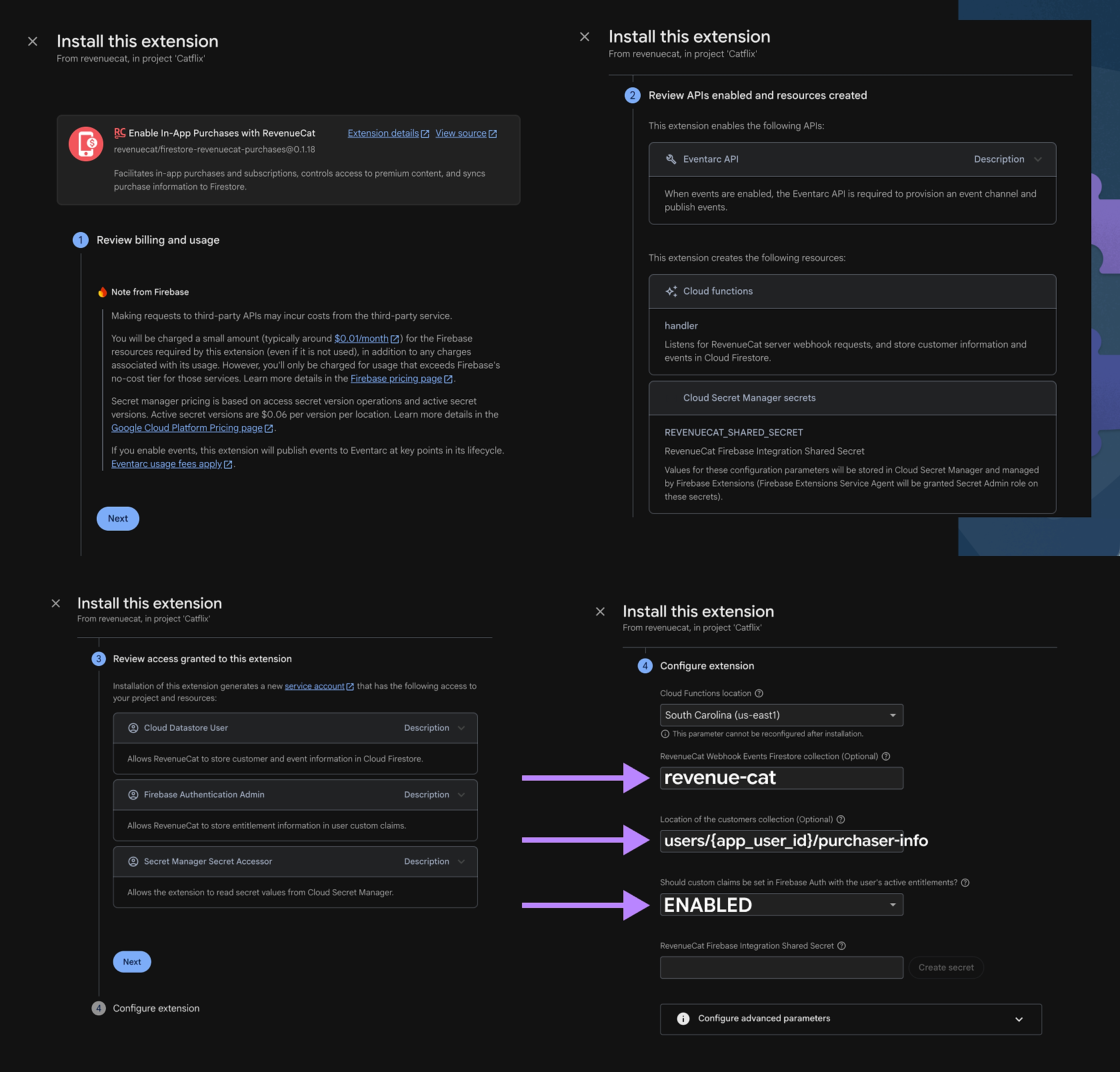
- After you have installed the extension (it will take around five minutes to install itself), you will see a webhook URL and Firebase security rules:
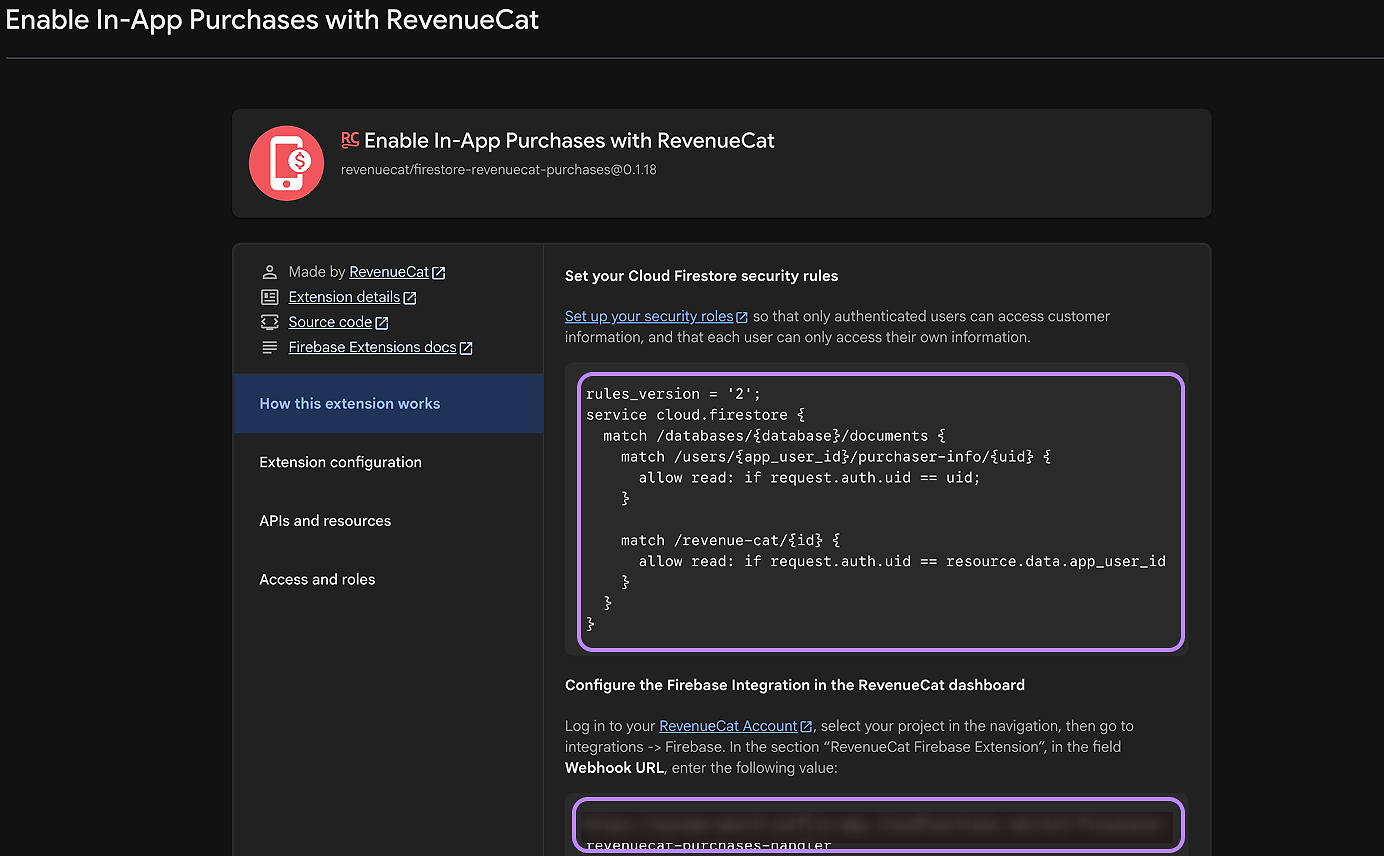
It is very important to copy these rules and add them to your Cloud Firestore Security rules. They control access to purchase information. Learn more about Firebase Security Rules here.
- Also, from the previous screen, copy the webhook URL and add it to your RevenueCat console:
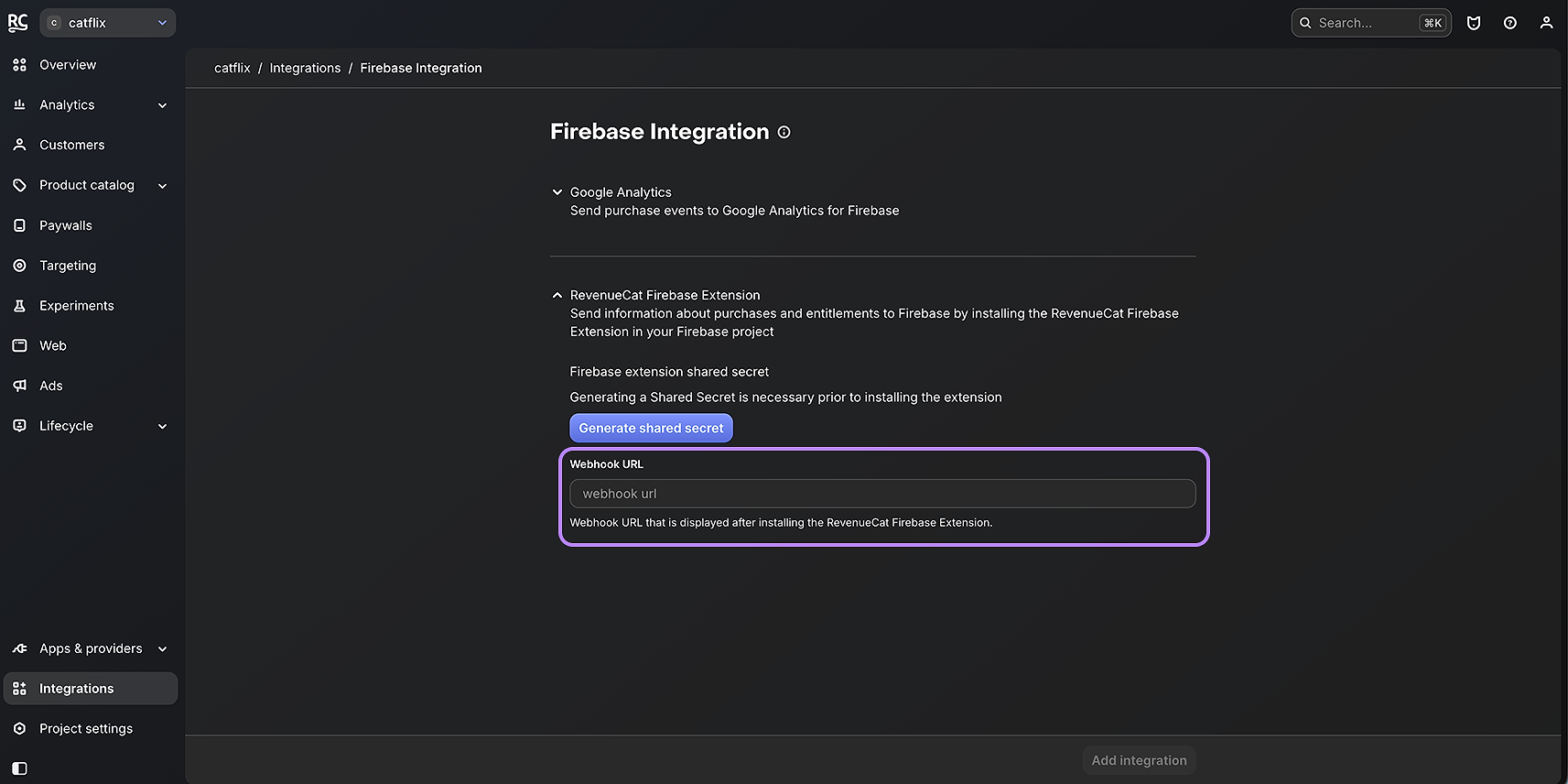
You’re done with installation! Now, when your users make a purchase, this information will be synced to your Firestore database, as well as set in your user’s auth custom claims (we will return to them in a moment). To finalize our task of making our play function gate premium access, let’s see how to do it with our current setup. Again, we have two options: reading from the database or reading from the user’s custom claims.
Reading entitlement data from Firestore
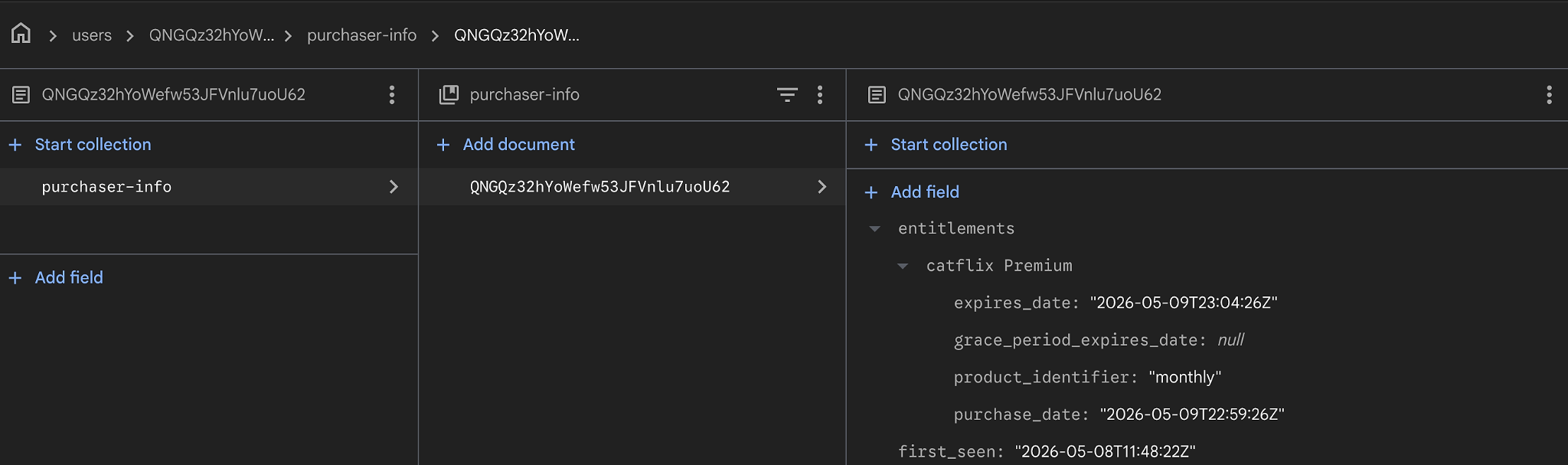
There isn’t much to explain here, because the code is as simple as it gets: it’s literally just a read from your own Firestore database:
And you can verify in your Firestore database that this information exists:
Reading entitlement data from Auth Custom Claims
Before we get to the code, we need to understand a couple of concepts.
What are custom claims, in a nutshell?
A Firebase Auth user has the standard fields you’d expect from an authenticated user, depending on the authentication type: a UID, maybe an email, sign-in providers, etc. Custom claims let you add a small list of arbitrary key-value pairs on top of that, included directly into every ID token Firebase issues for the user. You can think of them as a tiny piece of trusted metadata that Firebase signs and ships with every request. Anything in the claims your backend can read and trust because Firebase has already verified the token’s signature.
This is exactly what the RevenueCat Extension handles for us. Because earlier, during installation, we enabled custom claims, the extension now writes a claim called revenueCatEntitlements onto each user: a simple list of the entitlement IDs that the user currently has active. So, for a Catflix subscriber, their ID token carries revenueCatEntitlements: [‘catflix Premium’]from now until something changes (a cancellation, a refund, the subscription period ending). The Extension keeps that claim in sync, the same way it keeps the Firestore document in sync.
Note: The entire custom-claims payload for a user is capped at 1KB. That’s enough for an entitlements list, but worth knowing if you’re ever tempted to start stuffing user preferences in there: don’t.
Where does the auth data come from in our function?
Remember from earlier in the article that callable functions take care of a lot of heavy lifting for us: CORS, App Check verification, ID-token verification? One of the things they hand us “for free” is the verified auth payload in the request body via request.auth. By the time your handler runs, you already know who the caller is and, thanks to custom claims, what they’re allowed to do. No HTTP round-trip to RevenueCat, no Firestore read, nothing. The answer is right there in the request.
So our entire premium check collapses to: pull the revenueCatEntitlements claim out of the token and ask whether catflix Premium is in it.
That’s the whole thing. Notice this function isn’t async and doesn’t return a Future. There’s literally zero I/O. Compare that to the Firestore version, which still costs us a document read per call. With many requests, this difference can quickly add up.
The catch: claim refresh latency
There’s one tradeoff worth knowing about, otherwise you’ll hit it in production and have a confusing afternoon.
When the extension updates a custom claim on the server (e.g., the user just bought premium, cancelled, or their card got declined), the change is applied to the user’s auth record immediately. The catch is that custom claims live inside the user’s ID token, and the Firebase SDK on the client caches that token and reuses it for up to an hour before refreshing it. So even though the server has the new claim, the client keeps sending the old token to your function, and your function reads whatever claims were baked into that old token.
The result: the user just paid for premium, but for up to an hour, the next call to your function still sees them as a free user. Which is fine for “the user cancelled, and we’re holding on to their access for a bit,” but very much not fine for “the user just paid and is staring at a still-locked play button.”
The fix is one line on the client. Whenever RevenueCat tells us that the user’s subscription has changed, we force an ID-token refresh:
Now the very next call to our function carries the freshly-updated claim, and a just-purchased premium movie unlocks immediately.
Note: At the time of writing, the experimental Dart Cloud Functions SDK (firebase_functions: ^0.6.0) doesn’t expose custom claims on auth.token because they get stripped when the token is decoded. The pseudocode above is what your code will look like once that’s fixed; today, you have to grab the raw JWT off auth.rawToken and decode the payload yourself. Safe to do (the framework has already verified the token’s signature before your handler runs), but it’s a few lines of plumbing that have nothing to do with entitlements. TypeScript and Python SDKs surface claims correctly out of the box; this is a Dart-specific issue that should disappear in a future release.
So which one should you pick?
Both options end up at the same place: our function knows whether the user is premium without ever talking to RevenueCat at request time. The choice is mostly about latency vs freshness.
- Default to custom claims when the check runs on most requests. Zero I/O, zero marginal cost per call, scales for free as your user base grows.
- Default to Firestore when you need entitlement updates to propagate within seconds (no token-refresh dance), or when your function already reads other Firestore data and one more read is essentially free.
Use both if you want. The Extension keeps them in sync, so there’s no source-of-truth conflict: you can use claims on hot paths and Firestore on admin/analytics paths in the same project.
Summary
Before we wrap this up, let’s reiterate a few important caveats and considerations.
- App Check is a must for production apps; this is the lowest-hanging fruit when it comes to Firebase security. Server-side entitlement checks tell your function whether to grant access; App Check tells it whether to even talk to the caller. Both layers do different jobs, so don’t drop App Check just because the entitlement check moved to the backend.
- For Cloud Functions and RevenueCat Extension, you need to enable the Firebase pay-as-you-go Blaze plan. This means you will be billed, and make sure you secure your billing account and Firebase access.
- Make sure your private and secret keys stay that way: don’t commit them to your repository, never expose them to your client, store securely, and rotate regularly.
- If you’re using only Firebase Anonymous Authentication, remember that on re-install, you should restore your users’ purchases, because the UID is device-local.
- If you rely on custom claims, remember to refresh the token on the client side when changes happen in the RevenueCat SDK.
- Dart SDK for Firebase Cloud Functions is freshly launched and is currently behind the “experimental” flag: use with caution, read up on current limitations.
We have gone through the best practices for building a simple, efficient, and secure tech stack to handle premium content access in your mobile apps. The main takeaway is timeless: never trust the client. Thankfully, if you’re using Firebase, the RevenueCat Firebase extension and Firebase Cloud Functions make this quite easy. Moreover, the newly launched Dart SDK for Firebase Cloud Functions makes the process even more streamlined (although in the era of Gen AI, the comfort of a familiar language becomes less important, and there are obvious benefits to more mature SDKs… yet I still love and prefer Dart).
Happy building, stay safe, and may the delighted users and pretty dollars be constant companions in your indie journey!