
Back to the RevenueCat homepage
RevenueCat SDKGoogle Play Billing

Chapter 6: The Purchase Flow

Implementing the purchase flow directly means building BillingFlowParams, calling launchBillingFlow(), handling the PurchasesUpdatedListener callback, dealing with result codes, posting purchases to your backend, acknowledging, and managing edge cases like duplicate purchases and mid-flow disconnections.

The RevenueCat purchase flow is:

kotlin
val params = PurchaseParams.Builder(activity, packageToPurchase).build()
val result = Purchases.sharedInstance.awaitPurchase(params)

The rest is handled by the SDK. This chapter explains what happens inside that call and the decisions you still need to make.

The Complete Flow
kotlin
// 1. Fetch offerings (can be cached from earlier)
val offerings = Purchases.sharedInstance.awaitOfferings()

// 2. User selects a package from your UI
val pkg = offerings.current?.monthly ?: return

// 3. Launch purchase
try {
    val result = Purchases.sharedInstance.awaitPurchase(
        PurchaseParams.Builder(activity, pkg).build()
    )
    val customerInfo = result.customerInfo

    // 4. Grant access based on updated CustomerInfo
    if (customerInfo.entitlements["pro"]?.isActive == true) {
        navigateToApp()
    }

} catch (e: PurchasesTransactionException) {
    when {
        e.userCancelled -> { /* User backed out, do nothing */ }
        e.error.code == PurchasesErrorCode.ProductAlreadyPurchasedError -> {
            showMessage("You already have this subscription")
        }
        else -> showError(e.error.message)
    }
}

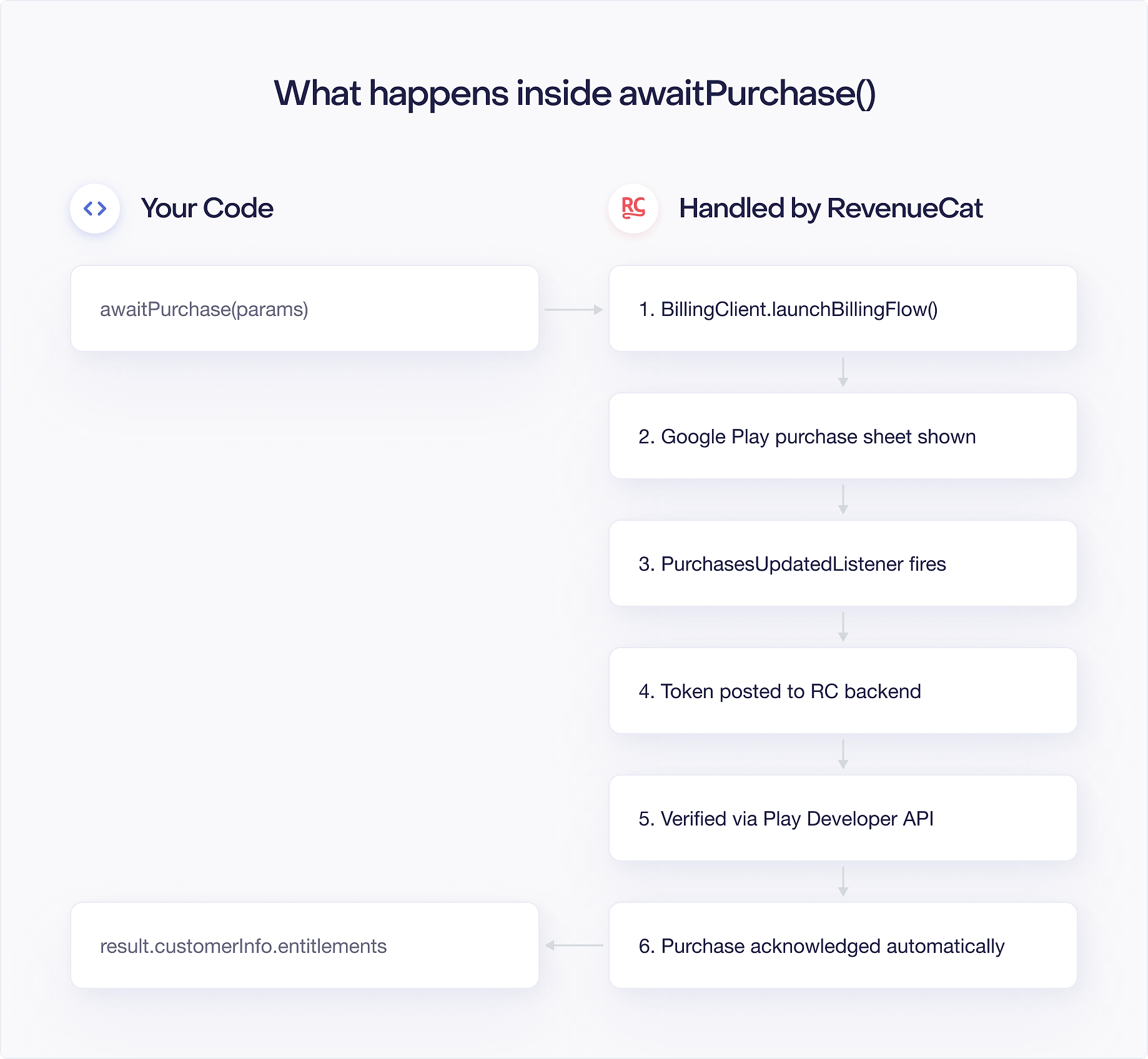
What awaitPurchase() Does Internally

  1. Builds BillingFlowParams with the correct ProductDetailsParams: maps your Package to the right offer token and product details format that Google Play expects.
  2. Calls BillingClient.launchBillingFlow(): opens the Google Play purchase sheet attached to the activity you passed in PurchaseParams.
  3. Waits for the PurchasesUpdatedListener result: suspends the coroutine until Google Play delivers the outcome, whether success, cancellation, or an error code.
  4. If result is OK, posts the purchase token to the RevenueCat backend: sends the raw token from Google Play to RevenueCat so it can be recorded and verified server side.
  5. RevenueCat backend calls purchases.subscriptionsv2.get or purchases.products.get to verify: RevenueCat hits the Google Play Developer API to confirm the purchase is genuine before granting any entitlement.
  6. SDK acknowledges or consumes the purchase: calls acknowledgePurchase() for subscriptions and non-consumables, or consumePurchase() for consumables, within the 3 day window Google requires.
  7. Returns PurchaseResult(storeTransaction, customerInfo): hands back the verified transaction and updated entitlement state so your code can gate access immediately.

If any step fails with a retriable error, the SDK retries automatically. You do not write retry logic.

Callback Style (without coroutines)

If you prefer callbacks:

kotlin
Purchases.sharedInstance.purchaseWith(
    PurchaseParams.Builder(activity, pkg).build(),
    onError = { error, userCancelled ->
        if (!userCancelled) showError(error.message)
    },
    onSuccess = { transaction, customerInfo ->
        navigateToApp()
    }
)

Personalized Pricing (EU)

For EU compliance with personalized pricing:

kotlin
PurchaseParams.Builder(activity, pkg)
    .isPersonalizedPrice(true)
    .build()

This passes isOfferPersonalized = true to BillingFlowParams, which shows the "This price has been customized for you" notice on the Google Play purchase dialog.

Purchasing a Specific SubscriptionOption

When you pass a Package to PurchaseParams, the SDK uses defaultOption (best available offer). To purchase a specific offer:

kotlin
val subscriptionOption = pkg.product.subscriptionOptions
    ?.firstOrNull { it.tags.contains("promo_50_off") }
    ?: pkg.product.defaultOption
    ?: return

val params = PurchaseParams.Builder(activity, subscriptionOption).build()

What the StoreTransaction Contains

PurchaseResult.storeTransaction is a StoreTransaction:

kotlin
val transaction: StoreTransaction = result.storeTransaction
transaction.orderId          // String?, null for restored purchases
transaction.purchaseToken    // the raw Play purchase token
transaction.productIds       // list of product IDs purchased
transaction.purchaseTime     // epoch millis
transaction.type             // ProductType.SUBS or INAPP

You typically do not need to use this directly. The customerInfo in the same result object is the canonical source of truth for entitlements.

Restoring Purchases

For users who reinstall the app or switch devices:

kotlin
try {
    val customerInfo = Purchases.sharedInstance.awaitRestore()
    if (customerInfo.entitlements["pro"]?.isActive == true) {
        navigateToApp()
    } else {
        showMessage("No active purchases found")
    }
} catch (e: PurchasesException) {
    showError(e.error.message)
}

awaitRestore() calls queryPurchasesAsync() internally, posts all found purchases to RevenueCat, and returns the updated CustomerInfo.

Prefer building from scratch?

The Google Play Billing Handbook covers the same topics with raw BillingClient, Developer API, and RTDNs.

Related chapters

  • Chapter 5: Configuring the SDK

    A single configure() call replaces the entire connection lifecycle, reconnection, and sync logic.

    Learn more
  • Chapter 8: Error Handling

    PurchasesErrorCode replaces BillingResponseCode. The SDK handles all retry logic automatically.

    Learn more
  • Chapter 3: One-Time Products with RevenueCat

    Three method calls are all you need: fetch offerings, launch a purchase, and check the result.

    Learn more
The Purchase Flow | RevenueCat