
Chapter 1: Understanding RevenueCat
Building in-app purchases on Android from scratch requires three separate systems: the Play Billing Library on the client, the Google Play Developer API on the server, and Real Time Developer Notifications via Cloud Pub/Sub. Each requires its own setup, its own code, and its own expertise to operate correctly.
RevenueCat reorganizes those three pillars into one. The SDK replaces the client-side BillingClient integration. The RevenueCat backend replaces your server-side Google Play Developer API calls. RevenueCat webhooks replace RTDNs. You interact with one SDK and one dashboard instead of three systems.
The RevenueCat Architecture

Your app calls the Purchases SDK. The SDK communicates with both Google Play (for the purchase UI and payment) and the RevenueCat backend (for verification and entitlement storage). Your server communicates with the RevenueCat backend, not directly with Google Play.
This architecture has a specific implication: RevenueCat is in the critical path for purchase verification. After a user completes a purchase, the SDK posts the token to RevenueCat before your app receives confirmation. This adds a network round trip but eliminates your need to implement server-side verification.
Key Concepts
Offerings and Packages
Instead of querying ProductDetails directly from Google Play, you fetch Offerings from RevenueCat. An Offering is a collection of Packages. A Package maps a RevenueCat logical product (monthly, annual, lifetime) to a specific Google Play product and base plan.
You configure Offerings in the RevenueCat dashboard. Your code fetches them at runtime:
This means your paywall code does not hardcode product IDs. You change what to show users by updating the Offering in the dashboard, with no app update required.
CustomerInfo and Entitlements
Instead of managing subscription state through the Google Play Developer API, you read CustomerInfo. CustomerInfo is a snapshot of the user's purchase history and active entitlements, computed and cached by RevenueCat.
An Entitlement is a logical access level you define in the RevenueCat dashboard, for example, "pro_access" or "premium". You map one or more products to each entitlement. When a user purchases any of those products, the entitlement becomes active.
Your access check becomes:
This is the entire entitlement check. The seven subscription states (ACTIVE, IN_GRACE_PERIOD, ON_HOLD, PAUSED, CANCELED, EXPIRED, PENDING) are resolved server-side. isActive already reflects the correct result.
RevenueCat In-App Purchases Cheat Sheet
The diagram below shows how Products, Packages, Offerings, and Entitlements relate to each other inside RevenueCat.
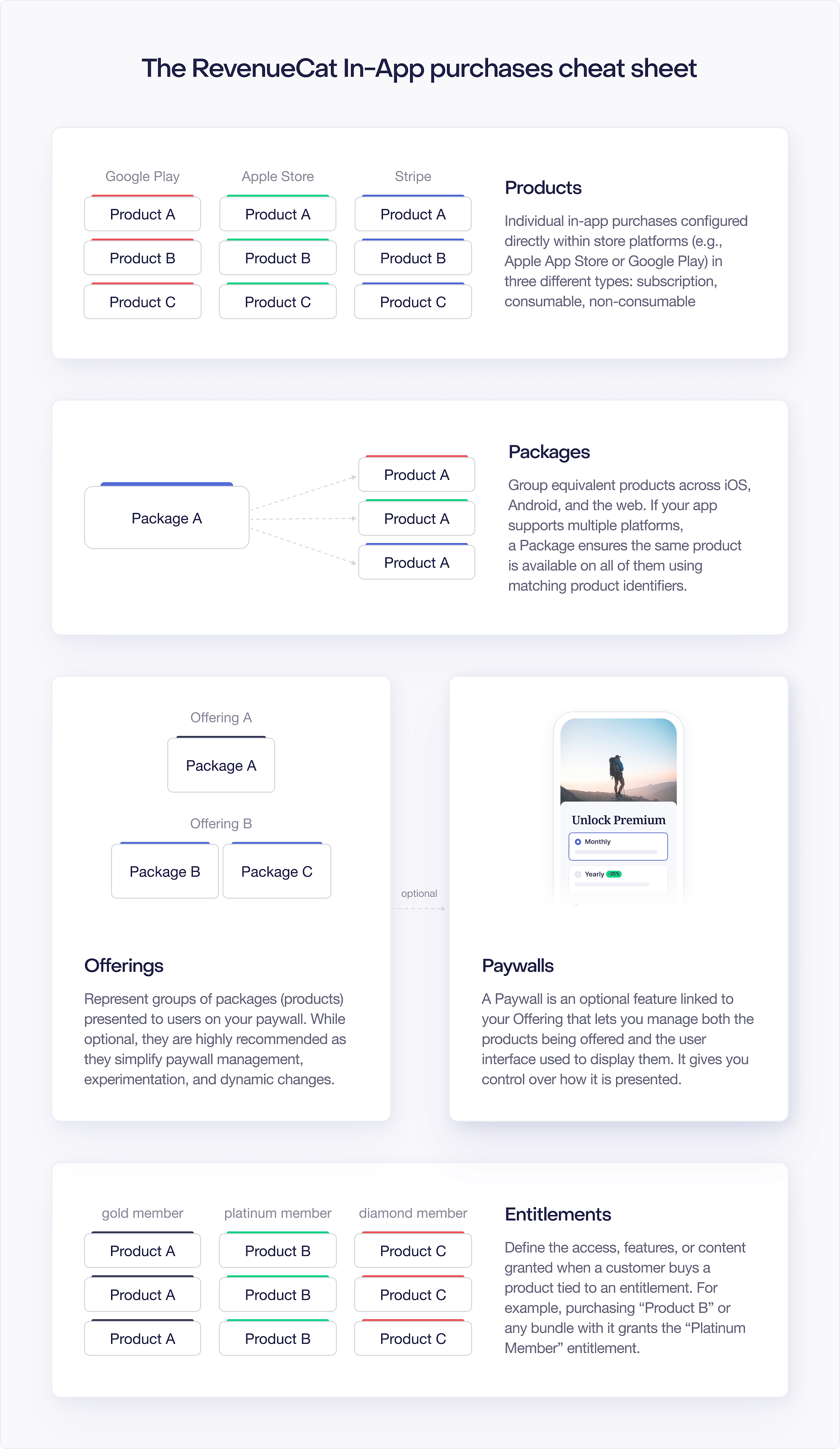
- Products are the items you define in the Google Play Console (subscriptions, one-time purchases).
- Packages wrap a single product with a type label (Monthly, Annual, Lifetime, or custom). A Package is the unit your paywall displays.
- Offerings group one or more Packages. One Offering is marked Current and returned by
offerings.current. You switch the Current Offering from the dashboard without a new app build. - Entitlements are the access levels your app enforces (
"pro_access","premium", etc.). You attach Products to Entitlements in the dashboard. Purchasing any attached Product activates the Entitlement inCustomerInfo.
The Purchases Singleton
Purchases.sharedInstance is the entry point for all SDK operations. You configure it once at app startup with your RevenueCat API key and it manages the rest of the session:
Unlike BillingClient, the Purchases singleton does not require you to manage connection state. It handles reconnection automatically and queues operations that arrive before the connection is ready.
What RevenueCat Does Not Replace
RevenueCat does not replace the Google Play Console. You still create products, base plans, and offers there. RevenueCat reads your Play Console product catalog and lets you organize those products into Offerings.
RevenueCat does not replace your app's UI. You still build your paywall, manage navigation, and display product prices. RevenueCat provides the data.
RevenueCat does not replace your user authentication system. You bring your own user IDs and pass them to the SDK. RevenueCat links purchase history to those IDs.
The Tradeoff
With raw Google Play Billing, you own the entire stack and every failure mode. With RevenueCat, you offload the complexity but take on a dependency. If RevenueCat's backend has an outage, your purchase verification flow is affected.
The SDK keeps a disk cache of CustomerInfo that allows entitlement checks to work offline using the last-known server state. This cache can become stale. Separately, RevenueCat offers an Offline Entitlements feature that computes entitlements client-side from local Play Store purchases, this is a distinct, explicitly-configured feature rather than the standard cache. Both provide resilience but with different semantics; neither is a full substitute for a reachable backend.
The rest of this handbook is about understanding exactly where RevenueCat helps and what remains your responsibility.

