
Chapter 3: Tracking users: URL parameter set up
Once your funnel's ready and aligned with the campaign, you need to add tracking details to the funnel link. These details are called URL parameters. Parameters do three distinct jobs:
- Reporting: identify the source, campaign, audience, and creative
- Personalization: repeat relevant campaign context or select appropriate proof
- Routing/branching logic: send a defined audience to a different screen, offer, or sequence
UTMs parameters (utm_source, utm_medium, and so on) are the standard set of URL parameters used for campaign reporting. They tell RevenueCat and your analytics tools where each visitor came from, and they can drive branching logic, the rules that send a visitor down a different path in the funnel based on the parameter values in their link.
Here’s an example URL parameter:
https://signup.cat/LINK_ID/?utm_source=facebook&utm_campaign=sleep_launch
The question mark starts the parameter section. In this example, utm_source and utm_campaign are parameters; facebook and sleep_launch are their values. An ampersand separates one parameter from the next. Whoever owns the destination — an ad manager or a creator's link-in-bio tool — adds the completed URL as the destination.
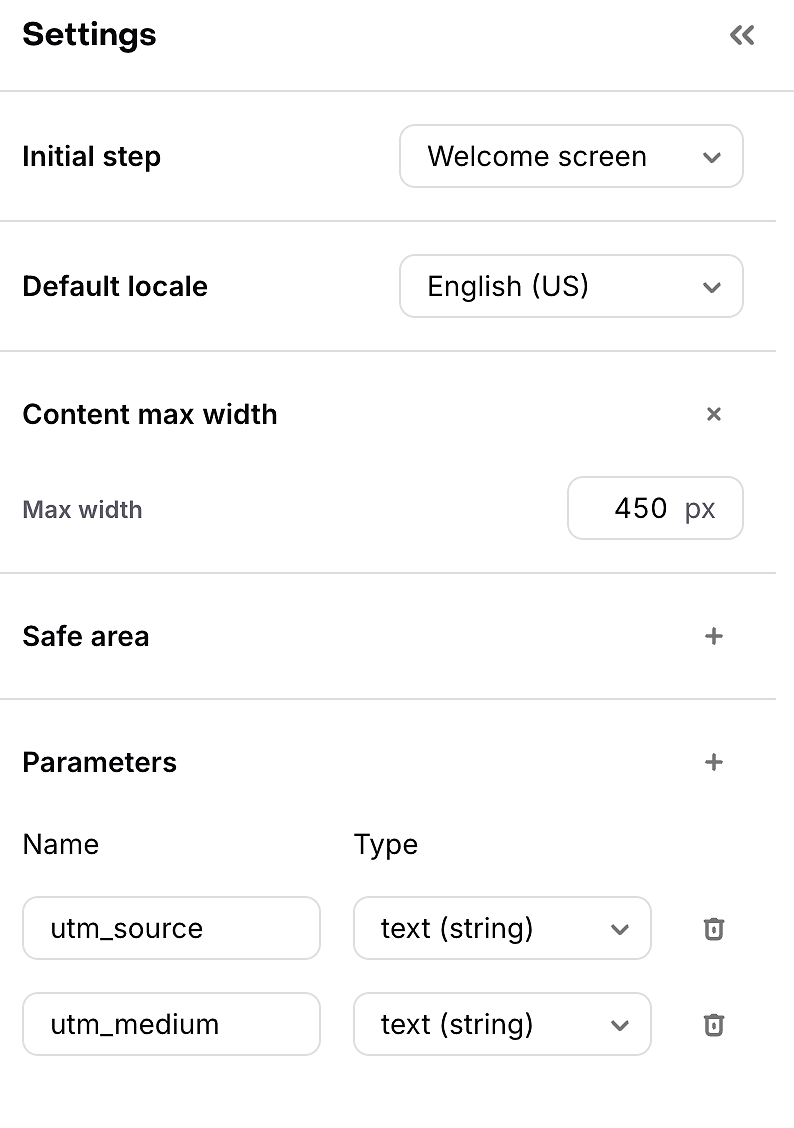
Set up parameters in this order:
- Decide which questions the data should answer, such as which platform, campaign, audience, creative, or partner produced the visit
- Use the five standard UTM names for readable reporting:
utm_source,utm_medium,utm_campaign,utm_term, andutm_content - If you need an additional value, such as
campaign_id,offer, orcreator, open the Funnel Editor, go to Settings → Parameters, add the parameter name, and choose its type - Add the names and values to the published funnel URL. Start with
?and separate additional pairs with& - Paste the completed URL into the destination field — an ad platform or a creator's bio link — open the preview, and confirm RevenueCat receives the expected values
RevenueCat automatically processes standard UTM parameters included in a funnel URL. They can be used in funnel analytics and in branching logic. Non-standard values — such as offer, audience, creator, or immutable ad-platform IDs — must first be declared under Funnel Settings → Parameters with the correct data type. See our Docs page for Deploying Funnels.
When naming your parameters, good branching rules are clear and durable — the rule should key off something that stays meaningful over time, not something that'll be dead in a week. For example:
utm_campaign=annual_plan_launch→ show the annual-plan value explanation: if someone arrives from a campaign specifically built to sell the annual plan, the funnel will skip the generic pitch and show them the screen that explains why annual is worth it (savings vs. monthly, etc.).audience=beginner→ show the foundational proof sequence: the parameter marks this visitor as a beginner segment, so the funnel will show them more basic, explanatory proof.offer=creator_annual_20→ show the approved creator offer: the parameter will show a specific offer — not a different default one — so the deal a creator promised their audience is the deal that shows up.
Put specific rules before broad rules and always configure a default path. Test every branch using the final production-format URL, including an unknown value, a missing value, and values containing spaces or special characters. These tests make your funnel’s logic foolproof!
Both paid user acquisition and influencer or affiliate marketing have their own naming and standardization rules for the values you'll actually use — paid campaign fields and creator and partner fields, respectively.
Useful Docs
Check out our Docs on Creating Funnels and Analyzing Funnels for more detail.