

Build no-code web funnels in RevenueCat
Unlock the flexibility and profit of web-to-app with our new funnel builder: create custom onboarding, surveys, and checkout flows in an instant. Free and included in your regular plan. Learn more.
Noom’s web-to-app funnel is extensive, like really extensive. The weight loss subscription app has one of the longest app onboarding funnels I’ve ever analyzed. Walking through it carefully and taking notes took around an hour and a half, and even a faster ‘quick’ run-through as a typical user still clocked in at 10-15 minutes, with up to 113 screens along the way.
Yet somehow, it never feels exhausting.
Instead, the experience feels personal, thoughtful, and surprisingly educational.
Why is Noom’s onboarding flow so long?
What makes Noom’s approach worth studying isn’t just the length of the funnel, but how intentionally that length is used. Every question clearly builds toward a payoff, sensitive moments are met with reassurance, and by the end, you genuinely feel as though the plan was designed specifically for you. Noom strikes a rare balance between asking for input and delivering value, and that’s what makes the funnel work.
Before we dive in, one important note: I’m human. I know, shocking. While I’ve worked to walk through as many variations of Noom’s flow as possible, there are inevitably moments I may have missed or paths I couldn’t fully test.
At one point, users are asked ten questions with four possible answers each, that’s 262,144 potential combinations. But fear not: this human did the homework to surface the most meaningful patterns and takeaways, testing roughly 20 different paths to ensure the core learnings are well represented.
So let’s walk through what makes this quiz-based onboarding funnel work and see what you can apply to your own web-to-app funnel. You can check out the full flow here.
1. Goal selection that reduces pressure
Noom opens with a question that’s refreshingly direct: What’s your weight loss goal? That clarity matters. If you’re a weight-loss app, hiding it creates uncertainty later.
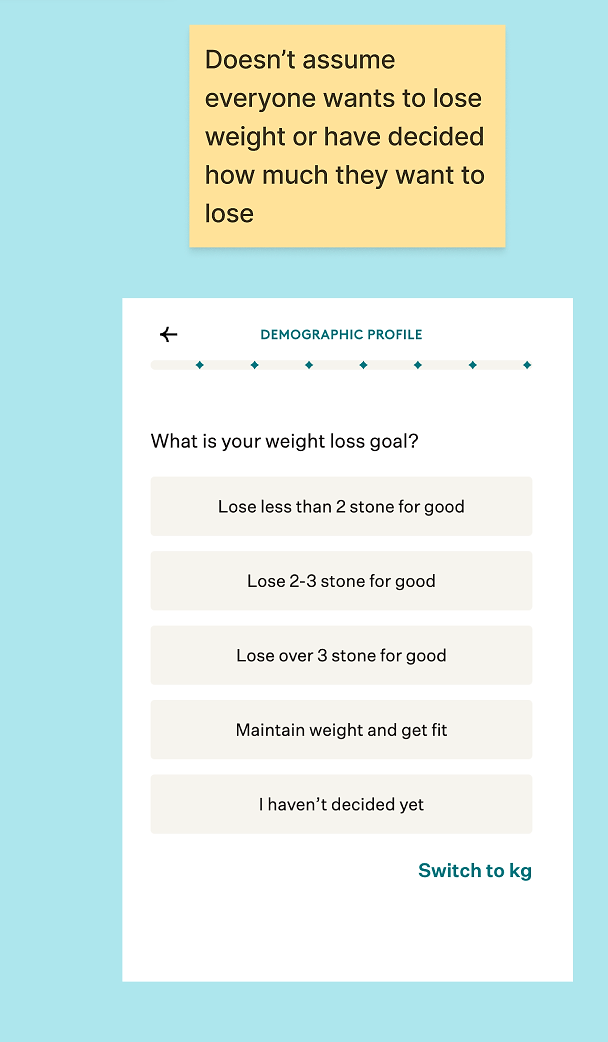
But the clever part lies in the options themselves. It’s not just “lose weight.” Users can also choose “maintain weight and get fit” or “I haven’t decided.” That final option may seem small, but it does important work: it removes the pressure to have a perfect answer on the very first screen and prevents users from feeling like they’ve already ‘failed’ before they’ve even started, especially critical when the first step is often where drop-off is highest.
Noom also allows users to switch units (stones or kilos). It sounds minor, but it matters. Confusion at this stage leads to inaccurate inputs, and inaccurate inputs erode trust. I may live in the UK, but I still couldn’t confidently tell you how much a stone is, and Noom smartly removes that friction before it becomes a problem.
2. Handling sensitive questions with care
Where Noom really stands out is in how they handle personal, potentially uncomfortable questions. The flow next asks about:
- Sex assigned at birth
- Gender identity
- Pregnancy status
- Current weight
- Medical conditions
These aren’t casual questions. In a category like weight loss, where vulnerability and self-judgment often show up early, the way questions are framed is critical. Noom addresses this by consistently doing four things:
A. They explain why before you can overthink it
Noom asks sex assigned at birth. This can easily feel intrusive or irrelevant:
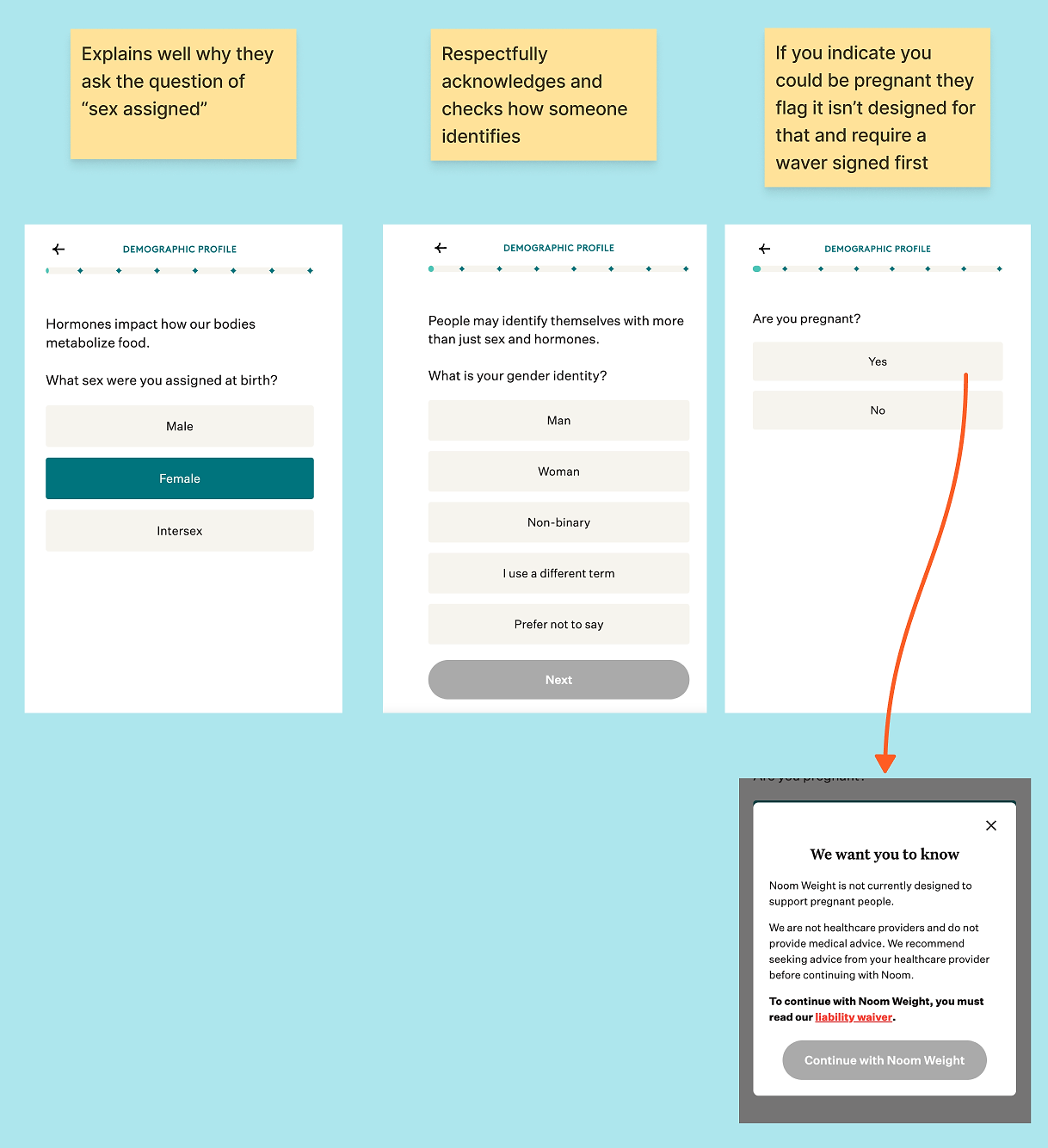
Noom does something many apps skip: it explains why, and it does it on the same screen. The framing is straightforward: hormones can affect how our bodies metabolize food. Whether or not every user fully agrees with the science, the key point is that it doesn’t feel like a random data grab.
They also introduce a progress indicator early on, which matters because at this stage, users are silently asking one question: How long is this going to take?
This isn’t just UX politeness, it’s trust-building. When users understand why information is being collected and how it will be used, they’re far more willing to share personal details.
Next, Noom asks about gender identity, separate from sex assigned at birth. This is one of those subtle moments where product design quietly signals: we’ve thought about real people.
Asking this way reduces the risk of mispersonalization and makes users more comfortable sharing personal information, because the app demonstrates care in how questions are framed.
Since I selected “woman,” Noom followed with a pregnancy question. They don’t let you simply continue if you indicate you are pregnant; instead, they clearly explain the app isn’t designed for that situation and require you to sign a waiver to proceed. This thoughtful approach balances user safety with transparency.
B. They reduce the mental load to keep you moving
I loved the age banding here:
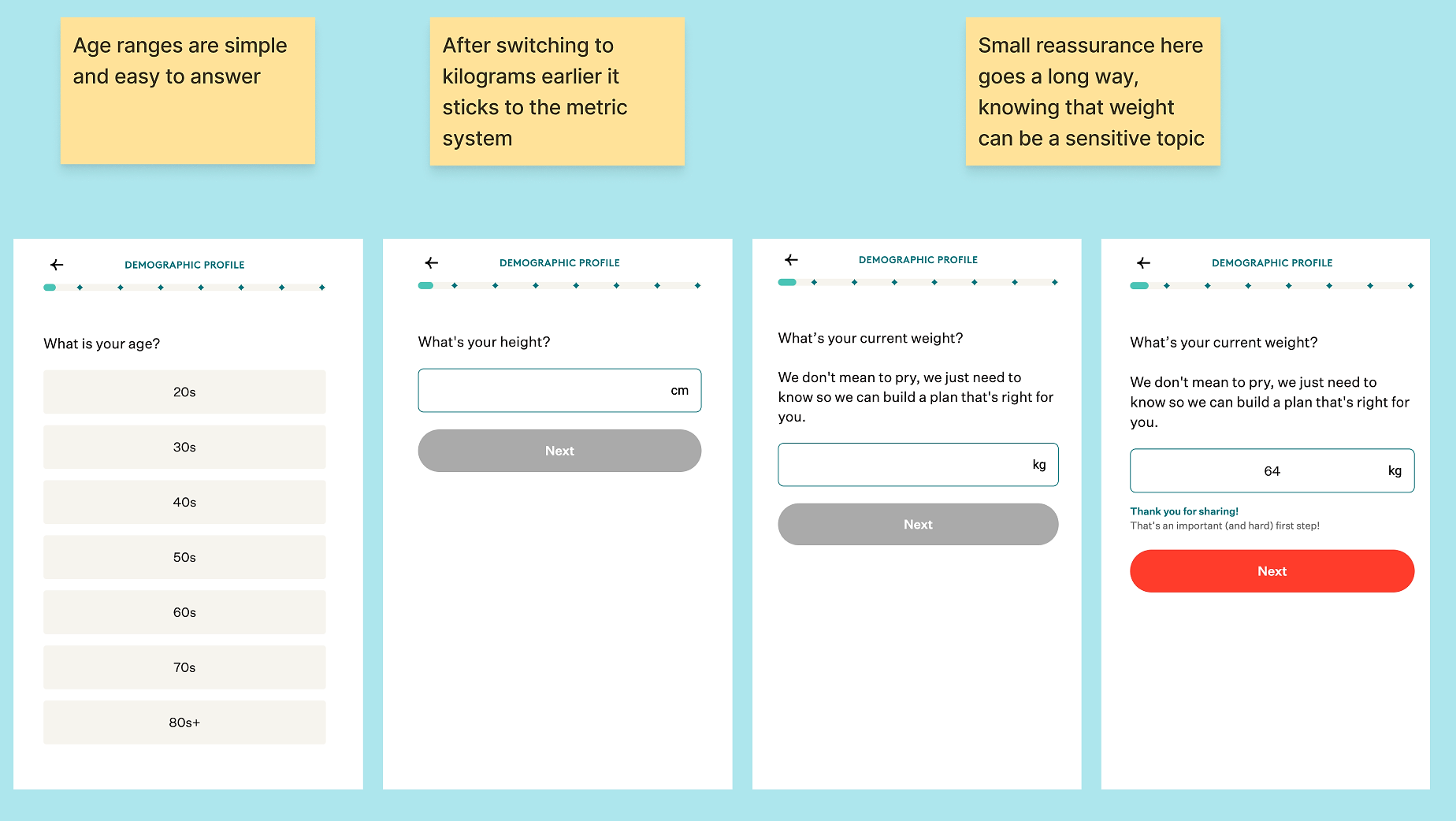
Instead of forcing users to enter exact ages or navigate fiddly brackets (20–24, 25–29, etc.), Noom uses broad ranges like twenties, thirties, and forties. I mean, 21 vs. 29 years old… very different, but at least they are making it easy for us.
In a long onboarding flow, this kind of simplification matters. It maintains momentum without sacrificing the usefulness of the data, and it reduces the pressure or overthinking that can come with sharing personal information.
C. They reassure you right after the hardest moment
Next comes height and current weight. Noom knows this can be sensitive, so they soften the request with: “We don’t mean to pry, we just need this to build a plan that’s right for you.”
When you submit your weight, the app responds immediately with: “Thank you for sharing. That’s an important and hard first step.” This isn’t just polite copy, it’s a micro-moment of emotional safety, arriving right when a user might feel judged.
One interesting choice: there’s no ‘I don’t know’ option for weight. That could create friction for users who avoid weighing themselves, but my guess is that weight serves as the anchor for the results graph later. In this case, Noom prioritizes data completeness over comfort. But perhaps that same clarification it offered earlier would be helpful here, so users understand the need.
D. Personalization that feels real (even when it isn’t)
Noom asks about health conditions next, with a multi-select list and a simple UI pattern that makes it clear you can choose more than one.
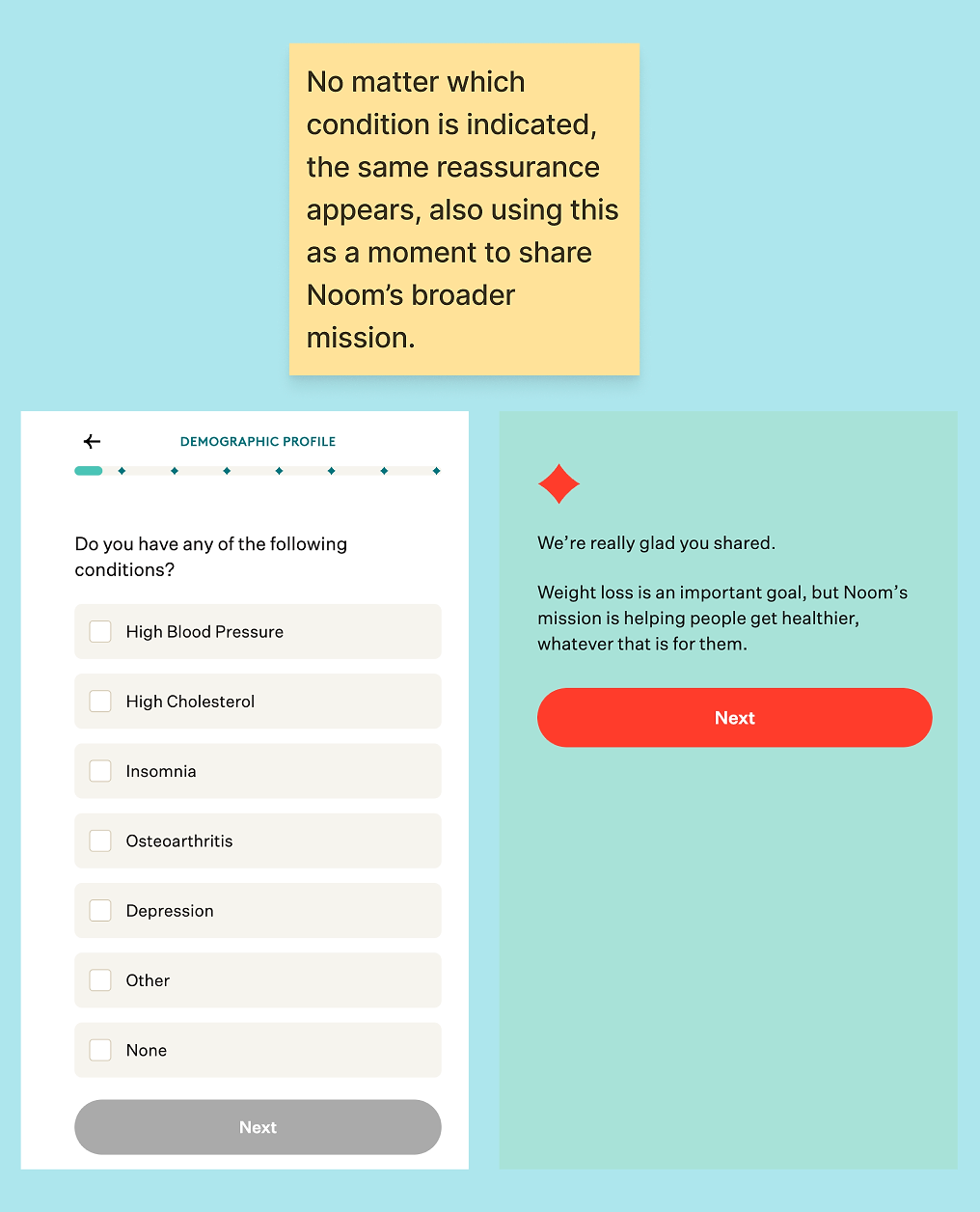
What stood out is what happens after you select something: you get a supportive message (“We’re so glad you shared…”), and it works even though it’s probably not truly personalized to your exact condition (the message remains the same no matter what you fill in).
That’s a smart tradeoff. With dozens of possible condition combinations, you don’t need custom copy for every branch. A single, well-written reassurance screen can still feel personal because it addresses the emotional reality of what just happened: the user admitted something vulnerable.
Noom also continues to explain why questions are being asked as they get more serious (e.g., diabetes, eating disorders). Not every condition needs the same level of explanation, but the consistency builds trust.
Additionally, Noom adapts follow-up questions based on your answers. For example, if you indicate you have diabetes, the app asks up to two additional questions tailored to the type.
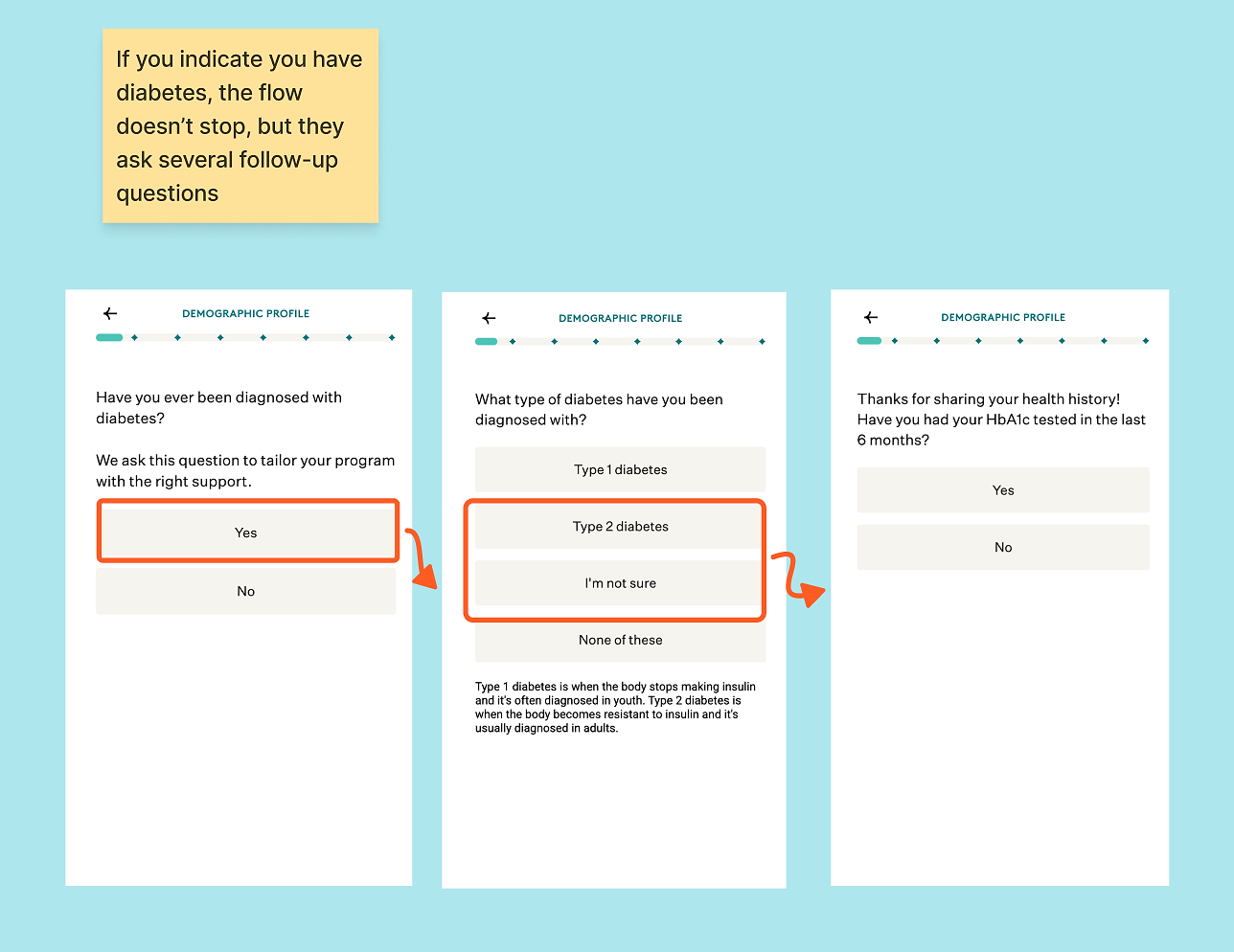
These moments of conditional logic make the experience feel tailored without requiring every question to branch infinitely.
The eating disorder question that follows is a tricky one:
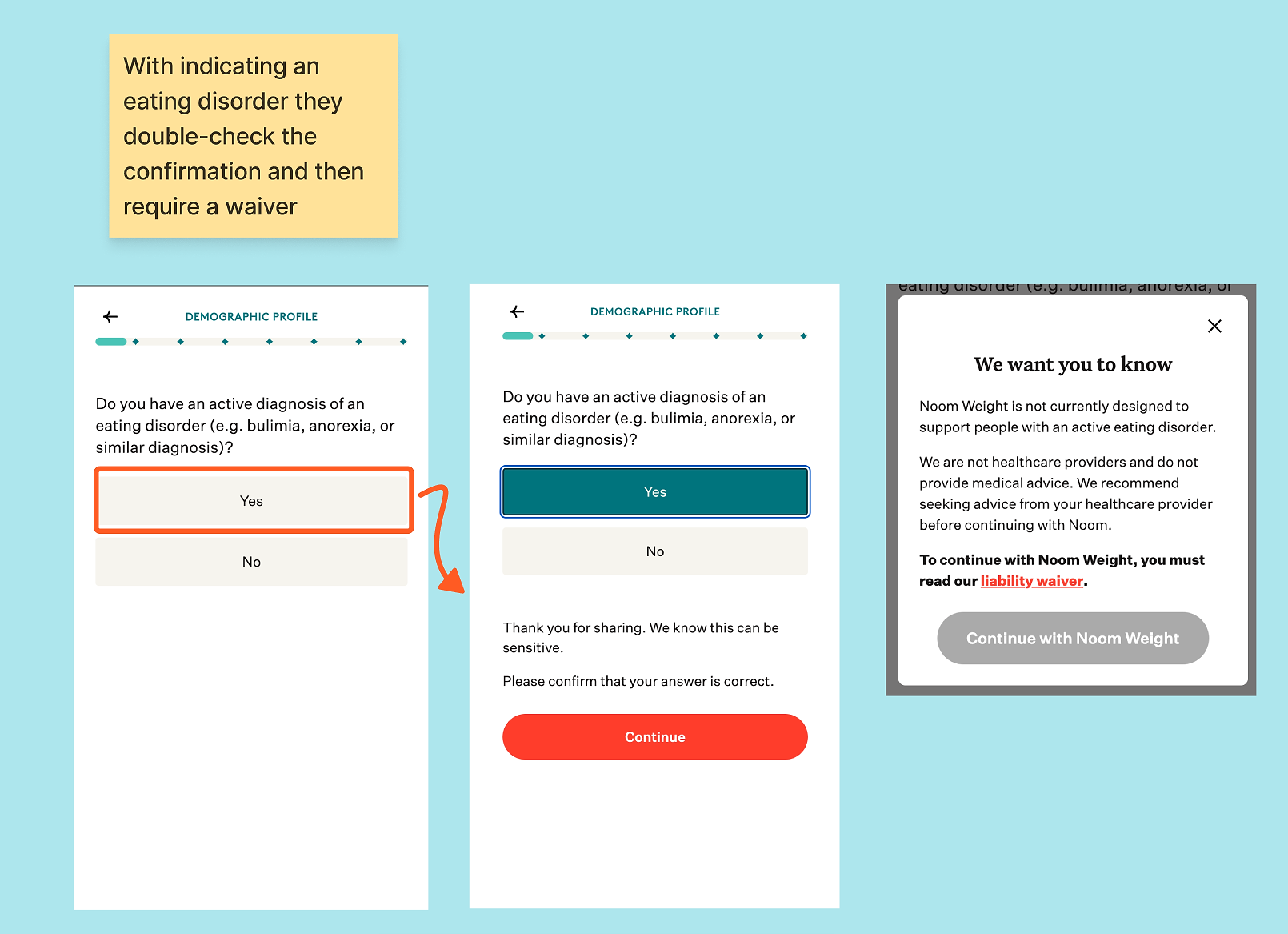
As someone with close friends who have struggled with eating disorders, the waiver alone doesn’t feel sufficient. I understand that if the flow stopped entirely, some users might be tempted to skip ahead, but even with the additional confirmation step, it still feels a bit too easy.
Notably, if you answer ‘no,’ the app doesn’t ask about any previous eating disorders, so that’s something to be aware of. This feels more like a moral consideration than a UX flaw, but I do appreciate that Noom at least doesn’t continue as if nothing happened when someone answers ‘yes.’ It shows some level of responsibility in handling sensitive health information.
Their slight redemption in my eyes? Two steps later, if I enter a weight that isn’t medically healthy, they won’t let me continue until I enter a weight that isn’t classified as underweight.
3. Turn a long form into a series of small wins
After filling in a lot of personal questions, Noom takes a moment to pause and shows the following screen:
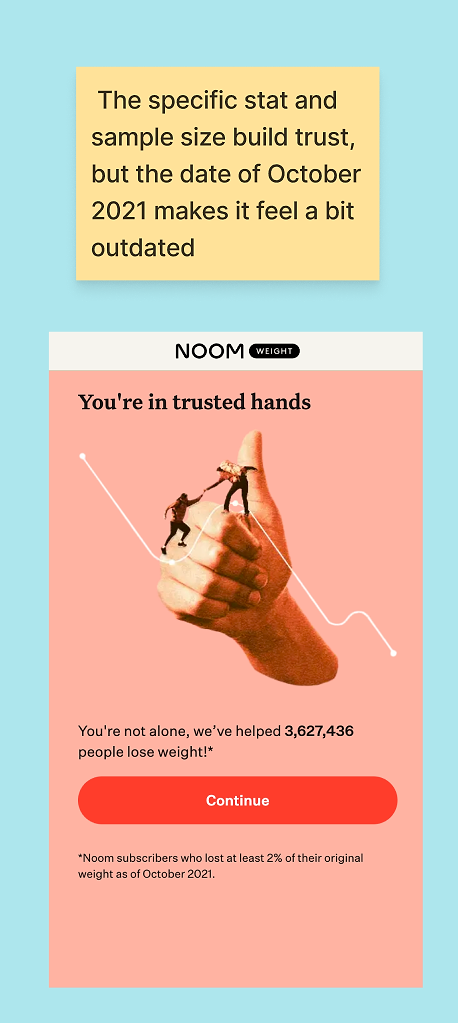
- The image of people on a hand is playful and approachable, especially paired with the phrase ‘you are in trusted hands.’
- The visual of climbing the line subtly signals that weight loss isn’t a straight downward journey, showing that Noom will support users through the hardest parts, like when weight temporarily increases.
- The statistic, “we’ve helped 3,627,436 people lose weight,” is both specific and significant, giving the claim credibility.
- The stat is backed with a data source and a defined minimum result (at least 2%), which further strengthens trust.
One minor issue: the stat is dated October 2021. Specificity builds credibility, but an older timestamp can create tension, slightly undermining the message.
4. Set expectations early, then repeat them on purpose
Throughout the flow, Noom constantly manages your expectations for what the app can and can’t do. There are three clever ways they do this:
A. The goal weight becomes the backbone of everything
Now Noom asks for your ideal weight and explains how it will use that number to predict a timeline and build a custom plan:
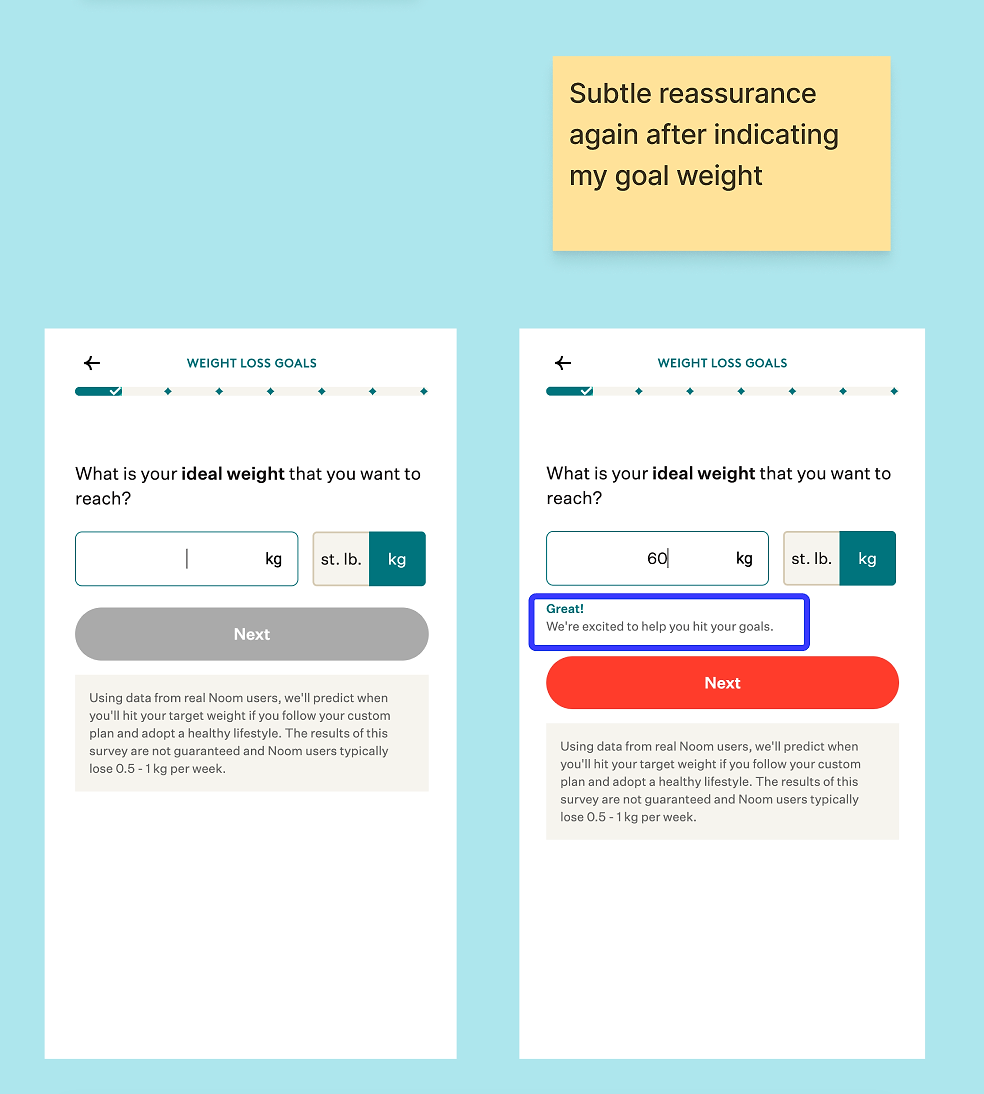
When you enter something unrealistic or unhealthy, the flow blocks you:
That’s a rare and important signal. Noom is willing to sacrifice a conversion rather than encourage harmful behavior, as noted earlier. It stands out as one of the clearest examples in the entire experience of the principle: we won’t optimize conversion at any cost.
B. The 0.5-1 kg message is repeated strategically
This is where Noom starts repeating a key expectation: subscribers typically lose 0.5-1 kg per week. They say it:
- On the goal screen
- Next to testimonials
- With your projected timeline
Normally, repetition can be a UX sin. Here, it’s strategic and serves as clear expectation management. If users expected to lose three kilos a week, they’d assume the product was broken. Noom anchors users to a healthier, realistic pace before they ever pay a dime.
C. The graph reframes the competition
Noom then shows the projected journey: a steady trend line versus the yo-yo effect of restrictive dieting:
This is a subtle but important move: Noom’s competitor isn’t just ‘another app.’ It’s crash dieting, inconsistency, and short-term motivation. The graph makes that comparison visual, which is far more persuasive than simply stating it in copy.
Next, Noom asks what you want to focus on: nutrition, movement, habits, or ‘other.’ I noticed a few of these practical questions appear throughout the flow. At first, they felt a bit random, but it soon became clear that this is likely strategic: spacing out the practical, must-ask questions keeps users engaged and prevents them from getting ‘bored’ with the flow.
5. Make the payoff visible before you ask for the email
A. The event question creates a deadline
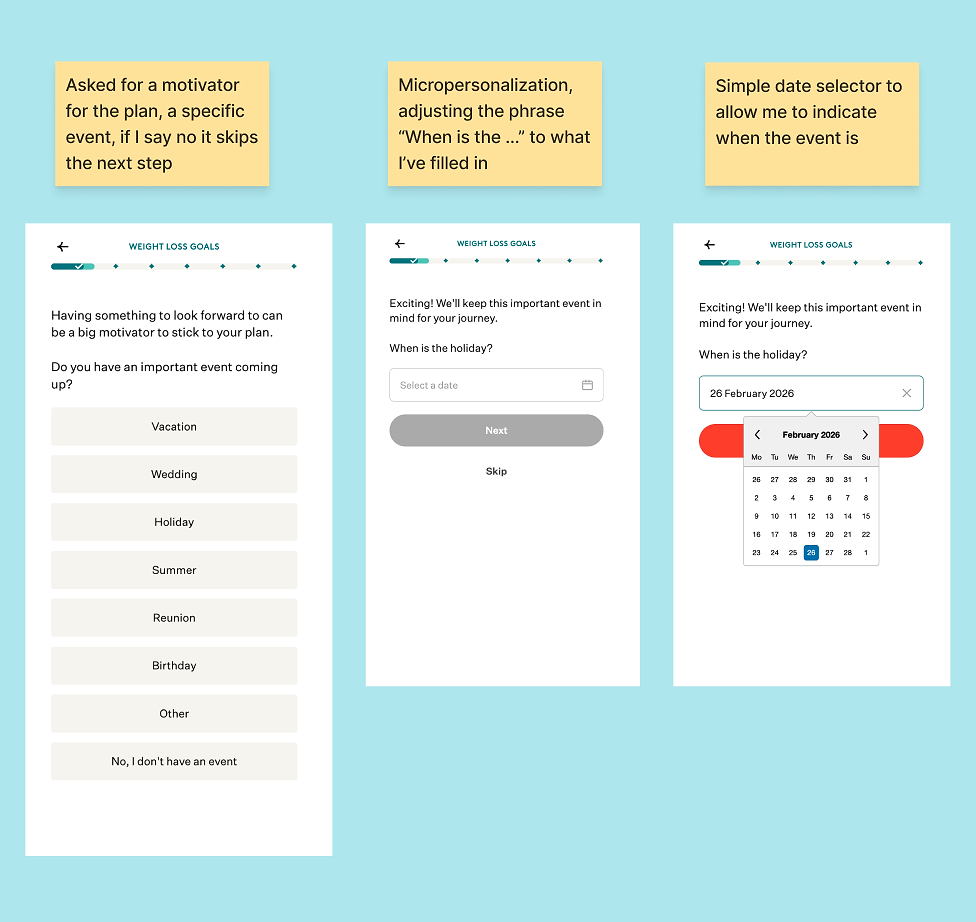
Next, Noom tries to identify a motivator, often framed as an upcoming event such as a holiday, wedding, or reunion. This makes sense: events create deadlines, and deadlines create urgency.
It can feel a bit superficial if a user’s true motivator is health, confidence, or energy. Noom softens this by including a ‘no event’ option, but the flow still nudges users to pick something, even asking them to specify a date.
B. Pace gives you control
Then you choose your pace: fast, slow, and steady, or in between.
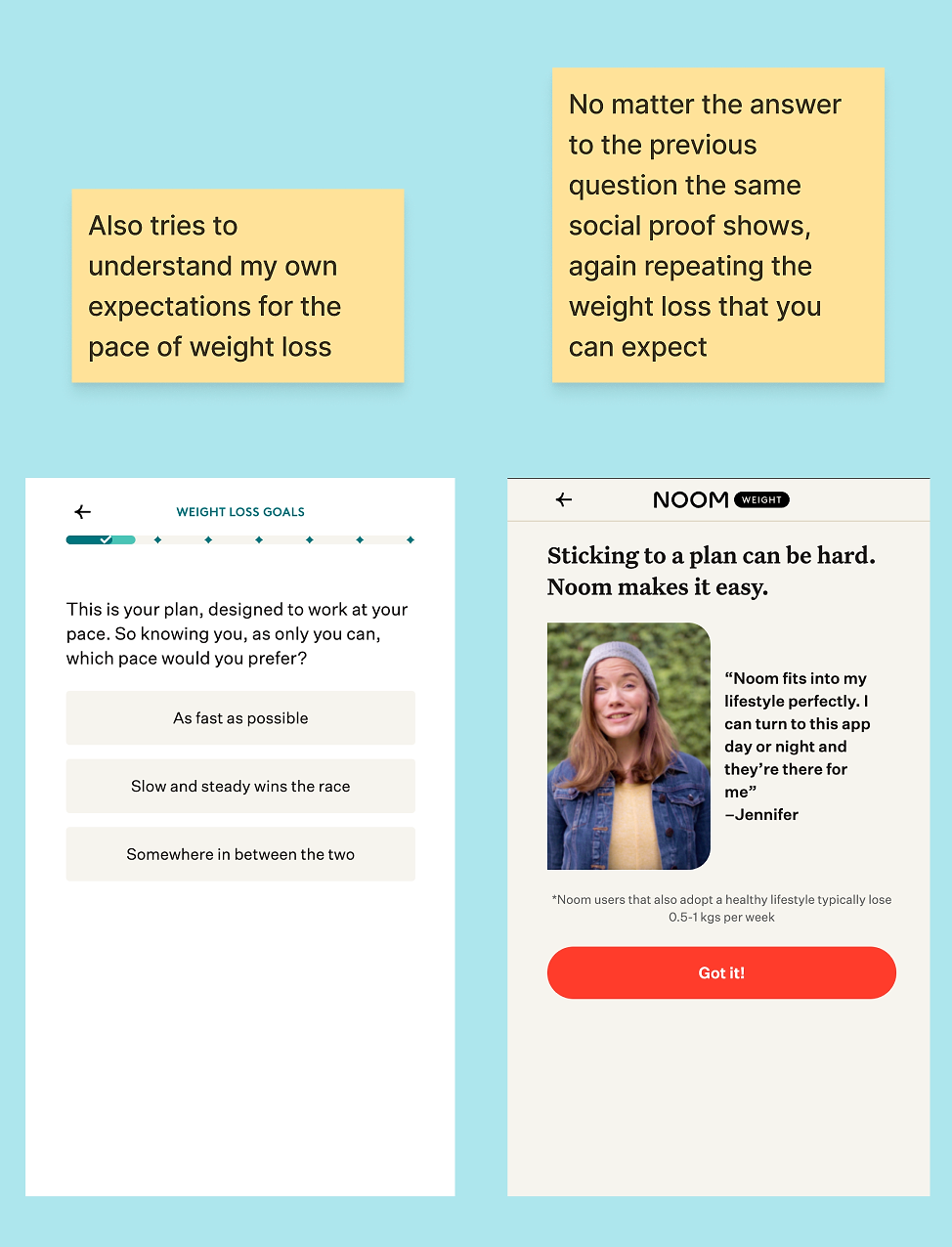
This is a simple control mechanism that addresses a common objection: ‘This won’t fit my life.’ Even if it doesn’t drastically change the plan, it gives users a sense of agency.
Noom follows with a testimonial and repeats the weight-loss pace statistic. Here, repetition is intentional as they want that expectation firmly embedded before users even see their results.
Interestingly, how fast I indicated I wanted to lose weight didn’t seem to affect the projected end date, even though I might have expected it to.
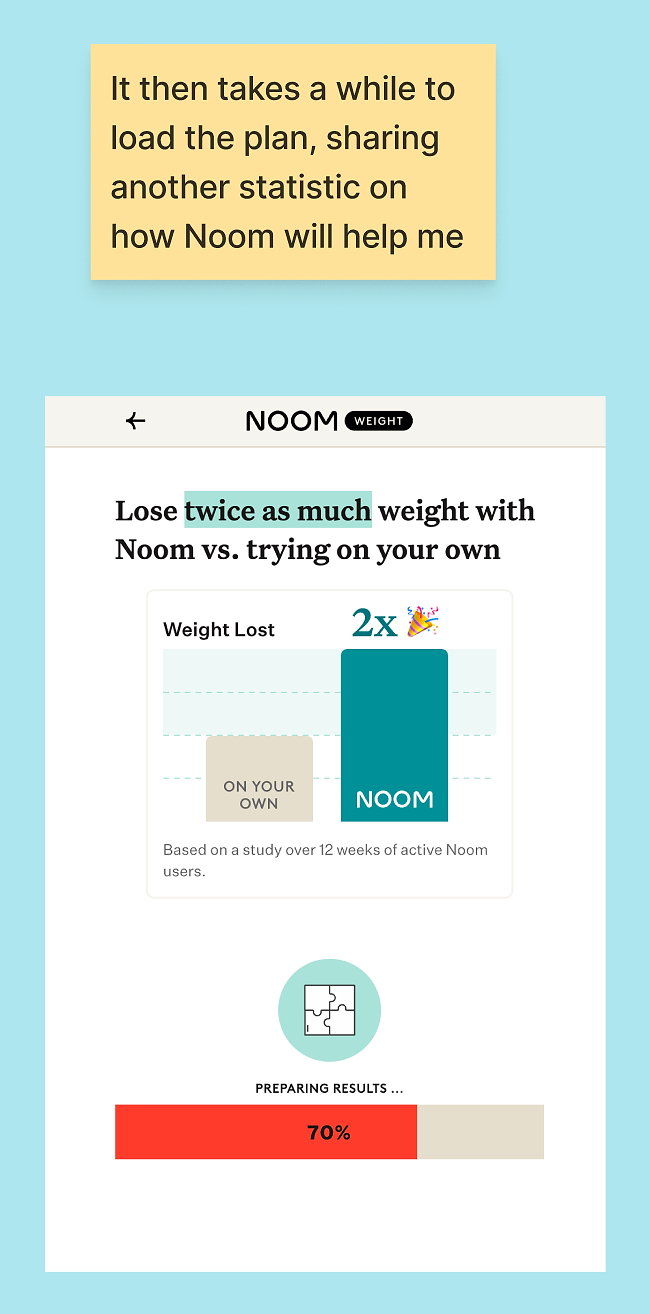
C. The loader does conversion work
Noom shows a short ‘calculating your plan’ screen before asking for your email.
That pause does two things. It makes the result feel earned, and it gives them a natural moment to introduce the idea that something valuable is about to be revealed.
D. The email gate appears at exactly the right time
About a third of the way through, Noom asks for my email, right before showing the results graph. The timing is smart: I’ve already invested enough in the flow that I want to continue, but I’m not so deep that I feel frustrated they’re only asking now.
The CTA isn’t a generic “Submit,” it’s “See my results.” They immediately clarify what I’ll get: a personalized weight-loss timeline and an estimate of how much I can lose before my holiday, a goal I indicated earlier.
They also separate the marketing opt-in into its own step, framed as “occasional research, advice, and special offers,” signaling both low volume and higher value.
6. Deliver the ‘this was built for me’ moment
Then Noom delivers the payoff: a results screen with your goal date, your event marker, and a realistic projection.
Tone matters here. Noom doesn’t overpromise; for example, if your event is in two months, they don’t suggest you’ll magically hit your ultimate goal by then. That realism builds more trust than aggressive promises ever could.
This is also where you see why some of the earlier questions were non-negotiable. Without a starting weight, a goal weight, and a deadline, this personalized results screen couldn’t exist.
7. Use an onboarding quiz to increase buy-in, not just collect data
After the initial health questions, Noom shifts into what they call a ‘behavioral profile quiz.’
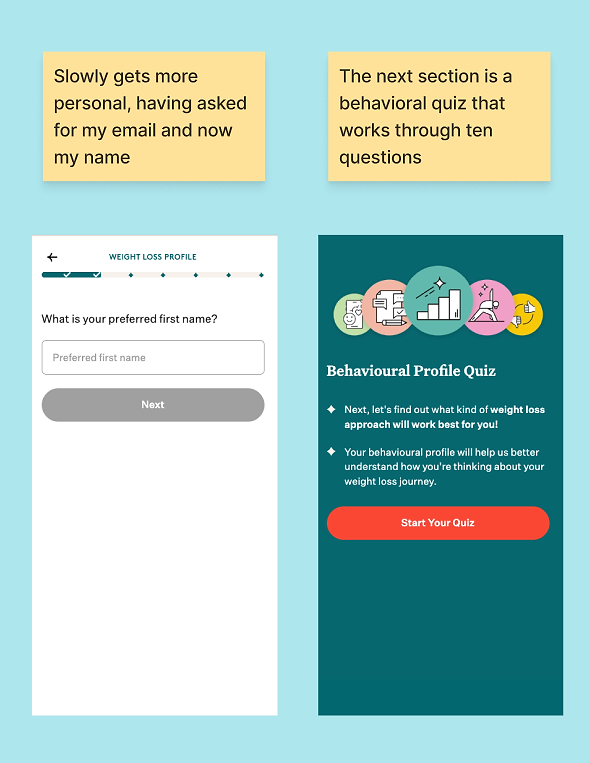
It uses sliders between two statements, repeated across 10 questions. The structure is deliberately consistent:
- You always know what to do
- You always see progress (“Question X of 10”)
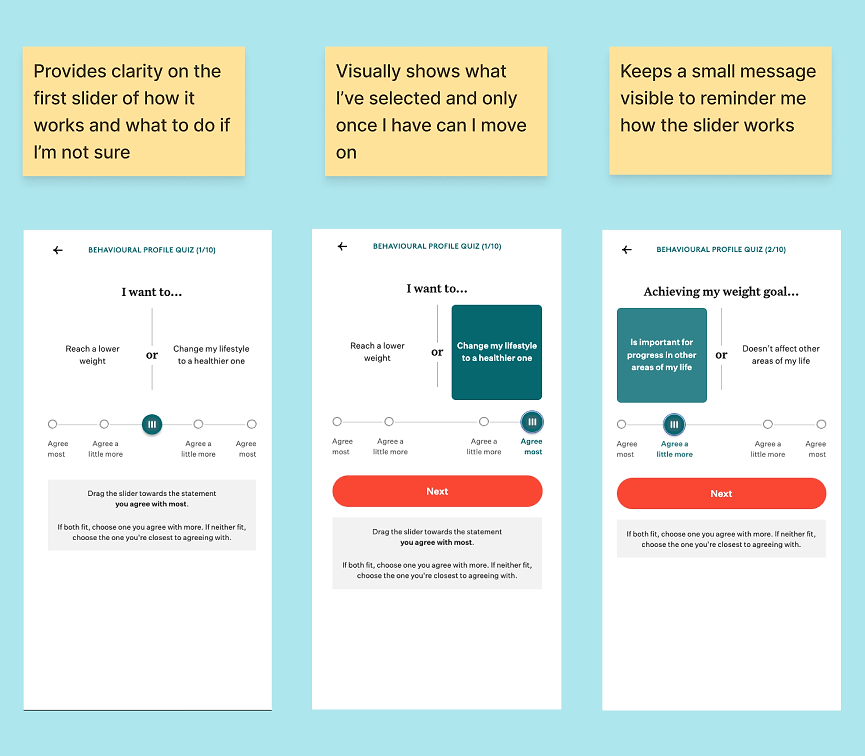
There are also subtle visual cues built in. For example, if you choose “Agree a little more,” the background color is slightly lighter than if you select “Agree most.” These small touches guide the user’s perception without being overt.
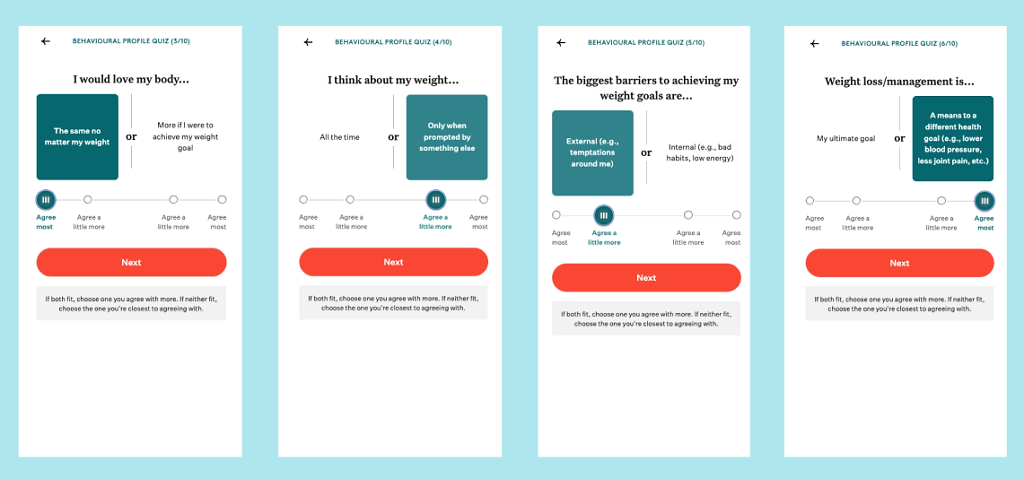
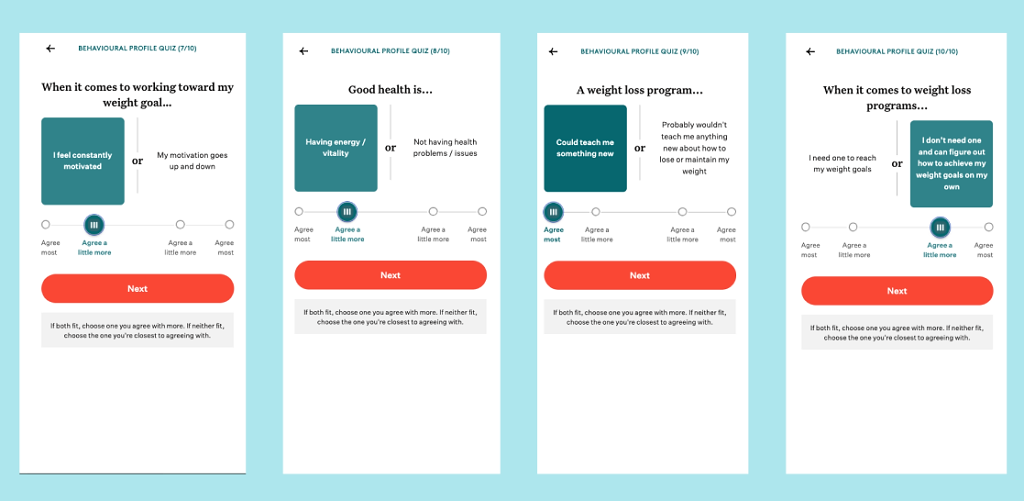
The end result is an analysis of my profile, this time with a shorter loader and no message, followed by the presentation of my personalized profile.
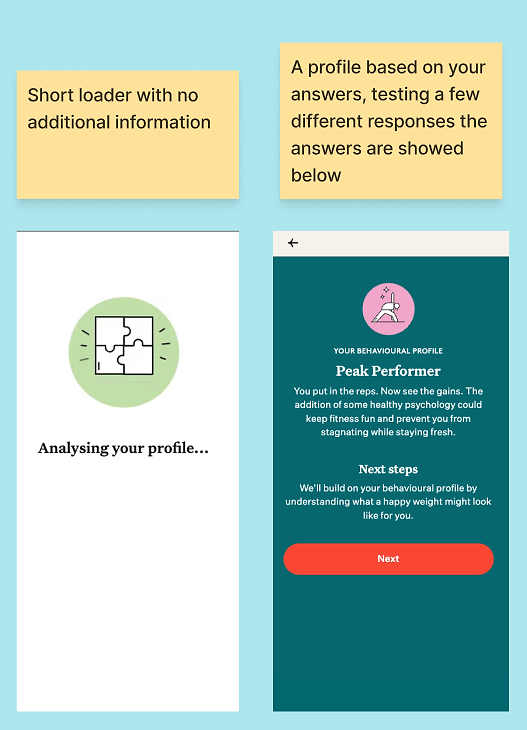
I tested extreme answers, including negative self-image, to see if Noom would respond poorly. What impressed me is that it frames the results constructively, acknowledging what you said without reinforcing shame.
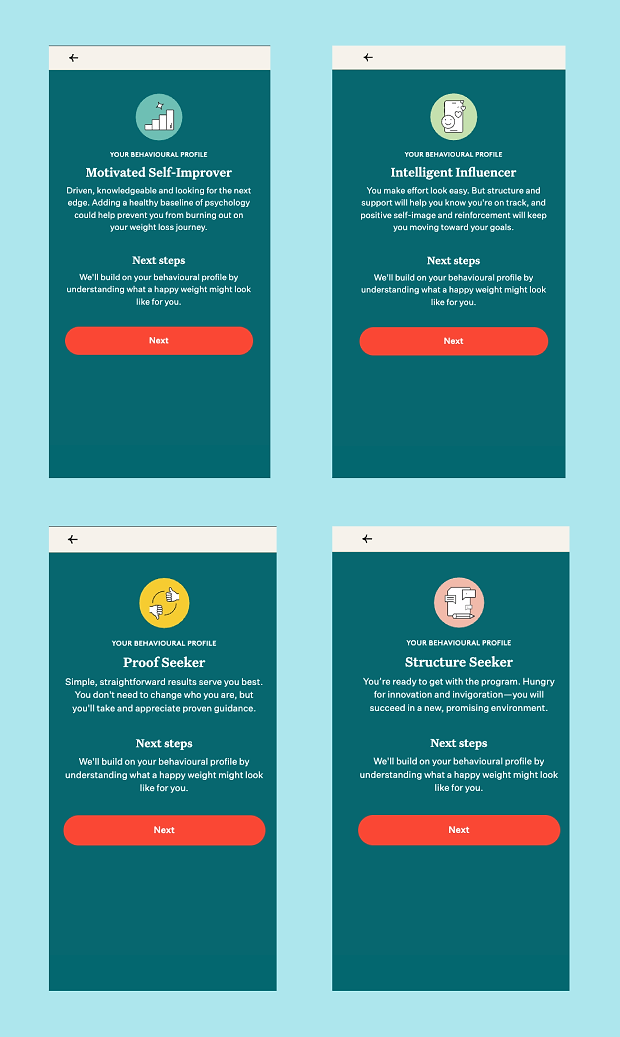
They’re not ignoring what I said, but they’re also not reinforcing negative self-talk. This feels like a careful balance.
8. Teach the ‘method’ inside onboarding
Rather than waiting until you have the app to start learning, Noom integrates small learning moments throughout the onboarding flow in various ways.
A. Selective empathy screens
After the profile, Noom asks practical questions about things like gym memberships, apps, and meal kits, another small, seemingly random question checked off early in the flow.
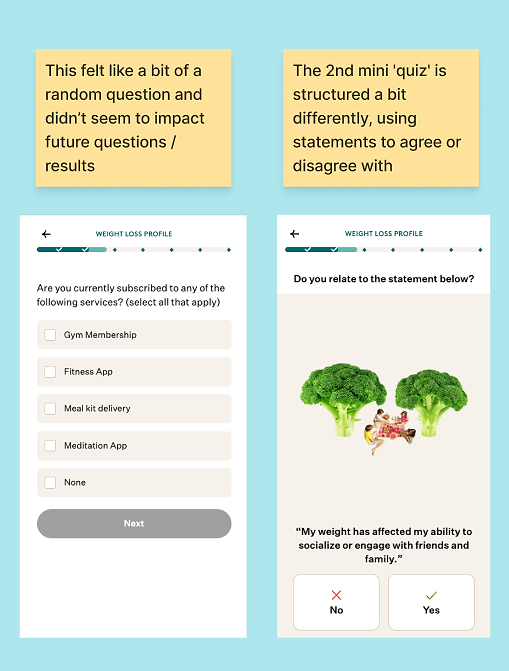
Next, the flow moves into agreement statements covering habit barriers, social impact, convenience, and decision fatigue. Interestingly, some answers trigger an additional reassurance screen, while others do not.
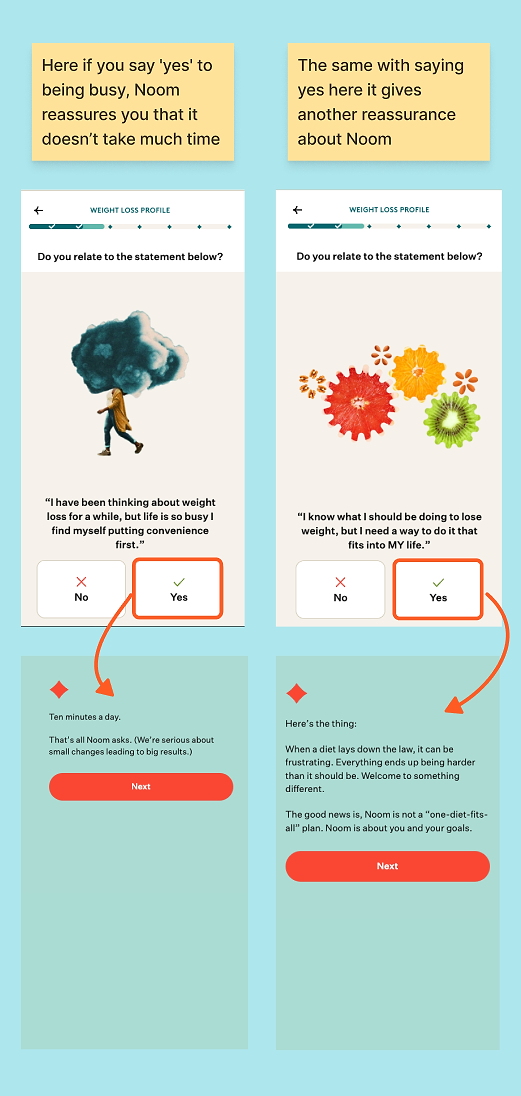
This creates a sense of responsiveness without forcing the flow to branch endlessly. It’s selective empathy, applied where it’s most likely to reduce drop-off.
B. The plan starts to feel more achievable
They also ask about lesson timing — “When would you like daily lessons?”—which is a smart operational detail disguised as personalization. In reality, it’s about choosing a routine that will stick.
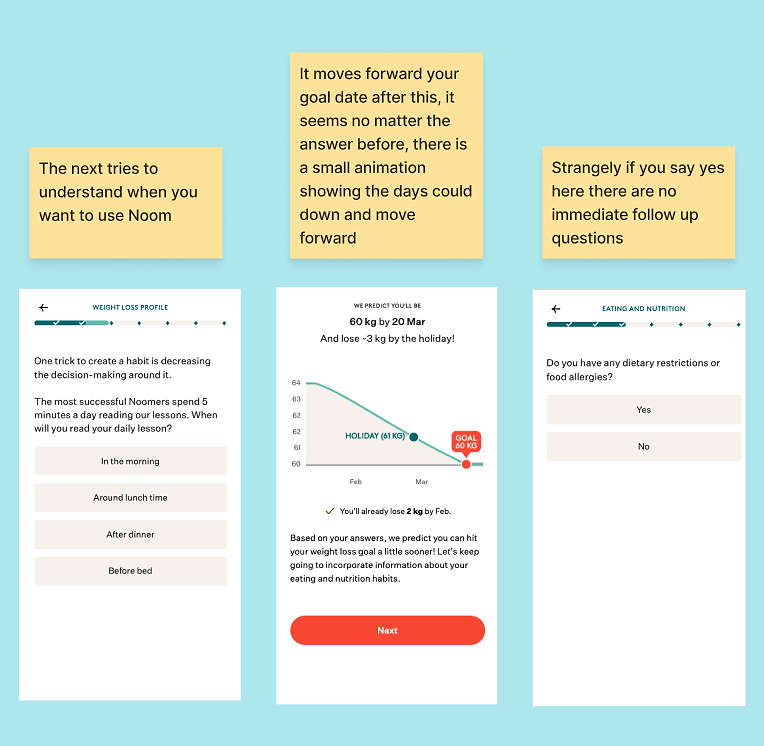
The flow returns to the graph, with the dates moving forward, interspersed with a few practical questions along the way.
C. A product demo without showing the product
This is where Noom’s onboarding effectively becomes a product demo, without ever showing the app interface.
They introduce the green/yellow/red system through questions about what you’ve eaten, then explain calorie density. The messaging is carefully non-shaming: there are no ‘bad foods,’ only foods that help you feel fuller for longer.
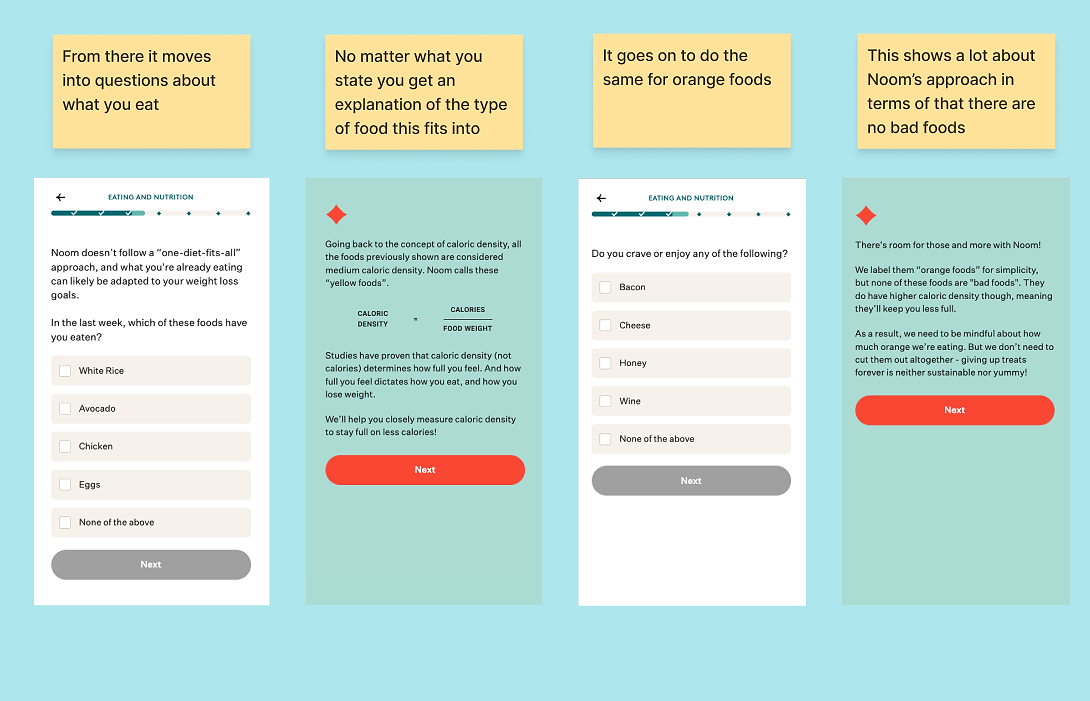
Even the cravings question — mine was sweet, so I picked honey (though I wished chocolate had been listed) — becomes a teaching moment: “There’s room for it. Just be mindful.”
This is objection handling at scale, addressing questions like:
- ‘Will I be hungry?’
- ‘Will I have to give up foods I like?’
- ‘Is this going to be restrictive?’
Noom answers these before you even reach the paywall.
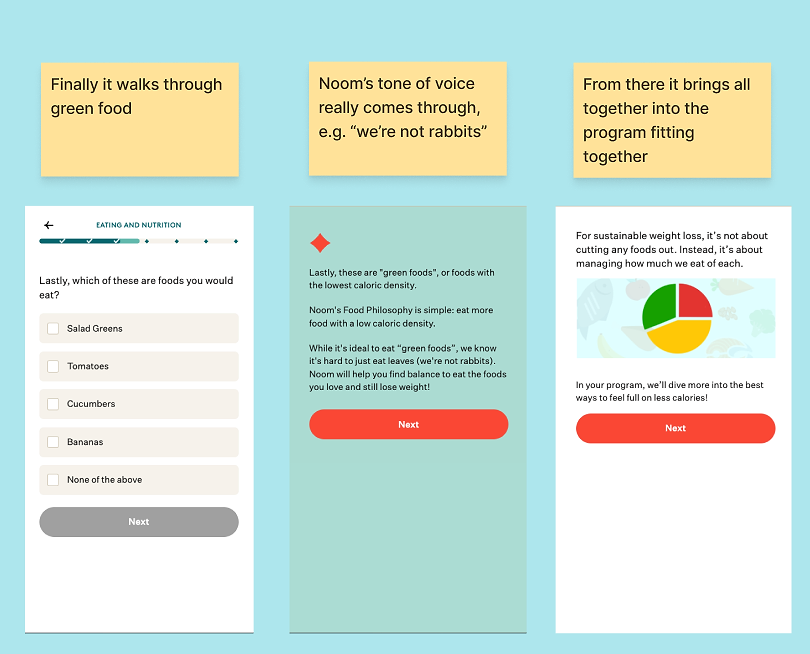
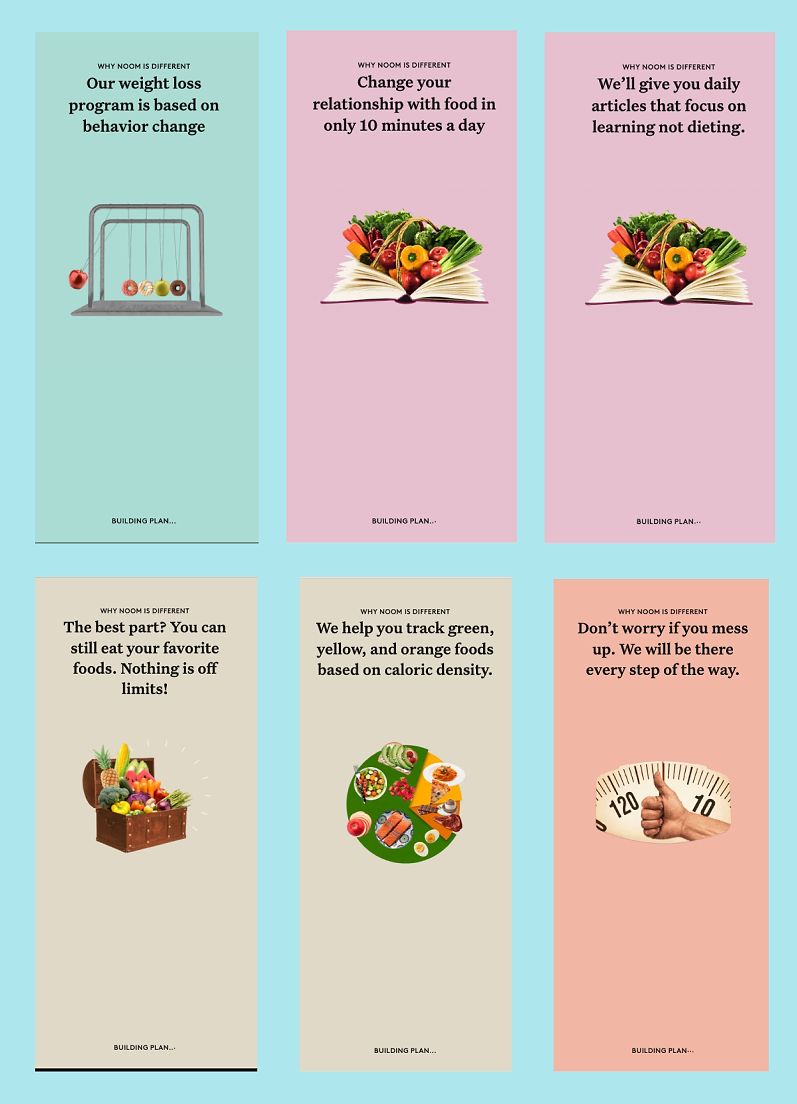
The flow then returns to another slow loader, which Noom uses again as a teaching moment to explain how the app works.
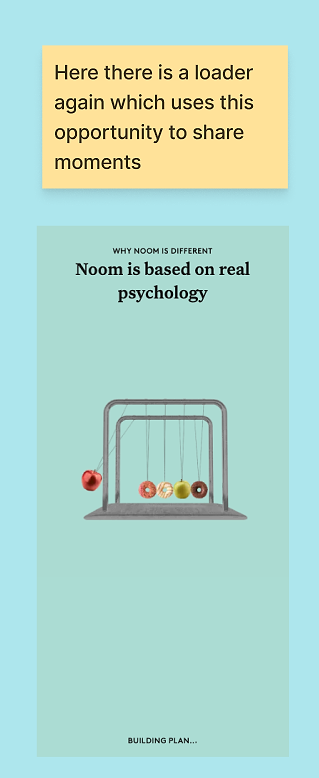
The screen slowly switches as it continues to build your plan:
D. Personalization only feels real when it cashes the cheque
When Noom asks about dietary restrictions or physical limitations, you naturally expect an immediate follow-up.
Earlier in the flow, every meaningful answer led to a tailored next step. When that doesn’t happen here, it stands out.
It’s a reminder that personalization isn’t just about collecting data; it’s about showing users how their answers shape what they see next.
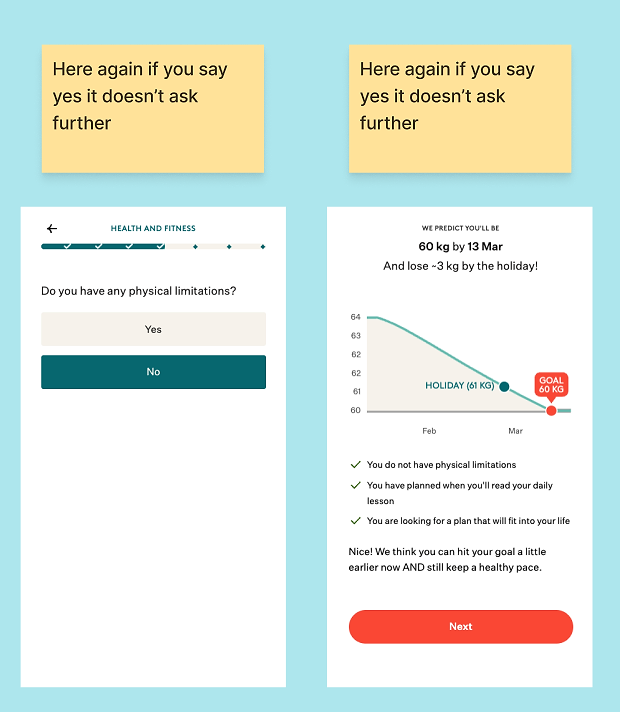
This creates a sense of progress and reward: the more I share, the faster I can achieve my goal.
It doesn’t feel manipulative. Instead, it’s as if Noom is saying, “Based on what you’ve told us, we think you can do this faster than we initially thought.”
Interestingly, even when I indicate a limitation or provide ‘negative’ answers, the goal always moves forward.
9. Use a relevant bonus to turn intent into action
From there, it asks about what else you want to achieve:
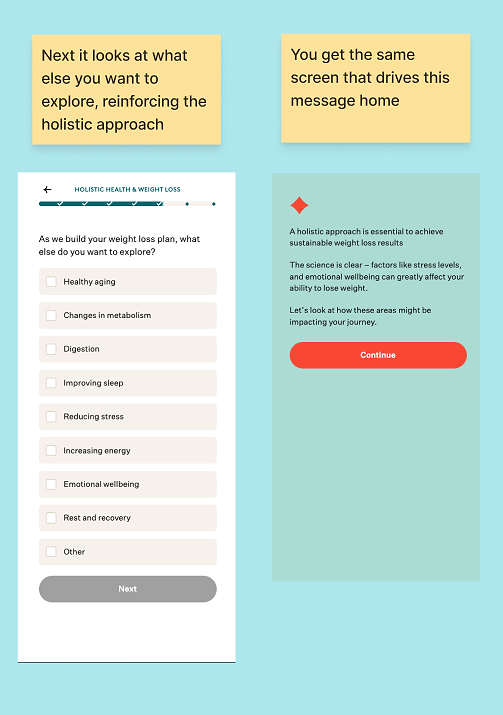
Interestingly, even if you don’t provide answers about reducing stress or emotional wellbeing, you still go through a mini quiz on the topic.
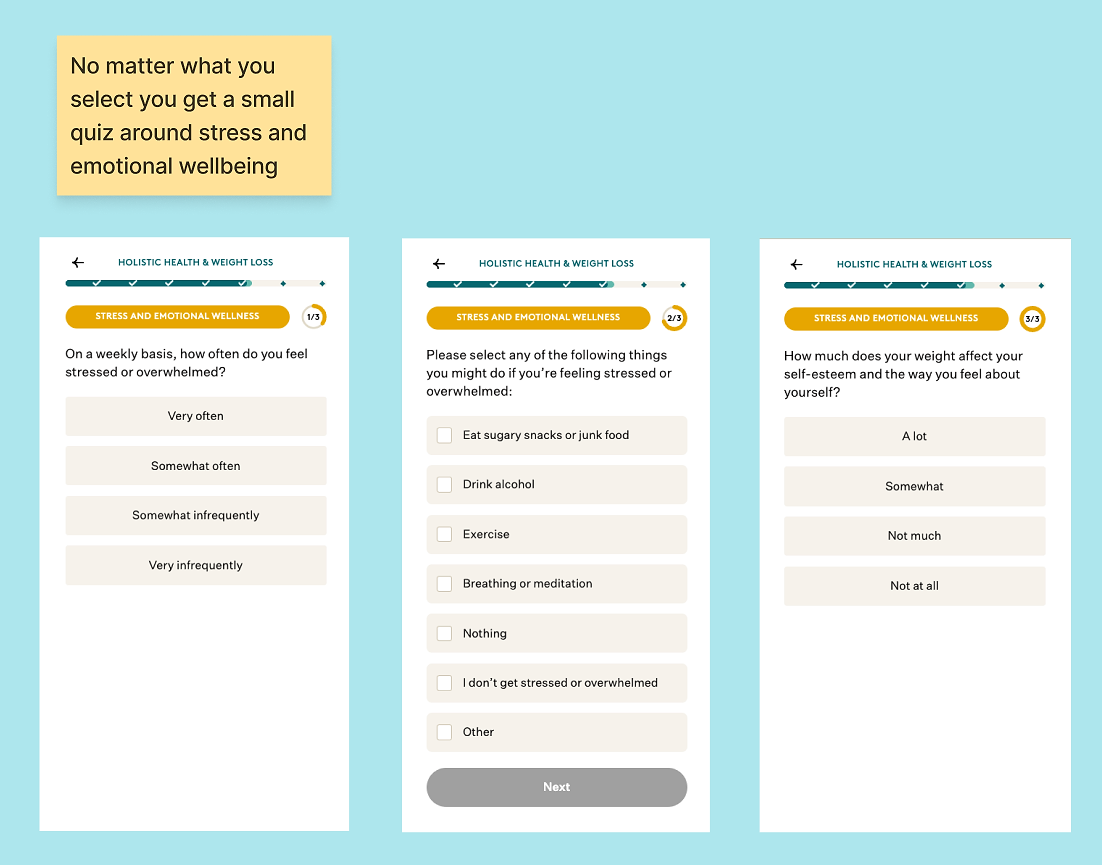
Noom uses this to calculate a stress score and offers to add stress management to your plan, using a low-pressure line: you can remove it later.
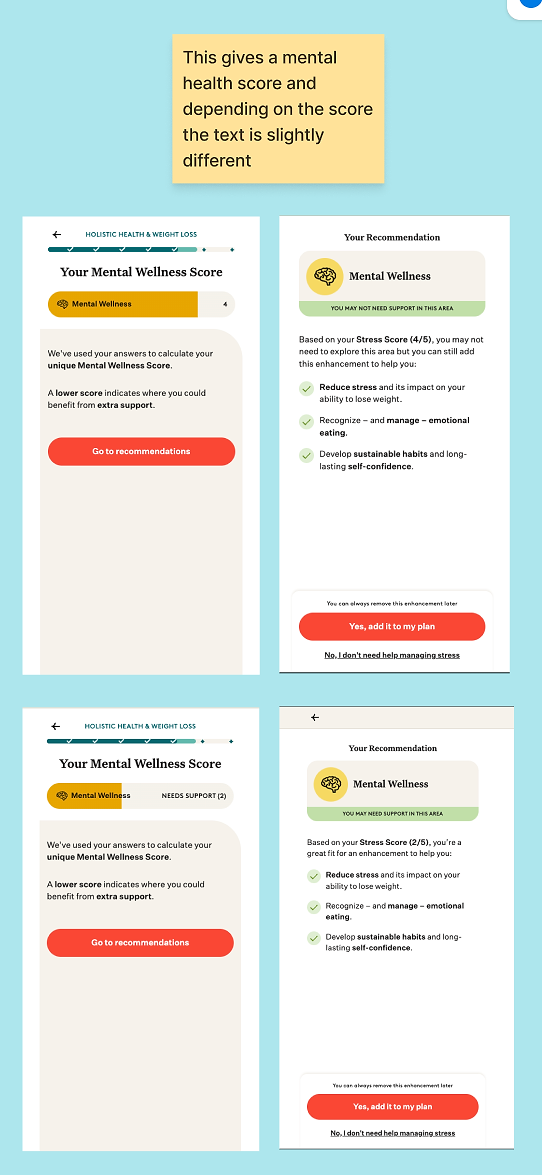
This immediately raises a question: What does it cost?
Strategically, that uncertainty works in Noom’s favor, because the pricing reveal comes later — paired with a time-limited incentive. At this point, I don’t know the cost, but I’m willing to continue because the framing feels low-pressure.
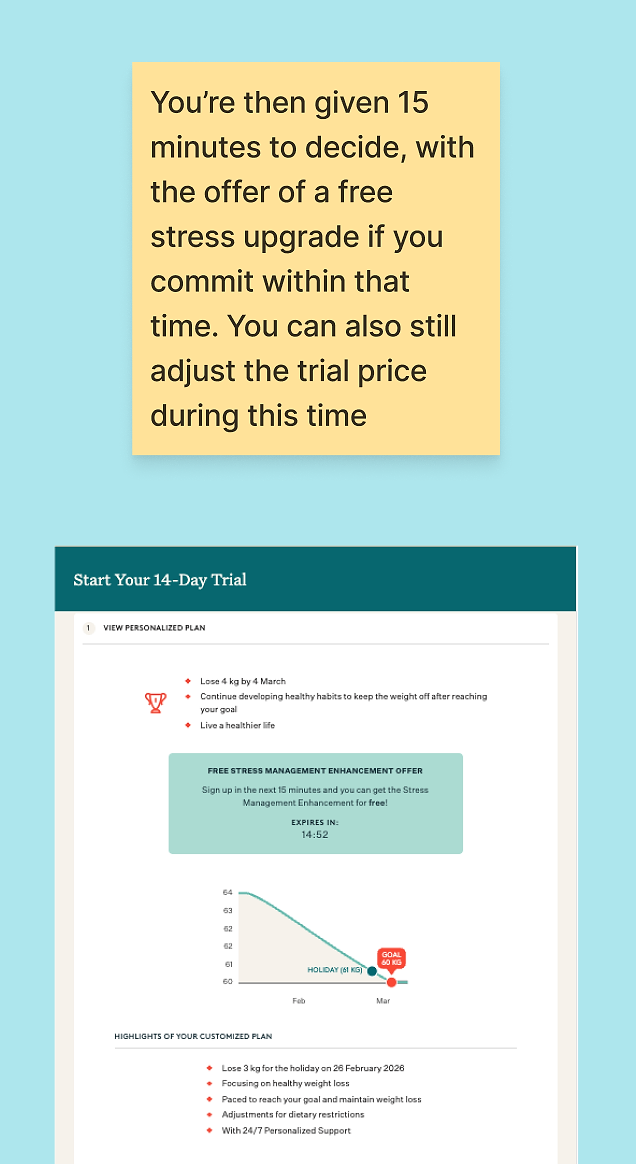
This becomes important during the pricing step, where the stress management course is offered as a ‘free enhancement’ if I sign up within 15 minutes. This approach is smart for two reasons:
- The 15-minute countdown creates urgency.
- A free course feels more believable than a discount — I’m less likely to think ‘this countdown is fake.’
The flow then continues with a few questions about motivation and emotions, mainly to reinforce the value of the plan being offered.
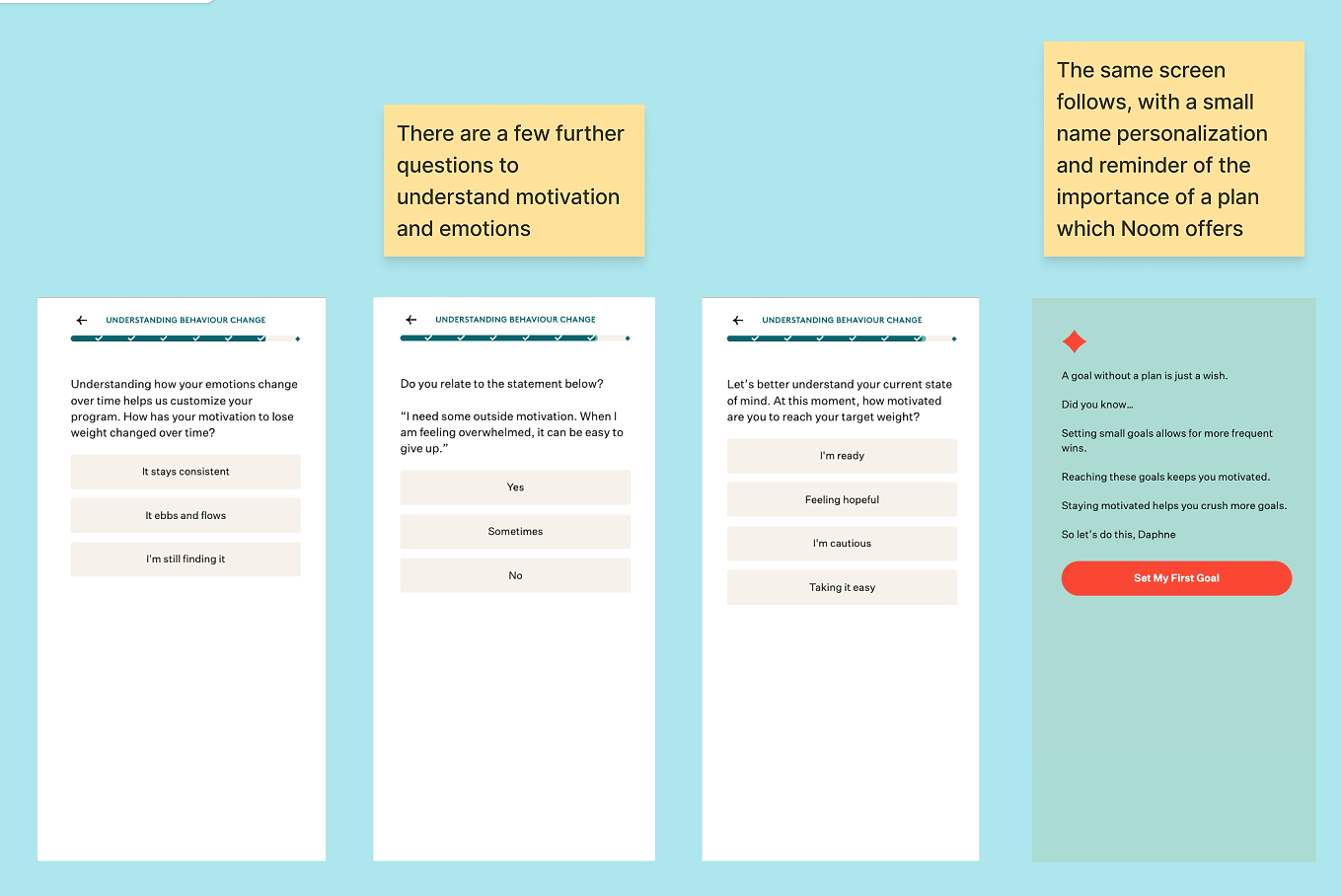
Finally, they check about other goals too:
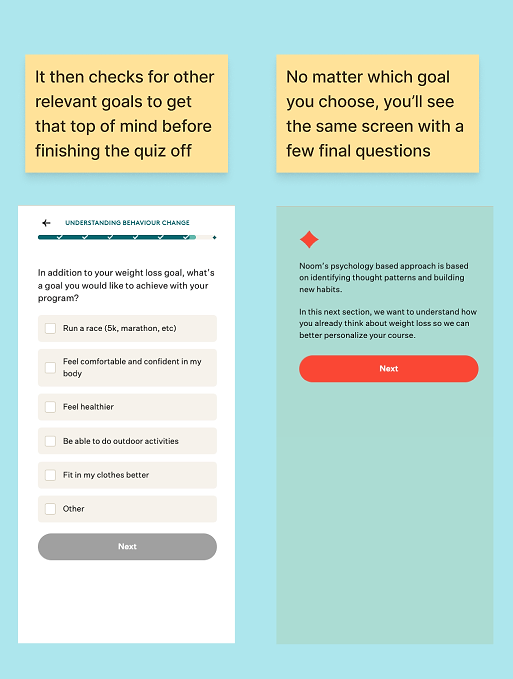
Before moving into another mini quiz on nutrition, which ties back to the earlier point about teaching the method during onboarding.
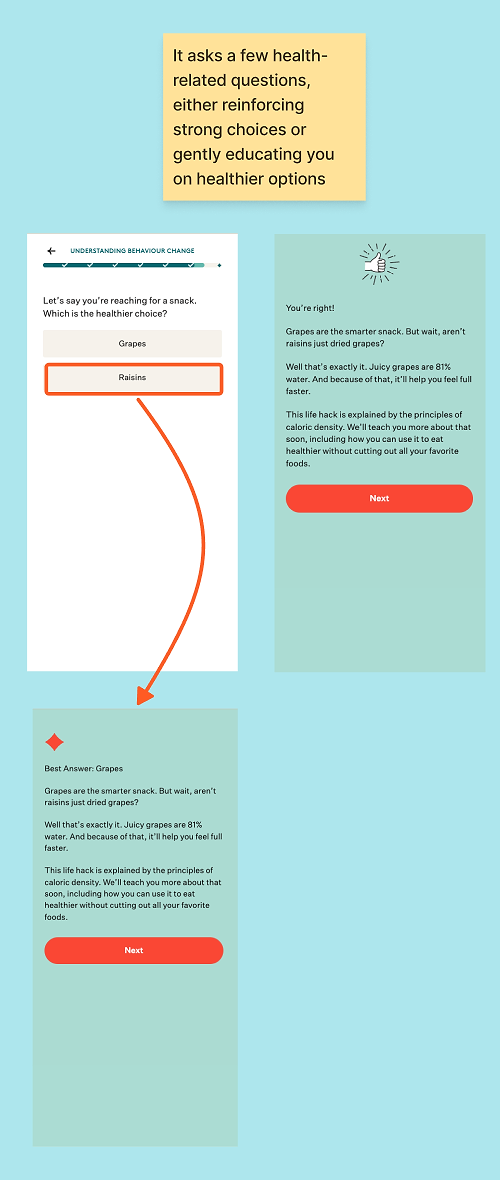
I love how, even when you get an answer wrong, Noom stays positive and non-judgmental, maintaining a consistent tone of voice throughout the entire flow.
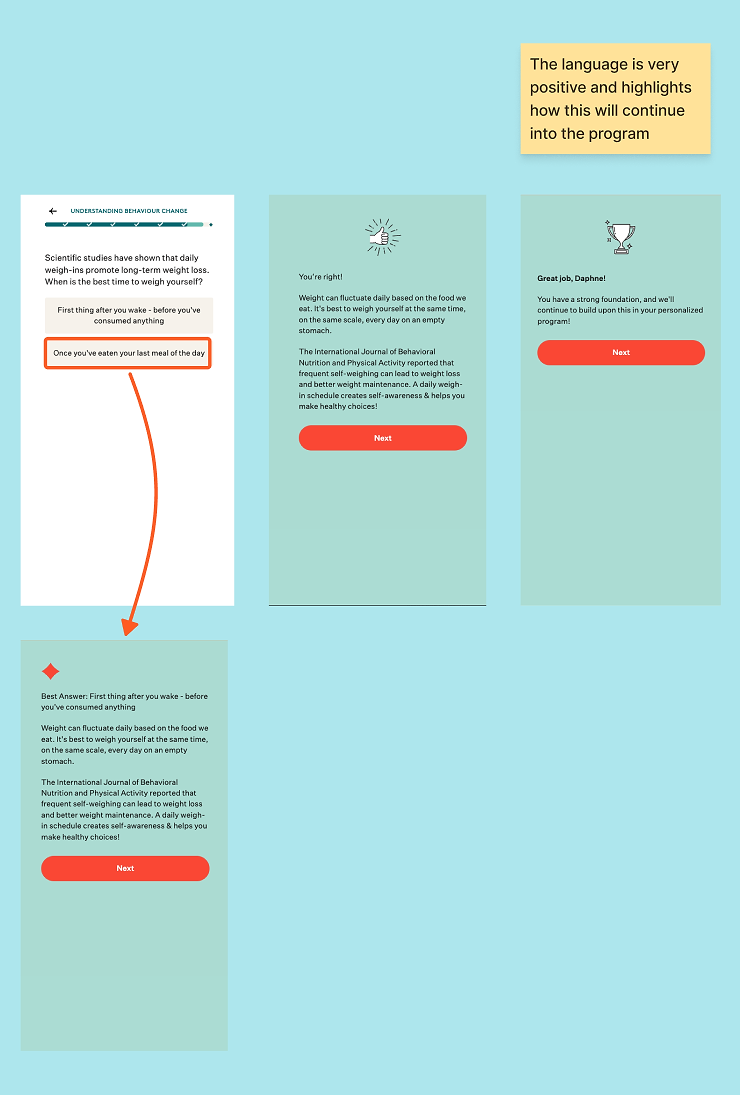
Another final standard question to check off, and the flow is almost complete. My main thoughts: 1) Why so many options? 2) The order feels a bit random.
10. Show how the insights are used
Believe it or not, after about 100 screens, we’re nearly there! The final act brings everything together into the ultimate plan.
A. When questions turn into a plan
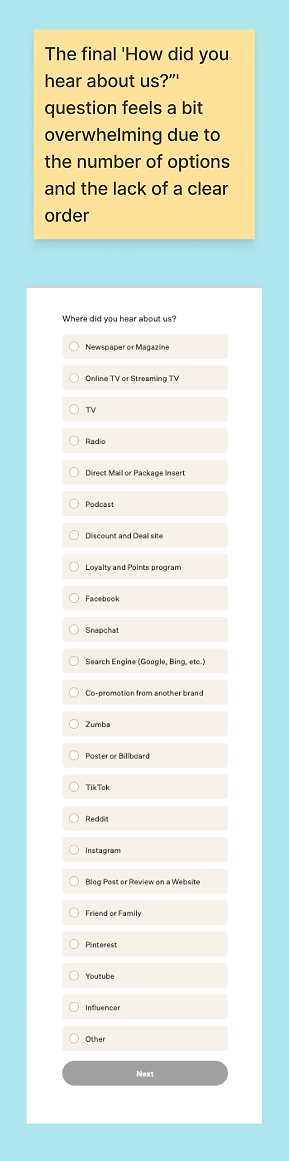
You see the loading screen that says Noom is ‘building your plan,’ but it’s more than just a spinner. In the background, the product is combining everything you’ve shared so far, from weight-loss goals to eating and nutrition habits.
This moment matters because it shifts the psychological contract. Up until now, you’ve mainly been answering questions; now it feels like Noom is actively working for you.
That shift is what makes the next section feel earned, rather than frustrating after a long flow.
B. The fake loader that actually does real work
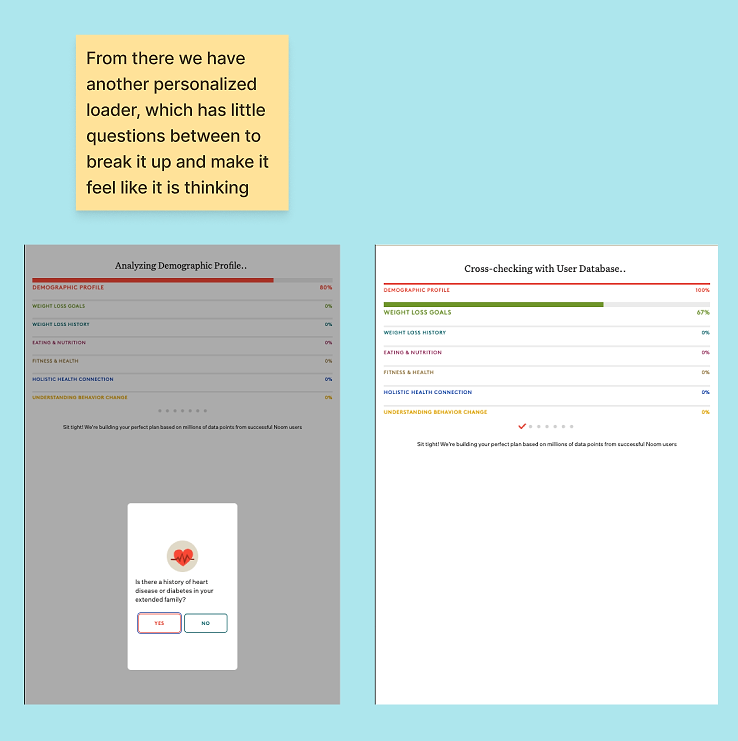
Noom uses loading screens in two ways throughout the flow:
- Short loaders that create a brief pause after effort.
- Longer loaders that mix in additional questions, like this section.
Even if the ‘processing’ is partly theatrical, it feels more believable because the interruptions show your inputs actively shaping the plan.
They further reinforce credibility by referencing “millions of successful users,” using social proof framed as evidence of model quality.
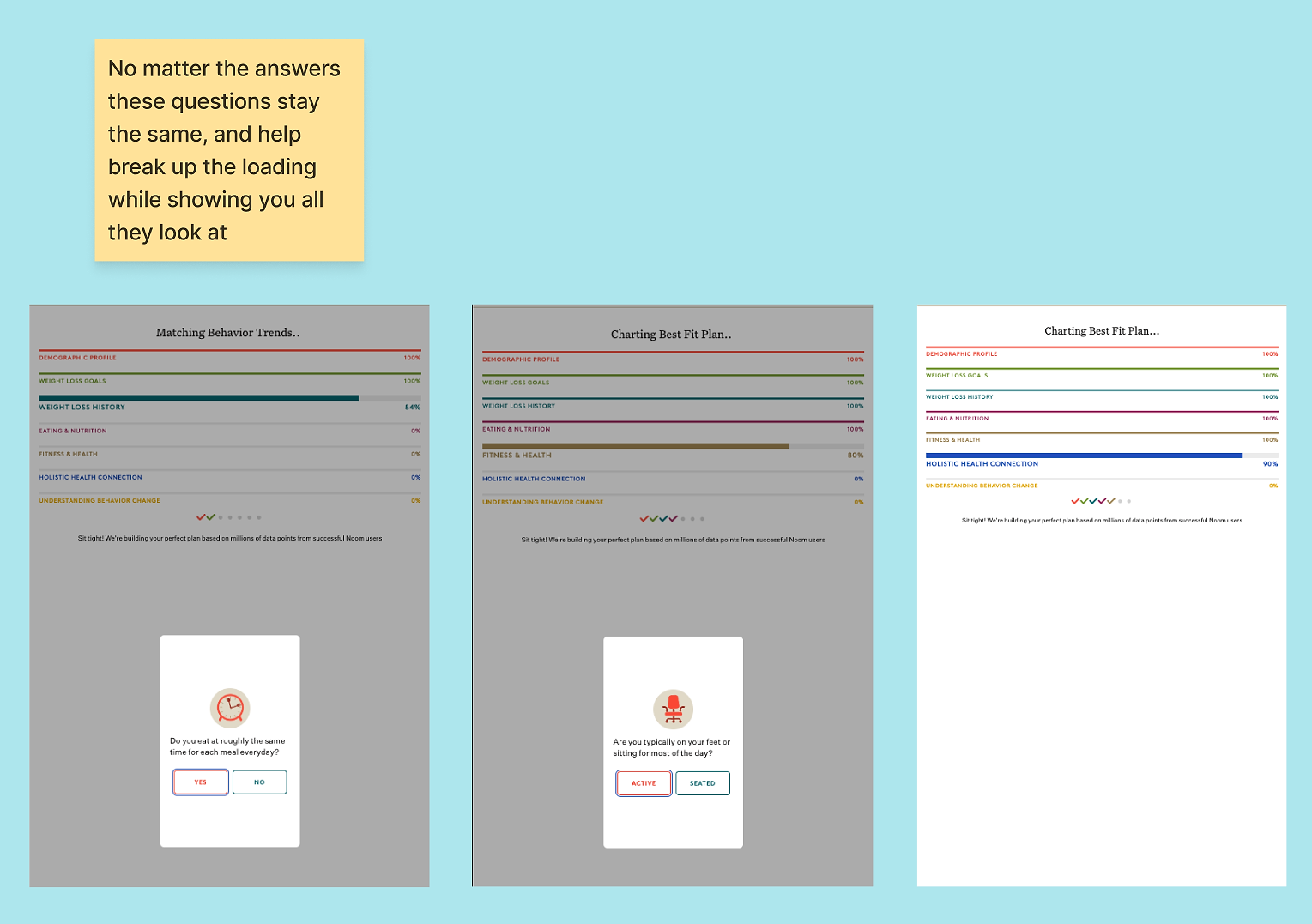
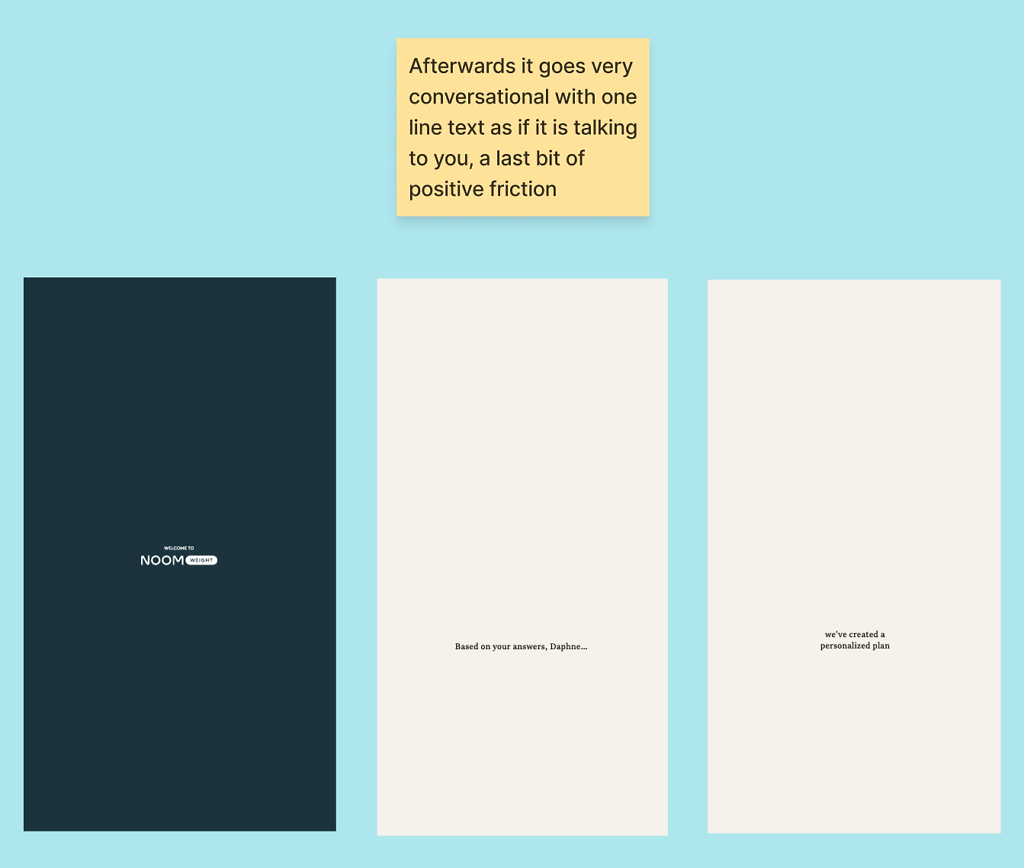
Even after this, the app loads again, but this time it feels conversational, almost like “We’ve heard you. Now we’re doing something with it.”
It gradually reveals what’s happening and builds excitement for the final result.

11. The ‘pay what you want’ trial
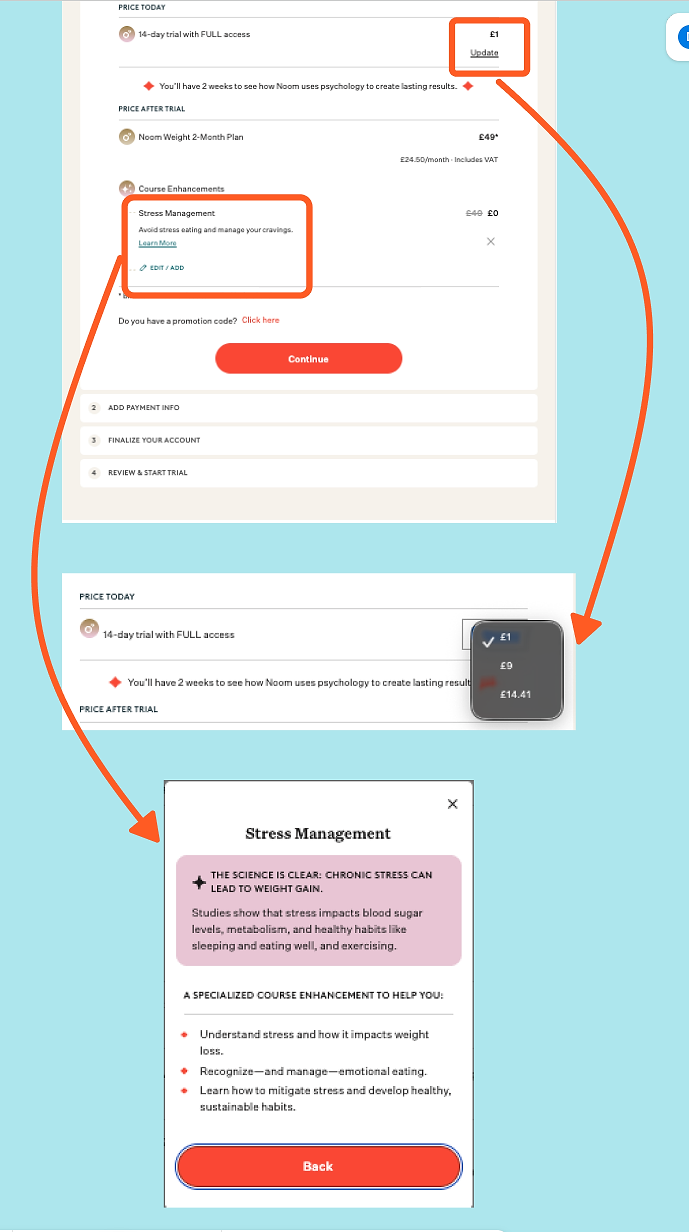
Then comes one of the most unusual pricing moments I’ve ever seen: Noom asks how much you’re willing to pay for a 14-day trial, offering three options.
It’s framed with cost transparency (“it costs us X to offer this trial”) and an altruistic nudge (“help others access Noom”). Functionally, your choice doesn’t change the offer, but psychologically, it reframes pricing as a contribution rather than an extraction.
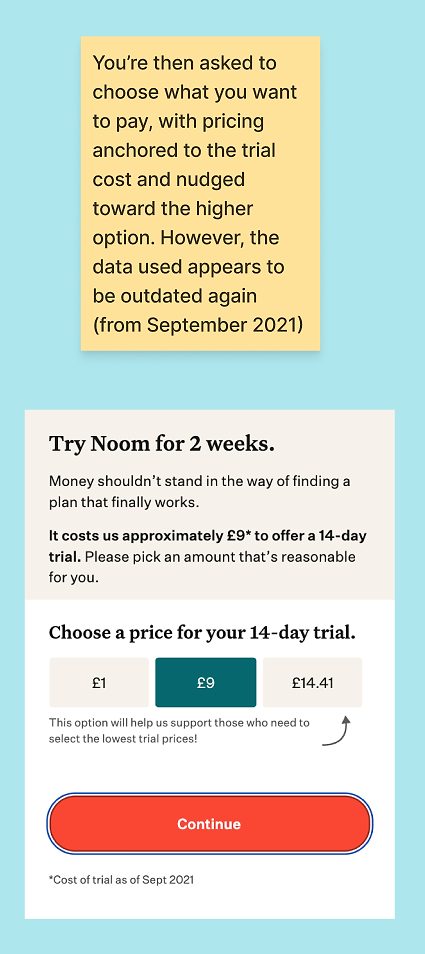
That said, I did notice the outdated date (September 2021)… yes, I’m nitpicking. On one hand, it probably costs them more now, so I’m getting a deal. On the other hand, it made me wonder why it hasn’t been updated in over three years.
Regardless of which trial price you choose, you proceed to the same offer in terms of costs after the trial.
12. What the app actually looks like? Unclear.
My biggest critique: after all of this, I still don’t know what the app experience actually looks like. I understand the plan, the psychology, the framework, and the promise, but I haven’t seen:
- What food logging looks like
- What the daily lesson experience looks like
- What ‘success’ looks like day-to-day inside the product
For a flow this long, one or two UI glimpses could likely increase confidence right before purchase, especially for users wondering, ‘Will I actually use this?’
What makes Noom’s quiz funnel effective?
Here’s a quick recap on the key takeaways from Noom’s web-to-app onboarding funnel:
- Reduce pressure at the first step. Let users ease into commitment. An ‘I haven’t decided yet’ option can prevent early drop-off without weakening intent.
- Explain why you’re asking personal questions. Sensitive questions feel safer when users understand how their answers will be used to help them.
- Offer reassurance immediately after vulnerable moments. A simple ‘thank you for sharing’ at the right time can dramatically increase trust.
- Use progress indicators to make long flows feel lighter. Showing how far someone has come reduces perceived effort and keeps momentum high.
- Set expectations early and repeat them on purpose. Repetition isn’t a UX failure when it anchors users to realistic outcomes.
- Visualize the alternative you’re competing against. Noom doesn’t just sell itself. It shows why crash dieting fails and reframes the real competitor.
- Make the payoff visible before asking for commitment details. Show users what they’ll get before asking for their email. Results first, data second.
- Reward effort with visible progress. As users invest more, Noom moves dates forward and sharpens projections. That feedback loop motivates completion.
- Use quizzes to increase buy-in, not just collect data. Consistent structure, clear progress, and non-judgmental framing turn quizzes into commitment devices.
- Teach your framework during onboarding. Introducing the green/yellow/red system early removes objections before pricing ever appears.
- Build commitment before introducing price. By the time Noom shows pricing, users have already invested time, effort, and emotional energy — a proven driver of paywall conversion.
- Show the product, not just the promise: After such a long, thoughtful flow, users still need clarity on what day-to-day app usage actually looks like, a key area where Noom falls short.
Noom’s funnel is a masterclass in onboarding conversion — building commitment through personalization, education, and empathy. It’s long, but it never feels tedious — every step serves a clear purpose. By the end, you genuinely feel like this plan was built just for you, even while knowing some of it is smoke and mirrors. When 55% of trial cancellations happen on Day 0, Noom’s investment in pre-paywall commitment-building looks less like a quirk and more like a calculated response to that reality.For subscription apps, especially in sensitive categories like health, finance, or mental wellness, Noom’s approach offers valuable lessons in trial-to-paid conversion: how to ask for personal information thoughtfully, build trust, and convert users through education rather than pressure — making it a blueprint for any wellness app funnel.