
Chapter 13: Cancellations, Pauses, and Winback
Subscriptions do not last forever. Users cancel for all kinds of reasons: they no longer need the feature, they want to save money, or they simply forgot what your app does. Sometimes the system cancels on their behalf after repeated payment failures. And sometimes you, the developer, need to cancel a subscription through your own backend.
This chapter covers every way a subscription can end or be interrupted, what happens to user access in each case, and the tools Google Play gives you to win subscribers back. You will learn how to handle cancellations, pauses, restores, resubscribes, deferrals, and revocations with the confidence that your entitlement logic stays correct throughout.
User Initiated Cancellation via Play Subscriptions Center
The most common cancellation path is the user doing it themselves. Users manage their subscriptions through the Google Play Store app under Settings > Payments & subscriptions > Subscriptions. They find your subscription, tap it, and tap "Cancel subscription." Google walks them through a brief cancellation flow that may include a survey asking why they are leaving.
From your app's perspective, this cancellation is silent. Your app does not receive a callback or in app notification at the moment the user cancels. Instead, you learn about it through two channels:
- Real Time Developer Notifications (RTDNs): Google sends a
SUBSCRIPTION_CANCELEDnotification to your backend. This is your primary signal. - Polling the API: When you call
purchases.subscriptionsv2.getfor the subscription, the response includes acanceledStateContextfield that tells you the subscription has been canceled and why.
The important thing to understand is that cancellation does not mean immediate loss of access. When a user cancels an auto renewing subscription, they retain full access until the end of their current billing period. The expiryTime field in the subscription resource tells you exactly when access ends. Until that time passes, the user is still a paying subscriber who deserves full access.
Your app should reflect this clearly. If a user cancels and then opens your app the next day, they should still see all premium features. You might show a banner saying "Your subscription ends on March 15" to remind them, but do not revoke anything early.
Developer Initiated Cancellation via API
Sometimes you need to cancel a subscription from your backend. A user might contact your support team asking to cancel, or your business logic might require canceling a subscription as part of a fraud mitigation workflow.
You cancel a subscription server side by calling purchases.subscriptionsv2.cancel on the Google Play Developer API. This endpoint requires the package name, the subscription's purchase token, and a cancellation reason.
Google provides two cancellation reasons for developer initiated cancellations:
USER_REQUESTED_STOP_RENEWAL: Use this when the user asked you to cancel on their behalf. Perhaps they contacted your support team, or your app provides its own cancellation button that calls your backend. The behavior is identical to the user canceling through the Play subscriptions center: the subscription stops renewing, but the user keeps access until expiryTime.
DEVELOPER_REQUESTED_STOP_PAYMENTS: Use this when you are canceling for your own reasons, not at the user's request. This might happen if you detect fraudulent activity, if the user violated your terms of service, or if you are winding down a product. The behavior is the same as the other reason in terms of access, but the canceledStateContext in the subscription resource records a different cancellation reason. This distinction matters for analytics and for understanding your churn patterns.
In both cases, the subscription does not renew at the next billing cycle. The user retains access until expiryTime. If you need to revoke access immediately, you need the separate revoke endpoint, which is covered later in this chapter.
System Initiated Cancellation
The third way a subscription gets canceled is when Google's payment system gives up trying to collect payment. This happens after the grace period and account hold mechanisms have been exhausted.
The sequence works like this:
- A renewal payment fails (e.g., expired credit card, insufficient funds).
- If you have configured a grace period, Google retries the payment for the grace period duration (typically 3, 7, 14, or 30 days). The user keeps full access during grace period.
- If the grace period expires without successful payment, the subscription enters account hold. The user loses access, but the subscription is not yet canceled.
- Google continues retrying the payment during account hold (up to 30 days).
- If account hold expires without successful payment, Google cancels the subscription. The subscription is now terminated.
When the system cancels a subscription this way, Google sends a SUBSCRIPTION_CANCELED RTDN to your backend. The canceledStateContext will indicate a system initiated cancellation due to payment failure.
Your backend should update the user's entitlement status to reflect the cancellation. If the user was already in account hold (no access), this is a final state change from "on hold, might recover" to "canceled, will not recover."
canceledStateContext: Understanding Why a Subscription Was Canceled
When you retrieve a canceled subscription through purchases.subscriptionsv2.get, the response includes a canceledStateContext object. This tells you exactly why the subscription was canceled, which is valuable for analytics, customer support, and deciding how aggressively to pursue win back.
The canceledStateContext contains a cancellationReason field with one of the following values:
For user and developer cancellations, there is additional context. A user cancellation includes the survey response if the user filled one out. A developer cancellation records whether it was USER_REQUESTED_STOP_RENEWAL or DEVELOPER_REQUESTED_STOP_PAYMENTS.
This information helps you segment your churned users. A user who canceled because "it's too expensive" is a good candidate for a discount win back offer. A user whose payment failed might come back if you prompt them to update their payment method. A user you canceled for fraud should not get a win back offer at all.
User Access After Cancellation: Until expiryTime
Regardless of how a subscription gets canceled, the user retains access until the expiryTime in the subscription resource. This is a fundamental rule of Google Play subscriptions.
When a user cancels on day 5 of a 30 day billing period, they have already paid for the full 30 days. Google does not issue a prorated refund, and the user keeps access for the remaining 25 days. Your app must respect this.
On your backend, the entitlement check should look something like this:
This means your entitlement logic should not check cancellation status alone. A canceled subscription with a future expiryTime is still an active subscription from the user's perspective. Only when expiryTime passes does the user lose access.
On the client side, queryPurchasesAsync() returns canceled subscriptions that have not yet expired. The Purchase object still appears in the results with a valid purchase token. Once expiryTime passes, the purchase disappears from queryPurchasesAsync() results.
Installment Subscription Cancellation
Installment subscriptions have special cancellation rules because of the commitment period. When a user subscribes to an installment plan, they agree to a minimum number of payments. Canceling before fulfilling that commitment is not straightforward.
If a user attempts to cancel during the commitment period, one of two things happens depending on the market and the plan configuration:
- Cancellation is blocked: The user cannot cancel until the commitment period ends. Google Play shows a message explaining that they have remaining committed payments.
- Cancellation is scheduled: Google accepts the cancellation request but schedules it to take effect after the commitment period ends. The user continues to be charged for the remaining committed payments.
When a cancellation is scheduled for the end of the commitment period, Google sends a SUBSCRIPTION_CANCELLATION_SCHEDULED RTDN. This is different from the standard SUBSCRIPTION_CANCELED notification. The scheduled cancellation means the subscription will continue to renew through the remaining commitment payments and then stop.
Your backend should handle SUBSCRIPTION_CANCELLATION_SCHEDULED by noting that the user intends to leave but is still an active, paying subscriber. Do not revoke access. Do not remove them from subscriber segments. The actual cancellation happens later, and you will receive a SUBSCRIPTION_CANCELED notification at that point.
After the commitment period ends and the subscription transitions to month to month renewal, the user can cancel freely, just like any other auto renewing subscription.
Pausing Subscriptions
Sometimes users do not want to cancel permanently. They just need a break. Google Play supports subscription pausing, which lets users temporarily stop their subscription and resume it later.
Pausing is different from canceling in an important way: a paused subscription is expected to resume. The user has signaled intent to come back. This makes paused subscribers a fundamentally different cohort from canceled subscribers in your analytics.
Duration Options by Billing Period
The pause duration depends on the subscription's billing period:
The user selects their preferred pause duration through the Play Store's subscription management screen. You cannot programmatically pause a subscription from your app or backend. Pausing is always user initiated through the Play Store.
To enable pausing for your subscription, you must opt in through the Play Console. Go to your subscription settings and enable the pause option. You can configure the maximum pause duration allowed.
The Pause Lifecycle: RTDN Sequence
When a user pauses a subscription, your backend receives a sequence of RTDNs that tracks the entire lifecycle:
SUBSCRIPTION_PAUSE_SCHEDULE_CHANGED: This fires immediately when the user schedules the pause. At this point, the subscription is still active. The pause has not started yet. It will begin at the end of the current billing period. Think of this as the user saying "pause my subscription at the end of this month."
SUBSCRIPTION_PAUSED: This fires when the pause actually begins, which is at the end of the current billing period. At this point, the user loses access. No payment is collected. The subscription enters a dormant state.
SUBSCRIPTION_RECOVERED: This fires when the pause ends and the subscription resumes. Google charges the user for the new billing period, and the user regains access.
Here is how to handle each notification:
Between SUBSCRIPTION_PAUSED and SUBSCRIPTION_RECOVERED, the user should not have access to premium features. Your entitlement logic must account for the paused state.
Querying Paused Subscriptions with includeSuspendedSubscriptions
By default, queryPurchasesAsync() on the client side does not return paused (suspended) subscriptions. This means if a user pauses their subscription and opens your app, the purchase does not appear in the query results, and your app has no local signal that the user was ever a subscriber.
Starting with PBL 8.1, you can include suspended subscriptions in your query by using the includeSuspendedSubscriptions option:
This is useful for showing a "your subscription is paused" message in your app, or for presenting a "resume now" option. Without this flag, you would need to rely entirely on your backend to know whether a user has a paused subscription.
When a suspended subscription appears in the query results, its purchaseState will be PURCHASED, the subscription was successfully purchased, it is just currently paused. Do not confuse this with PENDING, which is for purchases where payment has not yet completed (such as cash payments). You should not grant access for paused purchases. Use the presence of the purchase in results (with includeSuspendedSubscriptions = true) to drive UI that acknowledges the user's paused subscription and encourages them to resume.
Restoring a Canceled Subscription Before Expiration
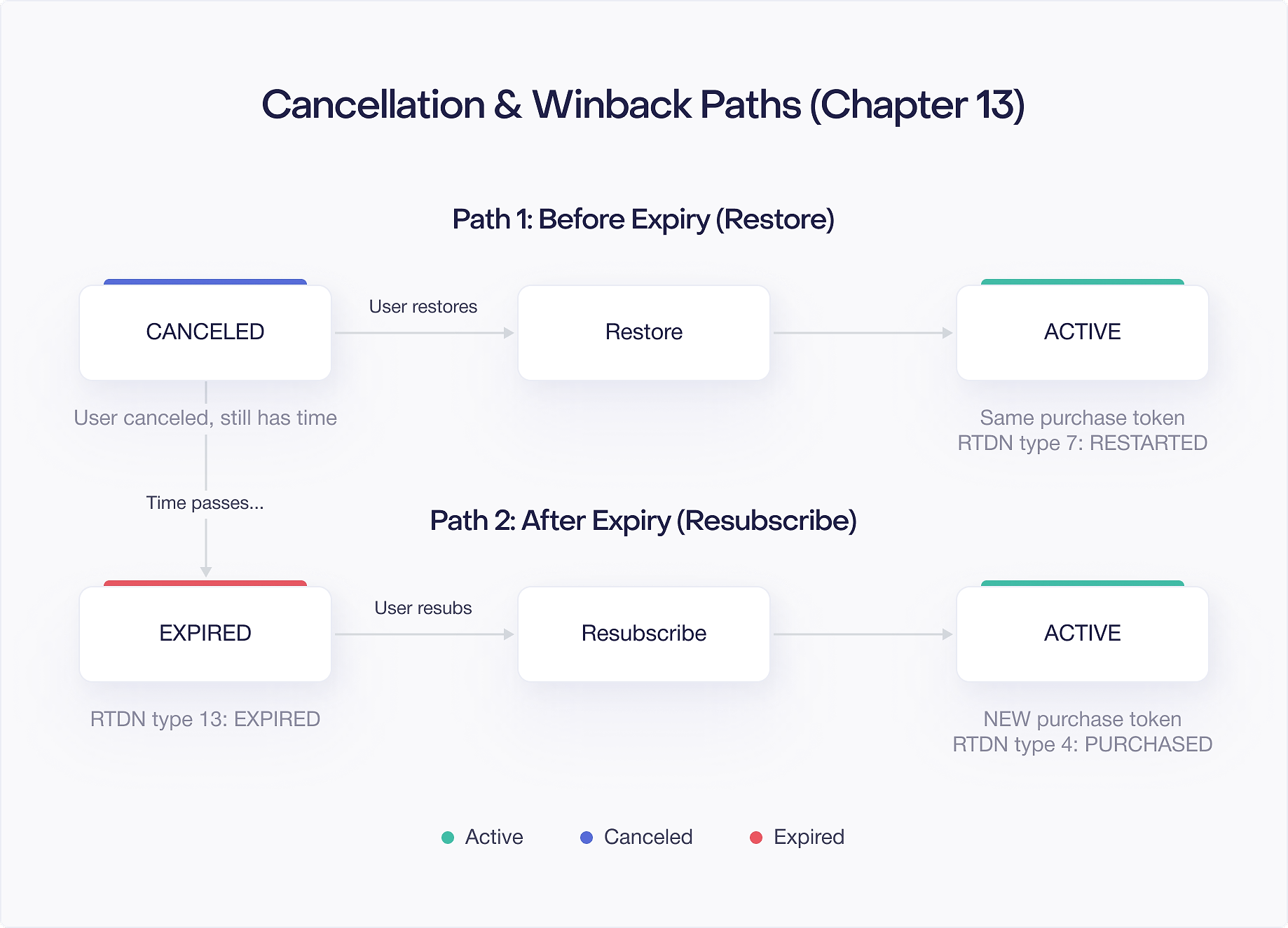
If a user cancels their subscription but changes their mind before expiryTime, they can restore it. Restoration reactivates the auto renewal so the subscription continues beyond the current billing period.
The user restores their subscription through the Play Store's subscription management screen. There is a "Resubscribe" or "Restore" button that appears for canceled subscriptions that have not yet expired.
When a user restores a canceled subscription, two important things happen:
- The purchase token stays the same. Unlike a plan change, restoration does not create a new token. The existing token simply becomes active again.
- Google sends a
SUBSCRIPTION_RESTARTEDRTDN to your backend.
Because the token does not change, your backend logic is straightforward. When you receive SUBSCRIPTION_RESTARTED, look up the existing subscription record by purchase token and flip it back to active:
On the client side, queryPurchasesAsync() continues to return this purchase (it was already returned before restoration, since the subscription had not yet expired). The user's access is uninterrupted. The only difference is that the subscription will now renew at the end of the billing period instead of expiring.
This is the simplest recovery path. No new tokens, no re verification, no changes to entitlement logic. The user picks up right where they left off.
Resubscribing After Expiration
If a subscription has already expired (past expiryTime), the user cannot restore it. Instead, they must resubscribe, which creates an entirely new subscription with a new purchase token.
A user can resubscribe through two paths:
- Through your app: You present subscription options and the user goes through the standard purchase flow. This is no different from a new subscription purchase.
- Through the Play Store: Google may show resubscribe options in the Play Store's subscription management screen. When the user resubscribes this way, the purchase happens outside your app.
When a resubscribe happens outside your app, the purchase context is captured in the outOfAppPurchaseContext field of the subscription resource. This field tells your backend that the subscription was purchased through the Play Store directly, not through your app's billing flow. Your PurchasesUpdatedListener will not fire for these purchases. You learn about them through RTDNs or by polling the API.
Because resubscribing creates a new purchase token, your backend treats it as a new subscription. There is no linkedPurchaseToken connecting the new subscription to the old one (unlike plan changes). This makes it harder to associate the resubscribe with the user's previous subscription history.
Linking Resubscribes to Original Accounts
When a user resubscribes after expiration, you want to connect the new subscription to their existing account. Google provides the expiredExternalAccountIdentifiers field to help with this.
If you passed an externalAccountId when the user originally subscribed (using BillingFlowParams.Builder.setExternalAccountId()), that identifier is stored with the subscription. When the subscription expires and the user resubscribes through the Play Store, the expiredExternalAccountIdentifiers field on the new subscription resource contains the external account IDs from the user's expired subscriptions.
This lets your backend map the new subscription back to the correct user account:
The key prerequisite is that you must set externalAccountId during the original purchase. If you did not, this field will be empty on the resubscribe, and you have no automatic way to link the new subscription to the old account. This is why setting externalAccountId is a best practice for every subscription purchase, even if you do not think you need it right now.
Deferred Billing: subscriptionsv2.defer
Deferred billing lets you extend a subscription's next renewal date without charging the user. This is useful for customer support scenarios where you want to give a user free time as compensation, or for promotional campaigns where you reward loyal subscribers with bonus time.
You call purchases.subscriptionsv2.defer on the Google Play Developer API with the purchase token and a new desired expiry time. The constraints are:
- Minimum deferral: 1 day beyond the current expiry time.
- Maximum deferral: 1 year beyond the current expiry time.
- The new expiry time must be in the future.
When you defer a subscription, the user keeps full access through the extended period. No payment is collected until the new expiry time arrives. The subscription then renews normally from the deferred date.
Here is a practical example. A subscriber contacts support because they experienced a bug that prevented them from using a premium feature for two weeks. You want to give them two free weeks as compensation:
A few things to keep in mind:
- Deferral does not change the subscription's purchase token. The same token remains valid.
- You can defer a subscription multiple times. Each deferral extends from the current (possibly already deferred) expiry time.
- Deferral does not work on canceled subscriptions. The subscription must be active (set to renew) for deferral to apply.
- Google sends an RTDN when a deferral is processed, so your backend can update its records.
Deferral is a powerful tool for customer retention. A well timed free extension can turn a frustrated subscriber into a loyal one.
Revocations: subscriptionsv2.revoke
Revocation is the most aggressive action you can take on a subscription. Unlike cancellation, which lets the user keep access until expiryTime, revocation removes access immediately.
You call purchases.subscriptionsv2.revoke on the Google Play Developer API. When you revoke a subscription:
- The user loses access immediately, regardless of how much time they had left in their billing period.
- Google issues a prorated refund for the unused portion of the billing period.
- The subscription is terminated. It cannot be restored.
Revocation is appropriate in limited circumstances:
- Fraud: You have confirmed that the subscription was purchased fraudulently.
- Terms of service violations: The user violated your terms in a way that warrants immediate removal.
- Chargebacks: In some cases, you may want to proactively revoke access when you detect a chargeback.
Do not use revocation as a substitute for cancellation. If a user contacts support asking to cancel and wants a refund, the appropriate path is to cancel the subscription (letting them keep access until expiryTime) and process a refund separately through the Play Console or the Voided Purchases API. Revocation is a blunt instrument that should be reserved for situations where immediate access removal is justified.
When you revoke a subscription, Google sends a SUBSCRIPTION_REVOKED RTDN. Your backend should handle this notification to ensure entitlement records are updated, even as a safety net in case your initial database update did not complete.

