
Chapter 11: The Subscription State Machine
A subscription is not simply "active" or "inactive." Between the moment a user subscribes and the moment their subscription ends for good, a subscription can pass through seven distinct states. Each state carries specific rules about whether the user gets access, what your app should show, how the Play Billing Library reports the purchase, and what your backend should do when it receives a notification.
If you get these states wrong, users either lose access they should have, or keep access they should not. Both outcomes cost you money and trust. This chapter is your definitive reference for every subscription state, the transitions between them, and the practical code decisions each state demands.
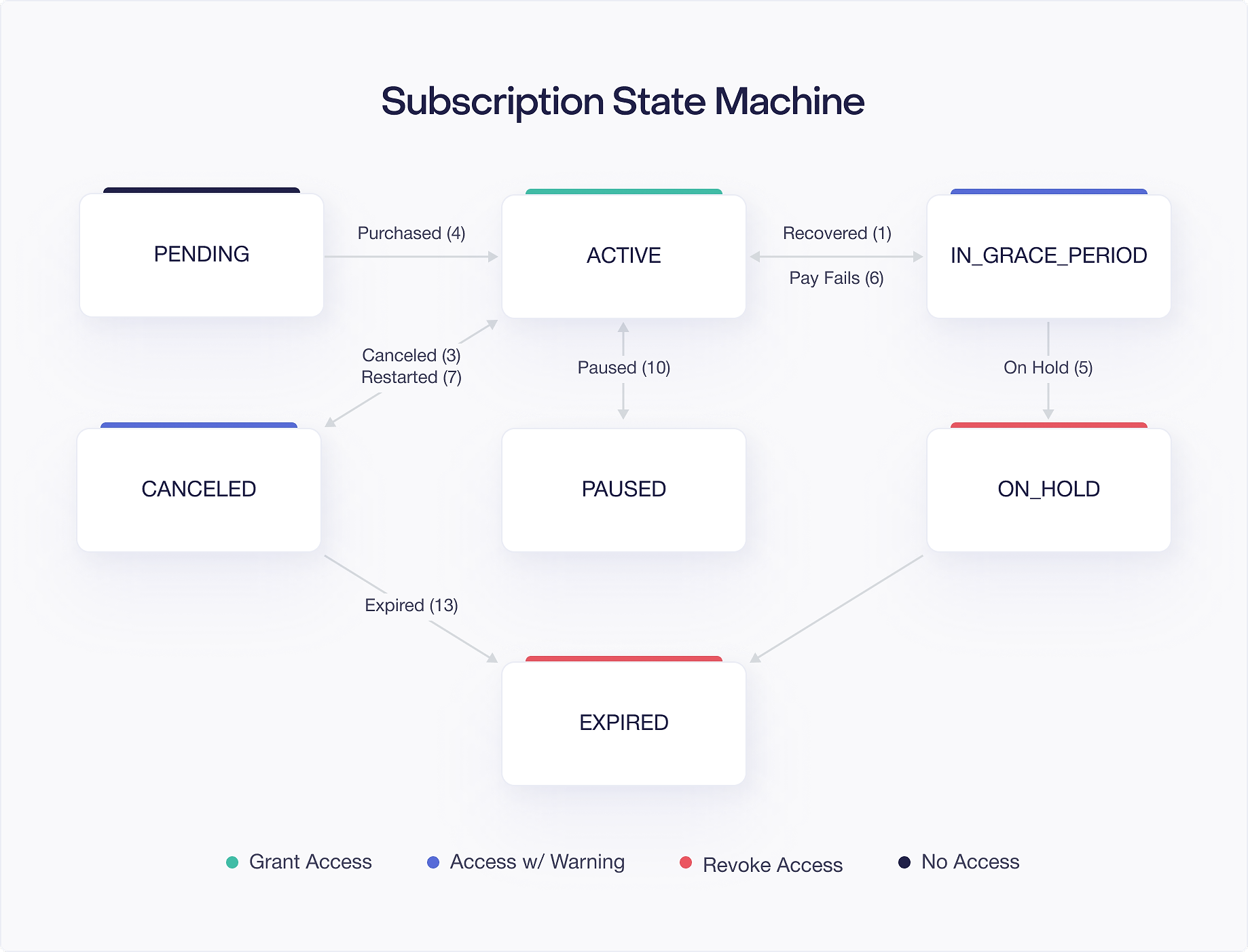
The 7 Subscription States
Google Play defines subscription state through the subscriptionState field on the SubscriptionPurchaseV2 resource returned by the Google Play Developer API. There are seven possible values. Each one represents a specific phase in the subscription lifecycle.
ACTIVE
The subscription is in good standing. The user has paid, Google processed the payment successfully, and the subscription is either within its current billing period or has just renewed. This is the happy path.
When a subscription is ACTIVE, your app should grant full access to the subscribed content. The expiryTime field indicates when the current billing period ends. For auto renewing subscriptions, Google will attempt to charge the user before this time. If the charge succeeds, the subscription stays ACTIVE and expiryTime advances to the end of the next billing period.
An ACTIVE subscription does not necessarily mean the user just paid. It means the most recent payment succeeded and the current period has not expired. A subscription can be ACTIVE for months or years as long as every renewal charge goes through.
IN_GRACE_PERIOD
A renewal payment failed, but Google is still trying to collect. The user retains access during this window.
Grace periods are configured in the Play Console under your subscription settings. You can set a grace period of 3, 7, 14, or 30 days. During this time, Google retries the payment using the user's payment method. If the retry succeeds, the subscription returns to ACTIVE. If it does not succeed within the grace period, the subscription moves to ON_HOLD.
This state exists because payment failures are often temporary. A credit card might be at its limit for a day, or a bank might flag an international transaction that the user then approves. Giving the user continued access while Google retries is better than cutting them off immediately over a transient payment issue.
Your app should still grant access during IN_GRACE_PERIOD, but you should also notify the user that their payment failed and ask them to update their payment method. Google provides a deep link you can use to send users directly to the Play Store payment settings.
ON_HOLD
The grace period expired without a successful payment. Access is revoked, but the subscription is not dead yet.
Account hold is also configured in the Play Console. You can enable account hold for up to 30 days. During this time, the user loses access to subscription content, but they can fix their payment method and reactivate. If the user updates their payment method and Google successfully charges them, the subscription returns to ACTIVE. If the hold period expires without recovery, the subscription moves to EXPIRED.
When a subscription is ON_HOLD, revoke access immediately. Show a message explaining that the subscription is on hold due to a payment issue and provide a way for the user to fix it. The goal is to recover the subscriber, not to punish them.
PAUSED
The user voluntarily paused their subscription. Access is revoked for the duration of the pause.
Pausing is an option you can enable in the Play Console. When enabled, users can pause their subscription for a period between one week and three months through the Play Store subscription management screen. During the pause, no billing occurs and the user does not have access.
When the pause period ends, Google resumes the subscription by charging the user. If the charge succeeds, the subscription returns to ACTIVE. If it fails, the subscription enters the grace period or account hold flow, just like a normal renewal failure.
Your app should recognize PAUSED as a voluntary action. Do not show alarming "payment failed" messages. Instead, inform the user that their subscription is paused and when it will resume.
CANCELED
The user canceled their subscription, but the current billing period has not ended yet. The user still has access until expiryTime.
This is one of the most commonly misunderstood states. Cancellation does not mean immediate loss of access. When a user cancels an auto renewing subscription, they keep access for the time they already paid for. The expiryTime field tells you exactly when access should end.
After expiryTime passes, the subscription transitions to EXPIRED. Until then, the user should have full access to everything their subscription entitles them to.
Your app can use this state to show retention messaging. A banner like "Your subscription ends on March 15. Resubscribe to keep access" gives the user a chance to change their mind. Google also provides a "Restore" button in the Play Store that lets users resubscribe before their current period ends.
EXPIRED
The subscription has ended. Either the user canceled and the billing period ran out, or the account hold period ended without payment recovery, or a prepaid subscription's time ran out.
When a subscription is EXPIRED, revoke access completely. The user is no longer a subscriber. They would need to purchase a new subscription to regain access.
The purchase token for an expired subscription remains valid for querying through the Google Play Developer API for 60 days after expiration. After that, the token becomes invalid. This 60 day window gives your backend time to process any final state changes and clean up records.
PENDING
The initial purchase has not completed yet. This happens with delayed payment methods like cash payments at convenience stores.
When a subscription starts in the PENDING state, do not grant access. The user has initiated the purchase but has not actually paid yet. If you grant access at this point, you risk giving away content for free if the payment never completes.
Once the payment processes, the subscription transitions to ACTIVE and you grant access at that point. If the payment fails or expires, the purchase is canceled and you never need to grant anything.
State Transitions and Their Triggers
Subscription states do not change randomly. Each transition is triggered by a specific event, and Google notifies you about most of these events through Real Time Developer Notifications (RTDNs). Understanding which notification type maps to which transition is essential for building a reliable backend.
Here is the complete map of state transitions, the events that cause them, and the RTDN types you receive:
A few things to note about this table. First, some transitions produce the same RTDN type. SUBSCRIPTION_RECOVERED (type 1) fires both when a grace period retry succeeds and when a user fixes their payment during account hold. Your backend should check the new subscriptionState on the SubscriptionPurchaseV2 resource rather than inferring state from the notification type alone.
Second, the transition from CANCELED back to ACTIVE via SUBSCRIPTION_RESTARTED only applies when the user resubscribes before their current period ends. If the subscription has already expired, a resubscription creates a new purchase token entirely.
Third, not every state transition sends an RTDN. The initial PENDING state is communicated through the purchase flow on the client, not through a server notification. You detect it when onPurchasesUpdated returns a purchase with PurchaseState.PENDING.
Which States Grant Access and Which Revoke It
This is the most practical question for your app: should the user have access right now? The answer depends entirely on the subscription state.
States That Grant Access
ACTIVE: Full access. No qualifications needed.
IN_GRACE_PERIOD: Full access. The user's payment failed, but they are still within the configured grace period. Continue granting access while showing a notification about the payment issue.
CANCELED: Full access until expiryTime. The user canceled, but they paid for the current period and should keep access until it ends. Check expiryTime and revoke access only after it passes.
States That Revoke Access
ON_HOLD: No access. The grace period expired without payment recovery. Revoke access and prompt the user to fix their payment method.
PAUSED: No access. The user voluntarily paused. Revoke access and show when the subscription will resume.
EXPIRED: No access. The subscription is over. Revoke access and offer a path to resubscribe.
States Where You Should Not Grant Access
PENDING: Do not grant access. Payment has not been completed. Wait for the state to transition to ACTIVE.
Here is a clean reference table:
Your entitlement check function should encode these rules directly:
This function handles the three access granting states. ACTIVE and IN_GRACE_PERIOD always grant access. CANCELED grants access only if the current time is before expiryTime. Everything else (including ON_HOLD, PAUSED, EXPIRED, and PENDING) returns false.
How queryPurchasesAsync() Behaves for Each State
The queryPurchasesAsync() method on BillingClient returns purchases that Google Play considers "owned" by the user on the current device. But "owned" does not mean the same thing for every state. Understanding what this method returns for each subscription state is important for building correct client side entitlement logic.
What queryPurchasesAsync() Returns
queryPurchasesAsync() returns Purchase objects for subscriptions in the following states:
- ACTIVE: Returned.
purchaseStateisPurchaseState.PURCHASED. - IN_GRACE_PERIOD: Returned.
purchaseStateisPurchaseState.PURCHASED. The purchase appears the same as an active subscription from the client's perspective. - CANCELED: Returned (until
expiryTime).purchaseStateisPurchaseState.PURCHASED. The user still "owns" the subscription until the period ends. - ON_HOLD: Returned.
purchaseStateisPurchaseState.PURCHASED. Even though the user should not have access, the purchase still appears in query results. Your app must check with your backend to determine the actual subscription state. - PAUSED: Not returned. A paused subscription does not appear in
queryPurchasesAsync()results. - EXPIRED: Not returned. Once a subscription expires, it disappears from query results.
- PENDING: Returned.
purchaseStateisPurchaseState.PENDING.
This behavior has an important implication: you cannot rely on queryPurchasesAsync() alone to determine whether a user should have access. The method returns purchases for ON_HOLD subscriptions (which should not have access), and does not distinguish between ACTIVE and IN_GRACE_PERIOD states on the client side.
Why Backend Verification Matters
The Purchase object returned by queryPurchasesAsync() does not contain a subscriptionState field. It only gives you purchaseState (either PURCHASED, PENDING, or UNSPECIFIED_STATE). To get the actual subscription state, you need to call the Google Play Developer API on your backend using the purchase token.
This is why every subscription app needs a backend component. The client can tell you "the user has a purchase," but only the server can tell you "the user's subscription is on hold and they should not have access."
Here is a practical pattern for combining client and server checks:
The client side check filters out obvious non entitlements (no purchase at all, or a pending purchase). The backend call determines the actual subscription state and makes the final access decision. This two step approach keeps your app responsive while maintaining accuracy.
The ON_HOLD Gap
The fact that ON_HOLD subscriptions appear in queryPurchasesAsync() results with PurchaseState.PURCHASED is one of the most common sources of entitlement bugs. If your app only checks the client side purchase state, a user whose subscription is on hold will appear to have full access.
Always verify subscription state on your backend, especially when granting access to high value content. For lower stakes content, you might cache the backend verification result and refresh it periodically rather than checking on every app launch, but never skip it entirely.
Purchase Token Validity
A purchase token is the unique identifier for a subscription purchase. You use it to verify purchases with the Google Play Developer API, to acknowledge purchases, and to track subscription state on your backend. But tokens do not last forever.
The 60 Day Window
A purchase token remains valid for querying through the Google Play Developer API for up to 60 days after the subscription expires. During this window, you can call purchases.subscriptionsv2.get with the token and receive the full SubscriptionPurchaseV2 resource, including the final subscription state.
After 60 days, the token becomes invalid. API calls with an expired token return an error. This means your backend must process all subscription lifecycle events and store the relevant state locally. You cannot rely on querying Google's API indefinitely.
Practical Implications
The 60 day window exists primarily for cleanup and reconciliation. Your backend should not be routinely querying expired tokens. Instead, process RTDNs as they arrive and keep your database up to date in real time.
However, the window is useful in a few scenarios:
- Missed RTDNs: If your server was down and missed a notification, you can query the token within 60 days to catch up on state changes.
- Reconciliation jobs: A periodic batch job can query all recently expired tokens to verify that your database state matches Google's records.
- Customer support: When a user reports a billing issue, your support team can look up the purchase token to see what Google's records show, as long as it is within the 60 day window.
Token Reuse After Expiration
Once a subscription expires, the user might resubscribe to the same product. When they do, Google issues a brand new purchase token. The old token and the new token are completely separate. The new subscription does not carry a linkedPurchaseToken pointing to the expired token unless it was specifically triggered through a resubscription flow.
Your backend should handle this by treating each purchase token as an independent subscription record. Map tokens to users through your own user account system, not by assuming any relationship between tokens for the same product.
Renewal Date Edge Cases
Subscription renewals happen on the same day of the month as the original purchase, where possible. But calendar months are not all the same length, and this creates edge cases that can confuse your reporting and your users.
Month End Drift
If a user subscribes on January 31st with a monthly billing period, what happens when February comes? February does not have a 31st day. Google handles this by renewing on the last day of the month. So the user renews on February 28th (or February 29th in a leap year).
But here is where it gets interesting. When March comes around, the renewal does not jump back to the 31st. It stays on the 28th. Once a renewal date drifts to a shorter month, it stays at the earlier date for subsequent months.
This means a subscription purchased on January 31st follows this pattern:
The date does not "recover" to the 31st. This is called month end drift, and it applies to all subscriptions purchased on the 29th, 30th, or 31st of a month.
Impact on Your App
Month end drift affects billing cycle calculations, analytics, and any UI that displays the next renewal date. If your app shows "next billing date" to the user, always read expiryTime from the subscription resource rather than calculating it yourself. Do not assume that a monthly subscription renews exactly 30 or 31 days after the previous renewal.
For reporting purposes, be aware that a subscription purchased on January 31st and one purchased on February 28th will share the same renewal date from March onward. If you track cohorts by purchase date, these users end up with different billing patterns despite having subscriptions of the same length.
Yearly Subscriptions and Leap Years
Annual subscriptions have a similar edge case. A subscription purchased on February 29th (leap year) renews on February 28th in non leap years. In the next leap year, it stays on February 28th rather than returning to the 29th. The same drift behavior applies.
What This Means for Your Backend
Never calculate expiry or renewal dates manually. Always use the expiryTime field from the SubscriptionPurchaseV2 resource. Google handles all the calendar math, and their calculation is the source of truth. If your manually calculated date differs from Google's expiryTime, Google's value wins, and your user's experience should reflect that.
Building a Robust State Handler
Now that you understand every state, let us look at how to build a backend notification handler that processes state changes correctly. Your RTDN handler receives a notification, queries the subscription state, and updates your entitlement database accordingly.
The important principle here is: always read the subscription state from the API response rather than inferring it from the notification type. Notification types tell you what happened, but the subscription state tells you what the current reality is. These can diverge if notifications arrive out of order or if your server processes them with a delay.
For the CANCELED state specifically, you should not revoke access immediately. Instead, read the expiryTime and schedule revocation for that time:
Common Pitfalls
Before wrapping up, here are the mistakes that cause the most problems in production:
Treating CANCELED as immediate revocation. This is the number one subscription state bug. A canceled subscription still has access until expiryTime. If you revoke immediately on receiving a SUBSCRIPTION_CANCELED RTDN, you are taking away access the user paid for.
Relying solely on queryPurchasesAsync() for entitlement. The client side API does not give you the full picture. ON_HOLD subscriptions appear with PurchaseState.PURCHASED, which looks like they should have access. Always verify with your backend.
Ignoring IN_GRACE_PERIOD. Some developers treat any payment failure as immediate revocation. If you have grace periods configured, you should continue granting access during this state. Otherwise, you are providing a worse experience than what Google intends.
Not handling PAUSED. If you enable pause in the Play Console but your app does not handle the PAUSED state, users who pause will see confusing behavior. Either handle the state properly or do not enable the feature.
Calculating renewal dates manually. As covered in the renewal date section, calendar math is tricky. Always use expiryTime from the API.

