
Chapter 12: Payment Recovery: Grace Period and Account Hold
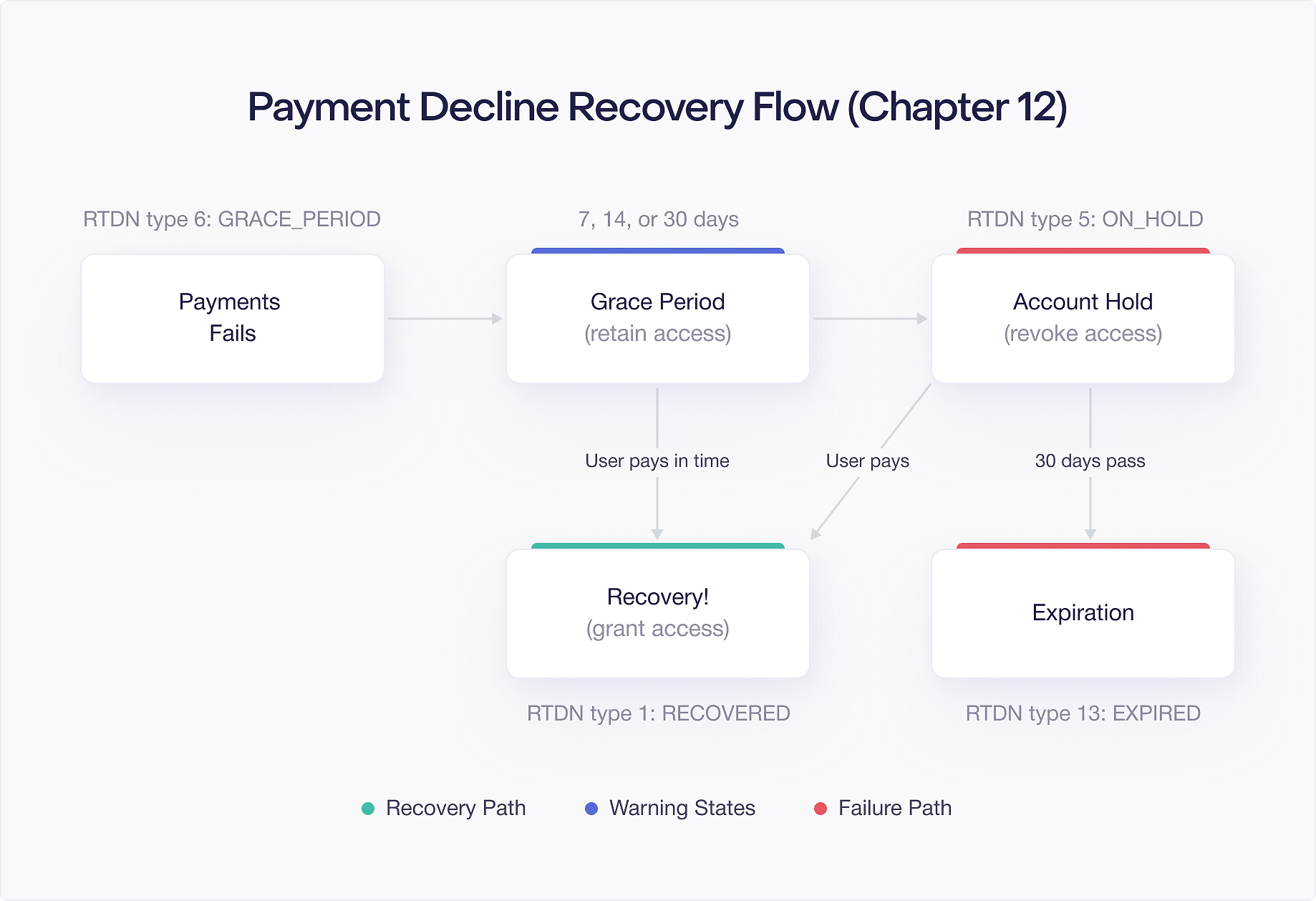
Subscriptions fail to renew. Credit cards expire, bank accounts run low, and payment methods get declined. When this happens, Google Play does not immediately cancel the subscription. Instead, it runs a multi stage recovery process designed to give the user time to fix the problem and keep their subscription alive.
This recovery process has two stages: grace period and account hold. Understanding how each stage works, what notifications you receive, and how to communicate with users during these stages directly affects your subscription retention rate. A well implemented recovery flow can save a significant percentage of subscriptions that would otherwise churn due to payment issues.
This chapter covers both stages of payment recovery, the Real Time Developer Notifications (RTDNs) you receive at each transition, what access the user should have during each stage, and how to use the In App Messaging API to help users fix payment problems without leaving your app.
Grace Period: What It Is and How It Works
A grace period is a window of time after a renewal payment fails during which Google continues to retry the payment. During this window, the user keeps full access to their subscription. The idea is simple: most payment failures are temporary. A card might be over its daily limit, a bank might flag an unusual charge, or the user's payment method might need updating. Giving Google a few days to retry often resolves the issue without the user ever noticing.
You configure grace periods in the Google Play Console under Monetize > Subscriptions > [Your Subscription] > Grace period settings. You can set the grace period duration per base plan. Google offers preset durations of 3, 7, 14, or 30 days for monthly and longer billing periods. For weekly subscriptions, the options are shorter.
The default behavior depends on when you created your subscription. Newer subscriptions created in the Play Console may have grace period enabled by default. Older subscriptions may have it disabled. You should explicitly check and configure this for every subscription in your app.
During the grace period, Google retries the payment on its own schedule. You do not control the retry timing. Google optimizes retry attempts based on signals like the time of day, payment method type, and historical success rates. Your only job is to keep the user's access active and, ideally, let the user know there is a problem so they can fix it proactively.
The Silent Grace Period
Even if you set your grace period to 0 days in the Play Console, Google still applies a minimum grace period of approximately 1 day. This is sometimes called the "silent" grace period because it happens regardless of your configuration.
During this silent grace period, Google retries the payment at least once before taking any further action. The subscription status in the Google Play Developer API will show that the subscription is still active. You will not receive a SUBSCRIPTION_IN_GRACE_PERIOD RTDN during this silent window because, from Google's perspective, the subscription has not formally entered the grace period you configured.
This means you cannot fully eliminate the grace period. Even with a 0 day configuration, there is a brief window where the subscription appears active despite a failed payment. In practice, this is a good thing. It prevents subscriptions from being immediately disrupted by transient payment issues that resolve within hours.
If you have configured a grace period longer than 0 days, the silent grace period is included in that duration. A 7 day grace period means 7 total days of payment retry, not 7 days plus the silent period.
SUBSCRIPTION_IN_GRACE_PERIOD RTDN
When a subscription enters the grace period you configured (not the silent minimum), Google sends a Real Time Developer Notification with the notification type SUBSCRIPTION_IN_GRACE_PERIOD. This notification tells your backend that the user's payment failed and Google is actively retrying.
Your backend should handle this notification by:
- Looking up the subscription using the purchase token from the notification.
- Calling the Google Play Developer API to get the current
SubscriptionPurchaseV2resource. - Checking the
lineItemsfor the subscription state, which will show the subscription in a grace period state. - Flagging the user's account internally so your app can show appropriate messaging.
- Keeping the user's entitlement active. Do not revoke access during grace period.
The SubscriptionPurchaseV2 resource will have the subscription state set to SUBSCRIPTION_STATE_IN_GRACE_PERIOD. The expiryTime field reflects the end of the grace period, not the original renewal date. This gives you a clear deadline: if payment is not recovered by this time, the subscription moves to account hold or cancels.
User Access During Grace Period
During the grace period, the user should retain full access to all subscription features. This is not optional. Google's guidelines require that you maintain the user's entitlement during the grace period because Google is still actively trying to collect payment. From the user's perspective, their subscription is still active.
If you revoke access during the grace period, you create a negative experience for users whose payment issue is temporary. Many of these users would have renewed successfully if given a few more days. Cutting them off prematurely drives unnecessary churn.
However, you should use this time to communicate with the user about the payment issue. A subtle banner in your app, a push notification, or an email letting them know their payment failed and suggesting they update their payment method can dramatically improve recovery rates. More on this in the communication section later in this chapter.
Detecting Grace Period and Showing UI
The client side Purchase object does not expose grace period state directly. A subscription in grace period still has isAutoRenewing = true (Google is still retrying payment) and purchaseState == PURCHASED, which is indistinguishable from a healthy active subscription when queried via queryPurchasesAsync(). Checking !purchase.isAutoRenewing would match canceled subscriptions, not grace period ones, a common mistake that leads to false negatives.
The reliable way to detect grace period status is through your backend. When your server receives the SUBSCRIPTION_IN_GRACE_PERIOD RTDN, it flags the user's account. Your app then checks this flag when it syncs with your server:
The banner should be visible but not intrusive. You want the user to notice it and take action, but you do not want to degrade their experience while they still have access. A dismissible banner at the top of your main screen works well for this.
In App Messaging API: showInAppMessages()
Google provides a built in way to prompt users to fix payment issues directly inside your app. The BillingClient.showInAppMessages() method displays a Google managed dialog that walks the user through resolving their payment problem. This is the simplest way to handle payment recovery UI because Google handles all the messaging, payment method selection, and retry logic.
To use it, call showInAppMessages() with the TRANSACTIONAL category. This category specifically targets payment related messages, including grace period and account hold notifications:
Call showInAppMessages() at natural points in your app, such as when the app launches, when the user navigates to a subscription feature, or when your backend indicates the user is in grace period or account hold. If there is no pending payment issue, the method returns NO_ACTION_NEEDED and shows nothing to the user. If there is an issue, Google displays the appropriate dialog automatically.
When the user successfully resolves their payment through this dialog, you receive SUBSCRIPTION_STATUS_UPDATED in the callback. At that point, refresh the user's subscription status from your backend because the subscription has been recovered.
A few things to keep in mind about showInAppMessages():
- You must pass a valid
Activityreference. The dialog is presented as an overlay on the activity. - The
TRANSACTIONALcategory covers both grace period and account hold scenarios. - Google controls the content and appearance of the dialog. You cannot customize the messaging.
- This is not a replacement for your own notifications. Use it as one part of a broader communication strategy.
Account Hold: When Grace Period Expires
If the grace period ends without a successful payment, the subscription enters account hold. Account hold is the second and more aggressive stage of payment recovery. Google continues to retry the payment, but the user's access is now revoked.
Account hold can last up to 30 days, depending on your configuration in the Play Console. You configure the account hold duration alongside the grace period settings. If you do not enable account hold, the subscription cancels immediately after the grace period expires.
Enabling account hold is strongly recommended. It gives Google additional time to recover the payment and gives the user additional time to fix their payment method. A subscription that enters account hold still has a meaningful chance of being recovered, especially if you communicate effectively with the user.
The account hold period starts the moment the grace period expires. If you had a 7 day grace period and a 30 day account hold, the total recovery window is 37 days from the initial payment failure. That is over a month for the user to update their payment method and restore their subscription.
SUBSCRIPTION_ON_HOLD RTDN
When a subscription transitions from grace period to account hold, Google sends a SUBSCRIPTION_ON_HOLD RTDN. This is your signal to revoke the user's access to subscription features.
Your backend should handle this notification by:
- Looking up the subscription using the purchase token.
- Calling the Google Play Developer API to confirm the subscription state is
SUBSCRIPTION_STATE_ON_HOLD. - Revoking the user's entitlement immediately.
- Flagging the user's account so your app can show account hold messaging.
- Triggering a push notification or email to the user explaining that their subscription has been suspended.
Here is the key difference from grace period handling: during account hold, you must revoke access. The user should not be able to use premium features. However, you should still make it easy for them to restore their subscription. Show a clear message explaining what happened and provide a direct path to fixing their payment method.
Your app should check for account hold status and display appropriate UI:
When a user is in account hold and opens your app, do not just show a blank screen or silently remove features. Show a dedicated screen that explains the situation and gives the user a clear call to action. The goal is to get them to fix their payment method, not to punish them.
Recovery: SUBSCRIPTION_RECOVERED
When Google successfully collects a payment during either the grace period or account hold, the subscription is recovered. Google sends a SUBSCRIPTION_RECOVERED RTDN to your backend. This is the notification you want to see because it means the subscription is back to normal.
Your backend should handle this notification by:
- Looking up the subscription using the purchase token.
- Calling the Google Play Developer API to confirm the subscription state is
SUBSCRIPTION_STATE_ACTIVE. - Restoring the user's entitlement immediately.
- Clearing any grace period or account hold flags on the user's account.
- Optionally sending the user a confirmation that their subscription has been restored.
Here is a backend handler that processes the recovery notification:
An important detail about recovery: the billing date resets. When a subscription recovers from grace period or account hold, Google sets the next billing date based on the recovery date, not the original renewal date. If a user's subscription was supposed to renew on March 1, failed, entered a 7 day grace period, and recovered on March 5, the next renewal date will be approximately April 5, not April 1. The user gets a full billing period from the point of recovery.
This billing date reset means you should update the renewal date in your database when you process the SUBSCRIPTION_RECOVERED notification. If you rely on a cached renewal date from before the payment failure, it will be wrong.
Failure: Auto Cancel After Account Hold
If the account hold period expires without a successful payment, Google automatically cancels the subscription. Your backend receives a SUBSCRIPTION_CANCELED RTDN (or SUBSCRIPTION_EXPIRED, depending on the specific flow).
At this point, the recovery process is over. The subscription is no longer active, and the user has lost their subscription. They would need to purchase a new subscription to regain access.
The total timeline from initial payment failure to cancellation is:
- Silent grace period: approximately 1 day (always applies).
- Configured grace period: 0 to 30 days (your setting).
- Account hold: 0 to 30 days (your setting).
If you configured a 7 day grace period and a 30 day account hold, the subscription survives up to 38 days of payment failure before canceling. If you configured neither, the subscription cancels after the silent grace period of approximately 1 day.
For most apps, enabling both grace period (7 or 14 days) and account hold (30 days) is the right choice. The additional retention from recovering subscriptions during these windows far outweighs the small operational cost of managing the states.
When the subscription finally cancels after account hold, handle it the same way you handle any other cancellation: revoke access, update your database, and optionally send the user a final notification with a link to resubscribe.
Communicating with Users During Payment Recovery
The difference between recovering a subscription and losing it often comes down to whether the user knows there is a problem. Many users have no idea their payment failed. They do not check their email from Google Play, and they do not notice the subtle "payment issue" notification in their device's notification drawer. Your app is the best channel to reach them.
Here is a layered communication strategy:
Push notifications: Send a push notification as soon as your backend receives the SUBSCRIPTION_IN_GRACE_PERIOD RTDN. Keep the message clear and actionable: "Your subscription payment could not be processed. Please update your payment method to avoid losing access." Include a deep link that takes the user directly to the Play Store's subscription management page or to your app's payment recovery screen.
Email: If you have the user's email address, send an email explaining the payment issue. Email works well because it persists. The user can come back to it later. Include clear instructions on how to update their payment method.
In app messaging: Use showInAppMessages() with the TRANSACTIONAL category as described earlier. Also consider building your own in app UI that appears when the user opens your app during grace period or account hold. Your own UI gives you control over the messaging and can be more specific about what the user will lose if they do not act.
Escalation during account hold: When the subscription moves from grace period to account hold, increase the urgency of your messaging. During grace period, a gentle banner works. During account hold, the user has lost access, so a full screen message explaining the situation and how to fix it is appropriate.
Timing matters: Do not send all your communications at once. Space them out. A push notification on day 1, an email on day 3, another push notification on day 7 (when account hold starts if your grace period is 7 days), and a final email partway through account hold. This cadence keeps the issue on the user's radar without being overwhelming.
Deep links to the Play Store: You can open the Play Store's subscription management page where the user can update their payment method:
This takes the user directly to their subscription settings in the Play Store, where they can update their payment method with just a few taps.
Changing Grace Period Duration for Existing Subscribers
If you change the grace period duration in the Play Console, the change affects existing subscribers differently depending on their current state.
Subscribers not currently in grace period: The new duration applies to their next payment failure. If a subscriber is currently active and renewing normally, they will get the new grace period duration if and when their next payment fails.
Subscribers currently in grace period: This is where it gets nuanced. If you shorten the grace period, subscribers who are already in grace period and whose current grace period window extends beyond the new shorter duration may have their grace period cut short. The subscription could transition to account hold (or cancel) sooner than originally expected.
If you extend the grace period, subscribers currently in grace period generally benefit from the longer window. Google extends their recovery window to match the new duration.
The practical advice: If you are going to change grace period duration, prefer extending it rather than shortening it. Extending the grace period is always safe for existing subscribers. Shortening it can cause unexpected transitions for subscribers who are actively in recovery.
If you must shorten the grace period, do it during a period when you expect fewer subscribers to be in grace period (if your analytics can tell you this). And monitor your SUBSCRIPTION_ON_HOLD and SUBSCRIPTION_CANCELED RTDN volume after the change to make sure you have not caused a spike in unexpected cancellations.
The same general principles apply to account hold duration changes: extending is safe, shortening can cause early cancellations for subscribers already in account hold.
Putting It All Together
Here is the complete lifecycle of a subscription that encounters a payment failure and eventually recovers:
- Renewal attempt fails: Google's initial charge attempt is declined. The silent grace period begins. The subscription still appears active.
- Grace period starts: After the silent period, the configured grace period begins. Google sends
SUBSCRIPTION_IN_GRACE_PERIODRTDN. Your backend flags the user. Your app shows a payment warning banner. The user retains full access. - Recovery during grace period: If Google collects payment during this window, it sends
SUBSCRIPTION_RECOVERED. Your backend restores the normal status, updates the billing date, and clears the flag. The user may never have noticed the issue. - Grace period expires: If payment is not recovered, the subscription moves to account hold. Google sends
SUBSCRIPTION_ON_HOLDRTDN. Your backend revokes the entitlement. Your app shows an account hold screen when the user opens it. - Recovery during account hold: If the user updates their payment method and Google collects payment, it sends
SUBSCRIPTION_RECOVERED. Your backend restores access and updates the billing date. The user is back to normal. - Account hold expires: If the entire account hold period passes without recovery, Google cancels the subscription. Your backend receives
SUBSCRIPTION_EXPIREDorSUBSCRIPTION_CANCELED. The subscription is over.
At each stage, your app should communicate clearly with the user about what is happening and what they need to do. The combination of Google's automatic payment retries, the In App Messaging API, and your own push notifications and in app UI gives you the best chance of recovering failed subscriptions.

