
Chapter 10: Real Time Developer Notifications (RTDN)
Every subscription lifecycle event that happens outside your app, a renewal, a cancellation, a payment failure, happens on Google's servers. If your backend does not learn about these events quickly, your users see stale entitlement states, your analytics miss subscription churn, and your support team cannot resolve billing disputes. Real Time Developer Notifications solve this by pushing subscription and purchase events to your backend the moment they occur.
This chapter covers the full RTDN pipeline: why polling is insufficient, how the architecture works, how to set up Cloud Pub/Sub, and how to process every notification type in production.
Why Polling Is Not Enough: The Case for Real Time Notifications
Without RTDN, the only way to know what happened to a subscription is to call the Google Play Developer API and ask. This polling approach has several problems.
First, there is latency. If you poll every 15 minutes, a user who cancels their subscription might retain access for up to 15 minutes after cancellation. For most apps this is tolerable, but if you poll every hour or every few hours, the gap becomes noticeable.
Second, there is cost. Every call to the purchases.subscriptionsv2.get endpoint counts against your API quota. If you have 100,000 active subscribers and poll each one every 15 minutes, that is 9.6 million API calls per day. Google's default quota for the Android Publisher API is generous but not unlimited, and you are spending compute and bandwidth on requests where most of the time nothing has changed.
Third, there is complexity. You need to maintain a scheduler that iterates through every active subscription, handles pagination, manages rate limits, and deals with transient failures. This is a lot of infrastructure for a problem that has a simpler solution.
RTDN flips the model. Instead of asking Google "has anything changed?", Google tells you "something changed." You receive a notification within seconds of a state change, and you only call the API to fetch the full details for that specific subscription. No wasted calls. No polling infrastructure. No stale states lasting minutes or hours.
In practice, most production billing systems use both approaches. RTDN handles the real time path for immediate state updates. A periodic poll acts as a safety net to catch any notifications that might have been missed due to infrastructure issues. But RTDN is the primary mechanism, and setting it up should be one of the first things you do when building server side billing logic.
RTDN Architecture: Google Play, Cloud Pub/Sub, and Your Backend
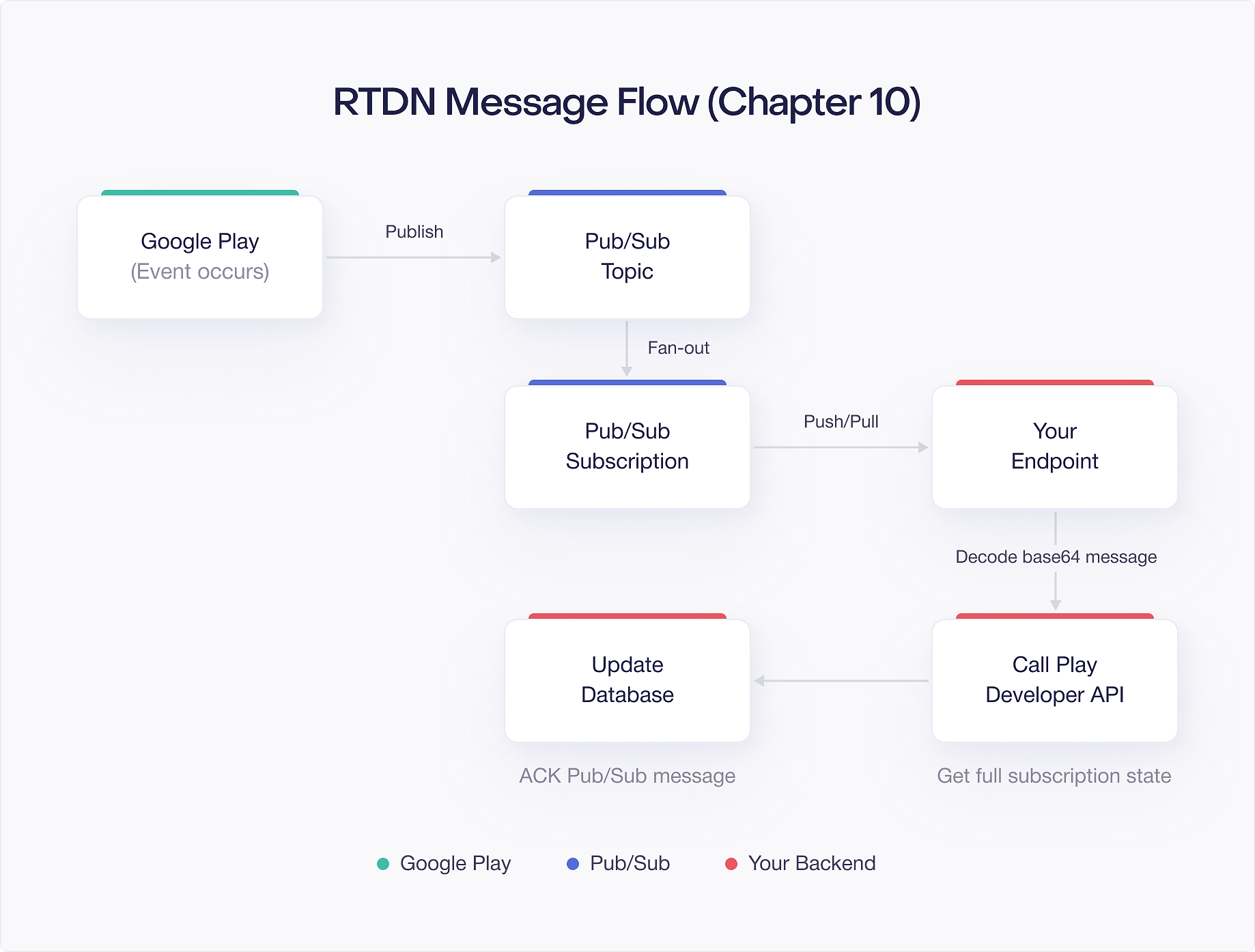
RTDN uses Google Cloud Pub/Sub as the delivery mechanism. Here is how the pieces connect:
- Google Play detects a subscription or purchase state change (renewal, cancellation, refund, etc.).
- Google Play publishes a notification message to a Cloud Pub/Sub topic that you own.
- Cloud Pub/Sub delivers the message to a subscription (push or pull) that your backend consumes.
- Your backend receives the notification, decodes the message, and calls the Google Play Developer API to get the full, current state of the purchase.
The important detail here is that you own the Pub/Sub topic and subscription. You create them in your own Google Cloud project. Google Play simply has publish permission to your topic. This means you control delivery settings, retry policies, dead letter handling, and monitoring.
The notification itself is a lightweight signal. It tells you which purchase changed and what type of change occurred, but it does not contain the full purchase state. You must call the API to get the complete picture. This is by design, and it is the golden rule of RTDN processing that you will see later in this chapter.
Push vs. Pull Subscription Strategies
Cloud Pub/Sub offers two ways to consume messages: push subscriptions and pull subscriptions. Each has trade offs for RTDN processing.
Push Subscriptions
With a push subscription, Pub/Sub sends an HTTP POST request to an endpoint you specify whenever a message arrives. Your backend exposes an HTTPS URL, Pub/Sub delivers the message to that URL, and your server responds with a 200 status code to acknowledge receipt.
Push works well when:
- You already have a web server or API gateway running.
- You want the simplest possible setup with no polling loop on your side.
- You need low latency processing (messages arrive as soon as they are published).
The main consideration is reliability. Your endpoint must be publicly accessible and respond quickly. If your server is down or responds with a non 2xx status code, Pub/Sub retries with exponential backoff. You need to handle duplicate deliveries because Pub/Sub guarantees at least once delivery, not exactly once.
Pull Subscriptions
With a pull subscription, your backend actively requests messages from Pub/Sub. You make a pull request, Pub/Sub returns any pending messages, and you acknowledge each one after processing.
Pull works well when:
- Your backend runs in an environment without a public URL (batch processing, internal services).
- You want fine grained control over when and how fast you process messages.
- You want to batch process notifications in groups.
The trade off is that you need to run a polling loop or use streaming pull, which adds infrastructure complexity. For most web backends, push is the simpler choice.
Which Should You Choose?
For most apps, push is the better starting point. You get a webhook style integration with minimal setup, and Cloud Pub/Sub handles the retry logic for you. If you later need more control over processing rate or if your architecture is not well suited to accepting inbound HTTP requests, you can switch to pull without changing anything on the Google Play side. The Pub/Sub topic stays the same, and you just create a different type of subscription.
Setting Up Cloud Pub/Sub
Setting up RTDN requires four steps: creating a topic, creating a subscription, granting publish rights to Google, and enabling RTDN in the Play Console.
Creating a Topic
Open the Google Cloud Console for your project and navigate to Pub/Sub. Create a new topic with a descriptive name, for example play-billing-notifications. This topic is where Google Play will publish all notification messages for your app.
You can also create the topic using the gcloud CLI:
One topic handles all notification types (subscription events, one time product events, voided purchases). You do not need separate topics for different event types.
Creating a Push or Pull Subscription
After creating the topic, create a subscription attached to it.
For a push subscription, specify the HTTPS endpoint where your backend will receive messages:
The ack-deadline is the number of seconds Pub/Sub waits for your server to acknowledge the message before retrying. Set this based on how long your notification processing takes. 60 seconds is a reasonable starting point.
For a pull subscription, omit the push endpoint:
Granting Publish Rights to Google's Service Account
Google Play publishes notifications using a specific service account: google-play-developer-notifications@system.gserviceaccount.com. You must grant this account the Pub/Sub Publisher role on your topic.
In the Google Cloud Console, go to your topic, open the Permissions tab, and add the service account with the roles/pubsub.publisher role.
Using the CLI:
Without this step, Google Play cannot publish to your topic and you will not receive any notifications. If RTDN appears to be set up correctly but you are not receiving messages, missing publisher permissions is the first thing to check.
Enabling RTDN in Play Console
The final step is to tell Google Play which Pub/Sub topic to use. In the Google Play Console:
- Navigate to Monetization setup (under "Monetize" in the left menu).
- Scroll to the Real time developer notifications section.
- Enter your full topic name in the format:
projects/YOUR_PROJECT_ID/topics/play-billing-notifications. - Click Send test notification to verify the connection.
- Save your changes.
The test notification sends a test message to your topic. If you have a push subscription set up, your endpoint should receive a POST request within a few seconds. If you are using a pull subscription, pull from the subscription to confirm the message arrived. A successful test notification confirms that Google Play can publish to your topic and your subscription is wired up correctly.
Message Format: Base64 Encoded JSON in Pub/Sub Data Field
When a Pub/Sub message arrives at your backend (via push or pull), the notification payload is inside the message's data field as a base64 encoded JSON string. The structure of the push request body looks like this:
The data field contains the base64 encoded notification. You decode it to get the DeveloperNotification JSON object:
After decoding, you parse the JSON string into a DeveloperNotification object. The next section covers that structure.
The DeveloperNotification Structure
The decoded JSON has the following top level structure:
Every notification includes version, packageName, and eventTimeMillis. Exactly one of the four notification type fields will be present in any given message:
subscriptionNotification: A subscription lifecycle event occurred.oneTimeProductNotification: A one time product event occurred.voidedPurchaseNotification: A purchase was voided (refunded or charged back).testNotification: A test message sent from the Play Console.
Here is a Kotlin data model for the full structure:
Your processing logic checks which field is non null and routes to the appropriate handler:
Processing Subscription Notifications
The subscriptionNotification field contains two pieces of information:
The notificationType is an integer that tells you what happened. The purchaseToken and subscriptionId tell you which subscription was affected. There are 14 subscription notification types, each representing a different lifecycle event.
SUBSCRIPTION_RECOVERED (1)
The user's subscription was recovered from an account hold. This means a payment that had previously failed has now succeeded, and the subscription is active again. When you receive this, call the API to confirm the subscription is active and restore the user's access immediately.
SUBSCRIPTION_RENEWED (2)
The subscription successfully renewed for a new billing period. This is the most common notification you will see for healthy subscriptions. Call the API to get the updated expiry time and extend the user's access accordingly.
SUBSCRIPTION_CANCELED (3)
The user canceled their subscription. This does not mean they lost access immediately. The subscription remains active until the end of the current billing period. When you receive this notification, call the API to check the expiryTimeMillis. Continue granting access until that time, then revoke it.
Do not revoke access the moment you receive this notification. The user paid for the current period and is entitled to use the service until it expires.
SUBSCRIPTION_PURCHASED (4)
A new subscription was purchased. You will typically process this on the client side first through the Play Billing Library, but this notification serves as a server side confirmation. Use it to verify that your backend recorded the purchase correctly. If you rely solely on client side purchase handling, this notification acts as a safety net for cases where the app crashed or the user switched devices before your client could report the purchase.
SUBSCRIPTION_ON_HOLD (5)
The subscription entered account hold because of a payment failure. During account hold, the user should not have access to subscription content. Revoke access when you receive this notification, but do not cancel the subscription in your system. The user's payment method may recover, and you will receive a SUBSCRIPTION_RECOVERED notification if it does.
Account hold can last up to 30 days by default (configurable in the Play Console). If the payment does not recover within the hold period, the subscription expires.
SUBSCRIPTION_IN_GRACE_PERIOD (6)
The subscription entered a grace period because the renewal payment failed. Unlike account hold, the user retains access during the grace period. You should continue granting access but may want to show a message prompting the user to update their payment method.
Grace periods are shorter than account holds (typically 3, 7, 14, or 30 days, configurable in the Play Console). If payment recovers during the grace period, you receive SUBSCRIPTION_RECOVERED. If it does not, the subscription moves to account hold or expires directly, depending on your configuration.
SUBSCRIPTION_RESTARTED (7)
A user resubscribed to a subscription that was previously canceled but had not yet expired. The user went into Google Play subscriptions management and tapped "Resubscribe" before the expiry date. When you receive this, call the API to confirm the subscription is active and auto renewing again.
SUBSCRIPTION_PRICE_CHANGE_CONFIRMED (8)
The user confirmed a pending price change for their subscription. If you raised the price of a subscription and Google required user opt in, this notification tells you the user accepted the new price. Their next renewal will be at the new price.
SUBSCRIPTION_DEFERRED (9)
The subscription's renewal date was pushed forward, typically through a developer initiated API call using the defer endpoint. This is used for granting free extensions (for example, as a customer support gesture). Call the API to get the new expiry time.
SUBSCRIPTION_PAUSED (10)
The subscription entered a paused state. The user chose to pause their subscription, and the pause has now taken effect. Revoke access when you receive this notification. The subscription will automatically resume at the end of the pause period, at which point you will receive a SUBSCRIPTION_RENEWED notification.
SUBSCRIPTION_PAUSE_SCHEDULE_CHANGED (11)
The user modified their pause schedule. This could mean they scheduled a pause that has not started yet, changed when the pause will happen, or canceled a pending pause. Call the API to get the current subscription state and update your records accordingly.
SUBSCRIPTION_REVOKED (12)
The subscription was revoked. This happens when a user requests a refund or when Google revokes the subscription for policy reasons. Revoke access immediately. Unlike cancellation, revocation means the user should lose access right away, regardless of how much time was left in the billing period.
SUBSCRIPTION_EXPIRED (13)
The subscription has fully expired. This is the terminal state. The user no longer has an active subscription. Revoke access if you have not already done so. This notification often comes after a cancellation when the billing period ends, or after account hold times out.
SUBSCRIPTION_PENDING_PURCHASE_CANCELED (14)
A pending purchase (such as a pending transaction waiting for parental approval or a slow payment method) was canceled before it completed. No access should have been granted for this purchase, so no revocation is needed. Clean up any pending records you may have created.
A Complete Subscription Handler
Here is a handler that routes each notification type to the appropriate business logic:
Each handler method follows the same pattern: call the Google Play Developer API with the purchase token, get the current subscription state, and update your database accordingly.
Processing One Time Product Notifications
One time product notifications are simpler. The structure contains:
There are two notification types:
ONE_TIME_PRODUCT_PURCHASED (1)
A one time product was purchased. As with subscription purchases, you will usually process this client side first, but this notification confirms the purchase on the server side. Call the API to verify the purchase and grant the entitlement if you have not already.
ONE_TIME_PRODUCT_CANCELED (2)
A pending one time product purchase was canceled. This applies to purchases that were in a pending state (for example, waiting for a cash based payment to complete) and were then canceled. If you had provisionally granted access for the pending purchase, revoke it now.
Here is the handler:
Processing Voided Purchase Notifications
Voided purchase notifications tell you that a previously completed purchase has been reversed. This happens when Google issues a refund, the user's payment is charged back, or Google revokes a purchase for policy violations.
The structure:
The productType tells you whether the voided purchase was a subscription (1) or a one time product (2). The refundType indicates the reason: full refund (1) or quantity based refund (2).
When you receive a voided purchase notification, revoke access to the associated content. The user received their money back, so they should no longer have the entitlement.
Be careful with voided purchase processing. Some businesses choose to let users keep access after a refund as a goodwill gesture, while others strictly revoke. Your business rules dictate the right behavior, but you must at least record the voided purchase in your system for financial reconciliation.
The Golden Rule: RTDNs Signal State Changes, Always Call the API
This is the single most important principle for working with RTDN, and it bears repeating: never make entitlement decisions based solely on the notification type. Always call the Google Play Developer API to get the full, current state.
RTDNs are signals, not sources of truth. They tell you "something happened to this purchase token," but they do not give you the complete picture. Here is why this matters:
Notifications can arrive out of order. A SUBSCRIPTION_CANCELED notification might arrive after a SUBSCRIPTION_RESTARTED notification if there was a delivery delay. If you blindly revoke access on cancellation without checking the API, you would incorrectly revoke access for a user who already resubscribed.
Notifications can be duplicated. Pub/Sub guarantees at least once delivery, meaning you may receive the same notification more than once. If your handler is not idempotent, duplicates can cause incorrect state transitions.
The notification does not contain the full state. A SUBSCRIPTION_RENEWED notification does not tell you the new expiry time, the current price, or whether a price change is pending. Only the API response has that information.
The correct pattern is:
- Receive the RTDN.
- Extract the purchase token.
- Call
purchases.subscriptionsv2.get(for subscriptions) orpurchases.products.get(for one time products) to get the full current state. - Update your database based on the API response, not the notification type.
The notification type is useful for logging, metrics, and routing (knowing which handler to call), but the API response is what you use for entitlement decisions.
Handling Notification Ordering and Deduplication
Because Cloud Pub/Sub guarantees at least once delivery and does not guarantee ordering, your RTDN processing must handle two scenarios: duplicate messages and out of order messages.
Deduplication
The simplest deduplication strategy uses the Pub/Sub message ID. Store each processed message ID and skip any message you have already seen:
Keep the processed message IDs in a cache or database table with a TTL. Pub/Sub typically retries within minutes to hours, so a TTL of 24 to 48 hours covers most cases without unbounded storage growth.
Out of Order Processing
Out of order notifications are trickier. If you receive SUBSCRIPTION_EXPIRED before SUBSCRIPTION_CANCELED, naive processing would expire the user, then try to cancel an already expired subscription.
The solution is to always defer to the API response rather than the notification type. Since you call the API for every notification (following the golden rule), you always get the current state regardless of which notification triggered the call. If two notifications arrive out of order, both API calls return the same current state, and your database ends up correct.
You can add an extra safety measure by using the eventTimeMillis field from the notification. If a notification's event time is older than the last event time you processed for that purchase token, you can still call the API, but you know the state might have already moved past this event:
This approach ensures you never miss a state update, even if notifications arrive in an unexpected order.
Estimating Pub/Sub Costs
Cloud Pub/Sub pricing has three components: message ingestion, message delivery, and storage for undelivered messages. For RTDN, the costs are typically very low.
Message volume. Each subscription lifecycle event generates one notification. A healthy monthly subscription generates roughly 12 renewal notifications per year, plus occasional cancellations, grace period events, and hold events. If you have 100,000 subscribers, expect roughly 1.2 million to 2 million messages per year from renewals alone, plus additional messages for lifecycle events.
Pricing. As of the current pricing model, Google Cloud offers the first 10 GB of message data per month free. Each Pub/Sub message for RTDN is tiny (a few hundred bytes). At 2 million messages per year with an average size of 500 bytes, that is about 1 GB per year of total data, well within the free tier.
When costs become meaningful. Pub/Sub costs start to matter when you have millions of subscribers generating tens of millions of notifications per month, or when you have many subscriptions attached to your topic. Even then, the per message cost is measured in fractions of a cent per 10,000 messages. For most apps, Pub/Sub costs for RTDN are effectively free.
The real cost of RTDN is not Pub/Sub itself. It is the Google Play Developer API calls you make in response to each notification. These calls count against your API quota, and if you have a very high volume of notifications, you may need to request a quota increase from Google. Monitor your API usage in the Google Cloud Console and request increases proactively before you hit the limit.

